Boardgames

Sky Team

Work together in silence to balance your airliner, manage its approach, and land safely at challenging airports around the world.

20
minutes

2 - 2
player(s)

Medium

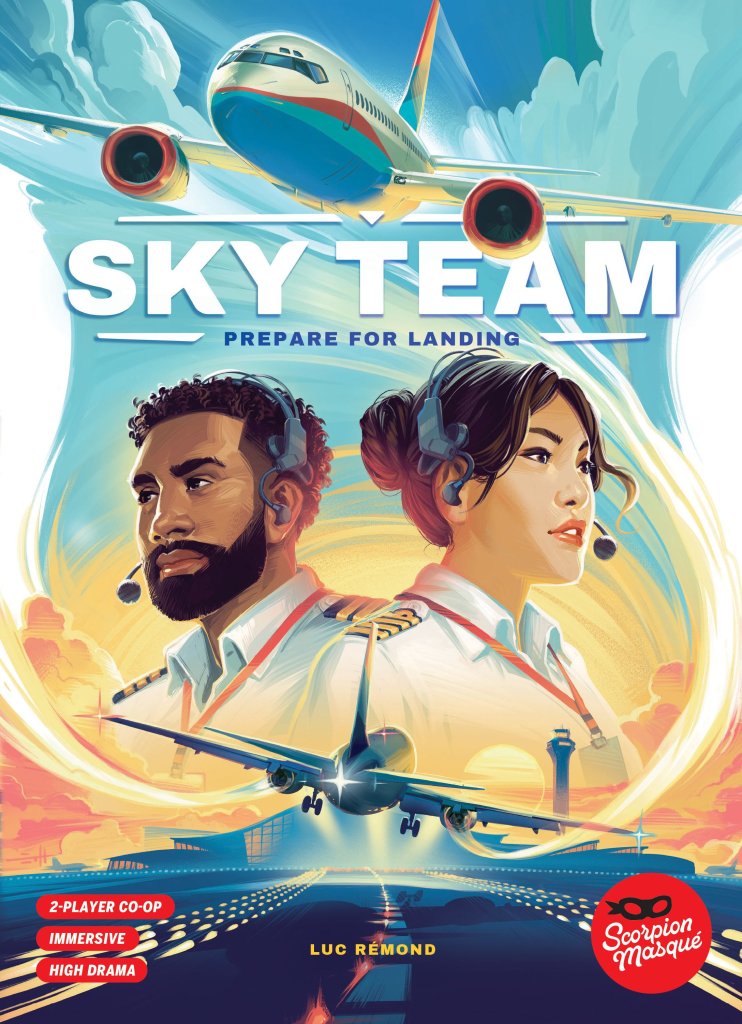
Sky Team board game cover

About this board game

Sky Team is a cooperative board game for exactly two players, with games lasting around 20 minutes, in which a pilot and co-pilot work together to land an airliner safely.

At the controls, you must silently assign your dice to the correct spaces in the cockpit. Each decision helps manage the aircraft’s approach, but every placement matters as you work together to maintain control.

  • Balance the axis of the plane
  • Control its speed
  • Deploy the flaps and extend the landing gear
  • Contact the control tower to clear your path
  • Use coffee to improve concentration and change the value of your dice

Your landing must stay within safe limits. If the aircraft tilts too much and stalls, overshoots the airport, or collides with another aircraft, the team loses the game—with the consequences reaching beyond the cockpit.

Every airport brings a different challenge as you travel from Montreal to Tokyo. Turbulence can make the approach even more difficult, demanding careful cooperation and precise choices from both players.

Designed exclusively for two, Sky Team combines silent teamwork, dice assignment, and tense cockpit management in a compact experience. Coordinate your actions, keep the aircraft under control, and try to bring it safely down at airports around the world.

Board Game Rules for
Sky Team

Download official rules (EN)

Landing Procedure

Take the controls of an airliner with your trusty crewmate, coordinate your efforts, and land your aircraft all over the world!

Goal

In this cooperative game, you play a team of pilots charged with landing your commercial airliner at airports all over the world. But landing an airplane is not as easy as you might think! You’ll need to:

  • communicate with the Control Tower to make sure your approach is free of air traffic,
  • adjust your speed to not overshoot the airport,
  • level your plane in order to land square with the ground,
  • deploy your flaps to increase lift and allow you to descend more steeply,
  • deploy your landing gear to ensure a safe landing,
  • and finally engage the brakes to slow the plane once you’ve landed.

Cooperation and nerves of steel are all it takes to succeed!

  • Duration: 20 min
  • Age: 14+
  • Players: 2

A game by Luc Rémond — Illustrations by Eric Hibbeler and Adrien Rives

Preparation: When You First Open the Box

Discarding unused punched board parts
  1. 1. Start by removing and throwing out all parts of the Control Panel marked with the trash symbol.
Applying double-sided stickers to the Control Panel
  1. 2. Stick the 9 double-sided stickers on the indicated spaces on the inside and back of the Control Panel.
Assembling the Airplane Axis disc
  1. 3. Stick the airplane sticker on the Airplane Axis disc. Place the Airplane Axis disc into its space.
Placing switches on green lights
  1. 4. Place the 10 Switches on the green lights.
Control Panel layout and areas overview

Setup Before Each Game

NOTE: This is the setup for the basic game. All other components not mentioned here (in the closed compartment) are part of the game’s advanced modules; you can leave these in the box for now.

  1. Control Panel: Place the Control Panel between the players, who should, ideally, be sitting next to each other on the same side of the table. Make sure the arrow on the Airplane Axis disc is pointing at the black triangle at the top, and that all Switches are covering the green lights.
  2. Aerodynamics markers: On the Speed Gauge, place the blue Aerodynamics marker between the 4 and the 5, and the orange Aerodynamics marker between the 8 and the 9.
  3. Brake marker: Place the Brake marker to the left of the 2 on the Brake track.
  4. Roles & Dice: The player on the side with the blue spaces plays the Pilot; give them the 4 blue dice. The player on the side of the orange spaces plays the Co-Pilot; give them the 4 orange dice.
  5. Altitude Track: Slide the Altitude Track (green/yellow side) into the slot at the top right of the Control Panel until the number 6000 is visible in the screen. The number in the screen indicates your altitude in feet, which is called your Current Altitude.
  6. Approach Track: Slide the YUL Montréal-Trudeau Approach Track into the slot at the top left of the Control Panel until the airplane icon is visible in the screen. This screen shows the position of your Airplane, which is called your plane’s Current Position.
  7. Reroll tokens: Place a Reroll token on each Reroll icon on the Altitude Track.
  8. Airplane tokens: Place as many Airplane tokens as there are Traffic icons on each space of the Approach Track.
  9. Coffee tokens: Create a reserve of Coffee tokens by placing them next to the board (not on the board).
  10. Player Screens: Give a screen to each player and read the reminders written inside.
Game setup diagram
Game setup diagram

Game Round Structure

The game is played over 7 rounds. Each round takes place in 3 phases:

  1. Strategy Discussion and Dice Rolls
  2. Dice Placement
  3. End of Round

Phase 1: Strategy Discussion and Dice Rolls

Discuss your strategy at the beginning of every round. For example: “We really need to get rid of that plane,” or “Let’s make sure we advance 2 spaces.”

Silence Rule

You are not allowed to discuss the dice. Saying things like, “If you get a 6, put it here,” or “Use your weakest die to do this action,” is not allowed. Once you have finished discussing, roll all 4 of your dice behind your screen so the other player can’t see them. From this moment on, both players must be completely silent until the end of the round, except for correcting possible rule errors.

Reroll

If there is a Reroll token in the Current Altitude space (as there is in the first round – 6,000 feet), remove it and add it to your supply at the top left of the Control Panel.

At any time during the round, any player may spend a Reroll token. This allows BOTH PLAYERS to reroll one or more of the dice behind their screen ONCE. (For example, the Pilot can spend the token to reroll 2 of the 3 dice remaining behind their screen, and the Co-Pilot can decide to reroll all 4 of their dice.)

Reroll token in altitude window

Phase 2: Dice Placement General Rules

  • A. Turn Order: Take turns. The arrow in the Current Altitude screen will indicate who plays first. For example, the Pilot (blue) begins the first round.
  • B. Placing Dice: On your turn, place ONE (and only one!) of your remaining dice (from behind your screen) on a FREE space (without a die) on the Control Panel.
  • C. Colour Constraints: The Pilot may only place their dice in blue spaces, and the Co-Pilot in the orange spaces. Some spaces are both blue and orange; either player can place dice there.
  • D. Number Constraints: Respect the number constraints. For example, the Co-Pilot may only place a 1 or 2 in the first Flaps space.
  • Combined Constraints: The majority of spaces have colour AND/OR number constraints. For example, only the Pilot can place a die in the Brakes section (those spaces are blue), AND it must be a die showing the number 2.
  • E. Radio Spaces: The Radio spaces have colour — but not number — constraints, so any number may be placed there.
  • F. Concentration Spaces: The Concentration spaces don’t have any constraints (any player may play a die of any value here).
Control panel dice placement constraints illustration

Actions Overview

The dice produce different effects depending on their value and the spaces on which they are placed.

Mandatory Actions

Action spaces with a Warning are mandatory; all other Action spaces are not. Every round, each player must place:

  • One die on the Axis
  • One die on the Engines

Loss Condition: You immediately lose the game if, at the end of a round, there isn’t 1 die of each colour on the Axis and 1 die of each colour on the Engines.

NOTE: These spaces are mandatory, but they do not need to be the first spaces where you place your dice!

Mandatory action spaces (Axis and Engines)

Axis Warning

Manage your plane’s Axis during your approach. The Airplane tilts. Be careful not to go into a spin!

As soon as the second die is placed, compare the value of both dice:

  • Equal values: Do not move anything if both dice have the same number.
  • Different values: Turn the Airplane as many marks as the difference between the 2 dice. Turn the Axis Arrow toward the player who played the highest die, and leave it there; do not reset the Axis to the starting point at the end of the round.

Example: Isabelle (Pilot) played a 5 and Oliver (Co-Pilot) played a 3. The Axis turns two marks towards Isabelle (5 – 3 = 2).

Going Into a Spin

If the Axis Arrow reaches or goes past an Crash, the plane goes into a spin and you immediately lose the game.

Did You Know?

In real life, airplanes work on 3 axes: yaw (nose left or right), pitch (nose up or down), and roll. The illustration you see here is a simplification, as it only represents the roll axis.

Victory Condition C: At the end of the last round, your plane must be completely horizontal.

Example of tilting the plane axis

Engines Warning

Depending on the power you assigned to the engines, the Airplane will advance… or not!

As soon as the second die is placed, add together the 2 dice played onto the Engine spaces; this is your speed. Then:

  • Sum is less than the weakest (blue) marker: Leave the Approach Track in place (do not move it).
  • Sum is between the 2 Aerodynamics markers: Advance the Approach Track 1 space.
  • Sum is greater than the highest (orange) marker: Advance the Approach Track 2 spaces.
Engines speed less than blue marker (no movement)
Engines speed between markers (advance 1 space)
Engines speed greater than orange marker (advance 2 spaces)

Collision

  • If one or more Airplane tokens move into the Current Position space, you’re still alive!
  • If there are Airplane tokens in the Current Position space and you have to advance the Approach Track, you have had a collision, and you’ve lost the game!
Collision check on the Approach Track

Overshoot

If the airport is in the Current Position space and you have to advance the Approach Track, you have overshot the airport, and you’ve lost the game!

Overshoot condition check

Radio

Communicate with the Control Tower to clear the traffic on your approach path.

  • The Pilot has only 1 space to place a Radio die, and the Co-Pilot has 2.
  • On the Approach Track, count the number of spaces, starting with your Current Position, and IMMEDIATELY remove one Airplane token from that space.
  • If you play a die with value 1, remove an Airplane from the Current Position space.
  • This action does not have any effect if there are no Airplanes in the space indicated by the die.

Example: Isabelle (Pilot – blue) plays a 2 on the only Radio space. She removes an Airplane from the second space (one space after the Current Position).

Victory Condition A: Remove all the Airplanes.

Radio action resolving airplane removal

Landing Gear (Pilot only)

Deploy the Landing Gear. Each piece of Landing Gear deployed increases the Airplane’s drag and wind resistance.

  1. Place a die respecting the number constraint. The order in which you deploy your Landing Gear is not important.
  2. Slide the Switch below your die to show the green light.
  3. IMMEDIATELY advance the blue Aerodynamics marker Aerodynamics blue one space. It should be between the 7 and the 8 when you have deployed all the Landing Gear.

Playing on a space whose Switch is already showing green has no effect.

Example: Isabelle activates the Landing Gear for the first time in this game. She places a 4 on the 3/4 space. She slides the Switch to show the green light. She moves the blue Aerodynamics marker to the space between the 5 and 6.

Aerodynamics and Speed

When you move your Aerodynamics markers, you are changing your Speed’s effect on the Approach Track. For example, moving the Blue marker forward means that a Speed of 5 will now advance your plane 0 instead of 1.

Victory Condition B: All the Landing Gear switches must show the green light at the end of the game.

Deploying landing gear action

Flaps (Co-Pilot only)

Deploy the flaps. Each flap extended increases the aircraft’s lift and wind resistance.

  1. Place a die respecting the number constraint. You must deploy the Flaps in order, from top to bottom (beginning with the 1/2 space, then the 2/3 one, and so on).
  2. Slide the Switch below your die to show the green light.
  3. IMMEDIATELY advance the orange Aerodynamics marker Aerodynamics orange one space. It should be just past the 12 once all the Flaps have been deployed.

Victory Condition B: All the Flaps switches must show the green light at the end of the game.

Example: Oliver (Co-Pilot) activates the second Flaps space. He places a 2 on the second space (2/3). He slides the Switch to show the green light. He moves the Orange Aerodynamics marker to the space between the 10 and the 11.

Deploying flaps action

Concentration

This is not the time to crack under pressure; concentrate and prepare your next manoeuvres.

  • The Pilot and Co-Pilot can place any die in any free Concentration space.
  • Immediately place a Coffee token in one of the 3 designated spaces. You cannot have more than 3 Coffee tokens.

Using Coffee Tokens

Any time you place a die anywhere on the Control Panel, you can use one or more Coffee tokens to modify the value of the die you are placing. Each spent token allows you to either add 1 to, or subtract 1 from, the value of your die. Return all spent Coffee tokens to the supply next to the board.

  • Any player may use the Coffee tokens, regardless of who created them.
  • Unspent tokens remain on the board for the following round.
  • Modifiers can only change the value of a die to numbers between 1 and 6.
  • Finally, subtracting 1 from a 1-value die does not change it to 6, nor does adding 1 to a 6 change it to a 1.

Example: Isabelle has a ‘3’ die. She really wants to remove the Airplane from the Current Position space. She removes 2 Coffee tokens from the Control Panel. She transforms her ‘3’ die to a ‘1’, places it on her Radio space, and removes the Airplane token in the first space (the Current Position space).

Concentration spaces and spending coffee tokens

Brakes (Pilot only)

Brake enough to bring the plane to a halt once it touches the runway.

  1. Place a die respecting the number constraint. The brakes must be deployed in order, starting with the 2 space, then the 4, and finally the 6.
  2. IMMEDIATELY advance the red Brake marker Brakes marker one space. The Brakes only have an impact in the game’s final round.

You do not have to deploy all your Brakes, but the more you deploy, the easier your landing will be.

Victory Condition D: During the last round of the game, your speed must be less than the position of the red Brake marker.

Example: Isabelle deploys the 2nd Brake of the game by placing a die of value 4 on the 4 space. She moves the red marker ahead one space (between the 4 and the 5).

Rerolls Reminder: Remember that you can, at any time during the round, spend a Reroll token.

Brakes track and marker advancement

Phase 3: End of Round

When you have placed all 8 dice, you can finally speak again! Do the following steps in order:

Decreasing Altitude

Regardless of what you have done during the round, the plane descends; there are 7 spaces on the Altitude Track, and therefore 7 rounds in the game.

  1. Advance the Altitude Track one space, or 1,000 feet.
  2. Take back your dice.

If the Airport image appears in the Current Position screen and the Airplane image appears in the Current Altitude screen, proceed to the Final Round and End of Game section. If it does not, restart a new round!

End of round altitude decrease and die retrieval

Special Cases

Reaching the Airport Too Soon

The Airport image is in the Current Position screen but the Airplane image is not in the Current Altitude screen.

You are in a holding pattern over the airport; you must play one (or more) rounds, without advancing any further on the Approach Track, so reduce your speed!

Reaching airport too soon (holding pattern)

Not Reaching the Airport in Time

The Airport image is not in the Current Position screen, but the Airplane image is in the Current Altitude screen.

You have crash landed before reaching the airport; you have lost the game!

Not reaching airport in time (crash landing)

Final Round and End of Game

The final round begins when the Airport image appears in the Current Position screen and the Airplane image appears in the Current Altitude screen. You’ve arrived at the airport at the same time as your plane is about to touch down. Great timing!

Final round trigger screens

Engines in the Final Round

You’ve touched down, and now you must apply the brakes so you don’t go off the end of the runway!

WATCH OUT: The way you read your speed changes!
During the final round, when playing the second engine die, instead of comparing your speed with the Aerodynamics markers, COMPARE IT WITH YOUR BRAKES.

Victory Condition D: The strength of your Brakes (indicated by the red Brake marker) must be greater than your speed (the sum of your Engines).

Contrary to the Flaps and Landing Gear, you do not need to deploy all your brakes. But they cannot be below 2, as this will result in your plane being unable to stop on the runway, and crashing.

Example: During the final round, Isabelle and Oliver’s total speed is 3 (1+2). Isabelle deployed Brakes 2 and 4. This turn’s speed is well to the left of the red Brake marker, so this landing condition has been met!

Speed vs Brakes comparison in final round

Final Turn: Landing & Victory Conditions

At the end of this round, you win if all four conditions are met:

  • A. Clear Path: There are no Airplane tokens on the Approach Track.
  • B. Configuration: All your Flaps and Landing Gear Switches show the green light.
  • C. Plane Level: Your Airplane’s Axis is completely horizontal.
  • D. Braking: Your Speed is less than your Brakes when you placed your Engine dice.

CONGRATULATIONS! The passengers burst into applause! You have landed smoothly, and you have won.

Now that you have mastered landing in Montreal, open the FLIGHT LOG booklet and discover new challenges!

Summary of victory conditions on the board

Strategic Advice

IMPORTANT: We do not advise reading this section unless you are having trouble landing your Airplane successfully.

The Briefing Period

The briefing period that comes before every round is very important. Look closely at the Approach Track and study your overall situation:

  • Is it better to advance 0, 1, or 2 spaces?
  • What elements could cause you to lose the game?
  • What is urgent? What can wait?

Communication

In Sky Team, there are 2 ways to communicate:

  1. Verbally, before rolling the dice;
  2. By placing your die during the Dice Placement phase, as explained below.

Placing Your Dice

A die is an ‘action’ in the cockpit, but also information for your teammate. If you put this value on this space at this moment in the game, what can they deduce from this? Are you helping them make good choices?

Before playing, you can also evaluate what your teammate needs. For example, if they need to engage the first flaps, you’d be better off putting a higher die on the Axis or onto the Engines. Putting yourself in your partner’s shoes is essential to creating a great team.

The Axis

The Axis is an essential element of your cockpit. It is both dangerous and flexible.

  • Dangerous: It can cause you to lose the game; it is extremely risky if both players wait until their last die to play on the Axis.
  • Flexible: Many values are often playable there, and you do not need to be balanced out until the final round.

Concentration

A discarded die is one less action in your cockpit: generate your Coffee tokens carefully. If one of your dice won’t be useful this turn, when is the right moment to discard it? A Coffee token might come in handy to your teammate; don’t wait until the final turn to do it.

Delaying

Has your dice roll generated many of the same value? Or a mix? You can use these to help your teammate by letting them place the first die into the interactive spaces (Axis and Engines). Not taking the lead allows your teammate to.

Speed

Know the importance of your speed every turn. It is sometimes crucial to advance 0, 1, or 2 spaces. This means quickly communicating to your teammate the strength of your engine. On the other hand, if there are no planes in front of you on the Approach Track, speed is less important, and you can use this knowledge to play your first die elsewhere.

Flaps and Landing Gear

These 2 sections (and their tokens) have an impact on your ability to land, so timing their deployment is absolutely critical. If you need to advance 2 spaces, don’t deploy your flaps too soon! Is the airport crowded with planes and you want to advance 0 spaces? Lowering the Landing Gear will help!

Radio

Clearing your approach path is necessary to advance. Removing a plane in space 1 or 2 is important information. In space 5… less so. Planning ahead is always a good idea. Moving a plane further down the track is useful… but not with your first die.

Credits & Acknowledgments

An immense thank you to the game’s 3 Co-Pilots:

  • Olivier PENAUD, for his inspiration and aeronautical knowledge
  • Jean-Claude PENAUD, First Officer, for sharing his experience
  • Michel DÔME, for the hundreds of successful landings together

Thank you to Christian, who believed in the project, to the Scorpion Masqué team for taking such good care of it, to Arthur, Robin, Mathias, Isabelle (and Lola!), and David for the hours of playtesting and their valuable insights. And finally, thank you to everyone who came across Sky Team at festivals and conventions and agreed to take off with us. — Luc

  • Head of Studio: Manuel Sanchez
  • Development: Christian Lemay
  • Project Manager: Olivier Lamontagne
  • Art Direction and Graphic Design: Sébastien Bizos
  • Brand Manager: Joëlle Bouhnik
  • Translation and Editing: Matthew Legault

Overview & Initial Assembly

Landing Procedure

Take the controls of an airliner with your trusty crewmate, coordinate your efforts, and land your aircraft all over the world!

Goal

In this cooperative game, you play a team of pilots charged with landing your commercial airliner at airports all over the world. But landing an airplane is not as easy as you might think! You’ll need to:

  • communicate with the Control Tower to make sure your approach is free of air traffic,
  • adjust your speed to not overshoot the airport,
  • level your plane in order to land square with the ground,
  • deploy your flaps to increase lift and allow you to descend more steeply,
  • deploy your landing gear to ensure a safe landing,
  • and finally engage the brakes to slow the plane once you’ve landed.

Cooperation and nerves of steel are all it takes to succeed!

  • Duration: 20 min
  • Age: 14+
  • Players: 2

A game by Luc Rémond — Illustrations by Eric Hibbeler and Adrien Rives

Preparation: When You First Open the Box

Discarding unused punched board parts
  1. 1. Start by removing and throwing out all parts of the Control Panel marked with the trash symbol.
Applying double-sided stickers to the Control Panel
  1. 2. Stick the 9 double-sided stickers on the indicated spaces on the inside and back of the Control Panel.
Assembling the Airplane Axis disc
  1. 3. Stick the airplane sticker on the Airplane Axis disc. Place the Airplane Axis disc into its space.
Placing switches on green lights
  1. 4. Place the 10 Switches on the green lights.
Control Panel layout and areas overview

Setup

Setup Before Each Game

NOTE: This is the setup for the basic game. All other components not mentioned here (in the closed compartment) are part of the game’s advanced modules; you can leave these in the box for now.

  1. Control Panel: Place the Control Panel between the players, who should, ideally, be sitting next to each other on the same side of the table. Make sure the arrow on the Airplane Axis disc is pointing at the black triangle at the top, and that all Switches are covering the green lights.
  2. Aerodynamics markers: On the Speed Gauge, place the blue Aerodynamics marker between the 4 and the 5, and the orange Aerodynamics marker between the 8 and the 9.
  3. Brake marker: Place the Brake marker to the left of the 2 on the Brake track.
  4. Roles & Dice: The player on the side with the blue spaces plays the Pilot; give them the 4 blue dice. The player on the side of the orange spaces plays the Co-Pilot; give them the 4 orange dice.
  5. Altitude Track: Slide the Altitude Track (green/yellow side) into the slot at the top right of the Control Panel until the number 6000 is visible in the screen. The number in the screen indicates your altitude in feet, which is called your Current Altitude.
  6. Approach Track: Slide the YUL Montréal-Trudeau Approach Track into the slot at the top left of the Control Panel until the airplane icon is visible in the screen. This screen shows the position of your Airplane, which is called your plane’s Current Position.
  7. Reroll tokens: Place a Reroll token on each Reroll icon on the Altitude Track.
  8. Airplane tokens: Place as many Airplane tokens as there are Traffic icons on each space of the Approach Track.
  9. Coffee tokens: Create a reserve of Coffee tokens by placing them next to the board (not on the board).
  10. Player Screens: Give a screen to each player and read the reminders written inside.
Game setup diagram
Game setup diagram

How to Play & Round Structure

Game Round Structure

The game is played over 7 rounds. Each round takes place in 3 phases:

  1. Strategy Discussion and Dice Rolls
  2. Dice Placement
  3. End of Round

Phase 1: Strategy Discussion and Dice Rolls

Discuss your strategy at the beginning of every round. For example: “We really need to get rid of that plane,” or “Let’s make sure we advance 2 spaces.”

Silence Rule

You are not allowed to discuss the dice. Saying things like, “If you get a 6, put it here,” or “Use your weakest die to do this action,” is not allowed. Once you have finished discussing, roll all 4 of your dice behind your screen so the other player can’t see them. From this moment on, both players must be completely silent until the end of the round, except for correcting possible rule errors.

Reroll

If there is a Reroll token in the Current Altitude space (as there is in the first round – 6,000 feet), remove it and add it to your supply at the top left of the Control Panel.

At any time during the round, any player may spend a Reroll token. This allows BOTH PLAYERS to reroll one or more of the dice behind their screen ONCE. (For example, the Pilot can spend the token to reroll 2 of the 3 dice remaining behind their screen, and the Co-Pilot can decide to reroll all 4 of their dice.)

Reroll token in altitude window

Phase 2: Dice Placement General Rules

  • A. Turn Order: Take turns. The arrow in the Current Altitude screen will indicate who plays first. For example, the Pilot (blue) begins the first round.
  • B. Placing Dice: On your turn, place ONE (and only one!) of your remaining dice (from behind your screen) on a FREE space (without a die) on the Control Panel.
  • C. Colour Constraints: The Pilot may only place their dice in blue spaces, and the Co-Pilot in the orange spaces. Some spaces are both blue and orange; either player can place dice there.
  • D. Number Constraints: Respect the number constraints. For example, the Co-Pilot may only place a 1 or 2 in the first Flaps space.
  • Combined Constraints: The majority of spaces have colour AND/OR number constraints. For example, only the Pilot can place a die in the Brakes section (those spaces are blue), AND it must be a die showing the number 2.
  • E. Radio Spaces: The Radio spaces have colour — but not number — constraints, so any number may be placed there.
  • F. Concentration Spaces: The Concentration spaces don’t have any constraints (any player may play a die of any value here).
Control panel dice placement constraints illustration

Cockpit Actions & Controls

Actions Overview

The dice produce different effects depending on their value and the spaces on which they are placed.

Mandatory Actions

Action spaces with a Warning are mandatory; all other Action spaces are not. Every round, each player must place:

  • One die on the Axis
  • One die on the Engines

Loss Condition: You immediately lose the game if, at the end of a round, there isn’t 1 die of each colour on the Axis and 1 die of each colour on the Engines.

NOTE: These spaces are mandatory, but they do not need to be the first spaces where you place your dice!

Mandatory action spaces (Axis and Engines)

Axis Warning

Manage your plane’s Axis during your approach. The Airplane tilts. Be careful not to go into a spin!

As soon as the second die is placed, compare the value of both dice:

  • Equal values: Do not move anything if both dice have the same number.
  • Different values: Turn the Airplane as many marks as the difference between the 2 dice. Turn the Axis Arrow toward the player who played the highest die, and leave it there; do not reset the Axis to the starting point at the end of the round.

Example: Isabelle (Pilot) played a 5 and Oliver (Co-Pilot) played a 3. The Axis turns two marks towards Isabelle (5 – 3 = 2).

Going Into a Spin

If the Axis Arrow reaches or goes past an Crash, the plane goes into a spin and you immediately lose the game.

Did You Know?

In real life, airplanes work on 3 axes: yaw (nose left or right), pitch (nose up or down), and roll. The illustration you see here is a simplification, as it only represents the roll axis.

Victory Condition C: At the end of the last round, your plane must be completely horizontal.

Example of tilting the plane axis

Engines Warning

Depending on the power you assigned to the engines, the Airplane will advance… or not!

As soon as the second die is placed, add together the 2 dice played onto the Engine spaces; this is your speed. Then:

  • Sum is less than the weakest (blue) marker: Leave the Approach Track in place (do not move it).
  • Sum is between the 2 Aerodynamics markers: Advance the Approach Track 1 space.
  • Sum is greater than the highest (orange) marker: Advance the Approach Track 2 spaces.
Engines speed less than blue marker (no movement)
Engines speed between markers (advance 1 space)
Engines speed greater than orange marker (advance 2 spaces)

Collision

  • If one or more Airplane tokens move into the Current Position space, you’re still alive!
  • If there are Airplane tokens in the Current Position space and you have to advance the Approach Track, you have had a collision, and you’ve lost the game!
Collision check on the Approach Track

Overshoot

If the airport is in the Current Position space and you have to advance the Approach Track, you have overshot the airport, and you’ve lost the game!

Overshoot condition check

Radio

Communicate with the Control Tower to clear the traffic on your approach path.

  • The Pilot has only 1 space to place a Radio die, and the Co-Pilot has 2.
  • On the Approach Track, count the number of spaces, starting with your Current Position, and IMMEDIATELY remove one Airplane token from that space.
  • If you play a die with value 1, remove an Airplane from the Current Position space.
  • This action does not have any effect if there are no Airplanes in the space indicated by the die.

Example: Isabelle (Pilot – blue) plays a 2 on the only Radio space. She removes an Airplane from the second space (one space after the Current Position).

Victory Condition A: Remove all the Airplanes.

Radio action resolving airplane removal

Landing Gear (Pilot only)

Deploy the Landing Gear. Each piece of Landing Gear deployed increases the Airplane’s drag and wind resistance.

  1. Place a die respecting the number constraint. The order in which you deploy your Landing Gear is not important.
  2. Slide the Switch below your die to show the green light.
  3. IMMEDIATELY advance the blue Aerodynamics marker Aerodynamics blue one space. It should be between the 7 and the 8 when you have deployed all the Landing Gear.

Playing on a space whose Switch is already showing green has no effect.

Example: Isabelle activates the Landing Gear for the first time in this game. She places a 4 on the 3/4 space. She slides the Switch to show the green light. She moves the blue Aerodynamics marker to the space between the 5 and 6.

Aerodynamics and Speed

When you move your Aerodynamics markers, you are changing your Speed’s effect on the Approach Track. For example, moving the Blue marker forward means that a Speed of 5 will now advance your plane 0 instead of 1.

Victory Condition B: All the Landing Gear switches must show the green light at the end of the game.

Deploying landing gear action

Flaps (Co-Pilot only)

Deploy the flaps. Each flap extended increases the aircraft’s lift and wind resistance.

  1. Place a die respecting the number constraint. You must deploy the Flaps in order, from top to bottom (beginning with the 1/2 space, then the 2/3 one, and so on).
  2. Slide the Switch below your die to show the green light.
  3. IMMEDIATELY advance the orange Aerodynamics marker Aerodynamics orange one space. It should be just past the 12 once all the Flaps have been deployed.

Victory Condition B: All the Flaps switches must show the green light at the end of the game.

Example: Oliver (Co-Pilot) activates the second Flaps space. He places a 2 on the second space (2/3). He slides the Switch to show the green light. He moves the Orange Aerodynamics marker to the space between the 10 and the 11.

Deploying flaps action

Concentration

This is not the time to crack under pressure; concentrate and prepare your next manoeuvres.

  • The Pilot and Co-Pilot can place any die in any free Concentration space.
  • Immediately place a Coffee token in one of the 3 designated spaces. You cannot have more than 3 Coffee tokens.

Using Coffee Tokens

Any time you place a die anywhere on the Control Panel, you can use one or more Coffee tokens to modify the value of the die you are placing. Each spent token allows you to either add 1 to, or subtract 1 from, the value of your die. Return all spent Coffee tokens to the supply next to the board.

  • Any player may use the Coffee tokens, regardless of who created them.
  • Unspent tokens remain on the board for the following round.
  • Modifiers can only change the value of a die to numbers between 1 and 6.
  • Finally, subtracting 1 from a 1-value die does not change it to 6, nor does adding 1 to a 6 change it to a 1.

Example: Isabelle has a ‘3’ die. She really wants to remove the Airplane from the Current Position space. She removes 2 Coffee tokens from the Control Panel. She transforms her ‘3’ die to a ‘1’, places it on her Radio space, and removes the Airplane token in the first space (the Current Position space).

Concentration spaces and spending coffee tokens

Brakes (Pilot only)

Brake enough to bring the plane to a halt once it touches the runway.

  1. Place a die respecting the number constraint. The brakes must be deployed in order, starting with the 2 space, then the 4, and finally the 6.
  2. IMMEDIATELY advance the red Brake marker Brakes marker one space. The Brakes only have an impact in the game’s final round.

You do not have to deploy all your Brakes, but the more you deploy, the easier your landing will be.

Victory Condition D: During the last round of the game, your speed must be less than the position of the red Brake marker.

Example: Isabelle deploys the 2nd Brake of the game by placing a die of value 4 on the 4 space. She moves the red marker ahead one space (between the 4 and the 5).

Rerolls Reminder: Remember that you can, at any time during the round, spend a Reroll token.

Brakes track and marker advancement

End of Round & Flight Situations

Phase 3: End of Round

When you have placed all 8 dice, you can finally speak again! Do the following steps in order:

Decreasing Altitude

Regardless of what you have done during the round, the plane descends; there are 7 spaces on the Altitude Track, and therefore 7 rounds in the game.

  1. Advance the Altitude Track one space, or 1,000 feet.
  2. Take back your dice.

If the Airport image appears in the Current Position screen and the Airplane image appears in the Current Altitude screen, proceed to the Final Round and End of Game section. If it does not, restart a new round!

End of round altitude decrease and die retrieval

Special Cases

Reaching the Airport Too Soon

The Airport image is in the Current Position screen but the Airplane image is not in the Current Altitude screen.

You are in a holding pattern over the airport; you must play one (or more) rounds, without advancing any further on the Approach Track, so reduce your speed!

Reaching airport too soon (holding pattern)

Not Reaching the Airport in Time

The Airport image is not in the Current Position screen, but the Airplane image is in the Current Altitude screen.

You have crash landed before reaching the airport; you have lost the game!

Not reaching airport in time (crash landing)

Final Round & Victory Conditions

Final Round and End of Game

The final round begins when the Airport image appears in the Current Position screen and the Airplane image appears in the Current Altitude screen. You’ve arrived at the airport at the same time as your plane is about to touch down. Great timing!

Final round trigger screens

Engines in the Final Round

You’ve touched down, and now you must apply the brakes so you don’t go off the end of the runway!

WATCH OUT: The way you read your speed changes!
During the final round, when playing the second engine die, instead of comparing your speed with the Aerodynamics markers, COMPARE IT WITH YOUR BRAKES.

Victory Condition D: The strength of your Brakes (indicated by the red Brake marker) must be greater than your speed (the sum of your Engines).

Contrary to the Flaps and Landing Gear, you do not need to deploy all your brakes. But they cannot be below 2, as this will result in your plane being unable to stop on the runway, and crashing.

Example: During the final round, Isabelle and Oliver’s total speed is 3 (1+2). Isabelle deployed Brakes 2 and 4. This turn’s speed is well to the left of the red Brake marker, so this landing condition has been met!

Speed vs Brakes comparison in final round

Final Turn: Landing & Victory Conditions

At the end of this round, you win if all four conditions are met:

  • A. Clear Path: There are no Airplane tokens on the Approach Track.
  • B. Configuration: All your Flaps and Landing Gear Switches show the green light.
  • C. Plane Level: Your Airplane’s Axis is completely horizontal.
  • D. Braking: Your Speed is less than your Brakes when you placed your Engine dice.

CONGRATULATIONS! The passengers burst into applause! You have landed smoothly, and you have won.

Now that you have mastered landing in Montreal, open the FLIGHT LOG booklet and discover new challenges!

Summary of victory conditions on the board

Strategic Advice & Credits

Strategic Advice

IMPORTANT: We do not advise reading this section unless you are having trouble landing your Airplane successfully.

The Briefing Period

The briefing period that comes before every round is very important. Look closely at the Approach Track and study your overall situation:

  • Is it better to advance 0, 1, or 2 spaces?
  • What elements could cause you to lose the game?
  • What is urgent? What can wait?

Communication

In Sky Team, there are 2 ways to communicate:

  1. Verbally, before rolling the dice;
  2. By placing your die during the Dice Placement phase, as explained below.

Placing Your Dice

A die is an ‘action’ in the cockpit, but also information for your teammate. If you put this value on this space at this moment in the game, what can they deduce from this? Are you helping them make good choices?

Before playing, you can also evaluate what your teammate needs. For example, if they need to engage the first flaps, you’d be better off putting a higher die on the Axis or onto the Engines. Putting yourself in your partner’s shoes is essential to creating a great team.

The Axis

The Axis is an essential element of your cockpit. It is both dangerous and flexible.

  • Dangerous: It can cause you to lose the game; it is extremely risky if both players wait until their last die to play on the Axis.
  • Flexible: Many values are often playable there, and you do not need to be balanced out until the final round.

Concentration

A discarded die is one less action in your cockpit: generate your Coffee tokens carefully. If one of your dice won’t be useful this turn, when is the right moment to discard it? A Coffee token might come in handy to your teammate; don’t wait until the final turn to do it.

Delaying

Has your dice roll generated many of the same value? Or a mix? You can use these to help your teammate by letting them place the first die into the interactive spaces (Axis and Engines). Not taking the lead allows your teammate to.

Speed

Know the importance of your speed every turn. It is sometimes crucial to advance 0, 1, or 2 spaces. This means quickly communicating to your teammate the strength of your engine. On the other hand, if there are no planes in front of you on the Approach Track, speed is less important, and you can use this knowledge to play your first die elsewhere.

Flaps and Landing Gear

These 2 sections (and their tokens) have an impact on your ability to land, so timing their deployment is absolutely critical. If you need to advance 2 spaces, don’t deploy your flaps too soon! Is the airport crowded with planes and you want to advance 0 spaces? Lowering the Landing Gear will help!

Radio

Clearing your approach path is necessary to advance. Removing a plane in space 1 or 2 is important information. In space 5… less so. Planning ahead is always a good idea. Moving a plane further down the track is useful… but not with your first die.

Credits & Acknowledgments

An immense thank you to the game’s 3 Co-Pilots:

  • Olivier PENAUD, for his inspiration and aeronautical knowledge
  • Jean-Claude PENAUD, First Officer, for sharing his experience
  • Michel DÔME, for the hundreds of successful landings together

Thank you to Christian, who believed in the project, to the Scorpion Masqué team for taking such good care of it, to Arthur, Robin, Mathias, Isabelle (and Lola!), and David for the hours of playtesting and their valuable insights. And finally, thank you to everyone who came across Sky Team at festivals and conventions and agreed to take off with us. — Luc

  • Head of Studio: Manuel Sanchez
  • Development: Christian Lemay
  • Project Manager: Olivier Lamontagne
  • Art Direction and Graphic Design: Sébastien Bizos
  • Brand Manager: Joëlle Bouhnik
  • Translation and Editing: Matthew Legault

Rules explaination videos