Boardgames

Coffee Rush

Collect ingredients, fulfill orders, unlock upgrades, and protect your rating from late-order penalties in a 30-minute barista challenge.

30
minutes

2 - 4
player(s)

Medium Light

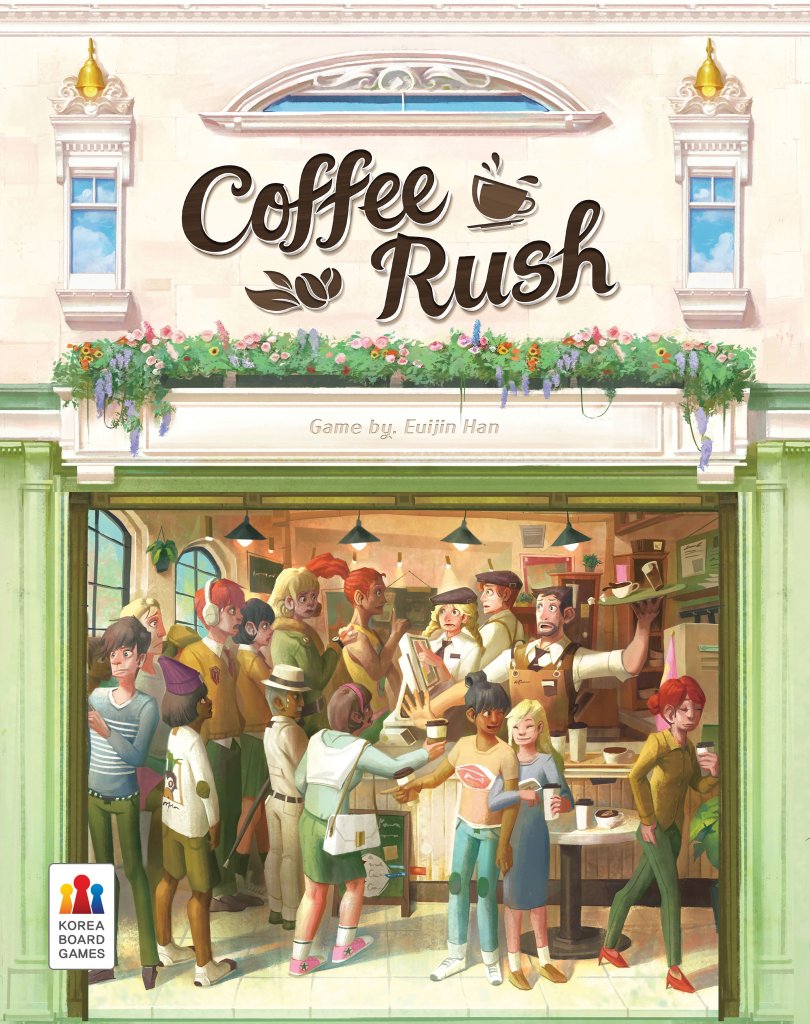
Coffee Rush board game cover

About this board game

Coffee Rush is a 2023 board game for 2–4 players that plays in about 30 minutes. Take on the role of a barista during a busy coffee-shop rush, completing customer orders to build your rating and earn recognition as the best barista.

During the game, each player moves around the ingredient board to collect the ingredients needed for their current orders. When you have everything required, fulfill an order to increase your rating. Careful planning is important, because unfinished orders do not wait forever.

Orders that are not fulfilled in time become penalty cards, subtracting from your rating. Completing three orders also gives you the opportunity to activate an upgrade, allowing you to acquire ingredients more easily and improve your ability to handle the growing workload.

  • Move on the ingredient board to gather what your orders require.
  • Complete customer orders to raise your rating.
  • Manage unfinished orders before they become penalties.
  • Activate an upgrade after fulfilling three orders.

The game ends when all order cards have run out or when a barista collects their fifth penalty card. At the end of Coffee Rush, compare ratings: the player with the highest rating wins.

With its clear focus on collecting ingredients, completing orders, and avoiding costly delays, Coffee Rush presents a focused challenge for players who want to balance progress with the pressure of a busy service period. Every fulfilled order can improve your standing, while missed orders threaten to pull your rating down.

Board Game Rules for
Coffee Rush

Download official rules (EN)

Introduction

Ages 8+ | 2–4 Players | 30 Minutes

This cafe is on a busy street with other great cafes. It has a cozy vibe, tasty coffee, and trends on social media. Although customers come here to relax, each work station becomes a battleground to complete orders. It can be troublesome if orders are not completed on time. Business can thrive with likes, but not so much with dislikes. Complete orders and become the best barista!

Objective

Complete orders and collect ratings. The game ends if all Order Cards run out or if someone collects 5 Penalty Cards. The player with the highest rating wins!

Components

  • 1 Ingredient Board
  • 4 Player Boards
  • 16 Upgrade Tiles (4 of each color: red, blue, green, yellow)
  • 6 Meeples (2 red, 2 blue, 1 green, 1 yellow)
  • 2 Rulebooks (EN/KR)
  • 80 Order Cards
  • 2 Ingredient Trays
  • 12 Cups
  • 15 Rush Tokens
  • 1 Starting Player Token
  • 102 Ingredient Tokens:
    • 18 Coffee beans
    • 12 Milk
    • 12 Steam
    • 12 Ice
    • 12 Chocolate
    • 12 Caramel
    • 12 Tea leaves
    • 12 Water
Components Overview
Components Overview

Setup (3–4 Players)

These are 3–4 player rules. 2 player rules are on page 8.

Setup Diagram
Setup Diagram
  1. Place the Ingredient Board in the middle of the table. [A]
  2. Place all Ingredient Tokens and Rush Tokens beside the Ingredient Board. Shuffle all Order Cards into a deck, and place it face down beside the Ingredient Board. This is the Supply Area. [B]
  3. Each player chooses a color and takes 1 Player Board, 1 Meeple, 4 Upgrade Tiles, and 3 Cups. [C] Place the Upgrade Tiles face down on the designated spot on the Player Board. Place Cups above the Player Board.
  4. Choose a starting player and have the “OPEN” side Starting Player Token placed in front of them. [D]
  5. The starting player takes Order Cards from the top of the deck and places them face up on their order tabs: 2 cards on tab 1, and 1 card on tab 2. Other players must place 1 card on tab 1 and 1 card on tab 2. [E]
  6. Starting from the player on the right of the starting player, and in an anticlockwise direction, take turns placing your Meeple (one at a time) on Ingredient Board cells. Two Meeples cannot be placed on the same cell. If all players have finished placing their Meeples, take the respective Ingredient Token from the Supply Area and place it into your Cup. [F]
Upgrade Tile Front and Back

Turn Overview

Turns proceed in a clockwise order from the starting player. Complete the following actions in order during your turn.

1. Activate Upgrades

At the beginning of your turn, if you have 3 or more completed Order Cards on the top-left of your Player Board, you can discard 3 of those Cards face up beside the Order Card deck and activate an upgrade of your choice. Select an Upgrade Tile and flip it so that it is face up to indicate its activation. You can use the activated Upgrades immediately after they are activated.

For more information on upgrades, refer to page 6.

2. Move

Move your Meeple on the Ingredient Board and receive Ingredient Tokens according to where you land. You must follow these rules when you move:

1. Move to an adjacent cell horizontally or vertically

You can only move to an adjacent cell to the north, south, east, or west. If you upgrade “Diagonal Movement” you can move diagonally.

Horizontal and Vertical Movement

2. You can move 1–3 times during your turn

You can move up to 3 times, but you can choose to move less.

3. Receive Ingredient Tokens according to where you land

Each time you move 1 cell, you must take the Ingredient Token that is drawn on the cell from the Supply Area and place it in front of you. If there are not enough Ingredient Tokens in the Supply Area, take as many as you can.

Receiving Ingredients While Moving

4. You can pass over a cell that already has a Meeple, but you cannot end your turn there

If you have enough moves, you can use 2 moves to first move onto a cell with another player’s Meeple, and then move again onto an adjacent cell. You are still able to receive Ingredient Tokens for the cell with the other player’s Meeple. However, you cannot end your turn on a cell that already has a Meeple. Therefore, when you end your turn, there can be only 1 Meeple on each cell.

Passing Over Other Meeples

5. You can move an additional cell using the Rush Token

You gain additional moves by using Rush Tokens. Using 1 Rush Token allows you to move 1 extra cell, and allows you to gain the Ingredient Token you land on. There is no limit to the number of Rush Tokens you can use on your turn. Used Rush Tokens must be returned to the Supply Area.

Using a Rush Token to Move

6. You can use the same cell several times

You can pass through the same cell several times on your turn, and even finish your turn on the cell you started on.

3. Pour Ingredients

You can freely distribute the Ingredient Tokens that you gained during the Move phase into your Cups. However, you must follow the rules below:

  1. Placing Ingredients: You can place Ingredient Tokens you gained on your turn in a Cup or several Cups. You can choose to place any number of Ingredient Tokens in your Cups or none at all. You can return any unwanted Ingredient Tokens to the Supply Area.
  2. No Transfers: Any Ingredient Tokens that are already in a Cup cannot be transferred into another Cup.
  3. Emptying Cups: You can empty any number of Cups during your turn. All Ingredient Tokens within your selected Cups must be discarded. Discarded Ingredient Tokens return to the Supply Area.

4. Process Order

The Ingredients required are shown on the Order Card. Gather Ingredient Tokens within your Cup as shown on your Order Card to complete the order. You must follow the rules below:

1. Order Ready

Once the contents of your Cup match the Order Card, place the Cup on top of the Order Card and let other players know that the order is ready.

2. Order Complete

If the Ingredient Tokens match the Order Card, return all Ingredient Tokens in the Cup to the Supply Area, and then place the relevant Order Card face down on the top-left of your Player Board. If the Ingredients in the Cup do not match your Order Card, the Order Card cannot be completed, and so you must return both the Cup and Order Card to where they were before your order was ready.

Order Complete: Correct vs Incorrect Examples

3. Specialty Menu

There are “Specialty Menu” Order Cards. Whenever you Complete Orders of this type you receive 1 Rush Token from the Supply Area. Put the Rush Tokens you received on the above of your Player Board.

Specialty Menu Card and Rush Token

4. Too Many Orders

Check how many Order Cards were completed on your turn. The two players left of the player in turn must take the same number of Order Cards from the deck as those just completed, and place them on their tab 1. When taking cards from the Order Card deck, the player on the left of the one in turn must take all Order Cards required before the next player takes their Order Cards.

Too Many Orders Distribution

5. Final Orders

During “Too Many Orders”, if there are no Order Cards left in the deck, starting with the player left of the one in turn, players must take the available Order Cards. Then the starting player flips the Starting Player Token to the “CLOSED” side.

Starting Player Token: Open and Closed Sides

5. Turn End

1. Flow of Time

After the Process Order phase is finished, Move all the Order Cards on the right side of your Player Board one tab down:

  • Order Cards that were on tab 4 are placed on the bottom (outside) of the Player Board.
  • Order Cards on tab 3 go to tab 4.
  • Order Cards on tab 2 go to tab 3.
  • Order Cards on tab 1 go to tab 2.

2. Penalties

During the “Flow of Time”, if Order Cards on tab 4 leave the Player Board, flip those Cards face down and place them on the Penalties area on the bottom-left of your Player Board. These Cards are now Penalty Cards. You then take the same number of Rush Tokens as the Penalties cards you just gained from the Supply Area. If the player in turn has 5 or more Penalty Cards, the starting player flips the Starting Player Token to the “CLOSED” side.

Flow of Time and Penalty Cards

3. Checking for End

When ending your turn, check whether the Starting Player Token is on the “CLOSED” side. If the Starting Player is on the “OPEN” side, it is the next player’s turn.

If the Starting Player Token is “CLOSED”, you can proceed to the Game End phase. If it was the turn of the player on the right of the starting player, proceed to the Game End phase immediately. If not, continue the round until the player right of the starting player completes their turn before proceeding to the Game End phase.


Activating Upgrades

Once upgrades are activated, they remain active throughout the entire game. There are 4 types of upgrades. On the beginning of your turn you can discard 3 completed Order Cards to activate 1 upgrade. When you activate an upgrade, flip the Upgrade Tile so that it is face up. You can use this upgrade effect immediately. Once the Upgrade Tile is face up, it stays that way until the game ends. Upgrade effects stack.

Upgrade Types

1. Double Meeples

You receive 2 Ingredient Tokens on cells with another Meeple.

Upgrade: Double Meeples

2. Diagonal Movement

You can move to diagonal cells.

Upgrade: Diagonal Movement

3. Double Corners

You receive 2 Ingredient Tokens on the 4 corner cells of the Ingredient Board.

Upgrade: Double Corners

4. Double Specialties

You receive 2 Ingredient Tokens on caramel, chocolate, water, and tea leaves cells.

Upgrade: Double Specialties

Upgrade Effects Stacking Example

Upgrade Effects Stacking - Step 1
Upgrade Effects Stacking – Step 1

Example: It is Nathan (blue)’s turn. Nathan has already upgraded Double Meeples and Double Corners. Ivan (yellow)’s Meeple is on the corner cell with the coffee bean. Nathan moves to the cell with the coffee bean, and receives double the Ingredients through the Double Meeples effect but also receives double the Ingredients from the Double Corners effect for a total of 4 Coffee Beans.

Upgrade Effects Stacking - Step 2
Upgrade Effects Stacking – Step 2

Then he moves to his original cell to receive steam. He can still move one more cell, but in order to potentially take more coffee beans on his next turn he chooses to end his turn without further moves.


Game End

When the Game Ends, the player with the highest rating wins.

  • Each completed Order Card: +1 Rating
  • Each activated Upgrade Tile: +2 Ratings
  • Each Penalty Card: -1 Rating

Tiebreaker

In case there is a tie, the player with the most completed Order Cards among those tied wins. In case of another tie, the player with more Rush Tokens among those still tied wins. If there is still a tie, win together!


2 Player Rules

For 2 players, the following rules change.

Preparation

  • Each player chooses a color (red or blue) and takes all components for that color: 1 Player Board, 2 Meeples, 4 Upgrade Tiles.
  • Choose a starting player. Beginning with the non-starting player, the players take turns placing Meeples on the Ingredient Board. Meeples cannot be placed on cells with another Meeple include yours. The non-starting player places 1 Meeple of their color, then the starting player places 1 Meeple of their color, and this repeats until 4 Meeples have been placed. Players take the Ingredient Tokens under their respective Meeples and put them into their Cup(s).

Move

  • On your turn you can only move one of your Meeples (you have 2).

Upgrade

  • The Double Meeples Upgrade also works when you are on cells with your own Meeple.

Too Many Orders

  • Check the number of Order Cards that were completed. The other player must take as many Order Cards from the deck and place them on their tab 1.

Flow of Time

  • When completing your turn, move all Order Cards one tab down and add 1 Order Card to your tab 1 before finishing. Game End can trigger even if the Order Cards are depleted through the Flow of Time. If Game End conditions are met, the Starting Player Token is flipped to its “CLOSED” side. If Game End conditions are met by the starting player, the other player can perform one last turn. If the non-starting player triggers Game End, the game ends immediately.

Optional Rules

Some Cards are easier to complete than others. If you want the game to be less dependent on luck, you can follow the following steps:

  1. During Setup, gather all Ristretto and Espresso Cards (total of 4 Cards).
  2. Each player places either a Ristretto or Espresso Card on their tab 1.
  3. Each player draws a Card from the deck and places it on their tab 2.
  4. The starting player then draws 1 more Card from deck and places it on their tab 1.
  5. Any remaining Ristretto or Espresso Cards are removed from the game.
Ristretto and Espresso Order Cards

Development: Korea Boardgames Dev. Dept.
Coffee Rush is published by Korea Boardgames Co., Ltd, under license by author “Euijin Han”.
Copyright © 2023 Korea Boardgames Co., Ltd. All Rights Reserved.
Game Design: Euijin Han | Illustrations: Siwon Hwang
Graphic Design: Sooyeon Lee | Project Manager: Ivan S.W. Yi
Korea Boardgames Co., Ltd. – www.koreaboardgames.com


Overview & Components

Introduction

Ages 8+ | 2–4 Players | 30 Minutes

This cafe is on a busy street with other great cafes. It has a cozy vibe, tasty coffee, and trends on social media. Although customers come here to relax, each work station becomes a battleground to complete orders. It can be troublesome if orders are not completed on time. Business can thrive with likes, but not so much with dislikes. Complete orders and become the best barista!

Objective

Complete orders and collect ratings. The game ends if all Order Cards run out or if someone collects 5 Penalty Cards. The player with the highest rating wins!

Components

  • 1 Ingredient Board
  • 4 Player Boards
  • 16 Upgrade Tiles (4 of each color: red, blue, green, yellow)
  • 6 Meeples (2 red, 2 blue, 1 green, 1 yellow)
  • 2 Rulebooks (EN/KR)
  • 80 Order Cards
  • 2 Ingredient Trays
  • 12 Cups
  • 15 Rush Tokens
  • 1 Starting Player Token
  • 102 Ingredient Tokens:
    • 18 Coffee beans
    • 12 Milk
    • 12 Steam
    • 12 Ice
    • 12 Chocolate
    • 12 Caramel
    • 12 Tea leaves
    • 12 Water
Components Overview
Components Overview

Setup

Setup (3–4 Players)

These are 3–4 player rules. 2 player rules are on page 8.

Setup Diagram
Setup Diagram
  1. Place the Ingredient Board in the middle of the table. [A]
  2. Place all Ingredient Tokens and Rush Tokens beside the Ingredient Board. Shuffle all Order Cards into a deck, and place it face down beside the Ingredient Board. This is the Supply Area. [B]
  3. Each player chooses a color and takes 1 Player Board, 1 Meeple, 4 Upgrade Tiles, and 3 Cups. [C] Place the Upgrade Tiles face down on the designated spot on the Player Board. Place Cups above the Player Board.
  4. Choose a starting player and have the “OPEN” side Starting Player Token placed in front of them. [D]
  5. The starting player takes Order Cards from the top of the deck and places them face up on their order tabs: 2 cards on tab 1, and 1 card on tab 2. Other players must place 1 card on tab 1 and 1 card on tab 2. [E]
  6. Starting from the player on the right of the starting player, and in an anticlockwise direction, take turns placing your Meeple (one at a time) on Ingredient Board cells. Two Meeples cannot be placed on the same cell. If all players have finished placing their Meeples, take the respective Ingredient Token from the Supply Area and place it into your Cup. [F]
Upgrade Tile Front and Back

Gameplay

Turn Overview

Turns proceed in a clockwise order from the starting player. Complete the following actions in order during your turn.

1. Activate Upgrades

At the beginning of your turn, if you have 3 or more completed Order Cards on the top-left of your Player Board, you can discard 3 of those Cards face up beside the Order Card deck and activate an upgrade of your choice. Select an Upgrade Tile and flip it so that it is face up to indicate its activation. You can use the activated Upgrades immediately after they are activated.

For more information on upgrades, refer to page 6.

2. Move

Move your Meeple on the Ingredient Board and receive Ingredient Tokens according to where you land. You must follow these rules when you move:

1. Move to an adjacent cell horizontally or vertically

You can only move to an adjacent cell to the north, south, east, or west. If you upgrade “Diagonal Movement” you can move diagonally.

Horizontal and Vertical Movement

2. You can move 1–3 times during your turn

You can move up to 3 times, but you can choose to move less.

3. Receive Ingredient Tokens according to where you land

Each time you move 1 cell, you must take the Ingredient Token that is drawn on the cell from the Supply Area and place it in front of you. If there are not enough Ingredient Tokens in the Supply Area, take as many as you can.

Receiving Ingredients While Moving

4. You can pass over a cell that already has a Meeple, but you cannot end your turn there

If you have enough moves, you can use 2 moves to first move onto a cell with another player’s Meeple, and then move again onto an adjacent cell. You are still able to receive Ingredient Tokens for the cell with the other player’s Meeple. However, you cannot end your turn on a cell that already has a Meeple. Therefore, when you end your turn, there can be only 1 Meeple on each cell.

Passing Over Other Meeples

5. You can move an additional cell using the Rush Token

You gain additional moves by using Rush Tokens. Using 1 Rush Token allows you to move 1 extra cell, and allows you to gain the Ingredient Token you land on. There is no limit to the number of Rush Tokens you can use on your turn. Used Rush Tokens must be returned to the Supply Area.

Using a Rush Token to Move

6. You can use the same cell several times

You can pass through the same cell several times on your turn, and even finish your turn on the cell you started on.

3. Pour Ingredients

You can freely distribute the Ingredient Tokens that you gained during the Move phase into your Cups. However, you must follow the rules below:

  1. Placing Ingredients: You can place Ingredient Tokens you gained on your turn in a Cup or several Cups. You can choose to place any number of Ingredient Tokens in your Cups or none at all. You can return any unwanted Ingredient Tokens to the Supply Area.
  2. No Transfers: Any Ingredient Tokens that are already in a Cup cannot be transferred into another Cup.
  3. Emptying Cups: You can empty any number of Cups during your turn. All Ingredient Tokens within your selected Cups must be discarded. Discarded Ingredient Tokens return to the Supply Area.

4. Process Order

The Ingredients required are shown on the Order Card. Gather Ingredient Tokens within your Cup as shown on your Order Card to complete the order. You must follow the rules below:

1. Order Ready

Once the contents of your Cup match the Order Card, place the Cup on top of the Order Card and let other players know that the order is ready.

2. Order Complete

If the Ingredient Tokens match the Order Card, return all Ingredient Tokens in the Cup to the Supply Area, and then place the relevant Order Card face down on the top-left of your Player Board. If the Ingredients in the Cup do not match your Order Card, the Order Card cannot be completed, and so you must return both the Cup and Order Card to where they were before your order was ready.

Order Complete: Correct vs Incorrect Examples

3. Specialty Menu

There are “Specialty Menu” Order Cards. Whenever you Complete Orders of this type you receive 1 Rush Token from the Supply Area. Put the Rush Tokens you received on the above of your Player Board.

Specialty Menu Card and Rush Token

4. Too Many Orders

Check how many Order Cards were completed on your turn. The two players left of the player in turn must take the same number of Order Cards from the deck as those just completed, and place them on their tab 1. When taking cards from the Order Card deck, the player on the left of the one in turn must take all Order Cards required before the next player takes their Order Cards.

Too Many Orders Distribution

5. Final Orders

During “Too Many Orders”, if there are no Order Cards left in the deck, starting with the player left of the one in turn, players must take the available Order Cards. Then the starting player flips the Starting Player Token to the “CLOSED” side.

Starting Player Token: Open and Closed Sides

5. Turn End

1. Flow of Time

After the Process Order phase is finished, Move all the Order Cards on the right side of your Player Board one tab down:

  • Order Cards that were on tab 4 are placed on the bottom (outside) of the Player Board.
  • Order Cards on tab 3 go to tab 4.
  • Order Cards on tab 2 go to tab 3.
  • Order Cards on tab 1 go to tab 2.

2. Penalties

During the “Flow of Time”, if Order Cards on tab 4 leave the Player Board, flip those Cards face down and place them on the Penalties area on the bottom-left of your Player Board. These Cards are now Penalty Cards. You then take the same number of Rush Tokens as the Penalties cards you just gained from the Supply Area. If the player in turn has 5 or more Penalty Cards, the starting player flips the Starting Player Token to the “CLOSED” side.

Flow of Time and Penalty Cards

3. Checking for End

When ending your turn, check whether the Starting Player Token is on the “CLOSED” side. If the Starting Player is on the “OPEN” side, it is the next player’s turn.

If the Starting Player Token is “CLOSED”, you can proceed to the Game End phase. If it was the turn of the player on the right of the starting player, proceed to the Game End phase immediately. If not, continue the round until the player right of the starting player completes their turn before proceeding to the Game End phase.


Upgrades Reference

Activating Upgrades

Once upgrades are activated, they remain active throughout the entire game. There are 4 types of upgrades. On the beginning of your turn you can discard 3 completed Order Cards to activate 1 upgrade. When you activate an upgrade, flip the Upgrade Tile so that it is face up. You can use this upgrade effect immediately. Once the Upgrade Tile is face up, it stays that way until the game ends. Upgrade effects stack.

Upgrade Types

1. Double Meeples

You receive 2 Ingredient Tokens on cells with another Meeple.

Upgrade: Double Meeples

2. Diagonal Movement

You can move to diagonal cells.

Upgrade: Diagonal Movement

3. Double Corners

You receive 2 Ingredient Tokens on the 4 corner cells of the Ingredient Board.

Upgrade: Double Corners

4. Double Specialties

You receive 2 Ingredient Tokens on caramel, chocolate, water, and tea leaves cells.

Upgrade: Double Specialties

Upgrade Effects Stacking Example

Upgrade Effects Stacking - Step 1
Upgrade Effects Stacking – Step 1

Example: It is Nathan (blue)’s turn. Nathan has already upgraded Double Meeples and Double Corners. Ivan (yellow)’s Meeple is on the corner cell with the coffee bean. Nathan moves to the cell with the coffee bean, and receives double the Ingredients through the Double Meeples effect but also receives double the Ingredients from the Double Corners effect for a total of 4 Coffee Beans.

Upgrade Effects Stacking - Step 2
Upgrade Effects Stacking – Step 2

Then he moves to his original cell to receive steam. He can still move one more cell, but in order to potentially take more coffee beans on his next turn he chooses to end his turn without further moves.


End of Game & Scoring

Game End

When the Game Ends, the player with the highest rating wins.

  • Each completed Order Card: +1 Rating
  • Each activated Upgrade Tile: +2 Ratings
  • Each Penalty Card: -1 Rating

Tiebreaker

In case there is a tie, the player with the most completed Order Cards among those tied wins. In case of another tie, the player with more Rush Tokens among those still tied wins. If there is still a tie, win together!


2-Player Rules & Variants

2 Player Rules

For 2 players, the following rules change.

Preparation

  • Each player chooses a color (red or blue) and takes all components for that color: 1 Player Board, 2 Meeples, 4 Upgrade Tiles.
  • Choose a starting player. Beginning with the non-starting player, the players take turns placing Meeples on the Ingredient Board. Meeples cannot be placed on cells with another Meeple include yours. The non-starting player places 1 Meeple of their color, then the starting player places 1 Meeple of their color, and this repeats until 4 Meeples have been placed. Players take the Ingredient Tokens under their respective Meeples and put them into their Cup(s).

Move

  • On your turn you can only move one of your Meeples (you have 2).

Upgrade

  • The Double Meeples Upgrade also works when you are on cells with your own Meeple.

Too Many Orders

  • Check the number of Order Cards that were completed. The other player must take as many Order Cards from the deck and place them on their tab 1.

Flow of Time

  • When completing your turn, move all Order Cards one tab down and add 1 Order Card to your tab 1 before finishing. Game End can trigger even if the Order Cards are depleted through the Flow of Time. If Game End conditions are met, the Starting Player Token is flipped to its “CLOSED” side. If Game End conditions are met by the starting player, the other player can perform one last turn. If the non-starting player triggers Game End, the game ends immediately.

Optional Rules

Some Cards are easier to complete than others. If you want the game to be less dependent on luck, you can follow the following steps:

  1. During Setup, gather all Ristretto and Espresso Cards (total of 4 Cards).
  2. Each player places either a Ristretto or Espresso Card on their tab 1.
  3. Each player draws a Card from the deck and places it on their tab 2.
  4. The starting player then draws 1 more Card from deck and places it on their tab 1.
  5. Any remaining Ristretto or Espresso Cards are removed from the game.
Ristretto and Espresso Order Cards

Development: Korea Boardgames Dev. Dept.
Coffee Rush is published by Korea Boardgames Co., Ltd, under license by author “Euijin Han”.
Copyright © 2023 Korea Boardgames Co., Ltd. All Rights Reserved.
Game Design: Euijin Han | Illustrations: Siwon Hwang
Graphic Design: Sooyeon Lee | Project Manager: Ivan S.W. Yi
Korea Boardgames Co., Ltd. – www.koreaboardgames.com