
Pipeline
2019
Develop pipelines, hire valuable experts, and manage oil markets in a high-stakes refinery strategy game for 2–4 players.
120
minutes
2 - 4
player(s)
12+
Medium Heavy


About this board game
Pipeline is an oil-industry strategy board game for 2–4 players, with games lasting about 120 minutes. Set during the privatization of a government-controlled energy sector, it challenges players to build companies capable of meeting worldwide demand and increasingly strict refinement standards.
Each player seeks to capitalize on the newly opened oil industry by developing a more efficient refinery. The heart of the experience is an interweaving pipeline network, which must be carefully crafted as players work to improve the way their refinery operates.
Success requires more than strong economic skills. Players must combine several connected priorities as they develop their businesses:
- Build an efficient network of pipelines within the refinery.
- Hire experts who provide valuable benefits over competitors.
- Manage the logistics of purchasing and selling refined oil.
- Respond to the demands of various oil markets.
The game’s setting reflects an industry under pressure: an increasingly complex and inefficient refinery system can no longer keep pace with global demand or rising standards. With privatization creating new opportunities, players compete to establish the most effective oil company.
In Pipeline, every business decision is connected to the structure of the refinery. Carefully planning the network while managing experts, purchases, sales, and market logistics can help turn an ambitious company into the industry leader.
/pic7182955.jpg)
Board Game Rules for
Pipeline
The refinement of oil has long been part of the government-controlled energy sector. Amassed with an incredibly complex and inefficient system of refineries, the government has felt the severe pressures of worldwide demand and the ever-increasing global standards for refinement. Unable to keep up with demand, the government has only one option: privatizing the oil industry.
You seek to capitalize on this opportunity by starting a company in the oil business. You will focus on building an efficient network in your refinery, upgrading your operations to provide valuable benefits over your competitors, as well as managing the logistics of purchasing and selling refined oil into the various markets to earn the most money in the game!
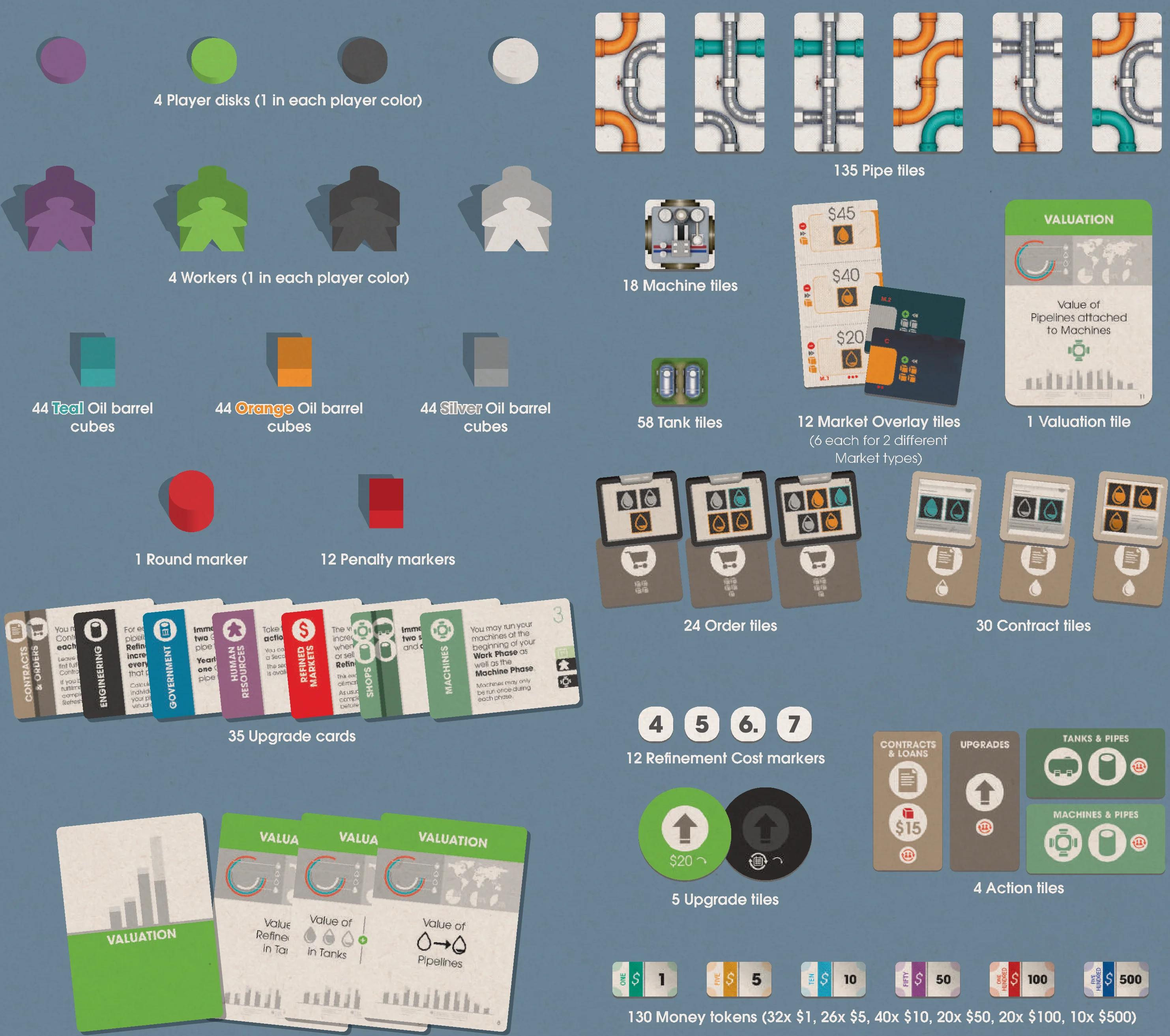
Components
- 1 Game board
- 4 Player boards
- 135 Pipe tiles
- 18 Machine tiles
- 58 Tank tiles
- 12 Market Overlay tiles (6 each for 2 different Market types)
- 1 Valuation tile
- 16 Valuation cards
- 30 Contract tiles
- 24 Order tiles
- 35 Upgrade cards
- 5 Upgrade tiles
- 4 Action tiles
- 12 Refinement Cost markers
- 1 Round marker
- 12 Penalty markers
- 130 Money tokens (32x $1, 26x $5, 40x $10, 20x $50, 20x $100, 10x $500)
- 4 Workers (1 in each player color)
- 4 Player disks (1 in each player color)
- 44 Teal Oil barrel cubes
- 44 Orange Oil barrel cubes
- 44 Silver Oil barrel cubes
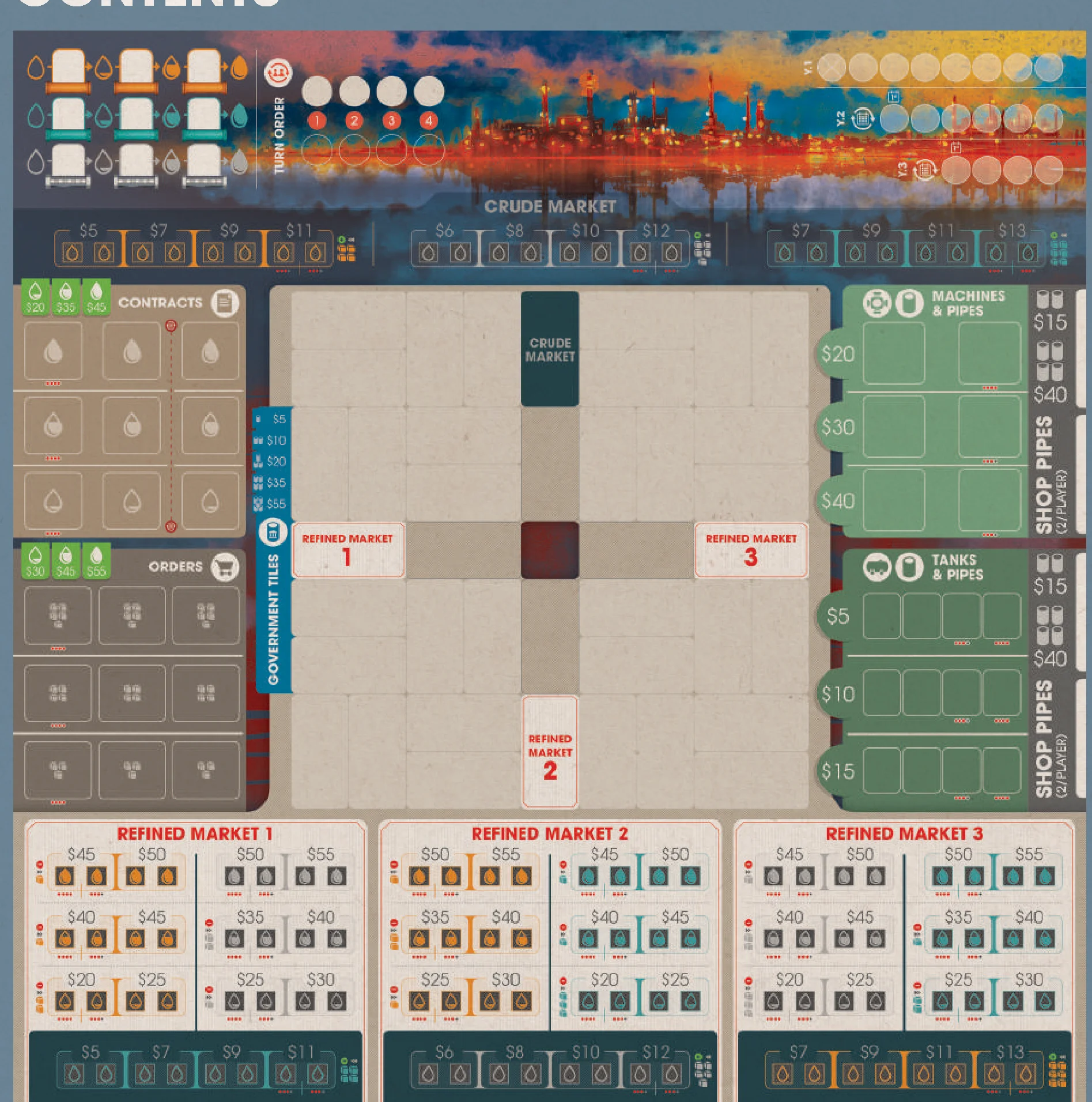
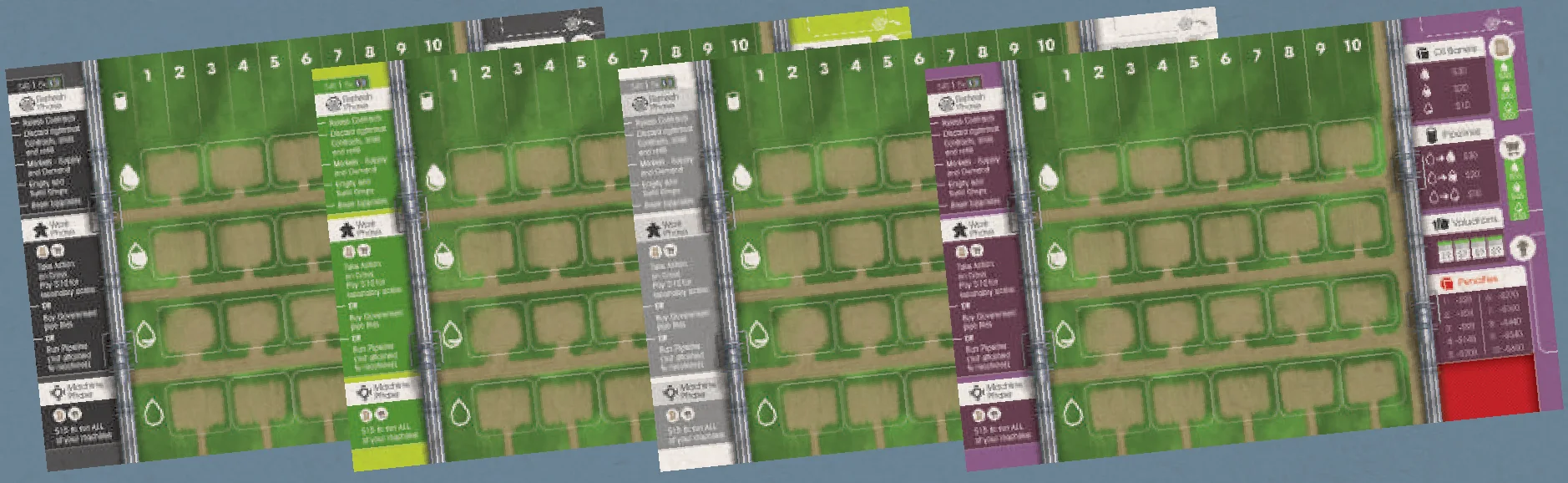
Game Board Setup
- With the game board in the middle of the table, each player takes the player board, worker, and disk in their color.
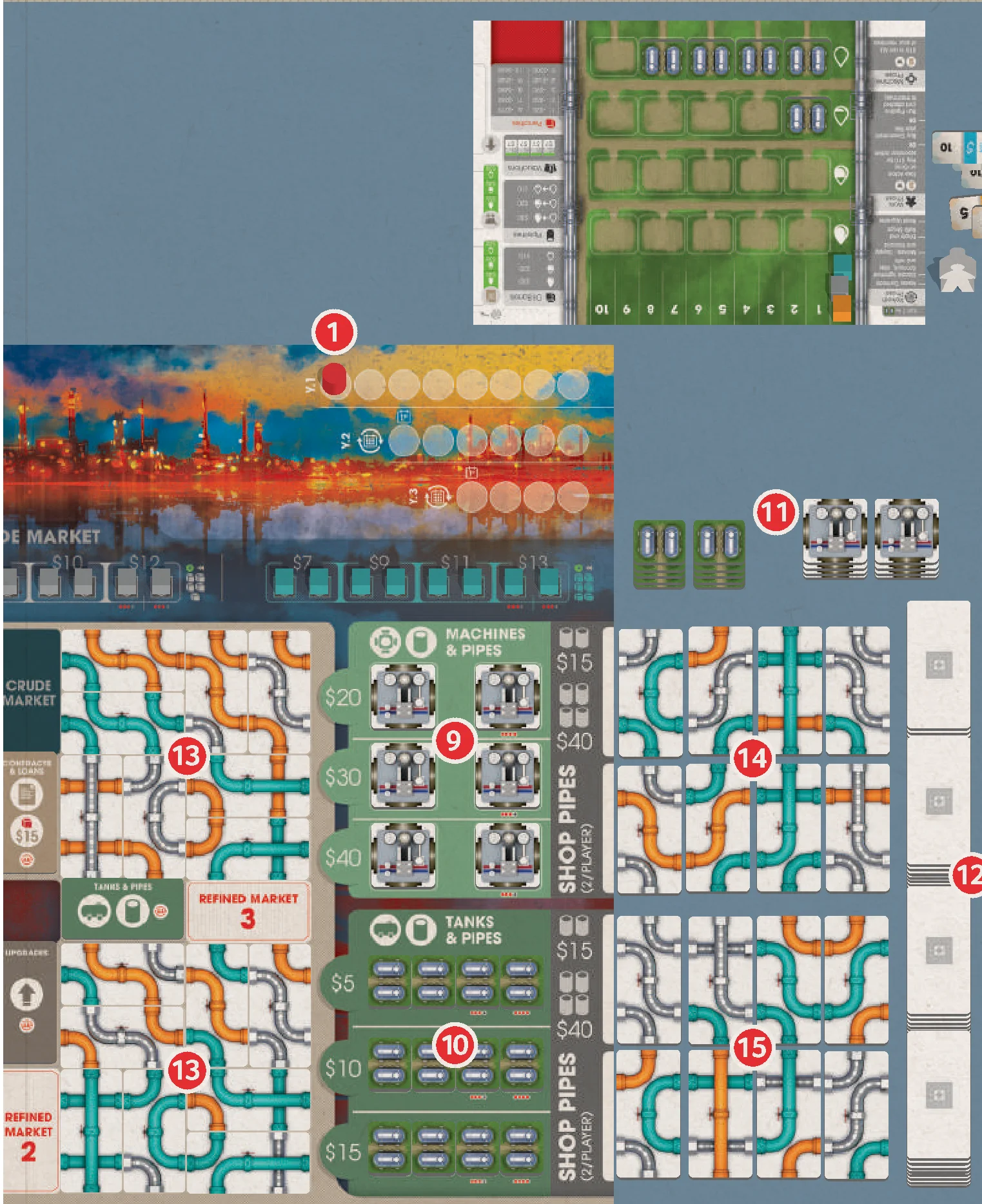
- Place the Round Marker on the leftmost space of Year 1 on the Round Track (1).
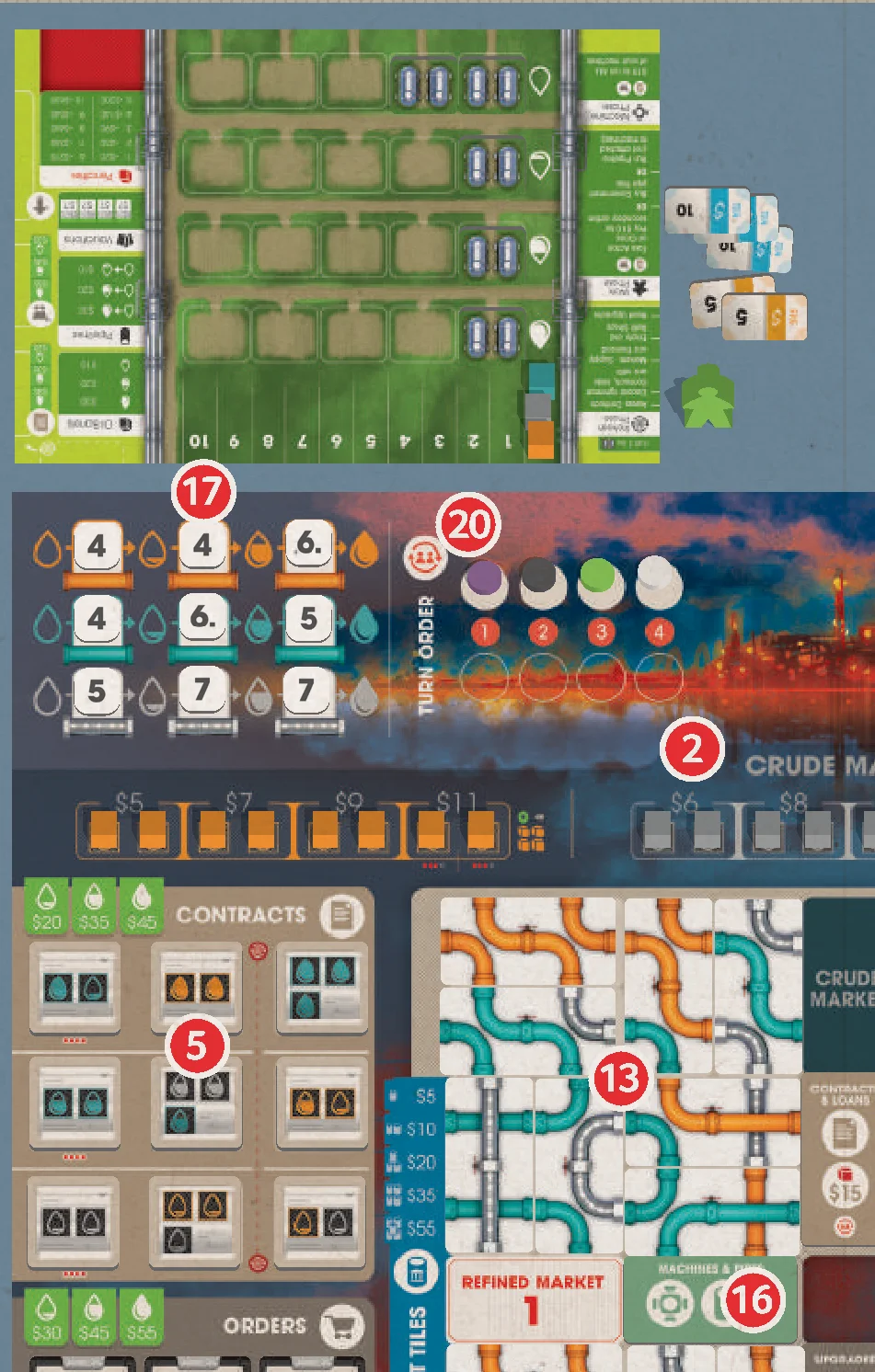
- Fill the Crude Market (2) and the Crude rows of the Refined Markets (3) with the matching color of Oil barrels. Use the Market Overlay tiles to reduce the number of available spaces when playing with fewer than 4 players.
- Separate the Contract tiles by grade of oil, as denoted on the reverse of the tiles by the following icons:
- Low Grade

- Mid Grade
- High Grade

Shuffle the stacks separately. Set aside a number of Contracts from each stack according to the number of players:
- 2 – 3 players: 4 Contracts
- 4 players: 5 Contracts
Return the other Contracts to the box. Place each stack face up next to the corresponding row on the game board (4). Fill each row of the Contracts display with Contract tiles from the corresponding stack (5). Leave the leftmost space in each row empty when not playing with 4 players.
- Low Grade
- Separate the Order tiles by the quantity of oil needed to fulfill them, as denoted on the reverse of the tiles (3, 4, or 5 cubes showing). Shuffle each stack of Order tiles separately, then fill each row of the Orders display with Order tiles from the corresponding stack (6). Leave the leftmost space in each row empty when not playing with 4 players. Return the remaining Order tiles to the box.
- Randomly select 5 different Upgrade types and place their corresponding Level 1, 2, and 3 cards in rows next to the game board (7). For first-time players, we suggest using the Government, Engineering, HR, Refined Markets, and Shop Upgrades. Return all unused cards to the box. The 5 Upgrade tokens are placed face up next to the Level 1 card on each row (8).
- Fill the Machine Shop with Machine tiles (9). Repeat for the Tank Shop using Tank tiles (10). Place the remaining Machine and Tank tiles in separate stacks next to the game board (11).
- Shuffle the Pipe tiles facedown and place them next to the board (12).
- Fill the 4 Government quadrants with 1 Pipe tile per space (13).
- Next to the Machine Shop, reveal 2 Pipe tiles per player, creating an available Market (14). Repeat for the Tank Shop (15).
- Shuffle all 4 Action tiles and place 1 on each available Action Space on the game board (16). The reverse of each Action tile is presented in landscape orientation to best orient the icons and text to the players. There is no gameplay difference between each side.
- Shuffle the Refinement Cost markers face down and place 9 face up in the Refinement Cost spaces (17). Return the remaining Refinement Cost markers to the game box.
For first-time players, we recommend removing the 7-value Refinement markers before shuffling.
- Shuffle the Valuation cards and deal 3 face up next to the game board (18). For first-time players, we suggest using the Value of Refined Oil in Tanks (1), Value of Pipelines (2), and $10 Per Tank Tile (3) Valuation cards. Return the remaining Valuation cards to the game box. Place the Valuation tile next to the 3 Valuation cards (19).
- Randomly choose a start player and place their disk on the upper and leftmost Player Order space (20). In clockwise order, the remaining players each place their disk on the next available Player Order space.
- Create a supply of Penalty cubes (21).
- Create a supply of Money tokens (22).
- Create a supply of remaining Oil barrels (23).
Fewer than 4 Players
When playing with fewer than 4 players, use the red dots under each space to determine if that space is to be used:
- 3 red dots: Only use this space with 3 or more players
- 4 red dots: Only use this space with 4 players
Market Overlay tiles
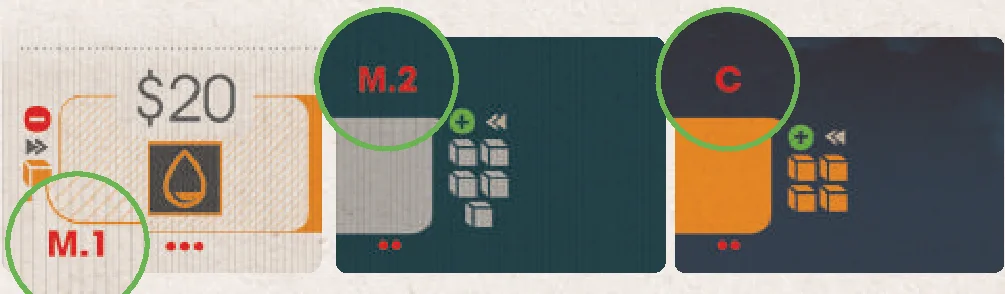
Based on player count, choose the corresponding Market Overlay tile and place it on its matching Market. Use the codes on each tile to determine the correct placement:
- Refined Markets 1, 2 and 3 are denoted by M.1, M.2, and M.3.
- The Crude Market is denoted by a C.
- Player counts are denoted by 2 red dots for 2 players and 3 red dots for 3 players.
Player Board Setup
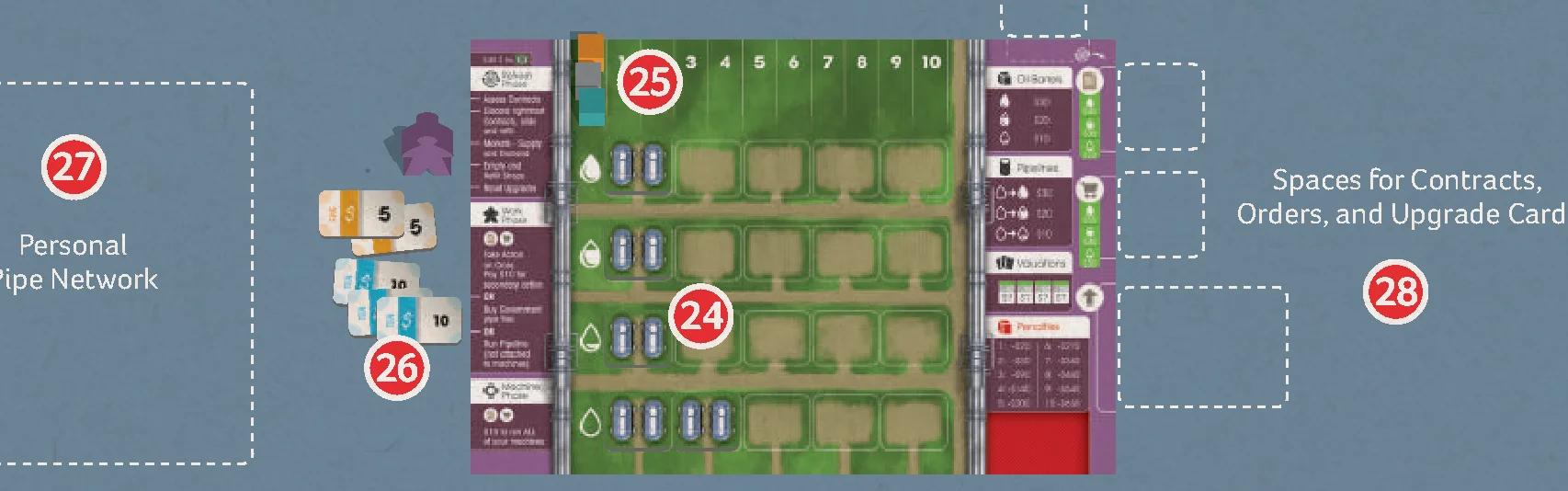
- Each player receives 5 Tank tiles to freely place on their player board (24). This allows the player to store different grades of oil from the start of the game. Tank tiles may not be stacked on top of each other. When deciding where to place Tank tiles, keep in mind that the column a Tank is placed in does not matter, only the row. Once placed, a Tank cannot be moved to a different row.
We recommend having 2 Tank tiles in the Crude section and the remaining 3 Tank tiles on each grade of oil.
- Each player places one cube of each oil color on the 0 space of the Pipeline track at the top of their player board (25). The Pipeline tracks are used to record the longest pipeline of each oil type in the player’s Personal Pipe Network.
- Each player takes $40 money from the supply (26).
- Each player places their worker next to their player board.
- Each player will need to leave some space to the left of their player board for their Personal Pipe Network (27), which will expand during the game, and some space to the right of their player board for Contracts, Orders, and Upgrade cards (28).
For easy reference, each player’s starting Tank tiles and money are denoted on their player board ($40 | 5x Tank tiles).
Oil Types & Grades
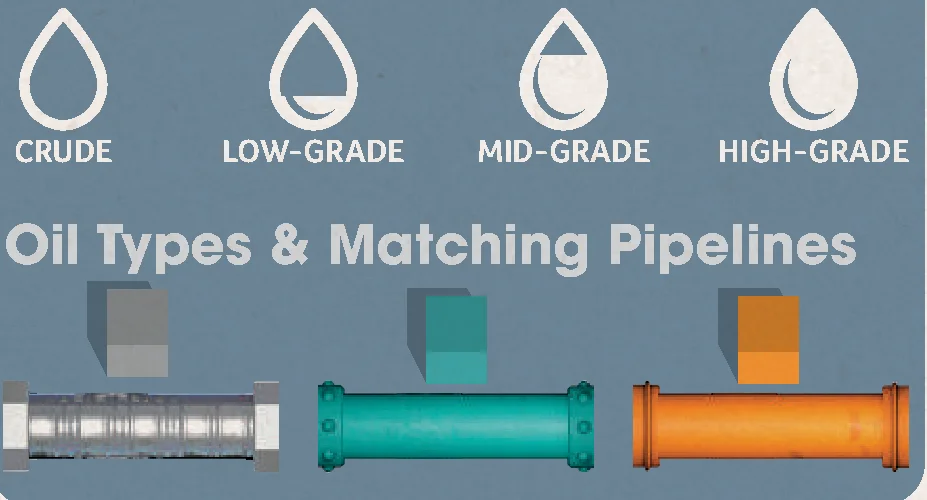
In Pipeline, there are 3 types of oil represented by their 3 distinct colors: Teal, Orange, and Silver. Each type of oil has 1 of 4 grades: Crude, Low-Grade, Mid-Grade, and High-Grade. Through the refinement process, oil can be refined from Crude all the way to High-Grade, which is worth more money at the Markets.
Game Structure
The game is played over 3 years—8 rounds in the first year, 6 rounds in the second year, and 4 rounds in the final year. In each round, players will take 1 turn in player order, beginning with the starting player.
A player’s turn is comprised of 2 phases:
- The Work Phase
- The Machine Phase
After all players have taken their turns, move the Round Marker to the next space on the Round Track. At the beginning of the second and third years, a Refresh Phase is conducted.
Refresh Phase
At the beginning of the second and third years, carry out a Refresh phase, consisting of the following steps:
- Contracts: Discard the rightmost column of Contracts. All remaining Contracts slide to the right 1 column. Refill ONLY the leftmost column, according to player number, with the next available Contracts from off the board. Players with incomplete Contracts receive a Penalty Token for each incomplete Contract. Any incomplete Contracts are removed from the game. Remove all Oil barrels from Players’ Contracts. Players who acquired Deferred Contracts now activate them by moving them to the Active Contracts area next to their board.
- Crude and Refined Markets: Resupply each Market according to its Supply icon. Remove oil from each of the 3 Refined Markets according to its Demand icon.
- The Crude Market may add 4 Oil barrels, filling from the furthest right empty space, and going left. As there are 5 available spaces, the leftmost space does not get refilled.
- A demand icon indicates how many Oil barrels should be removed, if possible. Oil barrels are removed from left to right, following the arrows indicated.
- Tank and Machine Shops: Discard and refill all Pipe tiles in the Machine and Tank Shops next to the game board based on the number of players. Refill all Tank and Machine tiles.
- Upgrades: Flip all face-down Upgrade markers so they are all face up.
Work Phase Basics 
Main Action
You have 1 worker that you use to take 1 Action each round. On your turn, you may place your worker on any Action space in the center cross of the game board (regardless if it is occupied or not), on Government Pipe tiles, or in your own Pipe Network to take the corresponding Action. You may repeat the same Action from turn to turn by choosing the same Action space. You must have enough cash to perform the Action.
Instead of performing an Action, you may pass.
Secondary Action
Additionally, if you take any 1 of the 8 Actions in the center cross of the game board, you may take a Secondary Action. To take the Secondary Action, pay $10 and move your worker to the Action space directly adjacent to the Main Action space. You must take the Main Action before taking the Secondary Action. The 4 Action spaces immediately adjacent to the center square space are not directly adjacent to each other. A player cannot perform a Main Action on 1 side of the center square and then perform a Secondary Action on another side of the center square.
Turn Order 
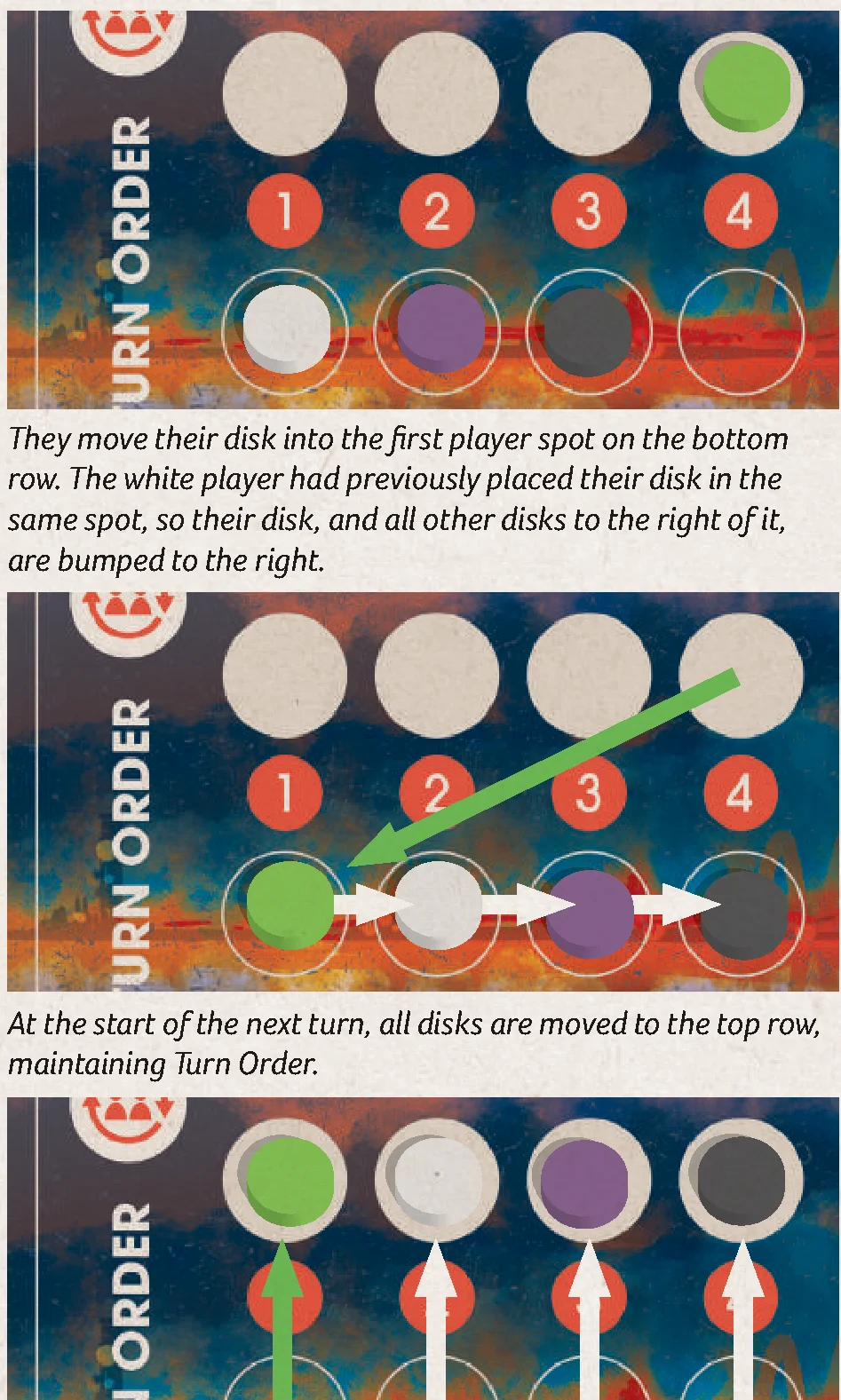
When you perform any part of an Action or Secondary Action that shows the Turn Order icon, you may change your position in Turn Order. After performing the Action, move your disk on the Turn Order track to the desired location in the row below. This reflects the change in Turn Order for the next game round. If the desired Turn Order space is occupied, you may still select the desired space, shifting the other markers left or right. At the end of the current game round, the new Turn Order is established for the next round by sliding the Turn Order markers back up to the top row.
Refined Markets 1, 2, & 3
To take this Action, place your worker on the Refined Market Action space on the board that matches the Refined Market you wish to visit (Refined Market 1, 2, or 3).
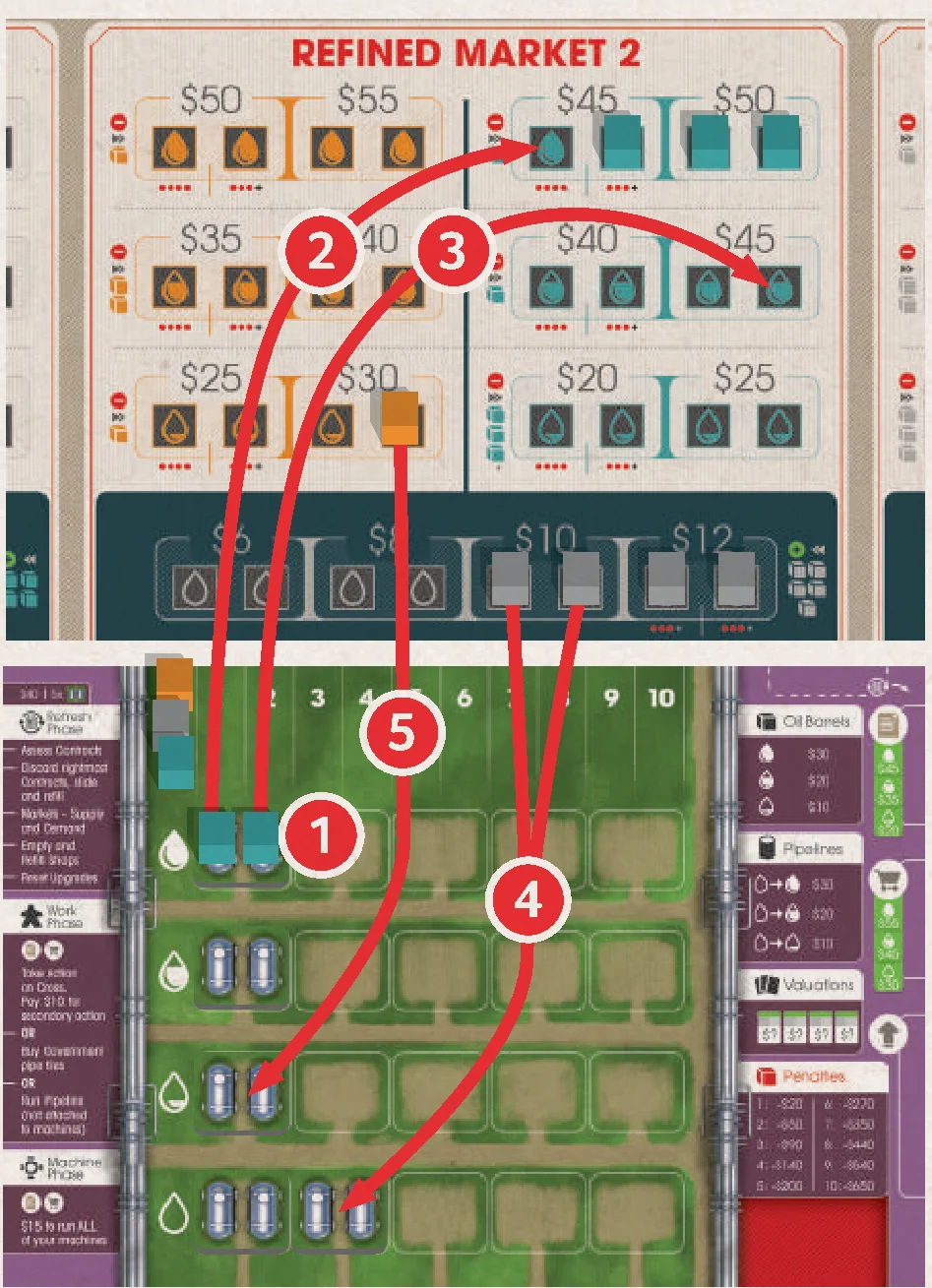
The 3 Refined Markets are where players can purchase and sell Crude, Low-Grade, Mid-Grade, and High-Grade oil. However, each Market has different sell and purchase prices, as well as different types of oil. You may only trade in the Refined Market that matches the number of the Action space you selected.
- At the Refined Markets, you may purchase and/or sell oil, but if you are purchasing and selling, you must complete all of your selling before purchasing.
- To purchase an Oil barrel, take an Oil barrel cube from the Market and pay the amount shown above it to the bank.
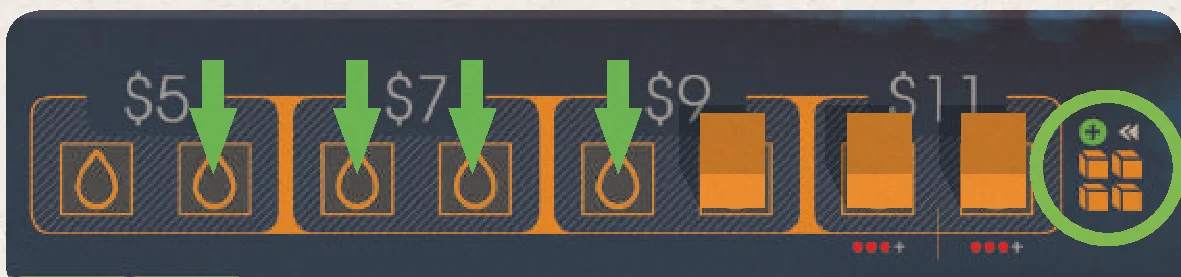
- To sell an Oil barrel, place an Oil barrel cube from your player board onto a free space in the Market, and receive from the bank the amount shown above that space. When selling oil, a higher grade of oil may be sold as a lower grade, but will only pay out money equal to the oil required, not sold. You may purchase and sell as many Oil barrel cubes as you wish.
Crude Market
The Crude Market works in the same way as the Refined Markets (above).
To take this Action, place your worker on the Crude Market Action space on the board. The Crude Market is where players can purchase all 3 different types of Crude oil.
- At the Crude Market, you may purchase and/or sell Crude oil, but if you are purchasing and selling, you must complete all of your selling before purchasing.
- To purchase a Crude Oil barrel from the Market, take an Oil barrel cube from the Market and pay the amount shown above it to the bank.
- To sell a Crude Oil barrel to the Market, place an Oil barrel cube from your player board onto a free space in the Market, and receive from the bank the amount shown above that space. When selling oil, a higher grade of oil may be sold as a lower grade, but will only pay out money equal to the oil required, not sold. You may purchase and sell as many Oil barrel cubes as you wish.
Contracts and Loans
To take this Action, place your worker on the Contracts & Loans Action space on the board.
Players may take up to 3 available Contracts and/or take 1 Loan.
- You may take up to 1 available Contract from each row on the game board. Contracts are free.
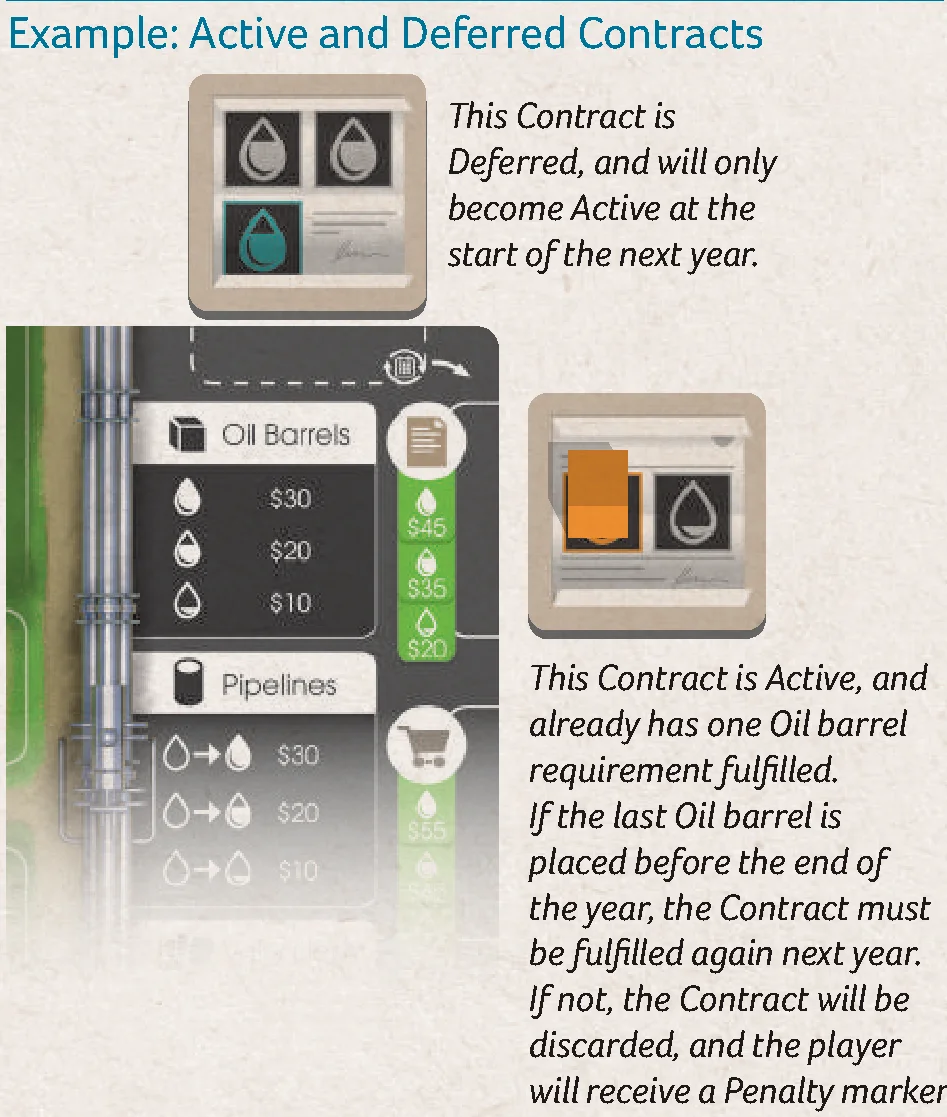
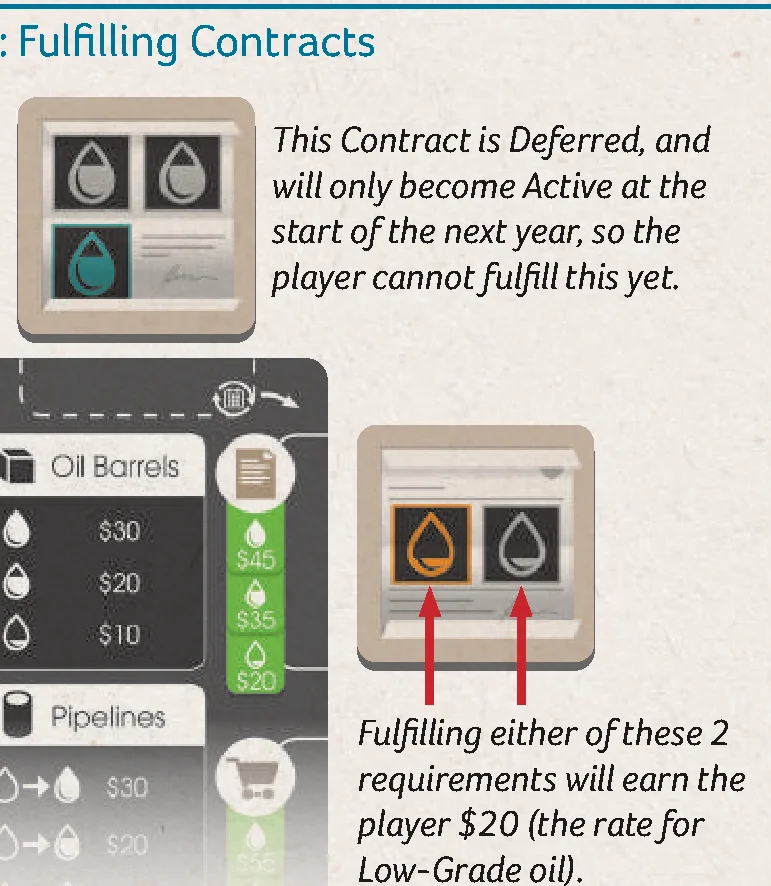
- For each Contract you take, immediately decide if the Contract is Active or Deferred to the next year. There is no limit to the number of Active or Deferred Contracts you can have:
- Active: Place the Contract in the Active area of your player board, to the right of the Contract icon. You must completely fulfill an Active Contract before the end of the current year. Successfully-fulfilled Contracts remain in play and must be fulfilled by the end of each year for the remainder of the game. If an Active Contract is not fulfilled by the end of the year, remove it from the game and take a Penalty marker.
- Deferred: If a Contract is Deferred until the next year, place the Contract in the Deferred area of your player board, above the Contract icon. During the Refresh phase for the following year, all Deferred Contracts become Active, and are moved to the Active area. Players cannot defer Contracts in year 3.
- When taking a loan, you immediately receive $15 and a Penalty marker.
- Players may also change their Turn Order for the next round after taking this Action.
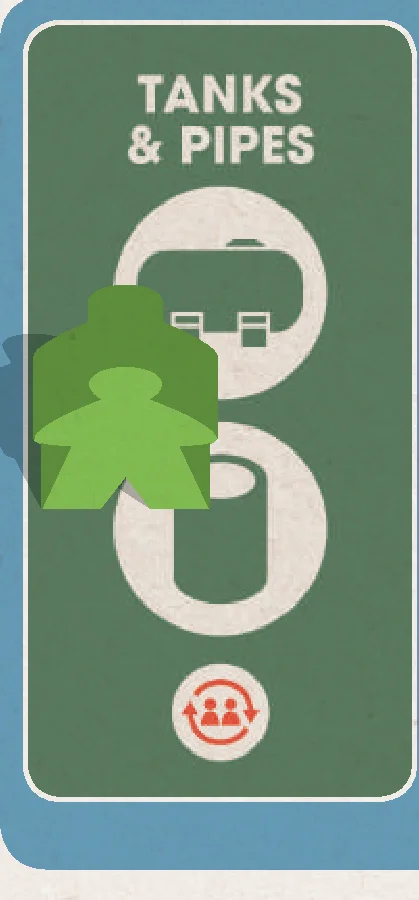
Tanks & Pipes
To take this Action, place your worker on the Tanks & Pipes Action space on the board.
Players may purchase Tanks and/or Pipe tiles from the available shops and in the order of their choosing. Tanks enable players to store more Oil barrels on their player boards. Pipe tiles extend a player’s Pipe Network, enabling the player to refine to higher grades of oil.
- When using the Tanks & Pipes Action space, you may only purchase Pipe tiles from the 2 rows next to the Tanks display.
- When purchasing a Tank tile, immediately place it in your Tank Farm on your player board. The row the Tank is placed in determines which grade of oil the Tank is certified to hold. The column has no effect on gameplay. Each Tank tile can store 2 Oil barrels of the same or different types. Players may purchase any number of available Tank tiles.
- When purchasing Pipe tiles, pay $15 for up to 2 available Pipe tiles or $40 for between 3 and 4 Pipe tiles. Then, immediately place the purchased Pipe tiles in your Personal Pipe Network.
- Players may also change their Turn Order for the next round after taking this Action.
Machines & Pipes
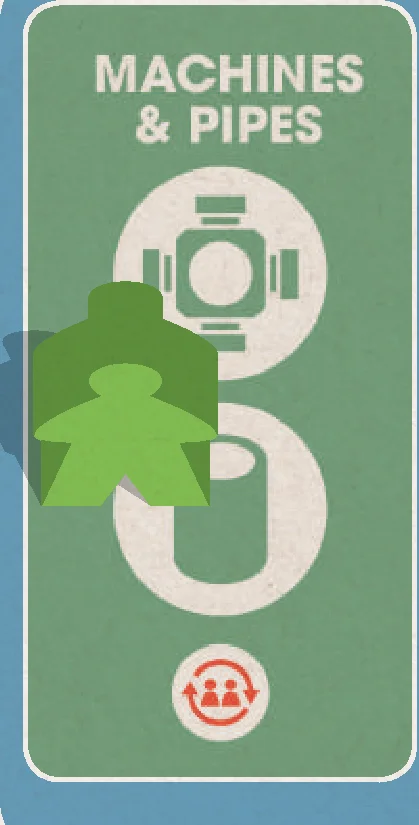
To take this Action, place your worker on the Machines & Pipes Action space on the board.
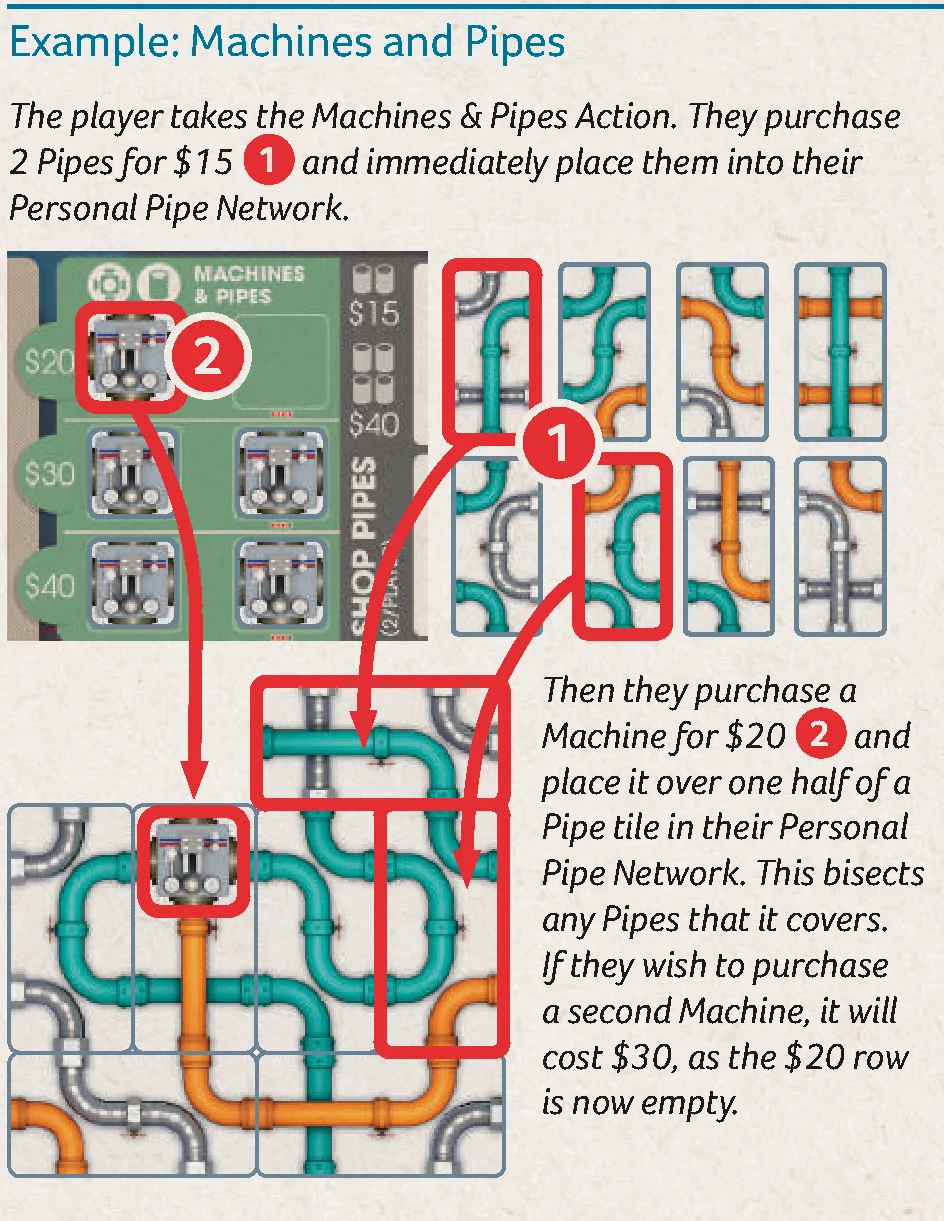
Players may purchase Machines and/or Pipe tiles in the order of their choosing. Machines enable the player to run Pipelines connected to them at the end of their turn. Pipe tiles extend a player’s Pipe Network, enabling the player to refine to higher grades of oil.
- When using the Machines & Pipes Action space, you may only purchase Pipe tiles from the 2 rows next to the Machines display.
- When purchasing a Machine tile, immediately place it in your Pipe Network on top of an existing Pipe tile. The Machine tile must cover exactly half of one Pipe tile, and cannot be placed so that it covers part of two different Pipe tiles. Players may purchase any number of available Machines.
- When purchasing Pipe tiles, pay $15 for up to 2 available Pipe tiles or $40 for between 3 and 4 Pipe tiles. Then, immediately place the purchased Pipe tiles in your Pipe Network.
- Players may also change their Turn Order for the next round after taking this Action.
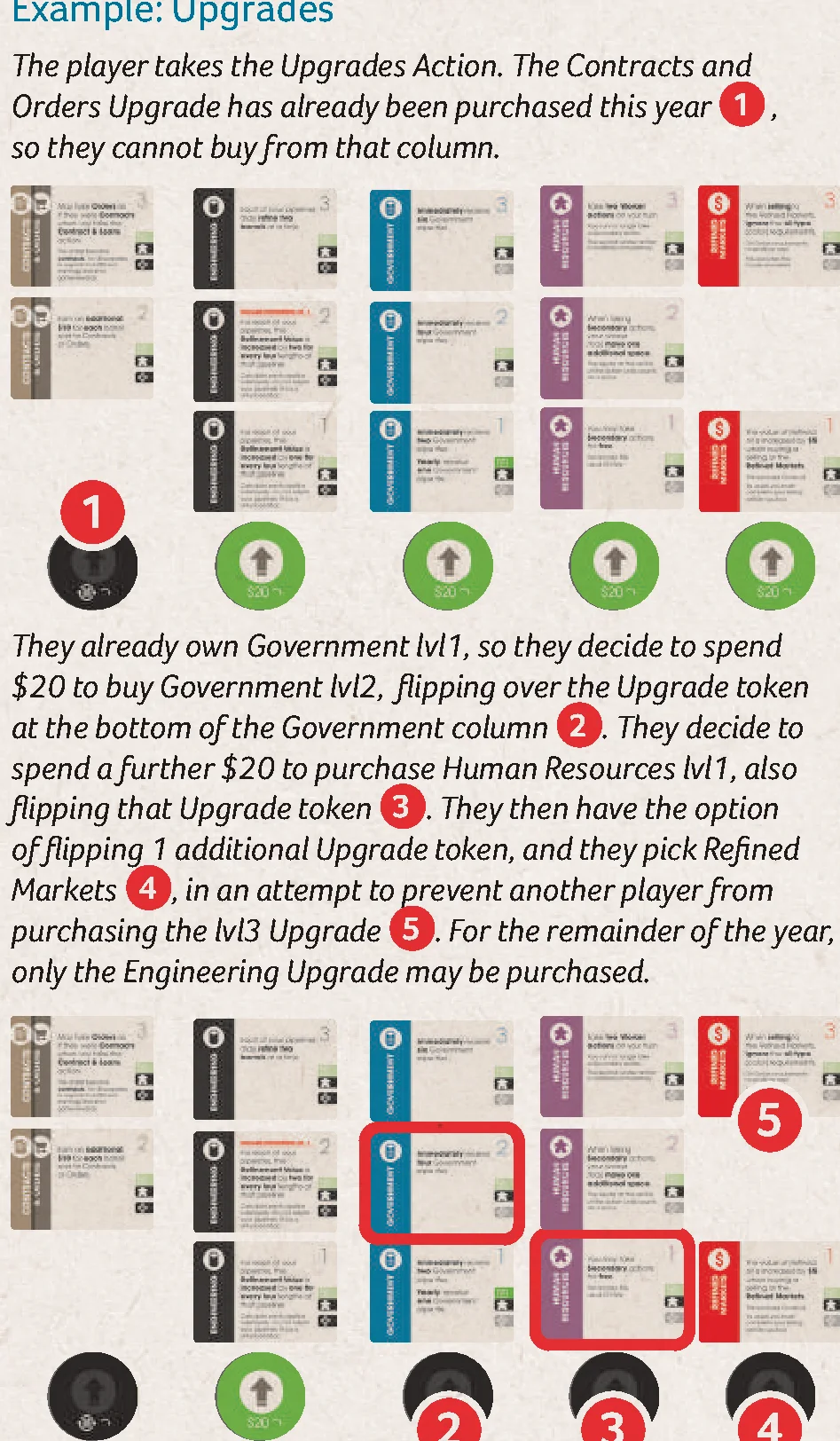
Upgrades
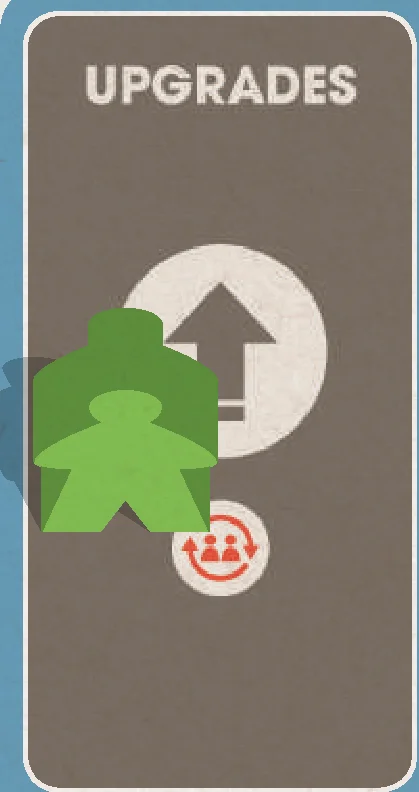
To take this Action, place your worker on the Upgrades Action space on the board.
Players may purchase up to 2 available Upgrades.
- To purchase an Upgrade, select 1 of the available face-up Upgrade tokens and flip it face down. Take a Level 1 Upgrade card of that type and add it to your player area. If you already have the Level 1 Upgrade card of that type, take the Level 2 Upgrade card. If you already have the Level 2 Upgrade card of that type, take the Level 3 Upgrade card.
- You may not purchase an Upgrade if its corresponding Upgrade token is flipped (dark side showing), and you cannot purchase two of the same type in a single Action.
- For each Upgrade purchased, you must pay $20.
- When you are finished purchasing Upgrades, you MAY flip an additional Upgrade token face down for free. This will prevent any players from purchasing this Upgrade until the following year.
- Players may also change their Turn Order for the next round after taking this Action.
- Yearly Upgrade Benefits: Some Upgrades provide players a benefit at the beginning of each new year. On your first turn of each new year, receive any yearly benefits as depicted on your Upgrade cards. More details on Upgrade cards can be found on page 11.
Government Pipe Tiles
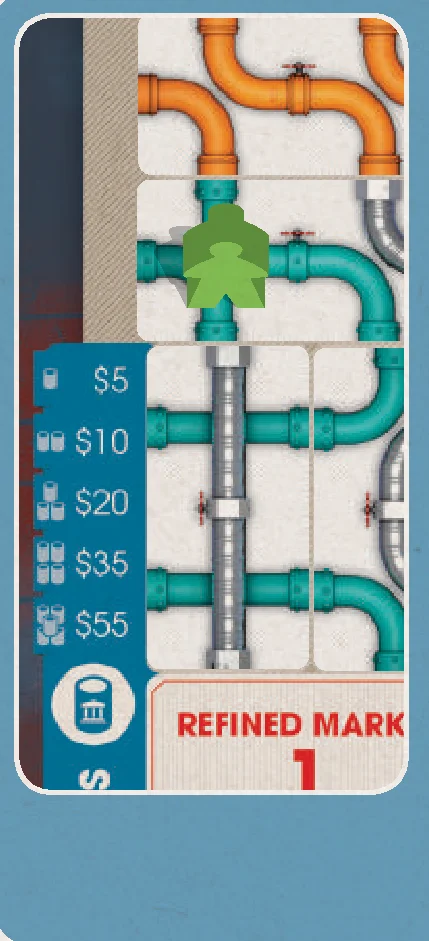
To take this Action, place your worker on a Pipe tile in an open quadrant of the Government Pipe display on the board.
- During the first year, 2 of the 4 quadrants may be declared open. However, a quadrant isn’t declared open until a player takes a Pipe tile from that quadrant (by purchasing Government Pipe tiles or by taking them due to a Government Upgrade). The first player to take this Action in the game may choose any of the 4 quadrants to declare open, and purchase tiles from that quadrant. When purchasing Government Pipe tiles in the first year, if only 1 quadrant has tiles missing (previously-declared open), you may purchase tiles from that quadrant, or declare any other quadrant open, and purchase from there.
- Once the game enters the second year, up to 3 quadrants may be declared open.
- In the third and final year, all 4 quadrants are declared open.
- The Pipe tile you place your worker on must be purchased. In addition to this Pipe tile, you may purchase as many of the Pipe tiles adjacent (excluding diagonals) to the selected Pipe tile within the same quadrant.
- The cost for purchasing Government Pipe tiles is indicated on the board (1 tile: $5, 2 tiles: $10, 3 tiles: $20, 4 tiles: $35, 5 tiles: $55).
- Take all purchased Government Pipe tiles and place them in your Personal Pipe Network.
Adding Pipe Tiles to Your Personal Pipe Network
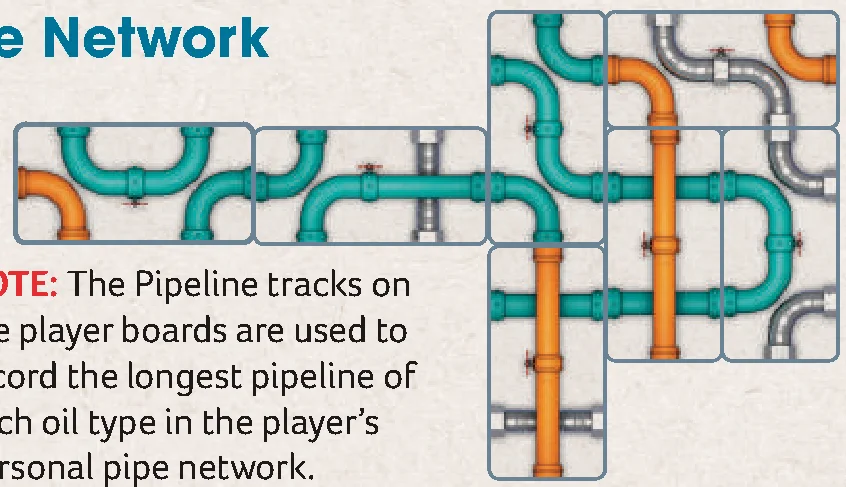
When adding a Pipe tile to your Personal Pipe Network, the new tile(s) must connect to at least 1 existing tile orthogonally, so that at least 1 segment of Pipeline on the new tile connects to 1 on a tile already in the network. The colors of Pipelines do not need to match (you may connect a Teal Pipe segment to an Orange Pipe segment, for example). Pipe tiles may be rotated in any direction. If you purchase multiple Pipe tiles at the same time, each Pipe tile may connect to different parts of your existing network.
NOTE: The Pipeline tracks on the player boards are used to record the longest pipeline of each oil type in the player’s personal pipe network.
Running Your Personal Pipe Network
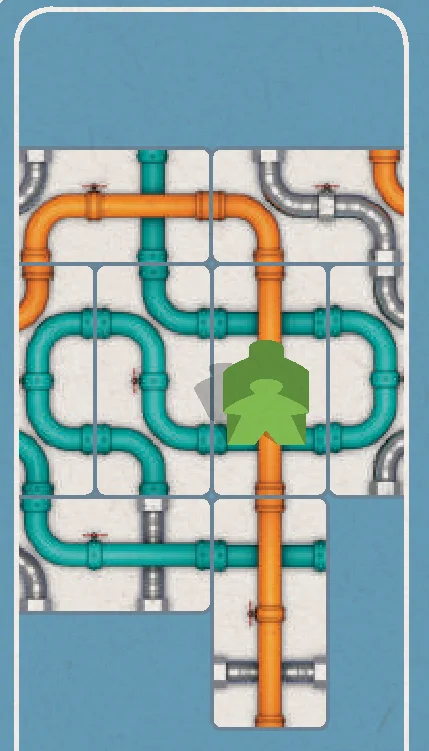
To take this Action, place your worker on a Pipe tile in your Personal Pipe Network. The worker may be placed on any Pipe tile, but cannot run Pipelines connected to a Machine.
Then, you may refine an Oil barrel for each Pipeline that passes through that tile.
- A Pipeline is a single, unbroken length of Pipe in a continuous color. Up to 3 Pipelines may pass through a single Pipe tile.
- Each Pipeline may only refine oil of the corresponding type. All Pipelines run simultaneously, so that tanks vacated during refinement may be filled again during that same refinement.
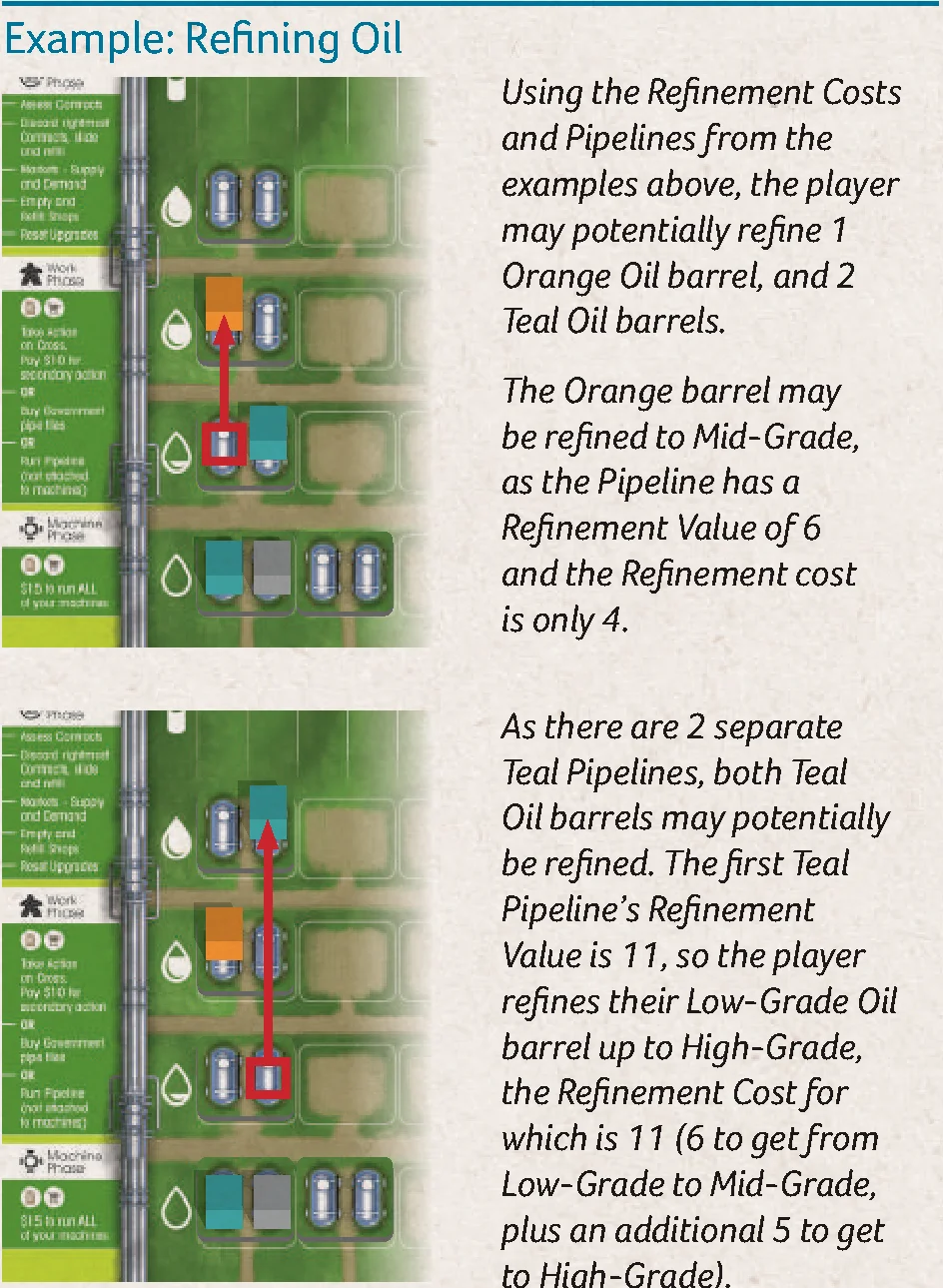
- To increase the grade of an Oil barrel, you must have a Pipeline with a Refinement Value equal to or greater than the Refinement cost for the refinement you wish to perform.
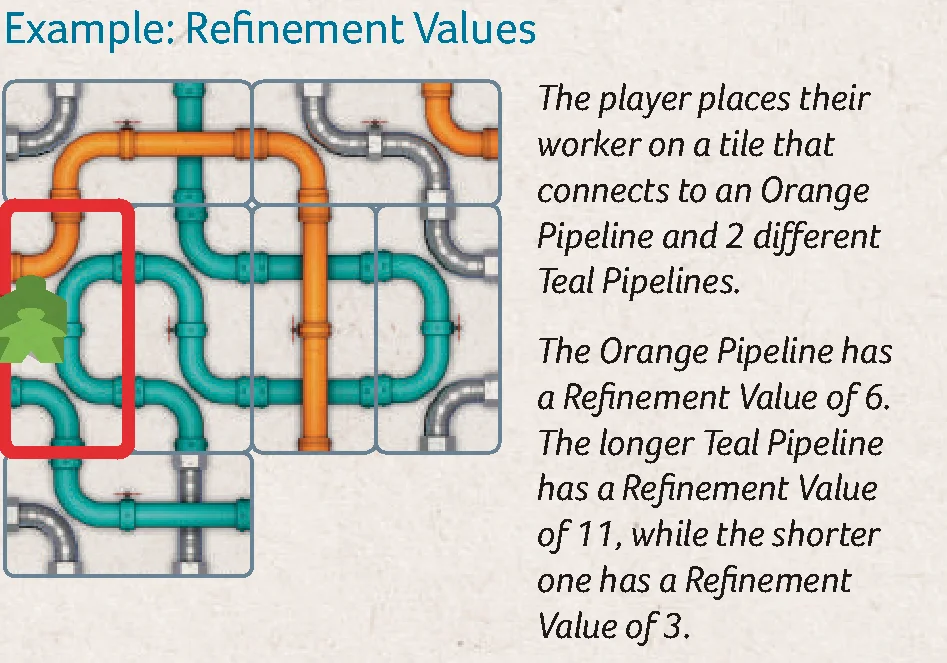
- A Pipeline’s Refinement Value is equal to its number of connected segments. A segment is a length between 2 joints.
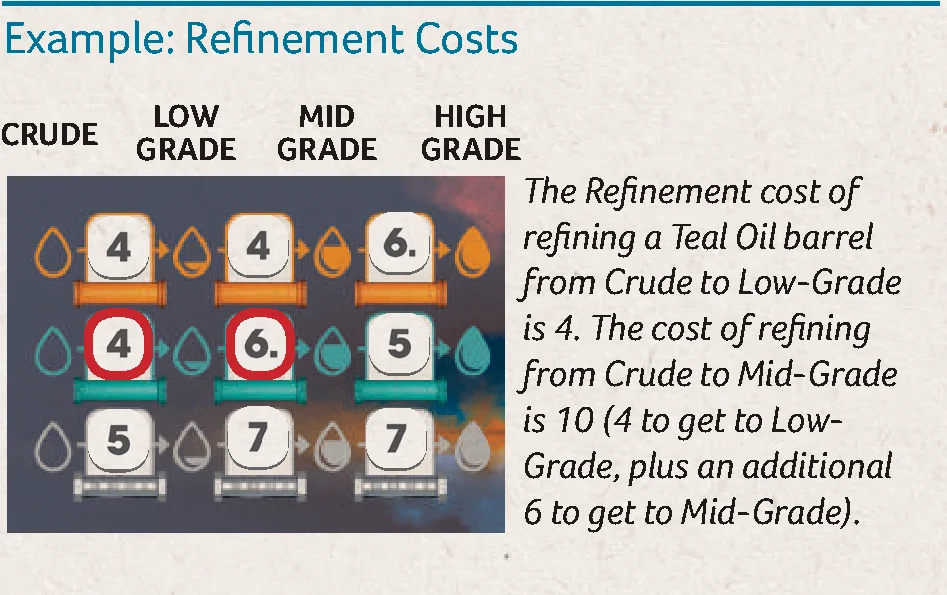
- The Refinement cost is dictated by the Refinement Cost markers on the board. These will tell you the cost of refining from 1 grade of oil to the next.
- It is possible to refine multiple steps in order to reach higher grades of oil in a single run, as long as the Pipeline’s Refinement Value is greater than or equal to the sum of the Refinement Costs for each grade of oil achieved in the single run. You do not need to have Tank space for the intermediate grade(s), only the final grade.
- There is no cost to run your Pipelines. Each Pipeline may only refine 1 barrel of oil.
- You cannot run the same barrel through multiple Pipelines in the same Action, and you may only run each Pipeline once per Action. If you refine a barrel of oil, you must have a free Tank on the corresponding row of your player board to move the barrel to (the column is irrelevant), otherwise it cannot be refined. You may refine to a lower grade than your Pipeline allows.

If you do not change your Turn Order, simply slide your disk down to the leftmost available space on the lower Turn Order track at the end of your turn.
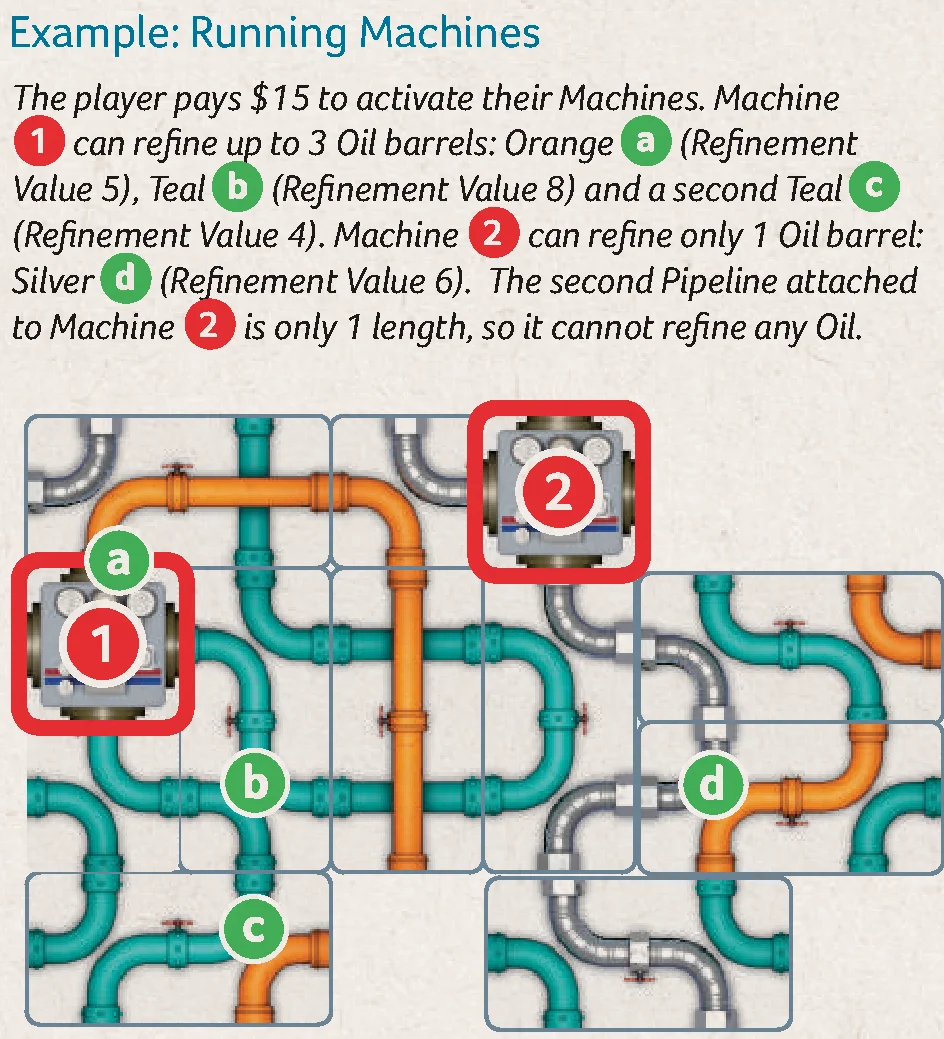
During the Machine Phase, you may pay $15 to activate any number of Machines you have attached to your Personal Pipe Network. Machines refine oil through the Pipelines connected to them. If the Machine is in the middle of a Pipeline, it bisects the Pipeline. Also, Machines do not count as a section of Pipe. All Pipelines run at the same time, only once and even if they are connected to multiple Machines, meaning that an Oil barrel cannot be refined multiple times during the same Machine Phase.
Contracts and Orders may be fulfilled at any time during the Work and Machine phases, but may not interrupt the Main or Secondary Actions.
Contracts
- Contracts may be filled partially throughout the current year.
- You immediately receive money for each Oil barrel cube placed on a Contract based on the grade of oil required, per the values listed on your player board.
- When selling oil, a higher grade of oil may be sold as a lower grade, but will only pay out according to the Contract requirement, regardless of the actual Grade of oil sold.
- You may fulfill multiple Contracts on your turn.
- A contract may only be fulfilled once per year.
- Deferred contracts may not have oil sold to them.
Orders
- Orders must be fulfilled completely and all at once.
- To fulfill an Order, take an available Order tile from the game board and place it next to your player board.
- Place the correct types of Oil barrel cubes on the tile from your player board.
- You receive money based on the grade of oil required on the Order, per the values listed on your player board.
- When fulfilling an Order, a higher grade of oil may be used as a lower grade, but will only pay out according to the Order requirement, regardless of the actual Grade of oil sold.
- You may fulfill multiple Orders on your turn.
- Do not refill Order tiles after they have been fulfilled.
The game is over after all players have taken their fourth turn, or passed, at the end of the third year.
Follow the next steps to determine the winner:
- Contracts: Assess all Contracts. Any player with incomplete Contracts removes them from the game, and takes 1 Penalty marker per removed Contract.
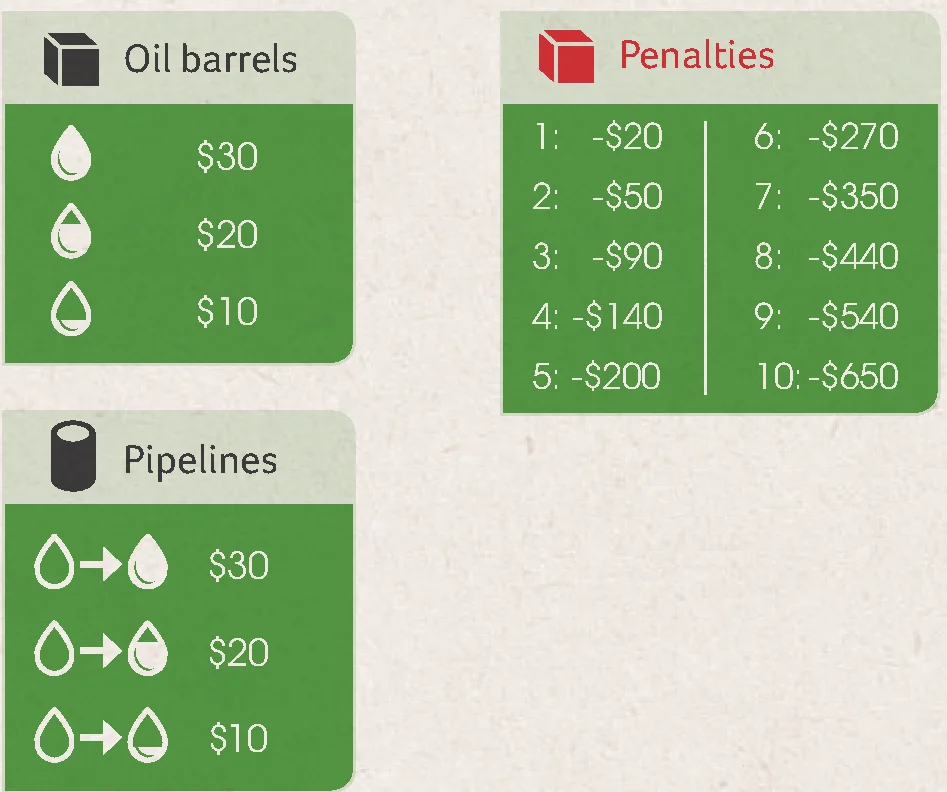
- Oil barrels: Players earn money for all remaining Oil barrels on their player boards at the rate denoted on their player board:
- Crude: $10
- Low-Grade: $20
- Mid-Grade / High-Grade: $30
- Pipelines: Players earn money for each of the Pipelines in their network, even multiples of the same color. The amount earned is determined by which grade of oil the Pipeline can refine a barrel of Crude to in a single run:
- Crude to Low-Grade: $10
- Crude to Mid-Grade: $20
- Crude to High-Grade: $30
- Pipelines that are not long enough to refine Crude oil to at least Low-Grade earn the player $0.
- Valuations: Players earn money from the Valuation tile and the 3 Valuation cards. See Appendix 2 for details on the Valuation cards. Note that Valuation cards may cause some of the items listed above to score a second time.
- Penalties: Players lose money for each Penalty token they have received during the game, at the rate denoted on their player board:
- 1 Penalty: -$20
- 2 Penalties: -$50
- 3 Penalties: -$90
- 4 Penalties: -$140
- 5 Penalties: -$200
- 6 Penalties: -$270
- 7 Penalties: -$350
- 8 Penalties: -$440
- 9 Penalties: -$540
- 10 Penalties: -$650
- Cash: Players add all money in their hand.
The player with the most money is declared the winner!
If there is a tie, the tied player who is furthest ahead in player order wins.
Appendix 1 – Upgrade Cards
Government
- Level 1 – Immediately receive 2 Government Pipe tiles from any combination of open quadrants. You can take from different quadrants. On your first turn at the beginning of each year, receive 1 Government Pipe tile from any open quadrant. If a new quadrant has not been declared open during this game year, you may choose to declare a new quadrant open, and receive a Government Pipe tile from that quadrant.
- Level 2 – Immediately receive 4 Government Pipe tiles from any combination of open quadrants. You can take from different quadrants.
- Level 3 – Immediately receive 6 Government Pipe tiles from any combination of open quadrants. You can take from different quadrants.
Shops
- Level 1 – Immediately take 2 Tank tiles from the Tank Shop and 1 Pipe tile from either Shop. In the event a Tank tile and/or Pipe tile is not available, you do not receive the tile, even if they become available later. On your first turn at the beginning of each year, take 2 Tank tiles from the Tank Shop.
- Level 2 – Immediately take 1 Machine tile from the Machine Shop and 2 Pipe tiles from any combination of both Shops. You can take from different Shops. In the event a Machine tile and/or Pipe tile is not available, you do not receive the tile, even if they become available later.
- Level 3 – Immediately take 1 Machine tile from the Machine Shop and 4 Pipe tiles from any combination of both Shops. You can take from different Shops. In the event a Machine tile and/or Pipe tile is not available, you do not receive the tile, even if they become available later.
Human Resources
- Level 1 – You do not have to pay $10 to take a Secondary Action.
- Level 2 – Rather than taking an adjacent Secondary Action, your worker may move up to 2 spaces to take a Secondary Action whose tile is further away. A space is either an Action tile or the empty square space at the center of the Action tiles.
- Level 3 – You may take any 2 Actions on your turn. You cannot take any Secondary Actions attached to any of your Main Actions.
Engineering
- Level 1 – Your Pipelines gain 1 additional virtual Refinement Value for every 4 Pipe segments. This value is also added for end game scoring.
- Level 2 – Your Pipelines gain 2 additional virtual Refinement Values for every 4 Pipe segments. This value is also added for end game scoring. After upgrading to level 2, you must discard your Engineering Level 1 card.
- Level 3 – Your Pipelines can run 2 barrels of oil of the same Grade (including Crude).
Refined Markets
- Level 1 – The value of refined oil is $5 more in the Refined markets. The value of crude oil is unaffected. This applies for both purchasing and selling. This does not affect the value of oil in any place other than the Refined Markets.
- Level 2 – When taking an Action at any of the Refined Markets (excluding the Crude Market, Contracts, and Orders), you may purchase and sell to ALL Refined Markets.
- Level 3 – When selling to any of the Refined Markets (excluding the Crude Market, Contracts, and Orders), the type of oil does not have to match the space. However, the grade of oil must still match or be of a higher grade.
Contracts & Orders
- Level 1 – You may fulfill any of your Contracts up to 2 times each year. The Oil barrels from the first fulfillment are placed next to the Contract as a reminder. If you begin a second fulfillment, the Contract must be fulfilled before the end of the current year as per the normal rules.
- Level 2 – Earn an additional $10 for each barrel sold to Contracts or Orders.
- Level 3 – You may take Orders as if they were Contracts when taking the Contracts & Loans Action. The Order tiles taken are placed next to the player’s Contracts and are considered Contracts for fulfillment and for end game Valuation cards. When fulfilling the Orders taken in this way, earn money as if it were a Contract.
Machines
- Level 1 – Immediately receive 1 Machine. As a Main Action during the Work Phase, you may place your worker on a Machine in your Pipe Network to run it at no cost.
- Level 2 – During the Machine Phase, your Machines cost a total of $5 to run.
- Level 3 – You may run your Machines before you take your Actions as well as during the Machine Phase. Machines may only be run once during each phase.
Appendix 2 – Valuation Cards
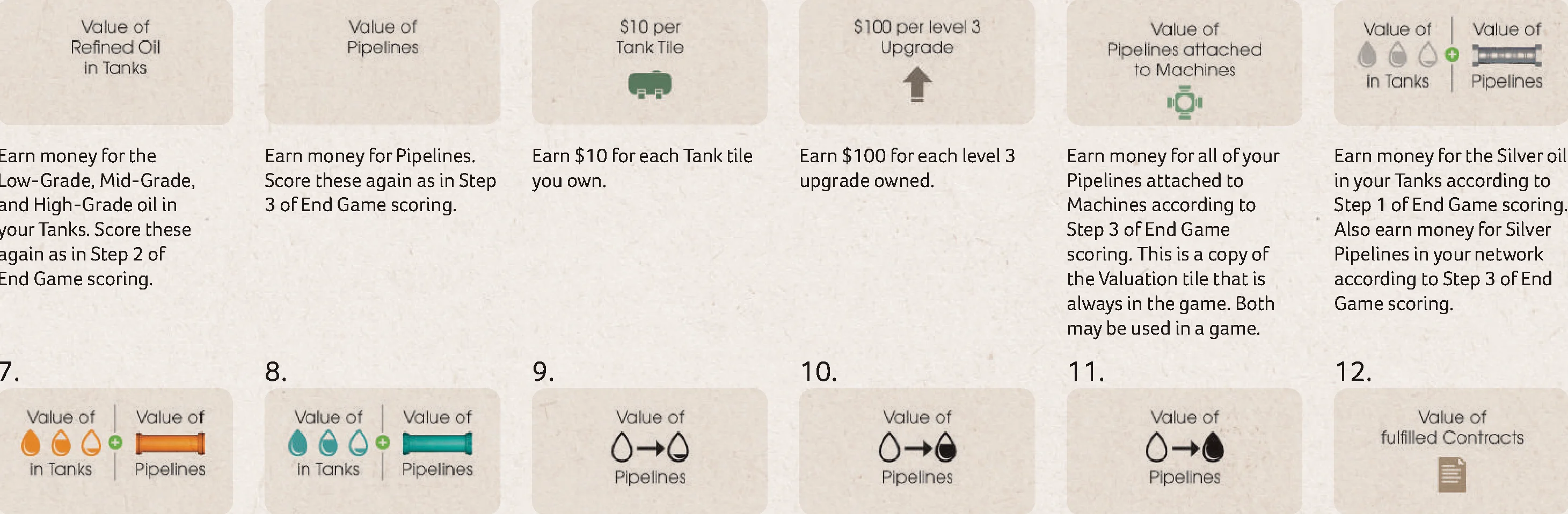
- Value of Refined Oil in Tanks: Earn money for the Low-Grade, Mid-Grade, and High-Grade oil in your Tanks. Score these again as in Step 2 of End Game scoring.
- Value of Pipelines: Earn money for Pipelines. Score these again as in Step 3 of End Game scoring.
- $10 per Tank Tile: Earn $10 for each Tank tile you own.
- $100 per level 3 Upgrade: Earn $100 for each level 3 upgrade owned.
- Value of Pipelines attached to Machines: Earn money for all of your Pipelines attached to Machines according to Step 3 of End Game scoring. This is a copy of the Valuation tile that is always in the game. Both may be used in a game.
- Value of Silver Oil in Tanks / Pipelines: Earn money for the Silver oil in your Tanks according to Step 1 of End Game scoring. Also earn money for Silver Pipelines in your network according to Step 3 of End Game scoring.
- Value of Orange Oil in Tanks / Pipelines: Earn money for the Orange oil in your Tanks according to Step 1 of End Game scoring. Also earn money for Orange Pipelines in your network according to Step 3 of End Game scoring.
- Value of Teal Oil in Tanks / Pipelines: Earn money for the Teal oil in your Tanks according to Step 1 of End Game scoring. Also earn money for Teal Pipelines in your network according to Step 3 of End Game scoring.
- Value of Low Pipelines: Earn $10 for each of the Pipelines in your network that refines Crude to Low-Grade oil and no higher. Pipelines that can refine to higher grades do not earn money.
- Value of Mid Pipelines: Earn $20 for each of the Pipelines in your network that refines Crude to Mid-Grade oil and no higher. Pipelines that can refine to higher grades do not earn money.
- Value of High Pipelines: Earn $30 for each of the Pipelines in your network that refines Crude to High-Grade oil.
- Value of Fulfilled Contracts: Earn money for each of your remaining Contracts as if they were immediately fulfilled with oil again.
- Value of Fulfilled Orders: Earn money for each of your completed Orders as if they were immediately fulfilled with oil again.
- Number of Pipeline types: Earn money for each of the following types of Pipeline you have in your Network. Multiples of the same type are ignored:
- Crude to Low-Grade (Orange)
- Crude to Mid-Grade (Orange)
- Crude to High-Grade (Orange)
- Crude to Low-Grade (Teal)
- Crude to Mid-Grade (Teal)
- Crude to High-Grade (Teal)
- Crude to Low-Grade (Silver)
- Crude to Mid-Grade (Silver)
- Crude to High-Grade (Silver)
- Number of Pipeline types attached to Machines: Earn money for each of the following types of Pipeline connected to a Machine you have in your Network. Multiples of the same type are ignored:
- Crude to Low-Grade (Orange)
- Crude to Mid-Grade (Orange)
- Crude to High-Grade (Orange)
- Crude to Low-Grade (Teal)
- Crude to Mid-Grade (Teal)
- Crude to High-Grade (Teal)
- Crude to Low-Grade (Silver)
- Crude to Mid-Grade (Silver)
- Crude to High-Grade (Silver)
- Number of Refined Oil types in Fulfilled Contracts and Orders: Earn money for each different type of oil in your Fulfilled Contracts and Orders. Each type and grade of oil must be different.
- Game Designer: Ryan Courtney
- Development: Clay Ross & Tim Kizer
- Editing: Travis D. Hill
- Additional editing: Paul Grogan (Gaming Rules!)
- Illustration: Ian O’Toole
- Graphic Design: Ian O’Toole
- Playtesters: Brian Luna Lucero, Michelle Lanier, Mac McAnally, Jesse Green, Andrew Corpuz, Charles Bates, Kymia Alishahi, Joseph Baranello, Gil Hova, Emerson Matsuuchi, Daniel Newman, Christopher McKeon, Danielle Cantarella, Rocco Privetera, Tam Myaing, Robert Hewitt, Leo Prommasa, Charles Barouch, Dickie Zhang, Amanda Davis, Gary Perrin Jr., Ryan Metzler, David Rothfeder, Matt Roy, Brian Willcutt, Craig Taylor, Tommy Hong, Kimberly Revia, Joe Wiggins, Janet Courtney, Bernard Courtney, Kristopher Snyder, Andrew Ryan Denison, Zach Landine, Edward Uhler, Daniel Bronson, Scott Seifert, Raymond Lambert, Gaia Maurer, Dante Amor, Jarod Chiang, Peter Kapsalis, Jason Dinger, Donna Dinger, Christopher Smith, Armando Larry Cruz Canales, Alex Blakeney, Adam Birch, Hayley Birch, Rowan Sawyer, Will Weaver, Jordan Draper, Purposeful Play, NYC Playtest, Brooklyn Game Lab, Eggplant, Queens Board Games Meetup, Astoria Geek & Sundry, and many I’ve accidentally missed.
- Artwork Playtesters: Malcolm King, Shay Rickman.
Introduction & Components
The refinement of oil has long been part of the government-controlled energy sector. Amassed with an incredibly complex and inefficient system of refineries, the government has felt the severe pressures of worldwide demand and the ever-increasing global standards for refinement. Unable to keep up with demand, the government has only one option: privatizing the oil industry.
You seek to capitalize on this opportunity by starting a company in the oil business. You will focus on building an efficient network in your refinery, upgrading your operations to provide valuable benefits over your competitors, as well as managing the logistics of purchasing and selling refined oil into the various markets to earn the most money in the game!
Components
- 1 Game board
- 4 Player boards
- 135 Pipe tiles
- 18 Machine tiles
- 58 Tank tiles
- 12 Market Overlay tiles (6 each for 2 different Market types)
- 1 Valuation tile
- 16 Valuation cards
- 30 Contract tiles
- 24 Order tiles
- 35 Upgrade cards
- 5 Upgrade tiles
- 4 Action tiles
- 12 Refinement Cost markers
- 1 Round marker
- 12 Penalty markers
- 130 Money tokens (32x $1, 26x $5, 40x $10, 20x $50, 20x $100, 10x $500)
- 4 Workers (1 in each player color)
- 4 Player disks (1 in each player color)
- 44 Teal Oil barrel cubes
- 44 Orange Oil barrel cubes
- 44 Silver Oil barrel cubes
Setup
Game Board Setup
- With the game board in the middle of the table, each player takes the player board, worker, and disk in their color.
- Place the Round Marker on the leftmost space of Year 1 on the Round Track (1).
- Fill the Crude Market (2) and the Crude rows of the Refined Markets (3) with the matching color of Oil barrels. Use the Market Overlay tiles to reduce the number of available spaces when playing with fewer than 4 players.
- Separate the Contract tiles by grade of oil, as denoted on the reverse of the tiles by the following icons:
- Low Grade
- Mid Grade
- High Grade
Shuffle the stacks separately. Set aside a number of Contracts from each stack according to the number of players:
- 2 – 3 players: 4 Contracts
- 4 players: 5 Contracts
Return the other Contracts to the box. Place each stack face up next to the corresponding row on the game board (4). Fill each row of the Contracts display with Contract tiles from the corresponding stack (5). Leave the leftmost space in each row empty when not playing with 4 players.
- Low Grade
- Separate the Order tiles by the quantity of oil needed to fulfill them, as denoted on the reverse of the tiles (3, 4, or 5 cubes showing). Shuffle each stack of Order tiles separately, then fill each row of the Orders display with Order tiles from the corresponding stack (6). Leave the leftmost space in each row empty when not playing with 4 players. Return the remaining Order tiles to the box.
- Randomly select 5 different Upgrade types and place their corresponding Level 1, 2, and 3 cards in rows next to the game board (7). For first-time players, we suggest using the Government, Engineering, HR, Refined Markets, and Shop Upgrades. Return all unused cards to the box. The 5 Upgrade tokens are placed face up next to the Level 1 card on each row (8).
- Fill the Machine Shop with Machine tiles (9). Repeat for the Tank Shop using Tank tiles (10). Place the remaining Machine and Tank tiles in separate stacks next to the game board (11).
- Shuffle the Pipe tiles facedown and place them next to the board (12).
- Fill the 4 Government quadrants with 1 Pipe tile per space (13).
- Next to the Machine Shop, reveal 2 Pipe tiles per player, creating an available Market (14). Repeat for the Tank Shop (15).
- Shuffle all 4 Action tiles and place 1 on each available Action Space on the game board (16). The reverse of each Action tile is presented in landscape orientation to best orient the icons and text to the players. There is no gameplay difference between each side.
- Shuffle the Refinement Cost markers face down and place 9 face up in the Refinement Cost spaces (17). Return the remaining Refinement Cost markers to the game box.
For first-time players, we recommend removing the 7-value Refinement markers before shuffling.
- Shuffle the Valuation cards and deal 3 face up next to the game board (18). For first-time players, we suggest using the Value of Refined Oil in Tanks (1), Value of Pipelines (2), and $10 Per Tank Tile (3) Valuation cards. Return the remaining Valuation cards to the game box. Place the Valuation tile next to the 3 Valuation cards (19).
- Randomly choose a start player and place their disk on the upper and leftmost Player Order space (20). In clockwise order, the remaining players each place their disk on the next available Player Order space.
- Create a supply of Penalty cubes (21).
- Create a supply of Money tokens (22).
- Create a supply of remaining Oil barrels (23).
Fewer than 4 Players
When playing with fewer than 4 players, use the red dots under each space to determine if that space is to be used:
- 3 red dots: Only use this space with 3 or more players
- 4 red dots: Only use this space with 4 players
Market Overlay tiles
Based on player count, choose the corresponding Market Overlay tile and place it on its matching Market. Use the codes on each tile to determine the correct placement:
- Refined Markets 1, 2 and 3 are denoted by M.1, M.2, and M.3.
- The Crude Market is denoted by a C.
- Player counts are denoted by 2 red dots for 2 players and 3 red dots for 3 players.
Player Board Setup
- Each player receives 5 Tank tiles to freely place on their player board (24). This allows the player to store different grades of oil from the start of the game. Tank tiles may not be stacked on top of each other. When deciding where to place Tank tiles, keep in mind that the column a Tank is placed in does not matter, only the row. Once placed, a Tank cannot be moved to a different row.
We recommend having 2 Tank tiles in the Crude section and the remaining 3 Tank tiles on each grade of oil.
- Each player places one cube of each oil color on the 0 space of the Pipeline track at the top of their player board (25). The Pipeline tracks are used to record the longest pipeline of each oil type in the player’s Personal Pipe Network.
- Each player takes $40 money from the supply (26).
- Each player places their worker next to their player board.
- Each player will need to leave some space to the left of their player board for their Personal Pipe Network (27), which will expand during the game, and some space to the right of their player board for Contracts, Orders, and Upgrade cards (28).
For easy reference, each player’s starting Tank tiles and money are denoted on their player board ($40 | 5x Tank tiles).
Core Concepts & Game Structure
Oil Types & Grades
In Pipeline, there are 3 types of oil represented by their 3 distinct colors: Teal, Orange, and Silver. Each type of oil has 1 of 4 grades: Crude, Low-Grade, Mid-Grade, and High-Grade. Through the refinement process, oil can be refined from Crude all the way to High-Grade, which is worth more money at the Markets.
Game Structure
The game is played over 3 years—8 rounds in the first year, 6 rounds in the second year, and 4 rounds in the final year. In each round, players will take 1 turn in player order, beginning with the starting player.
A player’s turn is comprised of 2 phases:
- The Work Phase
- The Machine Phase
After all players have taken their turns, move the Round Marker to the next space on the Round Track. At the beginning of the second and third years, a Refresh Phase is conducted.
Refresh Phase
At the beginning of the second and third years, carry out a Refresh phase, consisting of the following steps:
- Contracts: Discard the rightmost column of Contracts. All remaining Contracts slide to the right 1 column. Refill ONLY the leftmost column, according to player number, with the next available Contracts from off the board. Players with incomplete Contracts receive a Penalty Token for each incomplete Contract. Any incomplete Contracts are removed from the game. Remove all Oil barrels from Players’ Contracts. Players who acquired Deferred Contracts now activate them by moving them to the Active Contracts area next to their board.
- Crude and Refined Markets: Resupply each Market according to its Supply icon. Remove oil from each of the 3 Refined Markets according to its Demand icon.
- The Crude Market may add 4 Oil barrels, filling from the furthest right empty space, and going left. As there are 5 available spaces, the leftmost space does not get refilled.
- A demand icon indicates how many Oil barrels should be removed, if possible. Oil barrels are removed from left to right, following the arrows indicated.
- Tank and Machine Shops: Discard and refill all Pipe tiles in the Machine and Tank Shops next to the game board based on the number of players. Refill all Tank and Machine tiles.
- Upgrades: Flip all face-down Upgrade markers so they are all face up.
Work Phase & Worker Actions
Work Phase Basics
Main Action
You have 1 worker that you use to take 1 Action each round. On your turn, you may place your worker on any Action space in the center cross of the game board (regardless if it is occupied or not), on Government Pipe tiles, or in your own Pipe Network to take the corresponding Action. You may repeat the same Action from turn to turn by choosing the same Action space. You must have enough cash to perform the Action.
Instead of performing an Action, you may pass.
Secondary Action
Additionally, if you take any 1 of the 8 Actions in the center cross of the game board, you may take a Secondary Action. To take the Secondary Action, pay $10 and move your worker to the Action space directly adjacent to the Main Action space. You must take the Main Action before taking the Secondary Action. The 4 Action spaces immediately adjacent to the center square space are not directly adjacent to each other. A player cannot perform a Main Action on 1 side of the center square and then perform a Secondary Action on another side of the center square.
Turn Order
When you perform any part of an Action or Secondary Action that shows the Turn Order icon, you may change your position in Turn Order. After performing the Action, move your disk on the Turn Order track to the desired location in the row below. This reflects the change in Turn Order for the next game round. If the desired Turn Order space is occupied, you may still select the desired space, shifting the other markers left or right. At the end of the current game round, the new Turn Order is established for the next round by sliding the Turn Order markers back up to the top row.
Refined Markets 1, 2, & 3
To take this Action, place your worker on the Refined Market Action space on the board that matches the Refined Market you wish to visit (Refined Market 1, 2, or 3).
The 3 Refined Markets are where players can purchase and sell Crude, Low-Grade, Mid-Grade, and High-Grade oil. However, each Market has different sell and purchase prices, as well as different types of oil. You may only trade in the Refined Market that matches the number of the Action space you selected.
- At the Refined Markets, you may purchase and/or sell oil, but if you are purchasing and selling, you must complete all of your selling before purchasing.
- To purchase an Oil barrel, take an Oil barrel cube from the Market and pay the amount shown above it to the bank.
- To sell an Oil barrel, place an Oil barrel cube from your player board onto a free space in the Market, and receive from the bank the amount shown above that space. When selling oil, a higher grade of oil may be sold as a lower grade, but will only pay out money equal to the oil required, not sold. You may purchase and sell as many Oil barrel cubes as you wish.
Crude Market
The Crude Market works in the same way as the Refined Markets (above).
To take this Action, place your worker on the Crude Market Action space on the board. The Crude Market is where players can purchase all 3 different types of Crude oil.
- At the Crude Market, you may purchase and/or sell Crude oil, but if you are purchasing and selling, you must complete all of your selling before purchasing.
- To purchase a Crude Oil barrel from the Market, take an Oil barrel cube from the Market and pay the amount shown above it to the bank.
- To sell a Crude Oil barrel to the Market, place an Oil barrel cube from your player board onto a free space in the Market, and receive from the bank the amount shown above that space. When selling oil, a higher grade of oil may be sold as a lower grade, but will only pay out money equal to the oil required, not sold. You may purchase and sell as many Oil barrel cubes as you wish.
Contracts and Loans
To take this Action, place your worker on the Contracts & Loans Action space on the board.
Players may take up to 3 available Contracts and/or take 1 Loan.
- You may take up to 1 available Contract from each row on the game board. Contracts are free.
- For each Contract you take, immediately decide if the Contract is Active or Deferred to the next year. There is no limit to the number of Active or Deferred Contracts you can have:
- Active: Place the Contract in the Active area of your player board, to the right of the Contract icon. You must completely fulfill an Active Contract before the end of the current year. Successfully-fulfilled Contracts remain in play and must be fulfilled by the end of each year for the remainder of the game. If an Active Contract is not fulfilled by the end of the year, remove it from the game and take a Penalty marker.
- Deferred: If a Contract is Deferred until the next year, place the Contract in the Deferred area of your player board, above the Contract icon. During the Refresh phase for the following year, all Deferred Contracts become Active, and are moved to the Active area. Players cannot defer Contracts in year 3.
- When taking a loan, you immediately receive $15 and a Penalty marker.
- Players may also change their Turn Order for the next round after taking this Action.
Tanks & Pipes
To take this Action, place your worker on the Tanks & Pipes Action space on the board.
Players may purchase Tanks and/or Pipe tiles from the available shops and in the order of their choosing. Tanks enable players to store more Oil barrels on their player boards. Pipe tiles extend a player’s Pipe Network, enabling the player to refine to higher grades of oil.
- When using the Tanks & Pipes Action space, you may only purchase Pipe tiles from the 2 rows next to the Tanks display.
- When purchasing a Tank tile, immediately place it in your Tank Farm on your player board. The row the Tank is placed in determines which grade of oil the Tank is certified to hold. The column has no effect on gameplay. Each Tank tile can store 2 Oil barrels of the same or different types. Players may purchase any number of available Tank tiles.
- When purchasing Pipe tiles, pay $15 for up to 2 available Pipe tiles or $40 for between 3 and 4 Pipe tiles. Then, immediately place the purchased Pipe tiles in your Personal Pipe Network.
- Players may also change their Turn Order for the next round after taking this Action.
Machines & Pipes
To take this Action, place your worker on the Machines & Pipes Action space on the board.
Players may purchase Machines and/or Pipe tiles in the order of their choosing. Machines enable the player to run Pipelines connected to them at the end of their turn. Pipe tiles extend a player’s Pipe Network, enabling the player to refine to higher grades of oil.
- When using the Machines & Pipes Action space, you may only purchase Pipe tiles from the 2 rows next to the Machines display.
- When purchasing a Machine tile, immediately place it in your Pipe Network on top of an existing Pipe tile. The Machine tile must cover exactly half of one Pipe tile, and cannot be placed so that it covers part of two different Pipe tiles. Players may purchase any number of available Machines.
- When purchasing Pipe tiles, pay $15 for up to 2 available Pipe tiles or $40 for between 3 and 4 Pipe tiles. Then, immediately place the purchased Pipe tiles in your Pipe Network.
- Players may also change their Turn Order for the next round after taking this Action.
Upgrades
To take this Action, place your worker on the Upgrades Action space on the board.
Players may purchase up to 2 available Upgrades.
- To purchase an Upgrade, select 1 of the available face-up Upgrade tokens and flip it face down. Take a Level 1 Upgrade card of that type and add it to your player area. If you already have the Level 1 Upgrade card of that type, take the Level 2 Upgrade card. If you already have the Level 2 Upgrade card of that type, take the Level 3 Upgrade card.
- You may not purchase an Upgrade if its corresponding Upgrade token is flipped (dark side showing), and you cannot purchase two of the same type in a single Action.
- For each Upgrade purchased, you must pay $20.
- When you are finished purchasing Upgrades, you MAY flip an additional Upgrade token face down for free. This will prevent any players from purchasing this Upgrade until the following year.
- Players may also change their Turn Order for the next round after taking this Action.
- Yearly Upgrade Benefits: Some Upgrades provide players a benefit at the beginning of each new year. On your first turn of each new year, receive any yearly benefits as depicted on your Upgrade cards. More details on Upgrade cards can be found on page 11.
Government Pipe Tiles
To take this Action, place your worker on a Pipe tile in an open quadrant of the Government Pipe display on the board.
- During the first year, 2 of the 4 quadrants may be declared open. However, a quadrant isn’t declared open until a player takes a Pipe tile from that quadrant (by purchasing Government Pipe tiles or by taking them due to a Government Upgrade). The first player to take this Action in the game may choose any of the 4 quadrants to declare open, and purchase tiles from that quadrant. When purchasing Government Pipe tiles in the first year, if only 1 quadrant has tiles missing (previously-declared open), you may purchase tiles from that quadrant, or declare any other quadrant open, and purchase from there.
- Once the game enters the second year, up to 3 quadrants may be declared open.
- In the third and final year, all 4 quadrants are declared open.
- The Pipe tile you place your worker on must be purchased. In addition to this Pipe tile, you may purchase as many of the Pipe tiles adjacent (excluding diagonals) to the selected Pipe tile within the same quadrant.
- The cost for purchasing Government Pipe tiles is indicated on the board (1 tile: $5, 2 tiles: $10, 3 tiles: $20, 4 tiles: $35, 5 tiles: $55).
- Take all purchased Government Pipe tiles and place them in your Personal Pipe Network.
Pipe Network & Refining Oil
Adding Pipe Tiles to Your Personal Pipe Network
When adding a Pipe tile to your Personal Pipe Network, the new tile(s) must connect to at least 1 existing tile orthogonally, so that at least 1 segment of Pipeline on the new tile connects to 1 on a tile already in the network. The colors of Pipelines do not need to match (you may connect a Teal Pipe segment to an Orange Pipe segment, for example). Pipe tiles may be rotated in any direction. If you purchase multiple Pipe tiles at the same time, each Pipe tile may connect to different parts of your existing network.
NOTE: The Pipeline tracks on the player boards are used to record the longest pipeline of each oil type in the player’s personal pipe network.
Running Your Personal Pipe Network
To take this Action, place your worker on a Pipe tile in your Personal Pipe Network. The worker may be placed on any Pipe tile, but cannot run Pipelines connected to a Machine.
Then, you may refine an Oil barrel for each Pipeline that passes through that tile.
- A Pipeline is a single, unbroken length of Pipe in a continuous color. Up to 3 Pipelines may pass through a single Pipe tile.
- Each Pipeline may only refine oil of the corresponding type. All Pipelines run simultaneously, so that tanks vacated during refinement may be filled again during that same refinement.
- To increase the grade of an Oil barrel, you must have a Pipeline with a Refinement Value equal to or greater than the Refinement cost for the refinement you wish to perform.
- A Pipeline’s Refinement Value is equal to its number of connected segments. A segment is a length between 2 joints.
- The Refinement cost is dictated by the Refinement Cost markers on the board. These will tell you the cost of refining from 1 grade of oil to the next.
- It is possible to refine multiple steps in order to reach higher grades of oil in a single run, as long as the Pipeline’s Refinement Value is greater than or equal to the sum of the Refinement Costs for each grade of oil achieved in the single run. You do not need to have Tank space for the intermediate grade(s), only the final grade.
- There is no cost to run your Pipelines. Each Pipeline may only refine 1 barrel of oil.
- You cannot run the same barrel through multiple Pipelines in the same Action, and you may only run each Pipeline once per Action. If you refine a barrel of oil, you must have a free Tank on the corresponding row of your player board to move the barrel to (the column is irrelevant), otherwise it cannot be refined. You may refine to a lower grade than your Pipeline allows.
The Machine Phase
If you do not change your Turn Order, simply slide your disk down to the leftmost available space on the lower Turn Order track at the end of your turn.
During the Machine Phase, you may pay $15 to activate any number of Machines you have attached to your Personal Pipe Network. Machines refine oil through the Pipelines connected to them. If the Machine is in the middle of a Pipeline, it bisects the Pipeline. Also, Machines do not count as a section of Pipe. All Pipelines run at the same time, only once and even if they are connected to multiple Machines, meaning that an Oil barrel cannot be refined multiple times during the same Machine Phase.
Fulfilling Contracts & Orders
Contracts and Orders may be fulfilled at any time during the Work and Machine phases, but may not interrupt the Main or Secondary Actions.
Contracts
- Contracts may be filled partially throughout the current year.
- You immediately receive money for each Oil barrel cube placed on a Contract based on the grade of oil required, per the values listed on your player board.
- When selling oil, a higher grade of oil may be sold as a lower grade, but will only pay out according to the Contract requirement, regardless of the actual Grade of oil sold.
- You may fulfill multiple Contracts on your turn.
- A contract may only be fulfilled once per year.
- Deferred contracts may not have oil sold to them.
Orders
- Orders must be fulfilled completely and all at once.
- To fulfill an Order, take an available Order tile from the game board and place it next to your player board.
- Place the correct types of Oil barrel cubes on the tile from your player board.
- You receive money based on the grade of oil required on the Order, per the values listed on your player board.
- When fulfilling an Order, a higher grade of oil may be used as a lower grade, but will only pay out according to the Order requirement, regardless of the actual Grade of oil sold.
- You may fulfill multiple Orders on your turn.
- Do not refill Order tiles after they have been fulfilled.
End of Game & Scoring
The game is over after all players have taken their fourth turn, or passed, at the end of the third year.
Follow the next steps to determine the winner:
- Contracts: Assess all Contracts. Any player with incomplete Contracts removes them from the game, and takes 1 Penalty marker per removed Contract.
- Oil barrels: Players earn money for all remaining Oil barrels on their player boards at the rate denoted on their player board:
- Crude: $10
- Low-Grade: $20
- Mid-Grade / High-Grade: $30
- Pipelines: Players earn money for each of the Pipelines in their network, even multiples of the same color. The amount earned is determined by which grade of oil the Pipeline can refine a barrel of Crude to in a single run:
- Crude to Low-Grade: $10
- Crude to Mid-Grade: $20
- Crude to High-Grade: $30
- Pipelines that are not long enough to refine Crude oil to at least Low-Grade earn the player $0.
- Valuations: Players earn money from the Valuation tile and the 3 Valuation cards. See Appendix 2 for details on the Valuation cards. Note that Valuation cards may cause some of the items listed above to score a second time.
- Penalties: Players lose money for each Penalty token they have received during the game, at the rate denoted on their player board:
- 1 Penalty: -$20
- 2 Penalties: -$50
- 3 Penalties: -$90
- 4 Penalties: -$140
- 5 Penalties: -$200
- 6 Penalties: -$270
- 7 Penalties: -$350
- 8 Penalties: -$440
- 9 Penalties: -$540
- 10 Penalties: -$650
- Cash: Players add all money in their hand.
The player with the most money is declared the winner!
If there is a tie, the tied player who is furthest ahead in player order wins.
Appendices
Appendix 1 – Upgrade Cards
Government
- Level 1 – Immediately receive 2 Government Pipe tiles from any combination of open quadrants. You can take from different quadrants. On your first turn at the beginning of each year, receive 1 Government Pipe tile from any open quadrant. If a new quadrant has not been declared open during this game year, you may choose to declare a new quadrant open, and receive a Government Pipe tile from that quadrant.
- Level 2 – Immediately receive 4 Government Pipe tiles from any combination of open quadrants. You can take from different quadrants.
- Level 3 – Immediately receive 6 Government Pipe tiles from any combination of open quadrants. You can take from different quadrants.
Shops
- Level 1 – Immediately take 2 Tank tiles from the Tank Shop and 1 Pipe tile from either Shop. In the event a Tank tile and/or Pipe tile is not available, you do not receive the tile, even if they become available later. On your first turn at the beginning of each year, take 2 Tank tiles from the Tank Shop.
- Level 2 – Immediately take 1 Machine tile from the Machine Shop and 2 Pipe tiles from any combination of both Shops. You can take from different Shops. In the event a Machine tile and/or Pipe tile is not available, you do not receive the tile, even if they become available later.
- Level 3 – Immediately take 1 Machine tile from the Machine Shop and 4 Pipe tiles from any combination of both Shops. You can take from different Shops. In the event a Machine tile and/or Pipe tile is not available, you do not receive the tile, even if they become available later.
Human Resources
- Level 1 – You do not have to pay $10 to take a Secondary Action.
- Level 2 – Rather than taking an adjacent Secondary Action, your worker may move up to 2 spaces to take a Secondary Action whose tile is further away. A space is either an Action tile or the empty square space at the center of the Action tiles.
- Level 3 – You may take any 2 Actions on your turn. You cannot take any Secondary Actions attached to any of your Main Actions.
Engineering
- Level 1 – Your Pipelines gain 1 additional virtual Refinement Value for every 4 Pipe segments. This value is also added for end game scoring.
- Level 2 – Your Pipelines gain 2 additional virtual Refinement Values for every 4 Pipe segments. This value is also added for end game scoring. After upgrading to level 2, you must discard your Engineering Level 1 card.
- Level 3 – Your Pipelines can run 2 barrels of oil of the same Grade (including Crude).
Refined Markets
- Level 1 – The value of refined oil is $5 more in the Refined markets. The value of crude oil is unaffected. This applies for both purchasing and selling. This does not affect the value of oil in any place other than the Refined Markets.
- Level 2 – When taking an Action at any of the Refined Markets (excluding the Crude Market, Contracts, and Orders), you may purchase and sell to ALL Refined Markets.
- Level 3 – When selling to any of the Refined Markets (excluding the Crude Market, Contracts, and Orders), the type of oil does not have to match the space. However, the grade of oil must still match or be of a higher grade.
Contracts & Orders
- Level 1 – You may fulfill any of your Contracts up to 2 times each year. The Oil barrels from the first fulfillment are placed next to the Contract as a reminder. If you begin a second fulfillment, the Contract must be fulfilled before the end of the current year as per the normal rules.
- Level 2 – Earn an additional $10 for each barrel sold to Contracts or Orders.
- Level 3 – You may take Orders as if they were Contracts when taking the Contracts & Loans Action. The Order tiles taken are placed next to the player’s Contracts and are considered Contracts for fulfillment and for end game Valuation cards. When fulfilling the Orders taken in this way, earn money as if it were a Contract.
Machines
- Level 1 – Immediately receive 1 Machine. As a Main Action during the Work Phase, you may place your worker on a Machine in your Pipe Network to run it at no cost.
- Level 2 – During the Machine Phase, your Machines cost a total of $5 to run.
- Level 3 – You may run your Machines before you take your Actions as well as during the Machine Phase. Machines may only be run once during each phase.
Appendix 2 – Valuation Cards
- Value of Refined Oil in Tanks: Earn money for the Low-Grade, Mid-Grade, and High-Grade oil in your Tanks. Score these again as in Step 2 of End Game scoring.
- Value of Pipelines: Earn money for Pipelines. Score these again as in Step 3 of End Game scoring.
- $10 per Tank Tile: Earn $10 for each Tank tile you own.
- $100 per level 3 Upgrade: Earn $100 for each level 3 upgrade owned.
- Value of Pipelines attached to Machines: Earn money for all of your Pipelines attached to Machines according to Step 3 of End Game scoring. This is a copy of the Valuation tile that is always in the game. Both may be used in a game.
- Value of Silver Oil in Tanks / Pipelines: Earn money for the Silver oil in your Tanks according to Step 1 of End Game scoring. Also earn money for Silver Pipelines in your network according to Step 3 of End Game scoring.
- Value of Orange Oil in Tanks / Pipelines: Earn money for the Orange oil in your Tanks according to Step 1 of End Game scoring. Also earn money for Orange Pipelines in your network according to Step 3 of End Game scoring.
- Value of Teal Oil in Tanks / Pipelines: Earn money for the Teal oil in your Tanks according to Step 1 of End Game scoring. Also earn money for Teal Pipelines in your network according to Step 3 of End Game scoring.
- Value of Low Pipelines: Earn $10 for each of the Pipelines in your network that refines Crude to Low-Grade oil and no higher. Pipelines that can refine to higher grades do not earn money.
- Value of Mid Pipelines: Earn $20 for each of the Pipelines in your network that refines Crude to Mid-Grade oil and no higher. Pipelines that can refine to higher grades do not earn money.
- Value of High Pipelines: Earn $30 for each of the Pipelines in your network that refines Crude to High-Grade oil.
- Value of Fulfilled Contracts: Earn money for each of your remaining Contracts as if they were immediately fulfilled with oil again.
- Value of Fulfilled Orders: Earn money for each of your completed Orders as if they were immediately fulfilled with oil again.
- Number of Pipeline types: Earn money for each of the following types of Pipeline you have in your Network. Multiples of the same type are ignored:
- Crude to Low-Grade (Orange)
- Crude to Mid-Grade (Orange)
- Crude to High-Grade (Orange)
- Crude to Low-Grade (Teal)
- Crude to Mid-Grade (Teal)
- Crude to High-Grade (Teal)
- Crude to Low-Grade (Silver)
- Crude to Mid-Grade (Silver)
- Crude to High-Grade (Silver)
- Number of Pipeline types attached to Machines: Earn money for each of the following types of Pipeline connected to a Machine you have in your Network. Multiples of the same type are ignored:
- Crude to Low-Grade (Orange)
- Crude to Mid-Grade (Orange)
- Crude to High-Grade (Orange)
- Crude to Low-Grade (Teal)
- Crude to Mid-Grade (Teal)
- Crude to High-Grade (Teal)
- Crude to Low-Grade (Silver)
- Crude to Mid-Grade (Silver)
- Crude to High-Grade (Silver)
- Number of Refined Oil types in Fulfilled Contracts and Orders: Earn money for each different type of oil in your Fulfilled Contracts and Orders. Each type and grade of oil must be different.
Credits
- Game Designer: Ryan Courtney
- Development: Clay Ross & Tim Kizer
- Editing: Travis D. Hill
- Additional editing: Paul Grogan (Gaming Rules!)
- Illustration: Ian O’Toole
- Graphic Design: Ian O’Toole
- Playtesters: Brian Luna Lucero, Michelle Lanier, Mac McAnally, Jesse Green, Andrew Corpuz, Charles Bates, Kymia Alishahi, Joseph Baranello, Gil Hova, Emerson Matsuuchi, Daniel Newman, Christopher McKeon, Danielle Cantarella, Rocco Privetera, Tam Myaing, Robert Hewitt, Leo Prommasa, Charles Barouch, Dickie Zhang, Amanda Davis, Gary Perrin Jr., Ryan Metzler, David Rothfeder, Matt Roy, Brian Willcutt, Craig Taylor, Tommy Hong, Kimberly Revia, Joe Wiggins, Janet Courtney, Bernard Courtney, Kristopher Snyder, Andrew Ryan Denison, Zach Landine, Edward Uhler, Daniel Bronson, Scott Seifert, Raymond Lambert, Gaia Maurer, Dante Amor, Jarod Chiang, Peter Kapsalis, Jason Dinger, Donna Dinger, Christopher Smith, Armando Larry Cruz Canales, Alex Blakeney, Adam Birch, Hayley Birch, Rowan Sawyer, Will Weaver, Jordan Draper, Purposeful Play, NYC Playtest, Brooklyn Game Lab, Eggplant, Queens Board Games Meetup, Astoria Geek & Sundry, and many I’ve accidentally missed.
- Artwork Playtesters: Malcolm King, Shay Rickman.