Boardgames

The Red Cathedral

Compete as rival construction teams, gathering resources, claiming cathedral sections, and timing your builds to maximize prestige.

80
minutes

1 - 4
player(s)

Medium

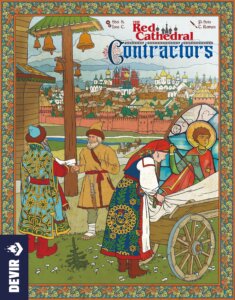
The Red Cathedral board game cover

About this board game

The Red Cathedral is a strategic Euro board game for 1–4 players, with games lasting about 80 minutes. Set in Moscow, it casts players as construction teams working to build St. Basil’s Cathedral at the command of Ivan the Terrible.

Each turn, choose one of three actions: assign a cathedral section, send resources to a section you have claimed, or visit the game board to gather what you need. The cathedral is divided into columns, and claiming sections gives you control of their spaces. Building more sections—and completing each one with its own tower—can earn valuable points at the end of the game.

Resource gathering takes place on the game board’s iconic rondel. Choose a die, move around the central track by the number shown on its top face, and collect the resources indicated by the destination space. Guilds and professionals can also provide favors, helping you make the most of your trip to the market.

  • Claim cathedral sections before your rivals can take them.
  • Deliver resources to complete your sections and receive money and prestige points.
  • Add decorations to completed sections to gain even more recognition from the Tsar.
  • Watch the timing carefully: completing a sixth section by any player triggers the end of the game.

Every action requires attention to the other players’ plans, creating a contest over space, resources, and timing. The Red Cathedral offers accessible rules while retaining plenty of strategic depth for players who enjoy optimizing their position from one game to the next.

Board Game Rules for
The Red Cathedral

Download official rules (EN)

In the mid-15th Century, to commemorate his military victories, Tsar Ivan the Terrible ordered the construction of the temple that would become known as St. Basil’s Cathedral. Its original design took several decades to complete, and many different teams took part in its construction.

In The Red Cathedral you will take on the role of a team of architects charged with building the cathedral. Each player will build different parts of the monument. Using your influence with the clergy and the different guilds of the city, you will attempt to earn more of the Tsar’s favor than your rivals. When the work on the cathedral has been completed, the player who has earned the most prestige will be the winner!

Game Design: Sheila Santos & Israel Cendrero
Players: 1-4 | Age: 10+ | Duration: 80 min

Resources and Materials

We use the term Materials to refer to any “physical” objects that are used in the construction, such as bricks or lumber. The concept of Resources (as we use it) includes the Materials, but also Rubles and Recognition Points.

  • Lumber Lumber
  • Brick Brick
  • Stone Stone
  • Gold Gold
  • Green gem Green Gem
  • Purple gem Purple Gem
  • Any material This icon is equivalent to one unit of any one material.

The Scoring Track

As you can see, the Scoring Track that runs around the Market board counts two different things: Recognition Points Recognition (numbers with a beige background) and Prestige Points Prestige.

  • Whenever the game tells you to “gain or lose Recognition,” move your score marker the number of spaces indicated forward or backwards.
  • When you are told that you “gain or lose Prestige,” move your marker to the closest Prestige Point space forward or backwards. At a certain point, the Recognition and Prestige spaces are equal.

At the end of the game, the player with the most Prestige Points wins.

Scoring track detail

Setup Steps

  1. Place the Market board in the center of the table, making sure to leave space next to it for the Cathedral Construction Site.
  2. Each player chooses a color and places the following in their own playing area:
    • Their personal Workshop board, with either the basic side (recommended for your first few games) or the advanced side up.
    • 4 (of their 6) Banners are placed in the Inventory on their Workshop board. The remaining Banners are placed outside the Inventory.
    • Their 4 Ornamentations (1 Door, 2 Arches, and 1 Cross), are placed in the matching spaces of their Workshop board.
  3. Place the score markers for each player on the 2 space of the Scoring Track (around the edge of the Market board), with the “+40” facing down.
  4. Shuffle the Resource tiles and place one randomly in each of the 8 spaces on the Market board. Turn them face up.
  5. Shuffle the Influence cards for each of the four groups (the Craftsmen’s Guild, the Teamsters’ Guild, the Merchants’ Guild, and the Clergy) separately. Draw one of each and place them in the four spaces indicated on the Market board (it does not matter which position each card is placed in).
  6. Take all 5 dice in both hands and shake them. Starting with the space next to the Resource tile that grants Recognition, let one die fall randomly into that space. Then drop one die in each of the following spaces, in the direction of the arrows.
  7. To one side, within reach of the players, create a general reserve for all of the building Materials and Rubles.
  8. Take the Building Plan cards that show the number of players in the game and mix them. Draw one at random and leave the rest in the box. This card will show the height for each of the towers that the players will build. Every tower has exactly one base and one dome, but the number of middle sections between each base and dome can vary.
  9. Take the Cathedral cards and shuffle them into three decks: the bases, the middle sections, and the domes. Randomly pull the number of base cards indicated on the Building Plan and place them in the Construction Site, making sure that the face showing the Building Costs on each card is showing. After that, place the number of middle cards indicated on the Building Plan for each tower above them, and then finish each tower with a dome card. You can now return the Building Plan card and the rest of the Cathedral cards to the box with the others.
  10. Take the Workshop tiles. If the game is being played with less than three players, put all of the tiles that have this icon 3 plus players back in the box. Place the tiles face down on the table and shuffle them well. Then, one by one, turn them face up and place one randomly on each of the Cathedral cards. Put any leftover tiles back in the box.
  11. You may choose who will be the first player to take their turn however you like. Once that has been decided, the first player will take 3 Rubles. The rest of the players are then given Rubles in clockwise order, receiving 4 Rubles, 4 Rubles, and 5 Rubles respectively.
Game setup diagram
Game setup diagram
First game recommended influence cards
Workshop and player board overview

The Advanced Workshop Setup

The Advanced Workshop side shows a compass on the workbench. They have special rules for the use of Workshop tiles and for unlocking the Ornamentations (page 7).

If you are playing with the Advanced Workshops, use the following setup: Ornamentations are placed in the indicated Workshop tile spaces, four Banners are placed in your Inventory and two Banners are placed in your white Workshop tile spaces.

Advanced Workshop board setup

Game Flow

The game is played in turns. Each player plays their full turn before it becomes the next player’s turn, and the order of play is always clockwise around the table.

The game ends when one player has completed the construction of their sixth Cathedral section. That player gets 3 Prestige as a reward and the end of the game is triggered. The other players will have one final turn before the game ends.

A Player’s Turn

During their turn, the player must carry out one of these 3 basic actions:

  • a) Claim a Cathedral Section
  • b) Build sections of the Cathedral
  • c) Acquire Resources from the Market

In addition, at any moment during their turn, a player may decide to execute any of these two optional actions:

  • Lose Prestige Points in exchange for rubles at a rate of 1 Prestige for 2 Rubles. They move their score marker back to the previous Prestige Point space and take 2 Rubles from the general reserve.
  • Lose 1 Prestige Point in order to roll the dice from any one space on the board. Move the score marker to the previous Prestige Point space, choose one of the eight spaces on the board and re-roll all the dice there. Players can use this optional action only once per turn.

The builders are assigned sections of the Cathedral to work on and place the scaffolding they need to carry out their work, represented in the game by the Banners. This will allow the towers to grow vertically out of the main structure and allow the construction teams to reach the highest parts of the towers.

To claim part of the Cathedral, a player carries out these steps:

  1. They take any one Banner from their personal Workshop board (possibly opening up a space in their Inventory).
  2. They Claim one available Cathedral card by placing their Banner on top of it. A Cathedral card is available if it does not have a Banner on it and it is either any base card or any other type of card that is directly above another card that already has a Banner on it (from any player).
  3. They take the Workshop tile that is on the claimed Cathedral card and place it in any empty Workshop space on their Workshop board. They have two choices:
    • A: Place the Workshop tile face down. If they do, they will not be able to activate that Workshop later.
    • B: Pay the cost (in Rubles) shown in that Workshop space and place the Workshop tile face up. They will be able to receive the benefit shown on that Workshop tile each time they move the die that matches that Workshop’s color—see “Activate a Workshop Tile” (page 15).
  4. If the Workshop tile is paid for and placed face up, the player immediately gains the benefit shown on it.
Example of claiming a cathedral section

In this example, we can see that the yellow player has placed one of their Banners on a Cathedral card that has the white die Workshop tile on it (1, 2). The yellow player pays 2 Rubles to place it in their blue Workshop (3). The player obtains resources based on the current position of the white die on the Market board, which is 2 Rubles (4).

Advanced Game Workshops

If you have chosen to play the game on the advanced side of the Workshop boards, keep the following things in mind:

  • The game plays the same as the standard game in all aspects except that placing a tile in the Workshop has a fixed cost of 3 Rubles and that the Ornamentations are not available right at the start of the game.
  • When part of the Cathedral is claimed and the Workshop tile is placed (after first paying the costs), the corresponding Ornamentation becomes available. If the player cannot or does not want to pay to place the tile, the Ornamentation does not become available.
  • The Banners in the white Workshops are used in the same way as those in the Inventory, and can be taken directly from there. A Workshop tile cannot be placed on a white Workshop space if the Banner blocking it has not been used.
Example of advanced game workshops

1. The yellow player is going to claim part of the Cathedral. They decide that the Workshop tile will go in their green Workshop so they can take the Arch there, moving it to the corresponding space on their board.
2. Then, the player takes a Banner from their Inventory and places it on the Cathedral card to claim it and its Workshop tile.
3. Finally, when placing the tile on the green space and paying 3 Rubles, the player moves the Arch and places it in its available place on their Workshop board. If they would have taken a Banner from their white Workshop spaces instead, their new Workshop tile could have gone to one of the white Workshop spaces.


Once the scaffolding has been installed, the construction teams can get to work and finish that part of the Cathedral. To do that, they will need construction Materials and, if they have the opportunity, they can add finishings to the work with beautiful Ornamentations.

Each time a player chooses this action, they may deliver up to three Materials to the Construction Site. Then those materials can be used to Build and/or Decorate the Cathedral.

If a section now has all of the required Materials, it is completed and the player is awarded Recognition Points and possibly Rubles. Adding Ornamentations may also award Prestige Points.

Building

The player takes the Materials they want to deliver from their Inventory and assigns them to one or more Cathedral cards that have their Banners on them. There is no requirement that the player finishes a section in a single delivery—simply leave the Materials on the card to show that they have already been delivered.

Building a Cathedral Section

A Cathedral section is finished once it has all of the required Materials on it. When this happens, the following steps are taken:

  1. The Materials are removed and returned to the general reserve.
  2. The player gains the Recognition Points and Rubles shown on the card.
  3. The card is flipped over so it is showing the finished side. The player’s Banner is left on the card.
Example of building a cathedral section

What happens if a Cathedral section is completed when there are unfinished sections below it?

If, when a section of the Cathedral is completed, there are cards that have not been finished below it in the same tower, the players who have claimed those unfinished sections will be chastised by the Tsar.

The player(s) who claimed those unfinished cards immediately lose Recognition Points equal to the number of finished sections above their cards without counting their own completed sections.

Penalty example 1 for unfinished sections

In the first picture, the red player has been able to complete part of the Cathedral before the blue player. The blue player is penalized 1 Recognition (A). Later on, the blue player still hasn’t completed their sections before the yellow player finishes theirs, so the blue player suffers a penalty of 3 Recognition (B): 1 Recognition for the top blue card (which only has 1 completed section above it) and 2 Recognition for the one at the bottom (which now has 2 completed sections above it, completed by the red and yellow players).

Penalty example 2 for unfinished sections

In this example, the blue player suffers a penalty of 1 Recognition when they finish their top section, due to the red player’s completed section but not for the section that blue just completed (A). Later, when the yellow player finishes their section (B), blue receives a penalty of 2 Recognition (due to the red and yellow sections but ignoring the finished blue section).

Decorating the Cathedral

Once a section of the Cathedral has been completed, there is an opportunity for the construction teams to add finishings, installing decorations and other types of improvements.

Each section of the cathedral, once finished, has space to place a single Ornamentation: bases allow the construction of a Door; middle sections allow the addition of Arches, and domes allow the erection of a Cross. Any player can install an Ornamentation on any completed Cathedral section, regardless of who built that section.

To decorate a Cathedral section, the player must deliver the Materials required for the Ornamentation (Door = lumber; Arch = stone; Cross = gold) plus 0, 1, or 2 jewels, which are “set” into the Ornamentation. If jewels are set into the Ornamentation, the player immediately gains:

  • 1 Prestige for each jewel set into it, or
  • a total of 3 Prestige if 2 jewels of different colors are set into it.

If an Ornamentation is added without any jewels, no Prestige Points are awarded at that time.

Either way, all Ornamentations can generate Prestige Points at the end of the game (in addition to those awarded for any jewels when built), so it makes sense to invest in them even if they are not accompanied by jewels.

Each Material (including any jewels) used for an Ornamentation counts as one Material delivered. Remember that you can only deliver a maximum of three Materials during each Build Sections of the Cathedral action. In this case, when a player sends Materials for a Decoration, all the chosen materials must be sent on the same turn. Unlike parts of the Cathedral, Decorations must be sent and finished in one go.

Example of decorating a cathedral dome

The yellow player uses their 3 deliveries to decorate a Cathedral dome, creating a Cross with 2 different jewels encrusted in it, which awards him 3 Prestige.

Example of delivering multiple ornamentations

The yellow player is using all 3 deliveries for Ornamentations, creating a Door (paying 1 lumber) with a jewel set in it (which gives them 1 Prestige) and a Cross (paying 1 gold) that does not grant them any immediate points.

Example of combined building and decorating

In this example of combined building and decorating, the yellow player is getting ready to complete a middle section of the Cathedral (1). They decide to build, using up one of their deliveries for the missing gold (2). This allows them to complete their section, earning 4 Recognition and 2 Rubles (3 & 4) and, furthermore, the green player is penalized and loses 1 Recognition. Since it is still possible to make 2 more deliveries this turn, yellow decides to use them to build an Arch with 1 jewel (1 delivery of stone and another for the jewel), which they then place on the section they just completed (5) for 1 additional Prestige which is awarded immediately (6).


A fundamental part of construction is having all of the required Materials at the moment you need to use them. Everything you might need is available in the Market. Furthermore, your relationships with the different Guilds will help you complete your job and are crucial to becoming the most famous and appreciated architect!

Resource management and the use of the Market are the heart of The Red Cathedral. To visit the Market, a player must follow these steps:

  1. Announce which Market die they are going to use.
  2. Move that die around the Market board in the direction of the arrows exactly the same number of spaces as the value it shows.
    • Optionally, if they use the white die or the die that is their own color, they may spend Rubles to move it additional spaces, at a rate of one Ruble for each extra space (which can result in a total movement that is greater than six spaces).
    • Important: A die cannot end its movement on a space that is already occupied by three dice. In other words, the maximum number of dice that can be in each space is three. If the moving die would end up in a full space, the player must choose a different die to move or—if it is the white die or their color—they may pay to increase its movement.
  3. The die remains on the space it reaches after moving.
  4. The player now performs any Market actions that they want to take, based on the space they moved to.
  5. Finally, they roll all of the dice that are in that space and then put them back in that space.
Moving dice on the market board

The yellow player decides to move the yellow die. It shows the number 3, so they move it three spaces, landing on the same space as the blue die. Since the yellow player is moving the yellow die (their color), they could spend Rubles to move it further, but they do not want to do so this time.

Market Actions

Once the die has completed its movement, the player may perform any or all of the following actions. They may perform each action only once, but they may be performed in any order the player wishes:

  1. Obtain Resources from the Market
  2. Use Influence
  3. Activate a Workshop Tile

1. Obtain Resources from the Market

The player takes the resources shown on the Resource tile next to that space from the general supply, multiplied by the number of dice in that space (as a maximum: the player may take a smaller amount if they wish).

Resources are limited to the quantity in the general supply. If any of them run out, any action that would award that Resource has no effect until the supply is replenished.

Example of obtaining market resources

After moving the yellow die, the player performs the “Take 2 Bricks” action twice (because there are 2 dice in the space) and gets 4 bricks. Since yellow is the player’s color, they could have paid 1 Ruble and instead landed where the red die is to obtain 4 Lumber.

The Inventory

Every time a player gets Materials, they must put them in their Inventory zone. Each Inventory initially has six open spaces, which can hold one Material each. Players can increase the size of their Inventories by claiming sections of the Cathedral.

Important: If you obtain Materials but there is no open space for them in your Inventory, you cannot discard those already in your Inventory to make space. You can only keep Materials that you have enough space for.

Inventory illustration

2. Use Influence

Players can use their influence with the four groups on the board—the Craftsmen’s Guild, the Teamster’s Guild, the Merchant’s Guild, and the Clergy—to perform a variety of actions. Each group is assigned a quadrant (representing the seasons of the year) on the Market board, which includes two Market spaces. The quadrant where the chosen die’s movement ends determines which of these groups can be influenced that turn.

When a player influences a Guild or the Clergy, they may perform one of the two actions shown on that group’s card. Some of these actions require a cost and others do not.

  • Actions marked with the lightning icon only allow the player to perform that action one time this turn.
  • Actions marked with the infinity icon can be performed as many times as the player wishes. For more details, see the Influence Actions Chart (page 20).
Using merchant influence example

To continue the example from before, after obtaining bricks, the player decides to use the Merchant’s Guild action to exchange 2 of their recently obtained bricks for 1 green jewel.

3. Activate a Workshop Tile

If the player has a Workshop tile assigned to their Workshop that matches the die they moved this turn, they may immediately obtain the benefit shown on that tile.

Workshop tile activation example

When this player moves the blue die, they can also receive resources from the space the red die is located in at that moment (2 lumber, in this case). If they move the yellow die, they gain 1 Recognition.

Some Workshop tiles provide resources, while others show one of the five dice colors. When you activate a Workshop tile that shows a die, you gain the resources shown on the Resource tile next to the space that die is sitting in. You only get these resources once, regardless of the number of dice in that space.

White Workshop Spaces

The White Workshop space on each player’s Workshop board has two spaces where Workshop tiles can be placed. If a player moves the white die on the Market board and has two tiles assigned to it in their Workshop, they may only choose one of the two to activate that turn (you cannot use both).

White workshop board spaces

REMEMBER: After completing your actions in the Market, you must roll all of the dice in the space you landed on.


Full influence cards reference chart

Craftsmen’s Guild

  • Sell any 1 Material for 1 Ruble.
  • Buy 1 of the indicated Materials for 1 Ruble.
  • Sell 1 of the indicated Materials for 1 Ruble.
  • Buy 1 Material of any type for 2 Rubles.
  • Sell 1 of the indicated Materials for 2 Rubles.
  • Buy 1 of the indicated Materials for 2 Rubles.

Teamster’s Guild

  • Pay 1 Ruble to deliver 1 Material to the Construction Site. It can be used to build and/or decorate.
  • Obtain 1 Ruble.
  • Pay 3 Rubles to deliver 2 Materials to the Construction Site. They can be used to build and/or decorate.
  • Pay 2 Rubles to switch the positions of any 2 Resource tiles in the Market.

Merchant’s Guild

  • Exchange 2 of the same Material in your Inventory for any 1 Material.
  • Exchange 1 Ruble plus 1 Material from your Inventory for 1 of any other Material.
  • Exchange 4 of the same Material in your Inventory for any 2 Materials.
  • Activate 1 of your Workshop tiles.

Clergy

  • Obtain 1 Recognition.
  • Pay 3 Rubles to obtain 1 Prestige.
  • Discard 3 different Materials to obtain 1 Prestige.
  • If you have completed at least 1 Cathedral section of each type, you get 2 Recognition.

End of the Game

As soon as any player has completed their sixth Cathedral card, and the Recognition Points provided by that card have been awarded, they gain 3 additional Prestige for bringing an end to the game. Then, the other players will each have one final turn before the final counting of points is performed.

Final Scoring

At this time, all players must move their score counters back to the closest lower Prestige Point space. If the player is already on a Prestige Point space, they do not move.

Important: If a player goes beyond 40 Prestige Points, flip their score counter so it shows the “+40” side and continue counting from the beginning of the track.

Score counter adjustment example

The yellow player must move back to the 14 Prestige space. The green player will remain on the 18 Prestige space.

Additional Scoring

On top of the Prestige Points earned during the game, players will add:

  • 1 Prestige for every 5 Materials and Rubles that they return to the general reserve at the end of the game.
  • A number of Prestige based on their contributions to each of the towers.

Tower Scoring

The total value of a tower is 2 Prestige for each section that is completed, plus 1 Prestige for each Ornamentation on it. Any sections that are not completed are not counted at all in the final scoring.

Each player counts the number of Banners and Ornamentations of their color they have on the completed Cathedral cards in that Tower.

  1. The player with the highest total receives the full value of that tower.
  2. The player with the second highest total receives half of the total value of the tower (rounding down for half points).
  3. The next player after them receives half of that, and so on.

If there is a tie for any position, add up the Prestige Points for the positions of the tied players and divide them evenly between them (rounding down). If a player does not have any Banners or Ornamentations in a tower, they receive no points for that tower.

Four-player tower scoring example

Example of Tower Scoring for Four Players

  • Tower 1: Number of Prestige to award: 7 (3 completed sections + 1 Ornamentation). Green has 1 banner + 1 Door and gets 7 Prestige. Yellow and red tie for 2nd and 3rd place (3 Prestige and 1 Prestige) so their 4 Prestige are split between them, with 2 Prestige going to each of the two players.
  • Tower 2: 5 Prestige for the blue player and 2 Prestige for the yellow player.
  • Tower 3: Points to be awarded: 12 Prestige. Blue gets 12 Prestige; yellow gets 6 Prestige; green and red get 2 Prestige each.
  • Tower 4: Points to be awarded: 10 Prestige. Green gets 10 Prestige; red gets 5 Prestige and yellow gets 2 Prestige.
  • Tower 5: Points to be awarded: 9 Prestige. 9 Prestige for blue; 7 Prestige (4+2+1) to be shared among yellow, red, and green, with 2 Prestige for each.
  • Tower 6: 9 Prestige. 9 Prestige for red; 4 Prestige for green (since the cross is green’s); and 2 Prestige for blue.

Special Rules for Two-player Games

The player with the greater presence in the tower (more Banners and Ornamentations) gets all of the points granted by that tower and the other player, if they are present in that tower, gets one third of the total instead of half (always rounding down). If they are tied, neither player gets any points for that tower.

Two-player tower scoring example

In the example: Tower 1: green 8 Prestige. Tower 2: yellow 6 Prestige, green 2 Prestige. Tower 3: yellow 8 Prestige, green 2 Prestige. Tower 4: green 5 Prestige, yellow 1 Prestige.

Winning the Game

The player with the most Prestige Points is the winner!

If there is a tie, the tied player with most completed sections wins. If the tied players have completed the same number of sections, the one with the most Ornamentations placed will be the winner. If they are still tied, then the players share the victory.


Ivan Yakovlevich was the architect chosen by the Tsar to design his great cathedral. By direct order of Ivan the Terrible, he will be the one who personally directs one of the construction teams. Nevertheless, your team will also take part in the job. Will you be able to do such brilliant work that it dazzles the Tsar even though you are in direct competition with the architect in charge of the construction?

If you wish to play the Solitaire Mode, you can find the rules you will need on page 18.

Setup

  1. Set up the game as you would for two players. Place both score counters on the Scoring Track and set the six Banners and the Ornamentations of the other color to the side. This will be the color used by Ivan Yakovlevich for his building team. You will not need his Workshop board.
  2. Take the Workshop tiles that are only used in games with 3-4 players 3 plus players that have the die action icons. You will have five, one of each color.
  3. Shuffle the five Solitaire cards and lay them out in a line. This is the order that Ivan will carry out his actions.
  4. Then, mix up the Workshop tiles that you pulled out and randomly place them face up in the spaces indicated on the Solitaire cards.
  5. Place five of Ivan’s Banners on top of the “Claim a Cathedral Section” Solitaire card. Place Ivan’s Ornamentations at the end of the row.
  6. Then, with the remaining Banner, immediately perform a Claim a Cathedral Section action for Ivan, claiming the Cathedral base card that grants the most Recognition Points. If there is more than one card worth the same number of points, Ivan will choose the tower that is farthest to the left. Remove the Workshop tile that was on the base card claimed by Ivan from the game.
  7. Now the game starts with you playing your first turn.

Gameplay

Play your turn in the normal way, choosing one of the three available actions. Then it will be Ivan’s turn. Continue alternating turns in this way until you or Ivan have finished their six parts of the Cathedral. Regardless, as soon as the end of the game is triggered, no player will get the 3 Prestige bonus, but the other player will still get one final turn.

Ivan’s Turn

During Ivan’s turn, look at the row of Solitaire cards and find the one furthest to the left that has a face-up Workshop tile. First, move the die shown on that Workshop tile as if Ivan was performing an Acquire Resources from the Market basic action, and then flip the Workshop tile face-down. If this would move a die to a space that already has three dice, do not perform this part of Ivan’s turn.

Ivan will not gain any Resources from this action, but he may still obtain a Recognition Point (either because he lands on a Market space that grants it or because the Influence card gives him a Recognition). In this case, update his score counter. After the die moves (if possible), perform the action indicated on that Solitaire card.

If, at the start of Ivan’s turn, all of his Workshop tiles are face down, carry out these steps before taking Ivan’s turn as normal:

  1. Iván will place one Ornamentation on a built card, if he can, following this criteria and order:
    • A: What Ornament to place? The order in which to place them is Door – Arch – Arch – Cross. Once the Door is in place, then the next to be placed is one of the Arches, and so on.
    • B: Where to place it? Ivan will try to decorate a card constructed by the player (if there are more than one, you chose which one). If that is not possible, he will choose one of the cards built by him (if there is more than one, you chose which one).
    • C: If this is not possible, ignore this step, even if there are other Ornamentations that can be placed. If Ivan has placed an Ornamentation, he gets 1 Prestige. He doesn’t have to pay any Materials to place them.
  2. Then, take all his Workshop tiles, mix them up again, and place them one by one on the cards face up to prepare for his turn.

Actions Performed by Ivan

  • Recognition: Ivan immediately obtains 4 Recognition.
  • Inventory: Place 4 Materials of any type on this card. The Material type does not matter, simply take Materials from the pile that has the most.
  • Transport: Place all of the Materials from Ivan’s Inventory on top of his Construction card.
  • Claim a Cathedral Section: If he still has any Banners, put 1 on a Cathedral card according to this order of preference:
    • 1. On a card directly above a section claimed or built by you.
    • 2. On a base.

    If neither of these conditions can be met, the player chooses which card Ivan claims. If the Workshop tile on that card grants Recognition, Ivan gets that Recognition. Either way, any tile that he obtains is discarded.

  • Construction: Place all of the Materials on top of this card on the Cathedral sections under construction by Ivan. When Ivan takes this action, he does not need to match the specific resources indicated on the Cathedral cards. The only thing he must respect is the number of Materials required. (For example, if a section requires 2 lumber, 1 brick, and 1 gold, for Ivan it requires any 4 Materials). If that section is now completed, Ivan receives the Recognition that would normally be awarded. To determine which card will receive the Materials, look from left to right, bottom to top. The first card claimed by Ivan that you find will be where the Materials are placed. If Ivan has more Materials than are needed, the extras are placed on the next Cathedral card he is building. For example if the current card only needs 3 Materials to be completed, and Ivan has 4 to place, the 1 remaining will go to the next card.

Acknowledgments: We would like to thank Bernini, Borromini and Adriano. And all the playtesters that know why. We also wish to express our appreciation to Antonio and Manuel for helping us get the game to the point where it was awesome and Devir for inviting us to dinner even though they did not know what they were getting into.

Credits:
Game design: Sheila Santos and Israel Cendrero
Illustration: Pedro Soto and Chema Román
Graphic design: Jordi Roca
English translation: Andy Campbell
English adaptation: William Niebling
Editor: David Esbrí
Devir Americas • 8123 South Orange Avenue, Suite 166 • Orlando, FL 32809 • USA
www.devirgames.com


Introduction & Overview

In the mid-15th Century, to commemorate his military victories, Tsar Ivan the Terrible ordered the construction of the temple that would become known as St. Basil’s Cathedral. Its original design took several decades to complete, and many different teams took part in its construction.

In The Red Cathedral you will take on the role of a team of architects charged with building the cathedral. Each player will build different parts of the monument. Using your influence with the clergy and the different guilds of the city, you will attempt to earn more of the Tsar’s favor than your rivals. When the work on the cathedral has been completed, the player who has earned the most prestige will be the winner!

Game Design: Sheila Santos & Israel Cendrero
Players: 1-4 | Age: 10+ | Duration: 80 min

Resources and Materials

We use the term Materials to refer to any “physical” objects that are used in the construction, such as bricks or lumber. The concept of Resources (as we use it) includes the Materials, but also Rubles and Recognition Points.

  • Lumber Lumber
  • Brick Brick
  • Stone Stone
  • Gold Gold
  • Green gem Green Gem
  • Purple gem Purple Gem
  • Any material This icon is equivalent to one unit of any one material.

The Scoring Track

As you can see, the Scoring Track that runs around the Market board counts two different things: Recognition Points Recognition (numbers with a beige background) and Prestige Points Prestige.

  • Whenever the game tells you to “gain or lose Recognition,” move your score marker the number of spaces indicated forward or backwards.
  • When you are told that you “gain or lose Prestige,” move your marker to the closest Prestige Point space forward or backwards. At a certain point, the Recognition and Prestige spaces are equal.

At the end of the game, the player with the most Prestige Points wins.

Scoring track detail

Game Setup

Setup Steps

  1. Place the Market board in the center of the table, making sure to leave space next to it for the Cathedral Construction Site.
  2. Each player chooses a color and places the following in their own playing area:
    • Their personal Workshop board, with either the basic side (recommended for your first few games) or the advanced side up.
    • 4 (of their 6) Banners are placed in the Inventory on their Workshop board. The remaining Banners are placed outside the Inventory.
    • Their 4 Ornamentations (1 Door, 2 Arches, and 1 Cross), are placed in the matching spaces of their Workshop board.
  3. Place the score markers for each player on the 2 space of the Scoring Track (around the edge of the Market board), with the “+40” facing down.
  4. Shuffle the Resource tiles and place one randomly in each of the 8 spaces on the Market board. Turn them face up.
  5. Shuffle the Influence cards for each of the four groups (the Craftsmen’s Guild, the Teamsters’ Guild, the Merchants’ Guild, and the Clergy) separately. Draw one of each and place them in the four spaces indicated on the Market board (it does not matter which position each card is placed in).
  6. Take all 5 dice in both hands and shake them. Starting with the space next to the Resource tile that grants Recognition, let one die fall randomly into that space. Then drop one die in each of the following spaces, in the direction of the arrows.
  7. To one side, within reach of the players, create a general reserve for all of the building Materials and Rubles.
  8. Take the Building Plan cards that show the number of players in the game and mix them. Draw one at random and leave the rest in the box. This card will show the height for each of the towers that the players will build. Every tower has exactly one base and one dome, but the number of middle sections between each base and dome can vary.
  9. Take the Cathedral cards and shuffle them into three decks: the bases, the middle sections, and the domes. Randomly pull the number of base cards indicated on the Building Plan and place them in the Construction Site, making sure that the face showing the Building Costs on each card is showing. After that, place the number of middle cards indicated on the Building Plan for each tower above them, and then finish each tower with a dome card. You can now return the Building Plan card and the rest of the Cathedral cards to the box with the others.
  10. Take the Workshop tiles. If the game is being played with less than three players, put all of the tiles that have this icon 3 plus players back in the box. Place the tiles face down on the table and shuffle them well. Then, one by one, turn them face up and place one randomly on each of the Cathedral cards. Put any leftover tiles back in the box.
  11. You may choose who will be the first player to take their turn however you like. Once that has been decided, the first player will take 3 Rubles. The rest of the players are then given Rubles in clockwise order, receiving 4 Rubles, 4 Rubles, and 5 Rubles respectively.
Game setup diagram
Game setup diagram
First game recommended influence cards
Workshop and player board overview

The Advanced Workshop Setup

The Advanced Workshop side shows a compass on the workbench. They have special rules for the use of Workshop tiles and for unlocking the Ornamentations (page 7).

If you are playing with the Advanced Workshops, use the following setup: Ornamentations are placed in the indicated Workshop tile spaces, four Banners are placed in your Inventory and two Banners are placed in your white Workshop tile spaces.

Advanced Workshop board setup

How to Play

Game Flow

The game is played in turns. Each player plays their full turn before it becomes the next player’s turn, and the order of play is always clockwise around the table.

The game ends when one player has completed the construction of their sixth Cathedral section. That player gets 3 Prestige as a reward and the end of the game is triggered. The other players will have one final turn before the game ends.

A Player’s Turn

During their turn, the player must carry out one of these 3 basic actions:

  • a) Claim a Cathedral Section
  • b) Build sections of the Cathedral
  • c) Acquire Resources from the Market

In addition, at any moment during their turn, a player may decide to execute any of these two optional actions:

  • Lose Prestige Points in exchange for rubles at a rate of 1 Prestige for 2 Rubles. They move their score marker back to the previous Prestige Point space and take 2 Rubles from the general reserve.
  • Lose 1 Prestige Point in order to roll the dice from any one space on the board. Move the score marker to the previous Prestige Point space, choose one of the eight spaces on the board and re-roll all the dice there. Players can use this optional action only once per turn.

Action: Claim a Cathedral Section

The builders are assigned sections of the Cathedral to work on and place the scaffolding they need to carry out their work, represented in the game by the Banners. This will allow the towers to grow vertically out of the main structure and allow the construction teams to reach the highest parts of the towers.

To claim part of the Cathedral, a player carries out these steps:

  1. They take any one Banner from their personal Workshop board (possibly opening up a space in their Inventory).
  2. They Claim one available Cathedral card by placing their Banner on top of it. A Cathedral card is available if it does not have a Banner on it and it is either any base card or any other type of card that is directly above another card that already has a Banner on it (from any player).
  3. They take the Workshop tile that is on the claimed Cathedral card and place it in any empty Workshop space on their Workshop board. They have two choices:
    • A: Place the Workshop tile face down. If they do, they will not be able to activate that Workshop later.
    • B: Pay the cost (in Rubles) shown in that Workshop space and place the Workshop tile face up. They will be able to receive the benefit shown on that Workshop tile each time they move the die that matches that Workshop’s color—see “Activate a Workshop Tile” (page 15).
  4. If the Workshop tile is paid for and placed face up, the player immediately gains the benefit shown on it.
Example of claiming a cathedral section

In this example, we can see that the yellow player has placed one of their Banners on a Cathedral card that has the white die Workshop tile on it (1, 2). The yellow player pays 2 Rubles to place it in their blue Workshop (3). The player obtains resources based on the current position of the white die on the Market board, which is 2 Rubles (4).

Advanced Game Workshops

If you have chosen to play the game on the advanced side of the Workshop boards, keep the following things in mind:

  • The game plays the same as the standard game in all aspects except that placing a tile in the Workshop has a fixed cost of 3 Rubles and that the Ornamentations are not available right at the start of the game.
  • When part of the Cathedral is claimed and the Workshop tile is placed (after first paying the costs), the corresponding Ornamentation becomes available. If the player cannot or does not want to pay to place the tile, the Ornamentation does not become available.
  • The Banners in the white Workshops are used in the same way as those in the Inventory, and can be taken directly from there. A Workshop tile cannot be placed on a white Workshop space if the Banner blocking it has not been used.
Example of advanced game workshops

1. The yellow player is going to claim part of the Cathedral. They decide that the Workshop tile will go in their green Workshop so they can take the Arch there, moving it to the corresponding space on their board.
2. Then, the player takes a Banner from their Inventory and places it on the Cathedral card to claim it and its Workshop tile.
3. Finally, when placing the tile on the green space and paying 3 Rubles, the player moves the Arch and places it in its available place on their Workshop board. If they would have taken a Banner from their white Workshop spaces instead, their new Workshop tile could have gone to one of the white Workshop spaces.


Action: Build Sections of the Cathedral

Once the scaffolding has been installed, the construction teams can get to work and finish that part of the Cathedral. To do that, they will need construction Materials and, if they have the opportunity, they can add finishings to the work with beautiful Ornamentations.

Each time a player chooses this action, they may deliver up to three Materials to the Construction Site. Then those materials can be used to Build and/or Decorate the Cathedral.

If a section now has all of the required Materials, it is completed and the player is awarded Recognition Points and possibly Rubles. Adding Ornamentations may also award Prestige Points.

Building

The player takes the Materials they want to deliver from their Inventory and assigns them to one or more Cathedral cards that have their Banners on them. There is no requirement that the player finishes a section in a single delivery—simply leave the Materials on the card to show that they have already been delivered.

Building a Cathedral Section

A Cathedral section is finished once it has all of the required Materials on it. When this happens, the following steps are taken:

  1. The Materials are removed and returned to the general reserve.
  2. The player gains the Recognition Points and Rubles shown on the card.
  3. The card is flipped over so it is showing the finished side. The player’s Banner is left on the card.
Example of building a cathedral section

What happens if a Cathedral section is completed when there are unfinished sections below it?

If, when a section of the Cathedral is completed, there are cards that have not been finished below it in the same tower, the players who have claimed those unfinished sections will be chastised by the Tsar.

The player(s) who claimed those unfinished cards immediately lose Recognition Points equal to the number of finished sections above their cards without counting their own completed sections.

Penalty example 1 for unfinished sections

In the first picture, the red player has been able to complete part of the Cathedral before the blue player. The blue player is penalized 1 Recognition (A). Later on, the blue player still hasn’t completed their sections before the yellow player finishes theirs, so the blue player suffers a penalty of 3 Recognition (B): 1 Recognition for the top blue card (which only has 1 completed section above it) and 2 Recognition for the one at the bottom (which now has 2 completed sections above it, completed by the red and yellow players).

Penalty example 2 for unfinished sections

In this example, the blue player suffers a penalty of 1 Recognition when they finish their top section, due to the red player’s completed section but not for the section that blue just completed (A). Later, when the yellow player finishes their section (B), blue receives a penalty of 2 Recognition (due to the red and yellow sections but ignoring the finished blue section).

Decorating the Cathedral

Once a section of the Cathedral has been completed, there is an opportunity for the construction teams to add finishings, installing decorations and other types of improvements.

Each section of the cathedral, once finished, has space to place a single Ornamentation: bases allow the construction of a Door; middle sections allow the addition of Arches, and domes allow the erection of a Cross. Any player can install an Ornamentation on any completed Cathedral section, regardless of who built that section.

To decorate a Cathedral section, the player must deliver the Materials required for the Ornamentation (Door = lumber; Arch = stone; Cross = gold) plus 0, 1, or 2 jewels, which are “set” into the Ornamentation. If jewels are set into the Ornamentation, the player immediately gains:

  • 1 Prestige for each jewel set into it, or
  • a total of 3 Prestige if 2 jewels of different colors are set into it.

If an Ornamentation is added without any jewels, no Prestige Points are awarded at that time.

Either way, all Ornamentations can generate Prestige Points at the end of the game (in addition to those awarded for any jewels when built), so it makes sense to invest in them even if they are not accompanied by jewels.

Each Material (including any jewels) used for an Ornamentation counts as one Material delivered. Remember that you can only deliver a maximum of three Materials during each Build Sections of the Cathedral action. In this case, when a player sends Materials for a Decoration, all the chosen materials must be sent on the same turn. Unlike parts of the Cathedral, Decorations must be sent and finished in one go.

Example of decorating a cathedral dome

The yellow player uses their 3 deliveries to decorate a Cathedral dome, creating a Cross with 2 different jewels encrusted in it, which awards him 3 Prestige.

Example of delivering multiple ornamentations

The yellow player is using all 3 deliveries for Ornamentations, creating a Door (paying 1 lumber) with a jewel set in it (which gives them 1 Prestige) and a Cross (paying 1 gold) that does not grant them any immediate points.

Example of combined building and decorating

In this example of combined building and decorating, the yellow player is getting ready to complete a middle section of the Cathedral (1). They decide to build, using up one of their deliveries for the missing gold (2). This allows them to complete their section, earning 4 Recognition and 2 Rubles (3 & 4) and, furthermore, the green player is penalized and loses 1 Recognition. Since it is still possible to make 2 more deliveries this turn, yellow decides to use them to build an Arch with 1 jewel (1 delivery of stone and another for the jewel), which they then place on the section they just completed (5) for 1 additional Prestige which is awarded immediately (6).


Action: Acquire Resources from the Market

A fundamental part of construction is having all of the required Materials at the moment you need to use them. Everything you might need is available in the Market. Furthermore, your relationships with the different Guilds will help you complete your job and are crucial to becoming the most famous and appreciated architect!

Resource management and the use of the Market are the heart of The Red Cathedral. To visit the Market, a player must follow these steps:

  1. Announce which Market die they are going to use.
  2. Move that die around the Market board in the direction of the arrows exactly the same number of spaces as the value it shows.
    • Optionally, if they use the white die or the die that is their own color, they may spend Rubles to move it additional spaces, at a rate of one Ruble for each extra space (which can result in a total movement that is greater than six spaces).
    • Important: A die cannot end its movement on a space that is already occupied by three dice. In other words, the maximum number of dice that can be in each space is three. If the moving die would end up in a full space, the player must choose a different die to move or—if it is the white die or their color—they may pay to increase its movement.
  3. The die remains on the space it reaches after moving.
  4. The player now performs any Market actions that they want to take, based on the space they moved to.
  5. Finally, they roll all of the dice that are in that space and then put them back in that space.
Moving dice on the market board

The yellow player decides to move the yellow die. It shows the number 3, so they move it three spaces, landing on the same space as the blue die. Since the yellow player is moving the yellow die (their color), they could spend Rubles to move it further, but they do not want to do so this time.

Market Actions

Once the die has completed its movement, the player may perform any or all of the following actions. They may perform each action only once, but they may be performed in any order the player wishes:

  1. Obtain Resources from the Market
  2. Use Influence
  3. Activate a Workshop Tile

1. Obtain Resources from the Market

The player takes the resources shown on the Resource tile next to that space from the general supply, multiplied by the number of dice in that space (as a maximum: the player may take a smaller amount if they wish).

Resources are limited to the quantity in the general supply. If any of them run out, any action that would award that Resource has no effect until the supply is replenished.

Example of obtaining market resources

After moving the yellow die, the player performs the “Take 2 Bricks” action twice (because there are 2 dice in the space) and gets 4 bricks. Since yellow is the player’s color, they could have paid 1 Ruble and instead landed where the red die is to obtain 4 Lumber.

The Inventory

Every time a player gets Materials, they must put them in their Inventory zone. Each Inventory initially has six open spaces, which can hold one Material each. Players can increase the size of their Inventories by claiming sections of the Cathedral.

Important: If you obtain Materials but there is no open space for them in your Inventory, you cannot discard those already in your Inventory to make space. You can only keep Materials that you have enough space for.

Inventory illustration

2. Use Influence

Players can use their influence with the four groups on the board—the Craftsmen’s Guild, the Teamster’s Guild, the Merchant’s Guild, and the Clergy—to perform a variety of actions. Each group is assigned a quadrant (representing the seasons of the year) on the Market board, which includes two Market spaces. The quadrant where the chosen die’s movement ends determines which of these groups can be influenced that turn.

When a player influences a Guild or the Clergy, they may perform one of the two actions shown on that group’s card. Some of these actions require a cost and others do not.

  • Actions marked with the lightning icon only allow the player to perform that action one time this turn.
  • Actions marked with the infinity icon can be performed as many times as the player wishes. For more details, see the Influence Actions Chart (page 20).
Using merchant influence example

To continue the example from before, after obtaining bricks, the player decides to use the Merchant’s Guild action to exchange 2 of their recently obtained bricks for 1 green jewel.

3. Activate a Workshop Tile

If the player has a Workshop tile assigned to their Workshop that matches the die they moved this turn, they may immediately obtain the benefit shown on that tile.

Workshop tile activation example

When this player moves the blue die, they can also receive resources from the space the red die is located in at that moment (2 lumber, in this case). If they move the yellow die, they gain 1 Recognition.

Some Workshop tiles provide resources, while others show one of the five dice colors. When you activate a Workshop tile that shows a die, you gain the resources shown on the Resource tile next to the space that die is sitting in. You only get these resources once, regardless of the number of dice in that space.

White Workshop Spaces

The White Workshop space on each player’s Workshop board has two spaces where Workshop tiles can be placed. If a player moves the white die on the Market board and has two tiles assigned to it in their Workshop, they may only choose one of the two to activate that turn (you cannot use both).

White workshop board spaces

REMEMBER: After completing your actions in the Market, you must roll all of the dice in the space you landed on.


Influence Cards Reference

Full influence cards reference chart

Craftsmen’s Guild

  • Sell any 1 Material for 1 Ruble.
  • Buy 1 of the indicated Materials for 1 Ruble.
  • Sell 1 of the indicated Materials for 1 Ruble.
  • Buy 1 Material of any type for 2 Rubles.
  • Sell 1 of the indicated Materials for 2 Rubles.
  • Buy 1 of the indicated Materials for 2 Rubles.

Teamster’s Guild

  • Pay 1 Ruble to deliver 1 Material to the Construction Site. It can be used to build and/or decorate.
  • Obtain 1 Ruble.
  • Pay 3 Rubles to deliver 2 Materials to the Construction Site. They can be used to build and/or decorate.
  • Pay 2 Rubles to switch the positions of any 2 Resource tiles in the Market.

Merchant’s Guild

  • Exchange 2 of the same Material in your Inventory for any 1 Material.
  • Exchange 1 Ruble plus 1 Material from your Inventory for 1 of any other Material.
  • Exchange 4 of the same Material in your Inventory for any 2 Materials.
  • Activate 1 of your Workshop tiles.

Clergy

  • Obtain 1 Recognition.
  • Pay 3 Rubles to obtain 1 Prestige.
  • Discard 3 different Materials to obtain 1 Prestige.
  • If you have completed at least 1 Cathedral section of each type, you get 2 Recognition.

End of Game & Final Scoring

End of the Game

As soon as any player has completed their sixth Cathedral card, and the Recognition Points provided by that card have been awarded, they gain 3 additional Prestige for bringing an end to the game. Then, the other players will each have one final turn before the final counting of points is performed.

Final Scoring

At this time, all players must move their score counters back to the closest lower Prestige Point space. If the player is already on a Prestige Point space, they do not move.

Important: If a player goes beyond 40 Prestige Points, flip their score counter so it shows the “+40” side and continue counting from the beginning of the track.

Score counter adjustment example

The yellow player must move back to the 14 Prestige space. The green player will remain on the 18 Prestige space.

Additional Scoring

On top of the Prestige Points earned during the game, players will add:

  • 1 Prestige for every 5 Materials and Rubles that they return to the general reserve at the end of the game.
  • A number of Prestige based on their contributions to each of the towers.

Tower Scoring

The total value of a tower is 2 Prestige for each section that is completed, plus 1 Prestige for each Ornamentation on it. Any sections that are not completed are not counted at all in the final scoring.

Each player counts the number of Banners and Ornamentations of their color they have on the completed Cathedral cards in that Tower.

  1. The player with the highest total receives the full value of that tower.
  2. The player with the second highest total receives half of the total value of the tower (rounding down for half points).
  3. The next player after them receives half of that, and so on.

If there is a tie for any position, add up the Prestige Points for the positions of the tied players and divide them evenly between them (rounding down). If a player does not have any Banners or Ornamentations in a tower, they receive no points for that tower.

Four-player tower scoring example

Example of Tower Scoring for Four Players

  • Tower 1: Number of Prestige to award: 7 (3 completed sections + 1 Ornamentation). Green has 1 banner + 1 Door and gets 7 Prestige. Yellow and red tie for 2nd and 3rd place (3 Prestige and 1 Prestige) so their 4 Prestige are split between them, with 2 Prestige going to each of the two players.
  • Tower 2: 5 Prestige for the blue player and 2 Prestige for the yellow player.
  • Tower 3: Points to be awarded: 12 Prestige. Blue gets 12 Prestige; yellow gets 6 Prestige; green and red get 2 Prestige each.
  • Tower 4: Points to be awarded: 10 Prestige. Green gets 10 Prestige; red gets 5 Prestige and yellow gets 2 Prestige.
  • Tower 5: Points to be awarded: 9 Prestige. 9 Prestige for blue; 7 Prestige (4+2+1) to be shared among yellow, red, and green, with 2 Prestige for each.
  • Tower 6: 9 Prestige. 9 Prestige for red; 4 Prestige for green (since the cross is green’s); and 2 Prestige for blue.

Special Rules for Two-player Games

The player with the greater presence in the tower (more Banners and Ornamentations) gets all of the points granted by that tower and the other player, if they are present in that tower, gets one third of the total instead of half (always rounding down). If they are tied, neither player gets any points for that tower.

Two-player tower scoring example

In the example: Tower 1: green 8 Prestige. Tower 2: yellow 6 Prestige, green 2 Prestige. Tower 3: yellow 8 Prestige, green 2 Prestige. Tower 4: green 5 Prestige, yellow 1 Prestige.

Winning the Game

The player with the most Prestige Points is the winner!

If there is a tie, the tied player with most completed sections wins. If the tied players have completed the same number of sections, the one with the most Ornamentations placed will be the winner. If they are still tied, then the players share the victory.


Solitaire Mode

Ivan Yakovlevich was the architect chosen by the Tsar to design his great cathedral. By direct order of Ivan the Terrible, he will be the one who personally directs one of the construction teams. Nevertheless, your team will also take part in the job. Will you be able to do such brilliant work that it dazzles the Tsar even though you are in direct competition with the architect in charge of the construction?

If you wish to play the Solitaire Mode, you can find the rules you will need on page 18.

Setup

  1. Set up the game as you would for two players. Place both score counters on the Scoring Track and set the six Banners and the Ornamentations of the other color to the side. This will be the color used by Ivan Yakovlevich for his building team. You will not need his Workshop board.
  2. Take the Workshop tiles that are only used in games with 3-4 players 3 plus players that have the die action icons. You will have five, one of each color.
  3. Shuffle the five Solitaire cards and lay them out in a line. This is the order that Ivan will carry out his actions.
  4. Then, mix up the Workshop tiles that you pulled out and randomly place them face up in the spaces indicated on the Solitaire cards.
  5. Place five of Ivan’s Banners on top of the “Claim a Cathedral Section” Solitaire card. Place Ivan’s Ornamentations at the end of the row.
  6. Then, with the remaining Banner, immediately perform a Claim a Cathedral Section action for Ivan, claiming the Cathedral base card that grants the most Recognition Points. If there is more than one card worth the same number of points, Ivan will choose the tower that is farthest to the left. Remove the Workshop tile that was on the base card claimed by Ivan from the game.
  7. Now the game starts with you playing your first turn.

Gameplay

Play your turn in the normal way, choosing one of the three available actions. Then it will be Ivan’s turn. Continue alternating turns in this way until you or Ivan have finished their six parts of the Cathedral. Regardless, as soon as the end of the game is triggered, no player will get the 3 Prestige bonus, but the other player will still get one final turn.

Ivan’s Turn

During Ivan’s turn, look at the row of Solitaire cards and find the one furthest to the left that has a face-up Workshop tile. First, move the die shown on that Workshop tile as if Ivan was performing an Acquire Resources from the Market basic action, and then flip the Workshop tile face-down. If this would move a die to a space that already has three dice, do not perform this part of Ivan’s turn.

Ivan will not gain any Resources from this action, but he may still obtain a Recognition Point (either because he lands on a Market space that grants it or because the Influence card gives him a Recognition). In this case, update his score counter. After the die moves (if possible), perform the action indicated on that Solitaire card.

If, at the start of Ivan’s turn, all of his Workshop tiles are face down, carry out these steps before taking Ivan’s turn as normal:

  1. Iván will place one Ornamentation on a built card, if he can, following this criteria and order:
    • A: What Ornament to place? The order in which to place them is Door – Arch – Arch – Cross. Once the Door is in place, then the next to be placed is one of the Arches, and so on.
    • B: Where to place it? Ivan will try to decorate a card constructed by the player (if there are more than one, you chose which one). If that is not possible, he will choose one of the cards built by him (if there is more than one, you chose which one).
    • C: If this is not possible, ignore this step, even if there are other Ornamentations that can be placed. If Ivan has placed an Ornamentation, he gets 1 Prestige. He doesn’t have to pay any Materials to place them.
  2. Then, take all his Workshop tiles, mix them up again, and place them one by one on the cards face up to prepare for his turn.

Actions Performed by Ivan

  • Recognition: Ivan immediately obtains 4 Recognition.
  • Inventory: Place 4 Materials of any type on this card. The Material type does not matter, simply take Materials from the pile that has the most.
  • Transport: Place all of the Materials from Ivan’s Inventory on top of his Construction card.
  • Claim a Cathedral Section: If he still has any Banners, put 1 on a Cathedral card according to this order of preference:
    • 1. On a card directly above a section claimed or built by you.
    • 2. On a base.

    If neither of these conditions can be met, the player chooses which card Ivan claims. If the Workshop tile on that card grants Recognition, Ivan gets that Recognition. Either way, any tile that he obtains is discarded.

  • Construction: Place all of the Materials on top of this card on the Cathedral sections under construction by Ivan. When Ivan takes this action, he does not need to match the specific resources indicated on the Cathedral cards. The only thing he must respect is the number of Materials required. (For example, if a section requires 2 lumber, 1 brick, and 1 gold, for Ivan it requires any 4 Materials). If that section is now completed, Ivan receives the Recognition that would normally be awarded. To determine which card will receive the Materials, look from left to right, bottom to top. The first card claimed by Ivan that you find will be where the Materials are placed. If Ivan has more Materials than are needed, the extras are placed on the next Cathedral card he is building. For example if the current card only needs 3 Materials to be completed, and Ivan has 4 to place, the 1 remaining will go to the next card.

Acknowledgments & Credits

Acknowledgments: We would like to thank Bernini, Borromini and Adriano. And all the playtesters that know why. We also wish to express our appreciation to Antonio and Manuel for helping us get the game to the point where it was awesome and Devir for inviting us to dinner even though they did not know what they were getting into.

Credits:
Game design: Sheila Santos and Israel Cendrero
Illustration: Pedro Soto and Chema Román
Graphic design: Jordi Roca
English translation: Andy Campbell
English adaptation: William Niebling
Editor: David Esbrí
Devir Americas • 8123 South Orange Avenue, Suite 166 • Orlando, FL 32809 • USA
www.devirgames.com