burncycle
2022
Coordinate robots, outwit guards, and hack corporate networks while adapting to ever-changing action directives.
180
minutes
1 - 4
player(s)
13+
Heavy


About this board game
burncycle is a puzzly infiltration game for 1–4 players, with sessions lasting around 180 minutes. Set in the far future, it puts you in command of a team of robots fighting human-run corporations that subjugate artificial intelligence.
Your mission is to infiltrate corporate headquarters and shut down both their physical operations and their circuitous digital networks. Search rooms, move toward higher floors, and gather new items and abilities while dealing with threatening guards, fatal viruses, and architecture designed to stop robotic intruders.
The game’s central challenge is creative action sequencing. Each round, a randomly drawn set of programming directives determines the order in which your robots may take physical, digital, and command actions. You can skip directives at the cost of an incomplete turn, or disobey them by spending valuable action dice. The most effective plans work within the current burncycle, arranging actions so the whole team benefits.
- Solo or cooperative play: Control a team alone or work together with up to four players.
- Changing headquarters: Unique neoprene layouts alter the geography of each corporate target.
- Escalating threats: CEO threat meters trigger new obstacles as time runs out.
- High-stakes objectives: Complete every floor without losing your command module or reaching the maximum threat level.
Delay can have serious consequences: bots may be left behind after immobilizing power drains or destructive counterhacking. With its combination of spatial challenges, programming restrictions, digital infiltration, and rising pressure, burncycle asks you to turn limited options into a coordinated robotic uprising.
/pic7182955.jpg)
Board Game Rules for
burncycle
Using This Book
This reference consolidates all gameplay rules for burncycle into an accessible, alphabetical format. New players are encouraged to begin with the Learn to Play manual to grasp the basic round flow and initial setup. Turn to this reference guide whenever specific questions or edge cases arise.
Clarifications addressing frequently anticipated questions are highlighted with >> at the conclusion of relevant entries.
Difficulty Levels
- Simplified: Use the simplified threat card (no threat events). Security unit special abilities are disabled.
- Standard: Standard threat card and all abilities active.
- Seasoned: Standard rules, plus threat advances by +1 whenever an awareness chip enters play from off-board.
Area & Adjacency
Area
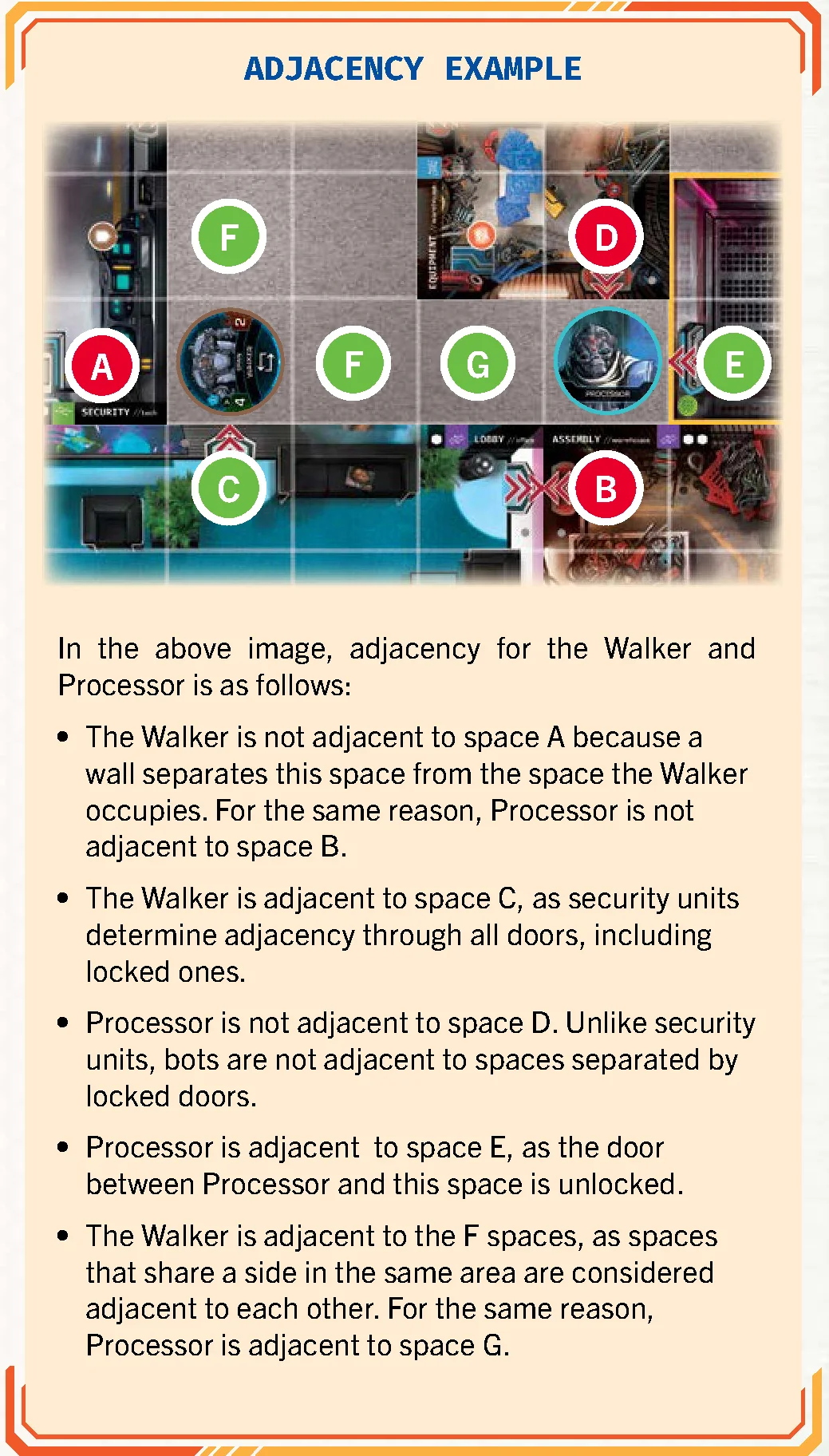
An area is any contiguous group of spaces bounded by walls, closed doors, or mat edges. Each room is a distinct area. All connected hallway spaces form an area; segmented hallways or disconnected outdoor spaces count as separate areas. Safe zones are distinct rooms and separate areas.
Adjacency
Adjacency applies strictly orthogonally (never diagonally) between spaces sharing an edge:
- Walls block adjacency. Unlocked doors and destroyed walls do not block adjacency.
- Bots: Locked doors block bot adjacency.
- Security Units: Locked doors DO NOT block security unit adjacency, as guards can traverse locked doors.
- Targeted Abilities: Adjacency is evaluated from the perspective of the acting unit (e.g., a Walker’s Drain affects a bot through a locked door).
- >> Security units only detect bots within their current area; a bot adjacent through a closed door or destroyed wall remains undetected unless spotted directly.
Component Limits
- Limited: Action chips, action dice, security unit chips, pings, destroyed wall chips (max 3 per floor).
- Unlimited: Beads, cache/key chips, terminal chips, pegs.
Bots Overview
Bots are player-controlled characters, comprising agents and the command module.
Agents
Agents are individual bots controlled by specific players. Rules affecting “agents” do not apply to the command module. Certain agents possess proprietary dice (e.g., Casing’s Pressure die, Bit’s Lift die) that are only used when playing as an agent.
Command Module
The command module is a shared unit accompanying the agent team. It does not take its own turns; players allocate move AP and action slots to it instead. Key rules:
- It has inventory slots and can carry keys, equipment, and uninstalled mods, but cannot activate equipment or mods. It can use keys.
- It does not receive objective power rewards.
- If the command module is shut down, the game is immediately lost.
- It starts with a fixed power level and does not need to spend power down to a limit, holding up to 10 power.
- Upgrades on the command module can be purchased using power from any combination of bots, provided at least 1 power is paid by the command module or the active player’s agent.
- The team reserve serves as the command module’s reserve.
Power & Routing
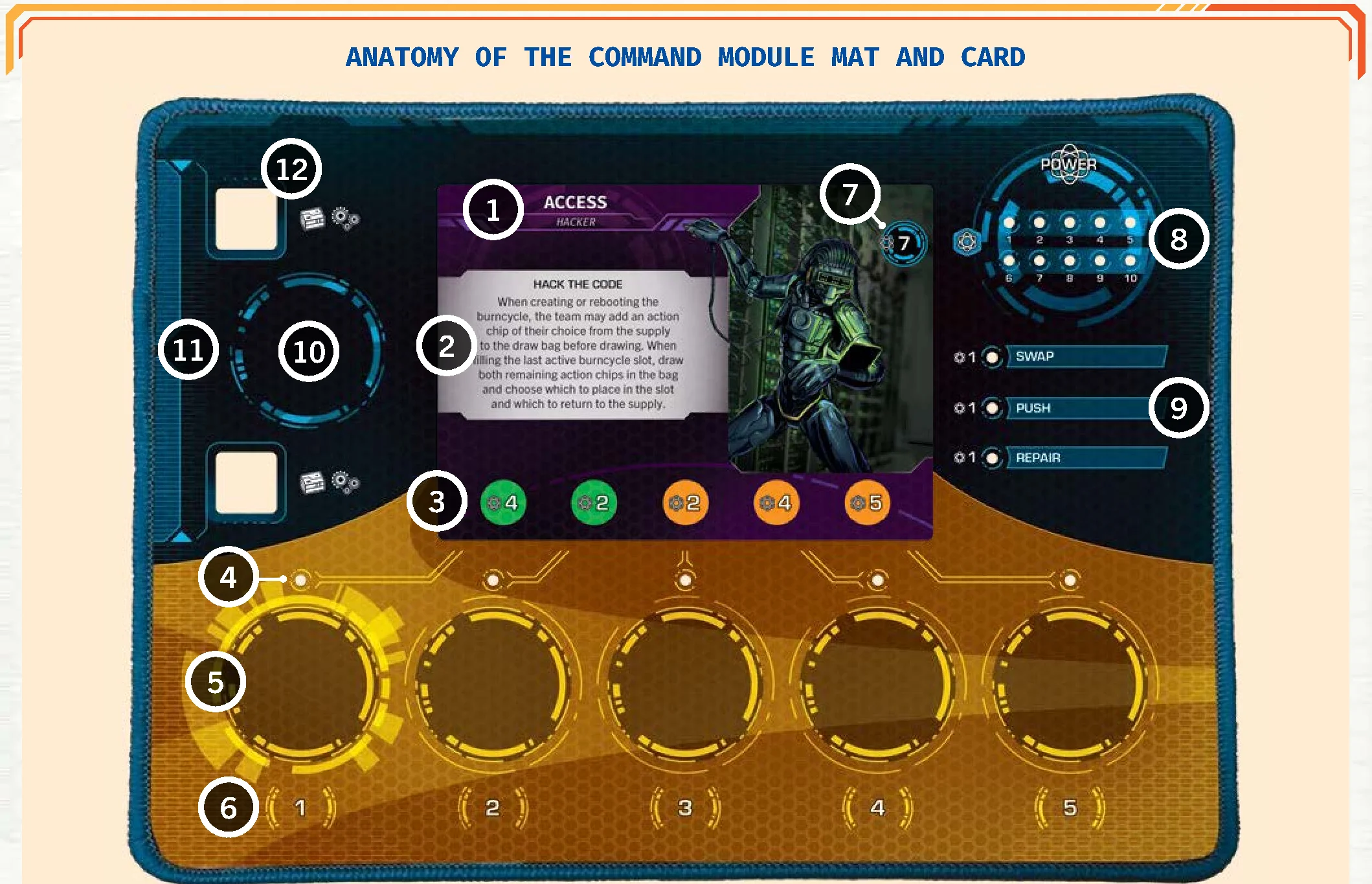
Power serves as bot health (0 power = shut down), currency for upgrades, and basic action dice in the pool (1 power = 1 basic action die). Players route power during steps 1 and 5 of their turn to activate abilities or purchase upgrades. Agents must spend down to their power bank limit at the end of step 5.
Action Dice & AP Checks
There are three grades of action dice:
- Basic Dice (1, 1, 1, 1, 2, blank)
- Advanced Dice (1, 1, 2, 2, 2, 3)
- Elite Dice (2, 2, 2, 2, 3, reroll)
During step 2 of their turn, a player builds their dice pool: 1 basic die for each current power point, plus advanced and elite dice matching their activated upgrades. Dice can be rolled in any quantity (including 0) when performing AP checks. Unused blanks from basic dice can be spent in pairs (2 blanks = 1 AP) or returned to the player’s pool. Reroll symbols on elite dice allow rerolling any die before totaling AP. Rolled dice return to the supply once spent.
AP (Action Points) & AP Checks
AP is generated by rolling action dice or from optimization bonuses. Rolled AP cannot be saved across actions or turns. Players may choose to utilize less AP than rolled. In threshold AP checks (such as strikes or terminals), all rolled dice are sent to the supply regardless of success, and excess AP is lost.
Inventory, Equipment & Keys
Each bot has 2 inventory slots for equipment/mods, and unlimited space for key chips. Keys are acquired from key equipment cards or by defeating guards carrying keys. Keys can be traded freely, used during keypad actions to auto-unlock doors, or spent during move actions to open adjacent doors on the fly.
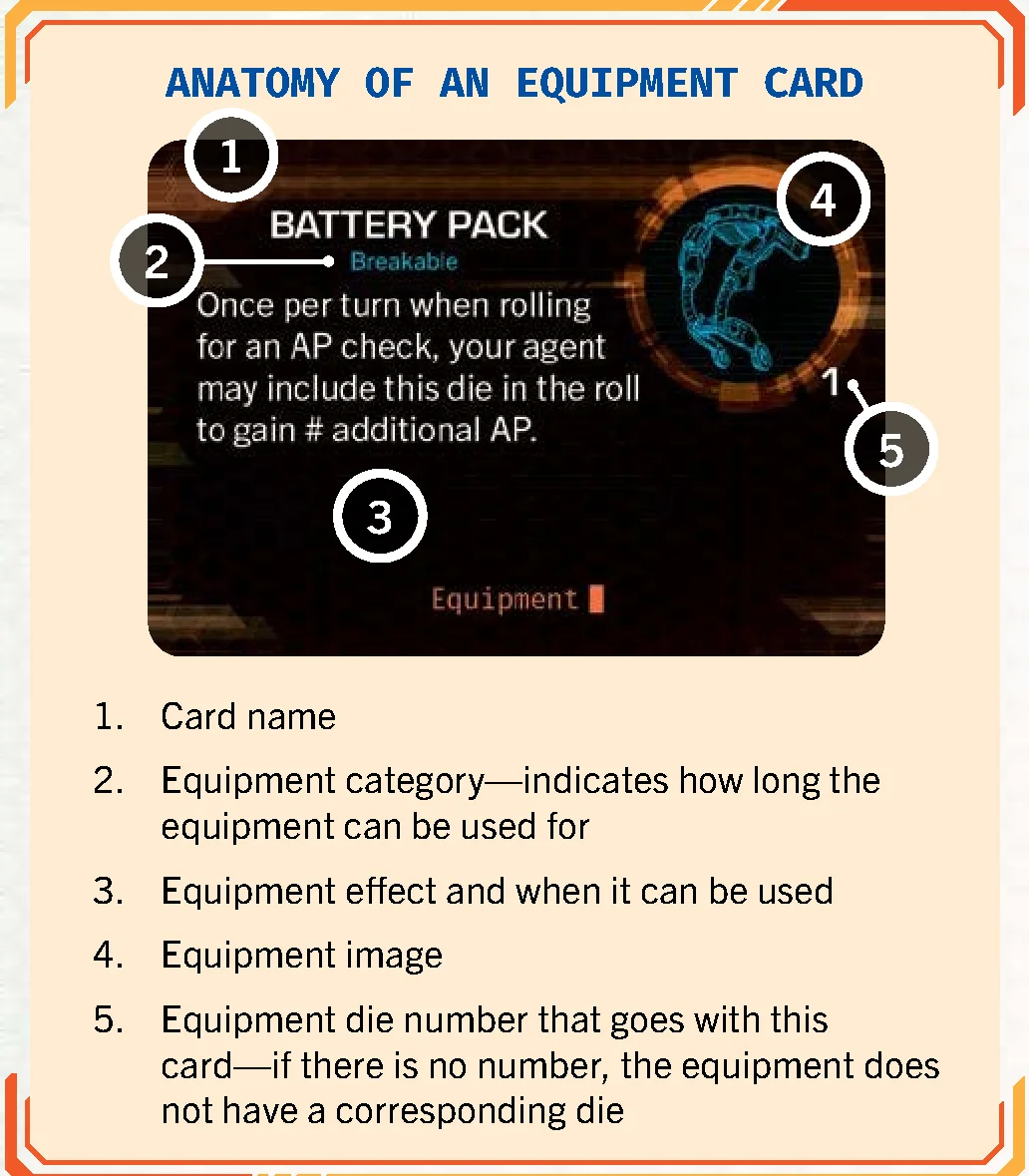
Equipment Cards
Acquired from caches, equipment cards are kept in inventory (limit 2 cards total across mods and equipment). Categories include:
- Discard: Trigger immediately when drawn, then discard.
- Single Use: Discard after using.
- Counter: Uses an equipment die showing charges or values.
- Breakable: Uses a die. If the rolled result displays a
 hazard icon in the corner, discard the card after resolving.
Mods & Imperatives
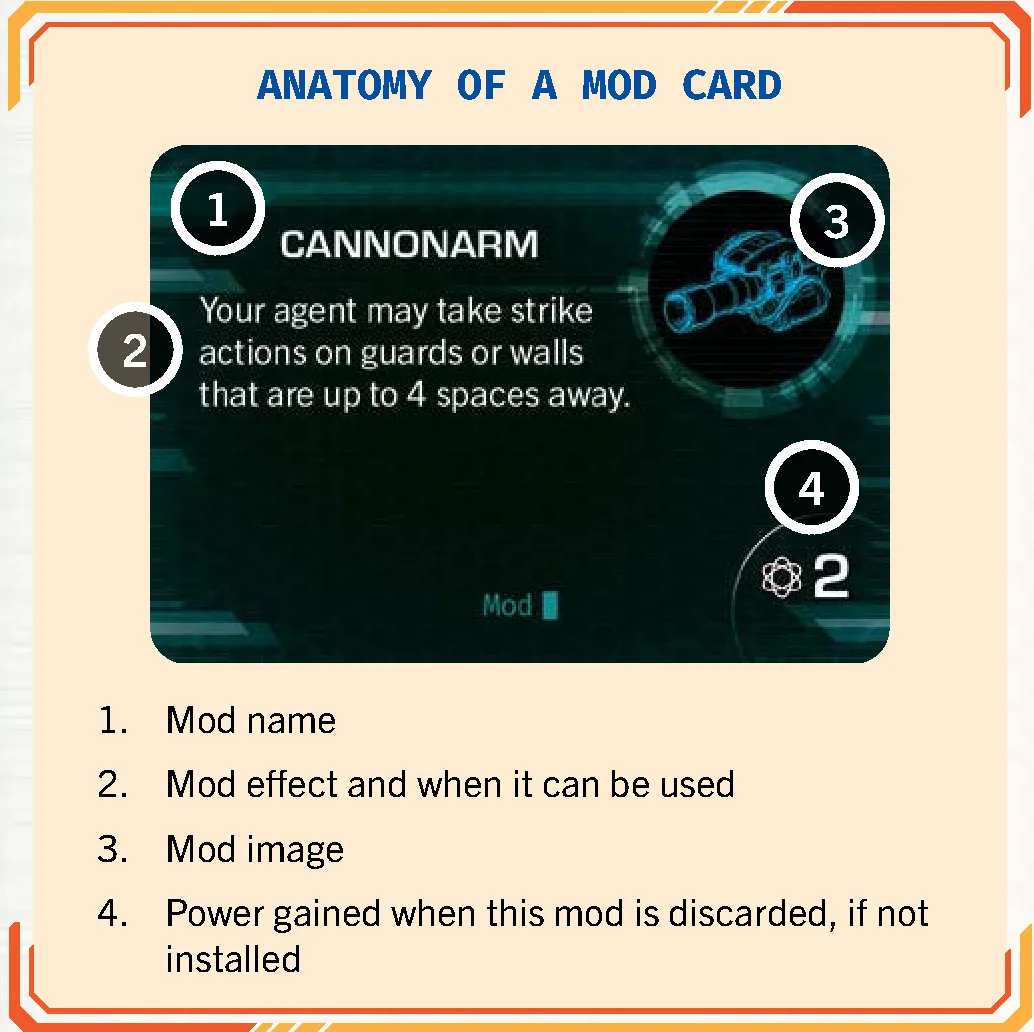
Mods
Obtained from terminals. Placed sideways as uninstalled (can be traded; discarding awards printed power). At any time, an agent can install a mod upright to gain its permanent ongoing benefit (installed mods cannot be traded or uninstalled; discarding them yields 0 power).
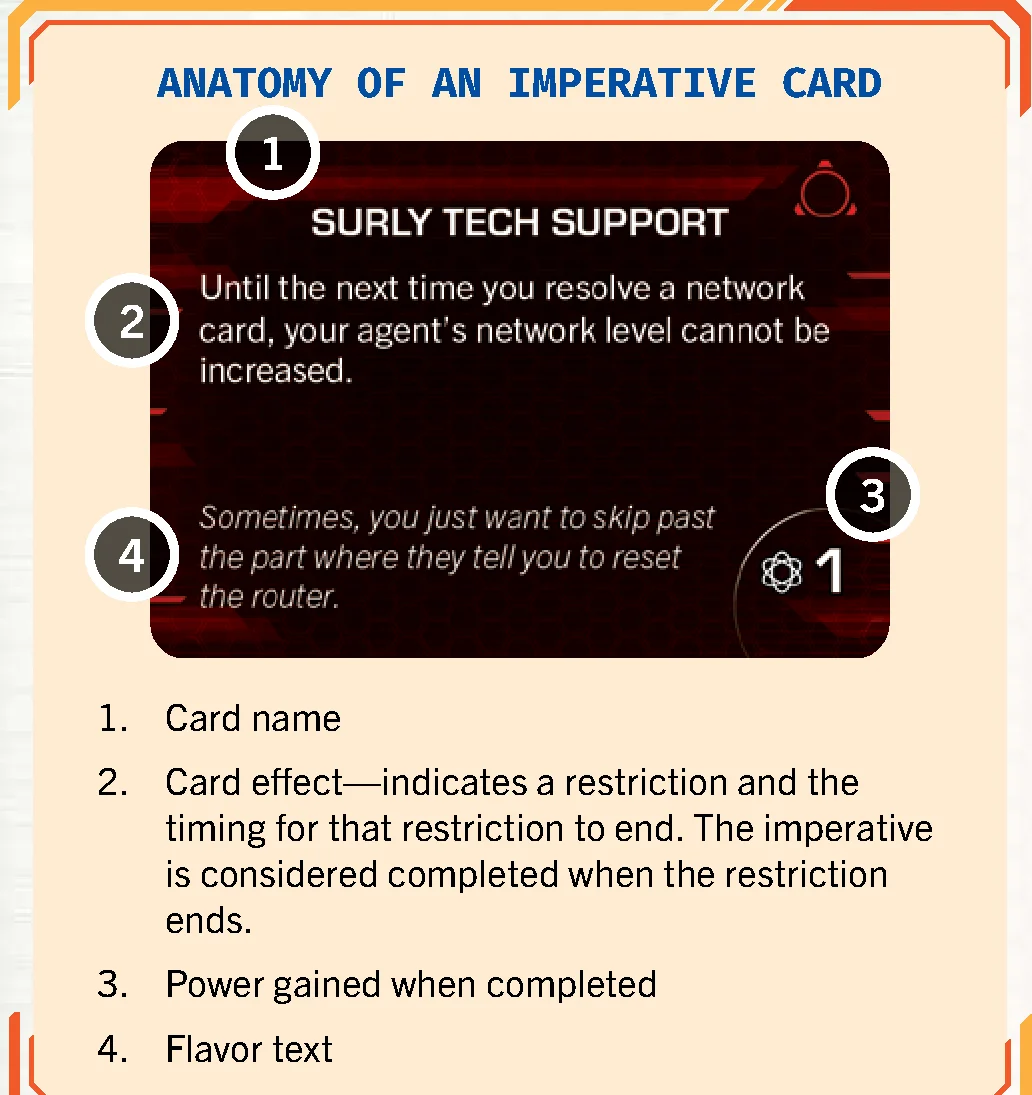
Imperatives
Cards imposing conditions on agents. Drawn at the start of each floor (limit 1 per agent; command modules never draw imperatives). Completing an imperative awards the listed power immediately. Failing or discarding an imperative costs 1 power.
Universal Abilities & Upgrades
Bots can acquire universal upgrades for 1 power each:
- Swap (1 Power): Move into an adjacent bot’s space, swapping positions simultaneously.
- Push (1 Power): Spend +1 AP during a move action to shove a security unit to an adjacent empty space, entering its space (causes detection). Adjacency is preserved during movement.
- Repair (1 Power): Use a general action to transfer power to any bot on the map.
Special Characters
Interface (Special Rules)
When disguised as a guard, Interface ignores detection from guard awareness and moves up to the disguise’s movement value. Disguised Interface acts as a guard during the corporation’s turn. If attacked, the disguise is lost and Interface takes 2 damage.
Memory & Joan the Drone
Joan is not a bot and does not trigger guard awareness. She has two states: charged and depleted. Depleted by surveilling or stunning guards via abilities, Joan recharges when sharing a space with Memory. Units can pass through Joan via automatic swap.
The Burncycle
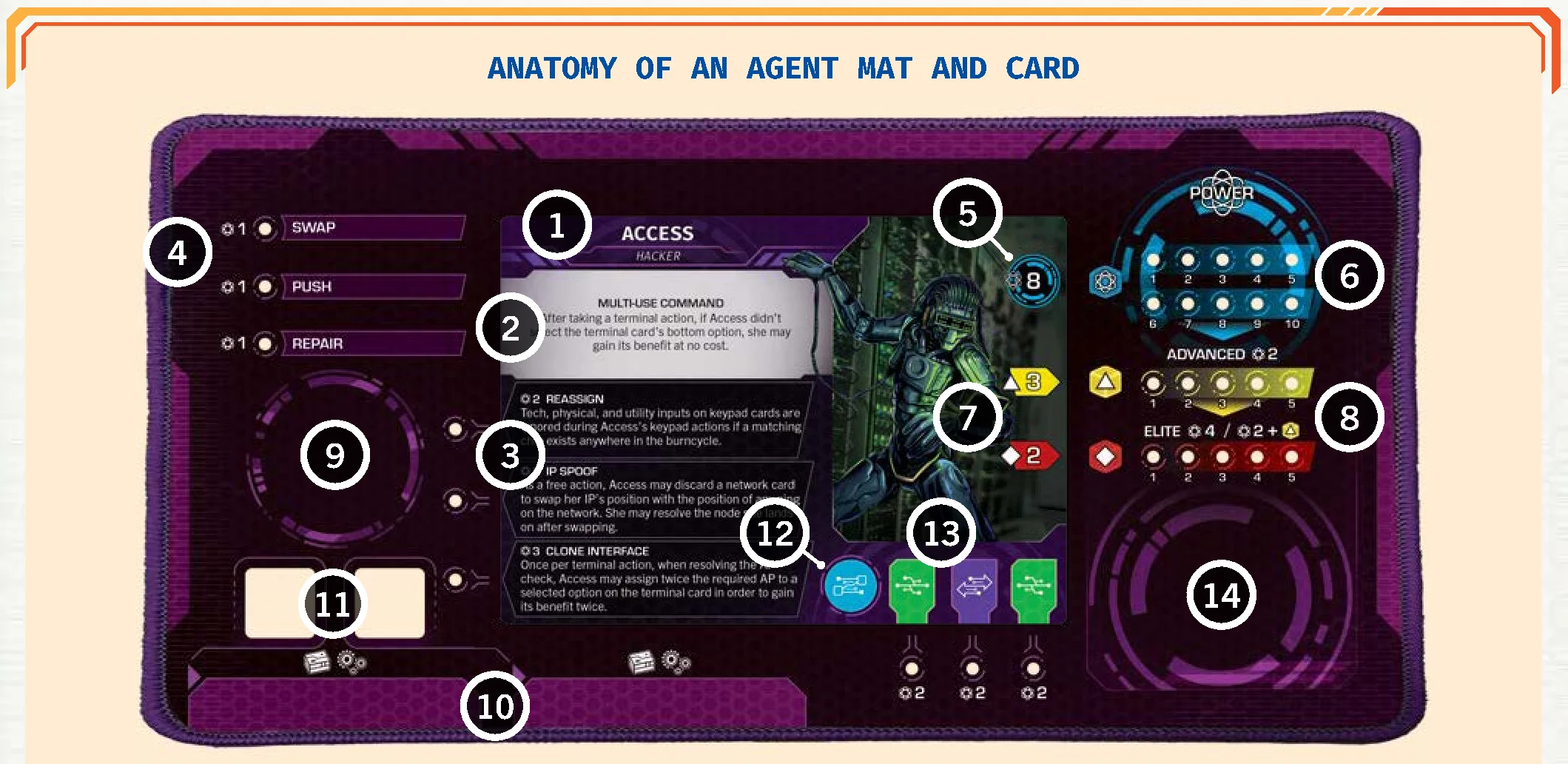
The burncycle represents the operational instruction sequence on the command module mat, consisting of up to 5 slots. Active slots contain action chips used for both physical/tech/utility actions and network movement.
Action Chips & Reserves
Action chips exist in five varieties: general, physical, tech, utility, and captain. They populate the burncycle track and constitute reserves.
Chips have an active side and a degraded side. The degraded side is only used while slotted in the burncycle track to signify that the chip is inactive for both actions and network movement.
Reserves are created during burncycle creation and reboots from outdoor spaces and occupied rooms. Used to alter the burncycle or resolve keypad inputs.
Using the Burncycle for Actions
During the action phase, players proceed through active burncycle slots from left to right, advancing the tracking bead:
- Captain Action Chip: Its designated event on the Captain card must be executed immediately when reached, even if the player passes on taking an action with the chip.
- Matching Chip Type: Performing an action matching the chip optimizes it. Matching is entirely optional.
- Degraded chips are skipped.
Using the Burncycle for Network Movement
During step 4 of a turn, each non-degraded chip grants network movement. General and captain chips allow an IP to move 1 node; physical, tech, and utility chips grant extended movement.
Degrading the Burncycle
At the end of every turn, roll the burncycle die to degrade a slot: flip the matching slot’s chip to its degraded face. A  result lets the player choose which chip degrades. If the rolled slot is already degraded or inactive, advance clockwise to the next active chip (slot 5 wraps to slot 1).
Rebooting the Burncycle
Rebooting can be declared before any player’s turn (not before the corporation’s turn):
- Clear all chips from the burncycle and all reserves to the supply.
- Place the captain chip and general action chips into the bag equal to the number of active slots. Draw and place them left-to-right.
- Regenerate team and personal reserves.
- Advance threat by the player count. Return banned IPs to the network at level 1.
Upgrading & Deactivating Slots
Players can unlock new slots during the power routing step by paying the power cost printed on the command module card. Unlocked slots immediately receive a general action chip from the supply. If an event deactivates a slot, remove its peg and return its chip to the supply.
Actions Overview
During the action phase of their turn, players can execute several categories of actions: general, physical, tech, and utility. The player advances the burncycle tracker token from left to right along the active chips currently installed in the burncycle track. For every active chip, the player may perform one action or choose to pass. Depending on the nature of the action, it is executed by the player’s agent, the command module, or the player directly.
An action is not required to match the type of chip it is activated on. However, if a physical, tech, or utility action aligns with a matching action chip in the burncycle track, that action becomes optimized, granting enhanced benefits or greater chances of success.
In contrast, free actions do not consume burncycle slots and may be triggered at any eligible moment during a player’s turn, provided they do not disrupt an action or resolution already taking place.
Physical Actions
Physical actions comprise move actions and strike actions. When activated on a physical action chip, they are optimized and provide an extra +2 AP for that action.
Move Actions
Move actions represent the primary method for bots to traverse the floor. When declaring a move action, the player performs an AP check by rolling any desired quantity of action dice from their dice pool:
- If optimized, add +2 AP to the total rolled.
- The player distributes the accumulated AP between their agent and the command module in any combination.
- Each AP allows a bot to move 1 space orthogonally.
- Bots cannot move through walls, locked doors, or other units, but may enter and pass through spaces containing caches or terminals.
- During movement, a bot may pick up any cache it enters (optional).
- Entering a room with a surveillance bead requires immediate surveillance: remove the bead, check the infobar for the number of surveillance dice (1 or 2), roll and resolve them, then resume the move action.
- >> Because action dice are rolled prior to dividing AP between the agent and command module, abilities modifying die rolls (such as Byte’s Tumble Magnet) can be triggered even if all resulting AP is allocated to the command module.
- >> If a move action is optimized, the bot may move using the 2 bonus AP without rolling any dice from the pool.
- >> Powers that explicitly modify agent movement (e.g., Casing’s Pressure die) cannot be applied to the command module.
- >> Players may interleave steps between their agent and the command module freely during a single move action.
- >> Movement awarded outside of standard move actions (such as bonus movement from gear or abilities) does not count as a move action. Abilities requiring a move action cannot trigger during bonus moves (for example, using a key requires a move action and cannot be done during Nitro Shot movement).
Strike Actions
Strike actions allow bots to attack security units and demolish walls. Either the agent or the command module may strike an adjacent target by conducting an AP check with any number of dice from their pool:
- If the action is optimized, add +2 AP to the total rolled.
- The total AP rolled must equal or exceed the durability of the target in a single attempt; AP cannot be accumulated across multiple actions.
Striking Security Units
A bot adjacent to a security unit may spend a strike action to stun or shut it down. Durability depends on the unit’s level:
- Level 1 Guard: 10 AP
- Level 2 Guard: 15 AP
- Level 3 Guard: 20 AP
- Captain: Value printed on the Captain card
Results of striking a security unit:
- Shut Down: If rolled AP equals or exceeds durability, the guard chip is discarded and the striking bot gains 1 power. If the guard carries a key, the bot takes the key into its inventory.
- Stun: If the strike fails but comes within 5 AP of the durability value, the attacker may choose to stun the unit instead. Flip the guard chip over; it will not activate on the corporation’s next turn and flips back at the end of the security phase. A key held by a stunned guard is also claimed by the striking bot.
- Threat and Detection: Striking a security unit always advances threat by 1 and immediately causes the striking bot to become detected, regardless of success.
- >> Players may intentionally use less than the rolled AP, such as electing to stun a guard instead of destroying it.
Striking Walls
A bot adjacent to a wall may attempt to destroy it with a strike action:
- Durability: 10 AP.
- Success: Place a destroyed wall chip on either side of the wall with its door arrow pointing toward the broken wall. The striking bot becomes detected and may immediately take a free move through the opening into an empty space.
- Failure: No chip is placed and the bot remains undetected.
- >> Destroyed walls are treated as unlocked doors for movement and adjacency.
- >> Bots cannot strike a wall segment that already contains a door.
- >> Maximum limit: Only 3 walls can be destroyed per floor. Destroyed wall chips are returned to the supply when changing floors.
- >> Exterior walls can be attacked, but openings lead nowhere unless granted a specific rule by the mission card. Exterior-facing door arrows are ignored.
Tech Actions
Tech actions include terminal actions and network card actions. They are optimized by the tech action chip.
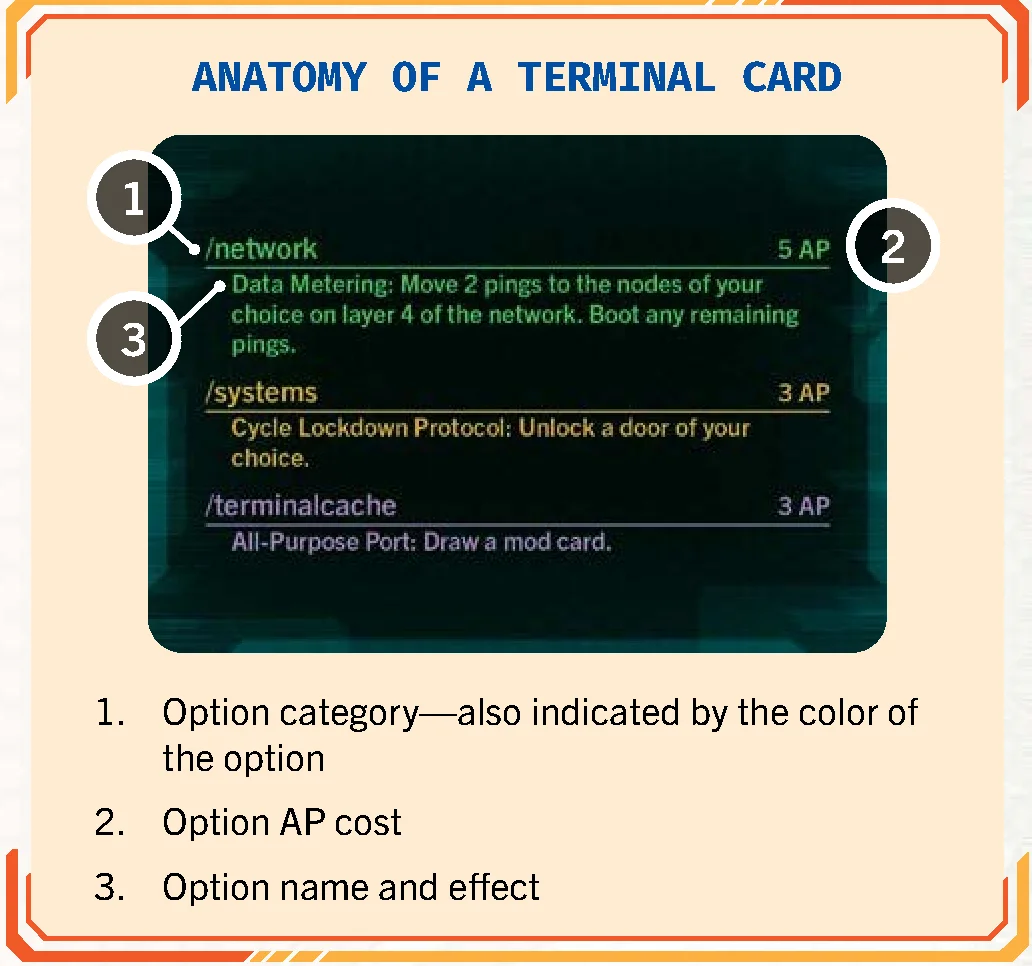
Terminal Actions
A bot occupying a terminal chip may take a terminal action. The player reveals the top card of the terminal deck, which presents 3 distinct options, each detailing an AP requirement and an effect:
- Select an option before rolling dice, then roll an AP check. Meeting or exceeding the requirement resolves the chosen effect. The terminal card and the floor chip are discarded regardless of success.
- Optimized: The player may select up to 2 options prior to rolling. Rolled AP can be distributed between both options. If insufficient for both, the player chooses which option to satisfy.
- >> Selected options cannot be altered after the roll. Players may choose to roll 0 dice or decline to apply rolled AP, but the terminal chip is still discarded.
Mainframe Terminals
Terminals flipped to their mainframe side (typically via surveillance rolls) reduce the AP cost of all options on terminal cards to 0 AP. Option limits still apply: 1 option for standard actions, 2 options when optimized.
Network Card Actions
An agent may execute a network card action from any position on the floor; the command module cannot take this action:
- Draw 1 network card and place it faceup near your agent mat. Agent hand limit is 3 network cards; excess cards must be discarded immediately.
- At the end of your turn, all unplayed network cards are discarded and do not carry over.
- Optimized: In addition to drawing the card, the player may immediately take an extra unoptimized action without moving the burncycle tracker.
- Network cards are resolved during the network step of the turn.
Utility Actions (Keypads)
The sole utility action is the keypad action, optimized by the utility action chip.
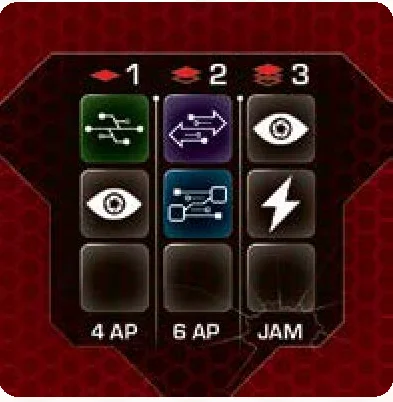
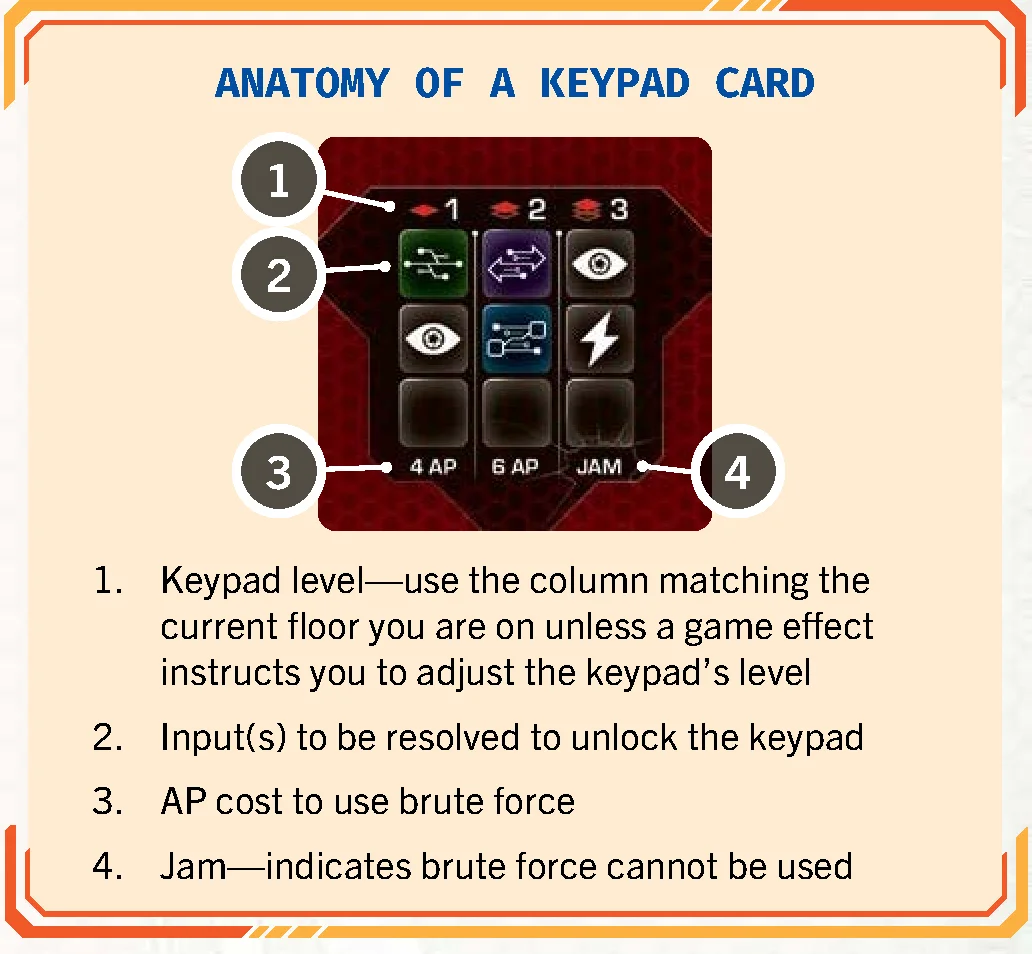
A bot adjacent to a locked door may attempt to open it with a keypad action. If a keypad card is already assigned to the door, use it; otherwise, draw the top keypad card and place it faceup next to the door. The column used corresponds to the current floor number (Floor 1, 2, or 3).
For every keypad die icon  printed in the column, roll the keypad die. Possible outcomes include:
 Automatic Unlock: The door opens instantly, resolving all requirements.
- Any other icon rolled (
 ,
,  ,
,  ,
,  ,
,  ,
,  ) is treated as an extra input that must be resolved.
Approaches to unlock the door:
- Resolving Inputs: Satisfy every icon in the column.
- Brute Force: Pass an AP check against the keypad’s durability (if not Jammed).
- Key: Discard a key to unlock the door immediately.
- Abort: Conclude the action without unlocking. The card remains by the door.
Upon success, discard the card, place an unlocked door peg in the board hole, and the bot may take a free move through into an empty space (without triggering swap or push). If unsuccessful, leave the keypad card faceup by the door for future attempts.
- >> Unlocking doors via keys during a move action or through terminal cards is not a keypad action.
- >> You cannot alter the burncycle midway through a keypad action.
- >> Multiple keypad attempts can be made on the same door in the same turn, keeping the same revealed card.
Resolving Inputs
All displayed and rolled inputs must be fulfilled during the same action in any chosen sequence. If optimized, the player may ignore any single input. Icons are resolved as follows:
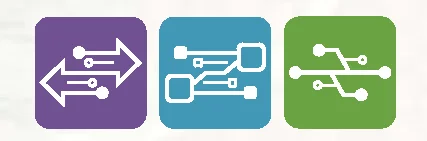 Physical / Tech / Utility: Discard a matching chip from personal/team reserve, OR jump the burncycle tracker ahead to a matching chip to the right of the current slot (forfeiting skipped actions).
- Alarm: The acting bot becomes detected (if already detected, counts as resolved).
- Ping: The CEO places 1 ping on the core (resolved even if all pings are deployed).
- Shock: The acting bot suffers 1 power loss.
- >> Inputs do not carry over across separate actions; all must be satisfied in one go.
- >> Keypad die results are re-rolled on subsequent attempts.
- >> The action chip currently holding the burncycle tracker cannot be used to pay for an input; only chips to its right may be used.
Brute Force
Unless the column states “Jam”, a bot may attempt to force the door via an AP check:
- Level 1: 4 AP
- Level 2: 6 AP
- Level 3: 8 AP
- >> Optimizing a keypad action provides no benefit when using brute force.
Keys
A bot in possession of a key may discard it at any point during a keypad action to immediately unlock the door without resolving inputs or rolling AP.
General Actions (Repair)
General actions cannot be optimized. The primary general action is Repair, available once a bot activates its repair upgrade. Certain abilities and mission cards may provide other general actions.
Repair Actions
With the repair ability unlocked (by routing 1 power to it), a bot may spend a general action to transfer power to another bot anywhere on the board (range is unlimited and line of sight is not required):
- The acting bot reduces its power bank by any chosen amount and increases the target bot’s power by that same amount.
- The acting bot must retain at least 1 power.
- A bot’s power may exceed its power bank capacity (up to the absolute maximum of 10).
- Repairing a shut-down bot reactivates it immediately.
- >> A bot repaired above its normal capacity does not have to discard excess power until step 5 of its subsequent turn.
Free Actions
Free actions do not advance the burncycle tracker and can be executed outside the standard action step. They can occur at any point on a player’s turn, except during another ongoing action, die roll resolution, or card effect resolution. Typical free actions include altering the burncycle and trading items. Mission cards, agent abilities, and equipment cards may also offer unique free actions.
- >> Free actions cannot interrupt movement within an ongoing move action. For instance, two bots cannot trade equipment midway through a move action.
- >> Free actions are permitted at the very beginning of a turn before taking any action-step actions, or at the very end after degrading the burncycle.
Altering the Burncycle
As a free action on their turn, a player may swap any chip in the burncycle track with an available action chip taken from either the team reserve or their personal reserve:
- The replaced chip (whether active or degraded) is returned to the general supply.
- The incoming reserve chip is always placed into the burncycle on its active face.
- If the captain action chip is removed and replaced before it has degraded, threat immediately advances by 2.
- >> Because free actions cannot interrupt other resolutions, you cannot alter the burncycle during a keypad action to fulfill required inputs.
- >> You cannot alter the burncycle after rolling the burncycle die but prior to degrading the indicated slot.
Trading
As a free action, an agent or command module may trade with any adjacent bot. Bots can exchange any quantity of keys, equipment cards, and uninstalled mod cards currently stored in their inventory. Exchanges between two player agents require the consent of both players.
- >> A trade is completely valid even if one participant receives nothing in return.
- >> Once a mod card is installed, it can never be traded.
- >> Following a trade, any bot whose inventory holds more than 2 total mods and equipment must discard down to the maximum hand limit of 2. Discarding an uninstalled mod in this manner still awards the power value printed on the card.
Floors & Mats
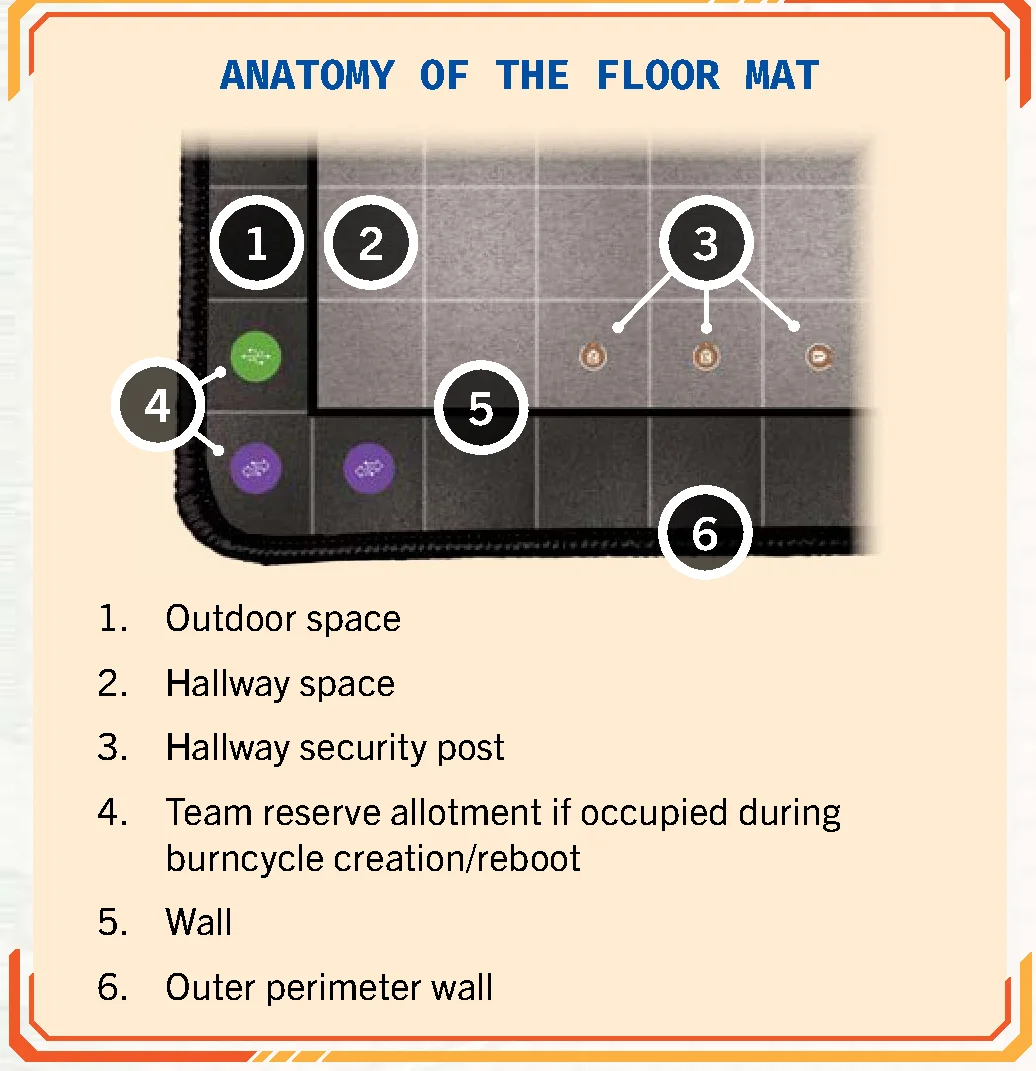
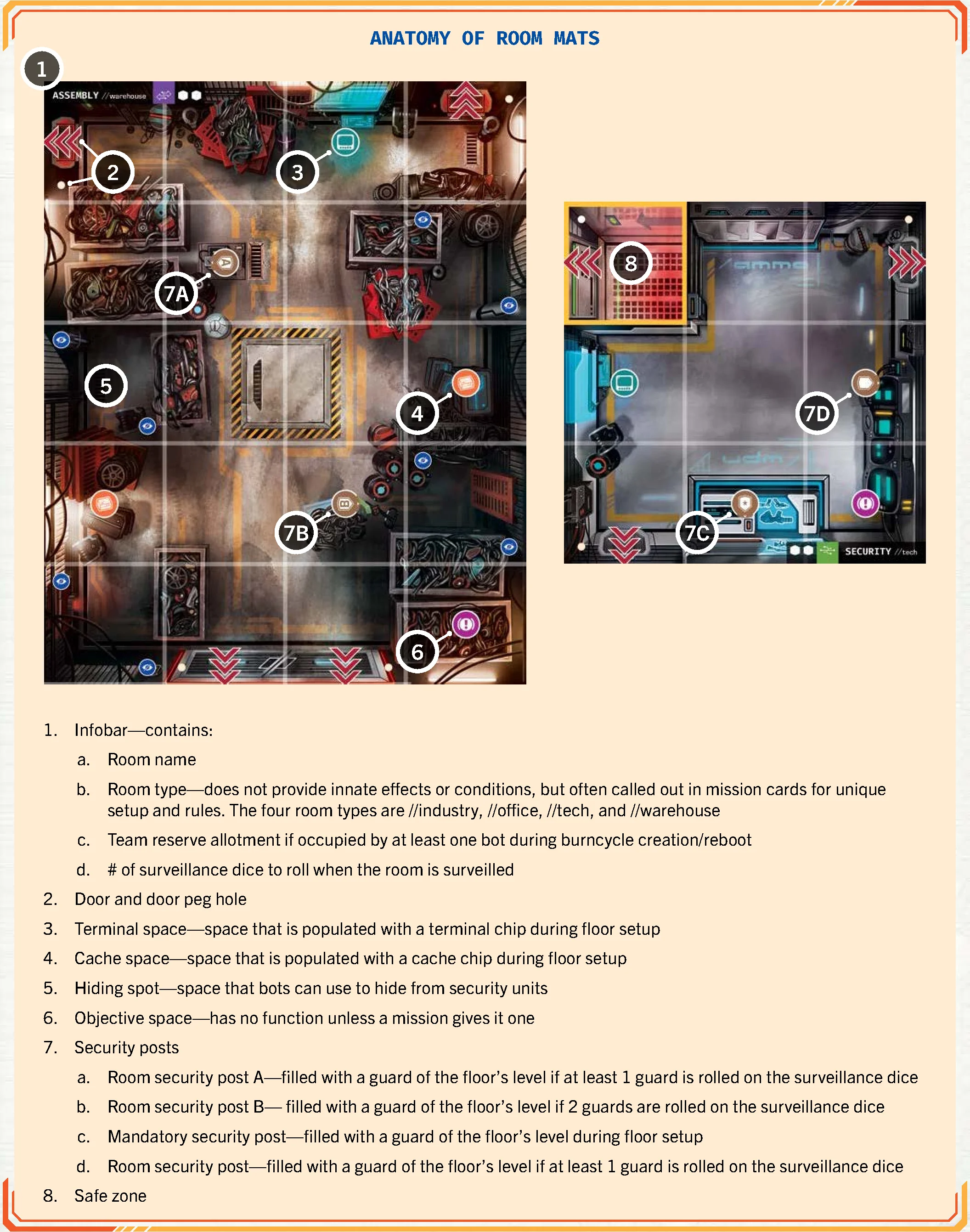
Each floor consists of room mats and hallways.
Changing Floors
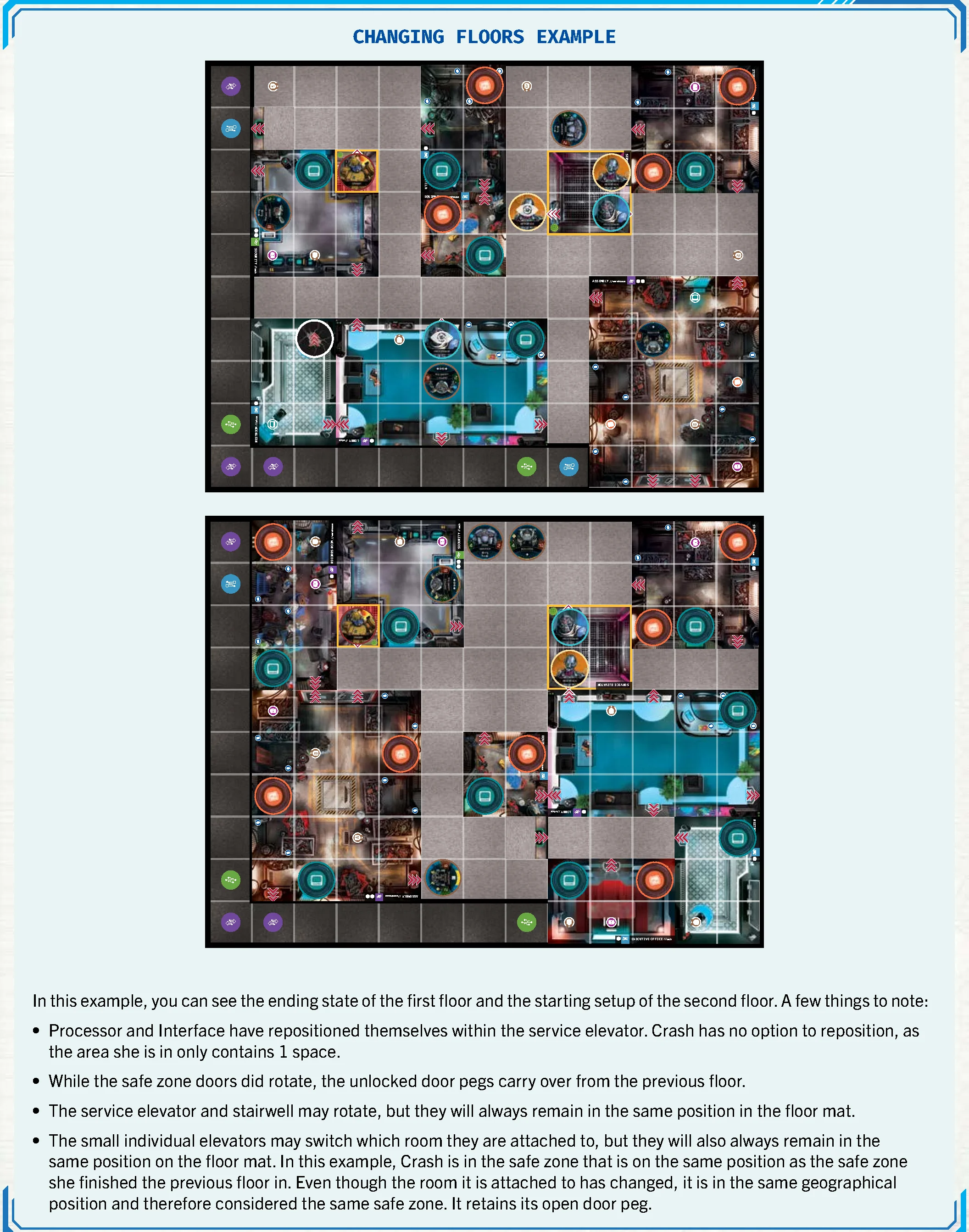
Advancing to the next floor requires completing all floor objectives and assembling all bots simultaneously in safe zones at the end of a turn:
- Assign the corporation marker to the player who took the final turn. Turn order resets so the player to their left becomes first player.
- Record unlocked safe zone doors (they remain unlocked on the next floor) and bot/guard locations inside safe zones.
- Remove all other board components and reset awareness chips.
- Set up the new floor according to the floorplan book, placing returning units in corresponding safe zones.
- Agents lacking an imperative card draw one.
Doors & Entrance
Doors are marked with  . All doors start locked. Bots cannot pass through locked doors, while guards can. Unlocking requires a keypad action or spending a key. Once unlocked, insert an unlocked door peg. Destroyed walls act as unlocked doors.
The single-tile Entrance mat creates a doorway and covers unused security posts.
Walls & Destroyed Walls
Outer mat edges, room borders, and lines separating outdoor spaces are walls that block sight, movement, and adjacency. Striking a wall with 10+ AP places a destroyed wall chip. Destroyed walls function as unlocked doors, and up to 3 walls may be destroyed per floor.
Surveillance
Entering an unsurveilled room (containing a surveillance bead) halts movement on the first space to roll the surveillance dice indicated in the room’s infobar:
 Guard: Spawn a floor-level guard at room post A (then B).
 Mainframe: Upgrade a terminal in the room to a mainframe terminal.
 Powercell: Surveilling bot gains 1 power.
 Autolock: Lock all doors leading into this room immediately.
 Imperative: The surveilling agent draws 1 imperative card.
Caches
Orange cache chips populate cache spaces during setup. Units can enter and pass through cache spaces. When a bot moves onto a cache, it may collect it: discard the chip and draw 1 equipment card into inventory. Security units do not collect caches but block bots while occupying the space.
Hiding Spots
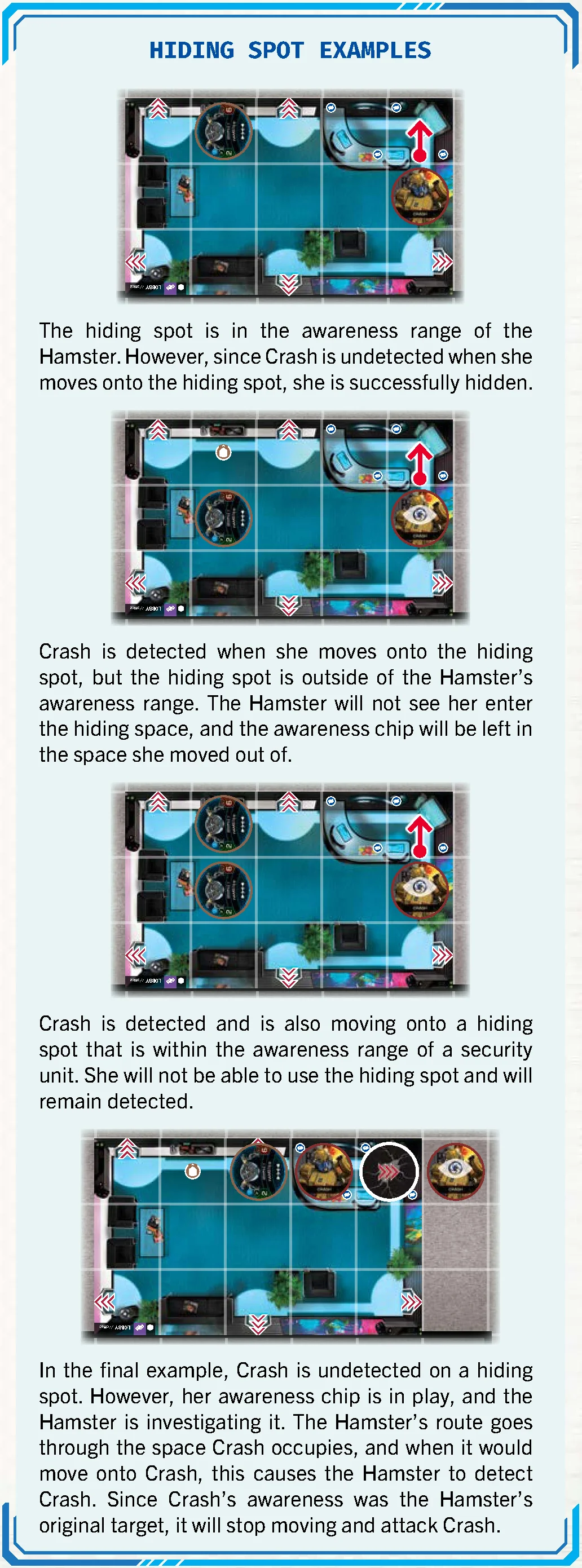
Designated by  symbols in rooms. When entered by an undetected bot (or outside enemy awareness), the bot hides and cannot be detected via awareness. If an enemy enters the space, the bot is detected.
The Corporation Turn
The CEO is located on the network mat and acts via pings. The corporation turn follows the player with the corporation marker chip and consists of three successive phases:
- Security Unit Activation (Pursue, Investigate, Patrol)
- Ping Activation
- Threat Advancement
Security Posts & Units
Deployment markers for guards:
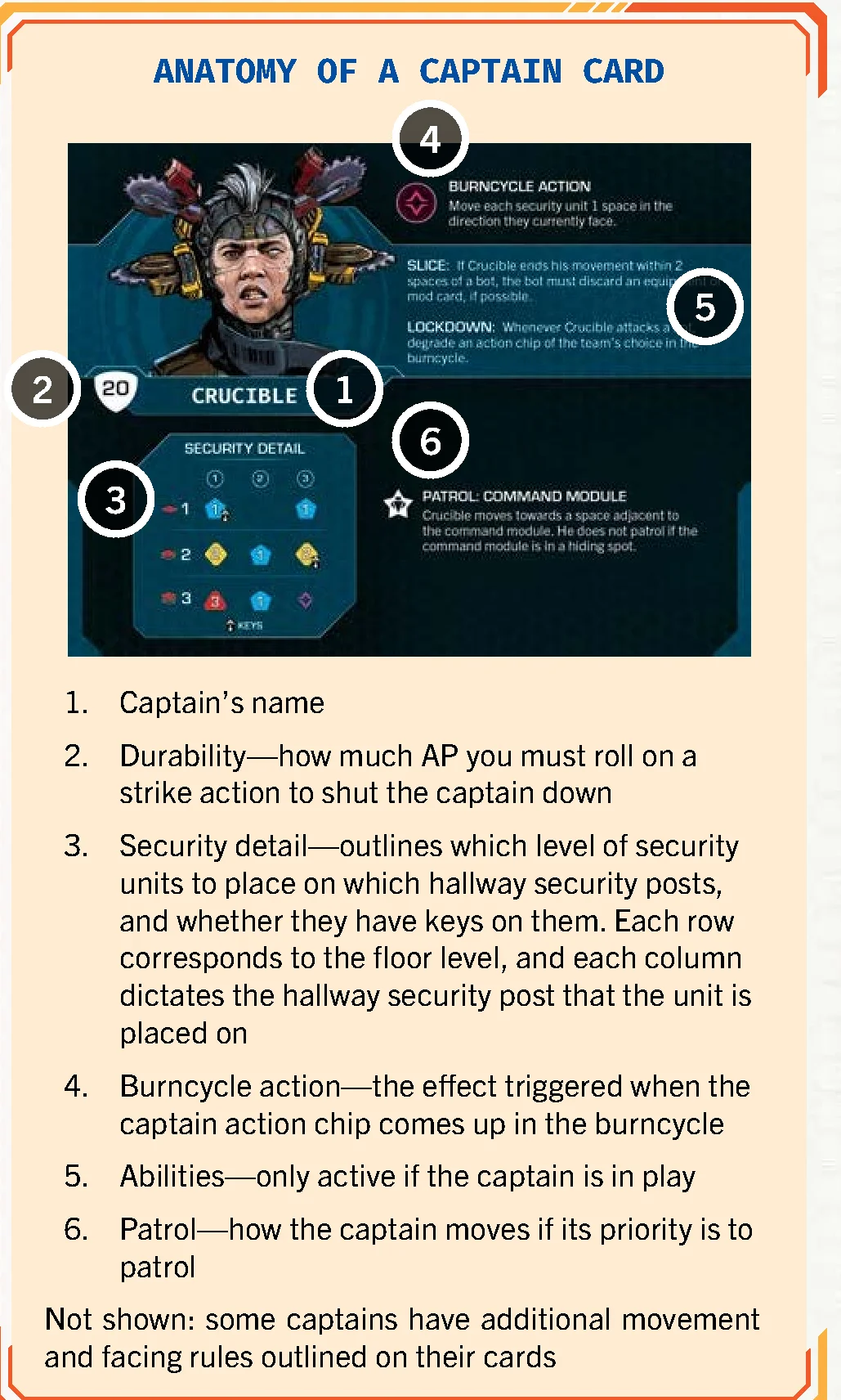
 Hallway Posts (1-3): Populated according to the Captain’s security detail chart.
 Mandatory Posts (Star): Populated during setup with a guard of the current floor level.
 Room Posts (A/B): Populated when a
  guard icon is rolled on surveillance dice.
Awareness & Detection
Awareness tracks the corporation’s surveillance of the bot team. Each bot has an awareness chip placed on the floor to mark its last confirmed position. A bot whose awareness chip occupies its current space is detected. Detection occurs upon entering a guard’s awareness range, triggering keypad alarms, being booted on the network, or attacking security.
- Security awareness is continuously checked at all times, during any phase or turn.
- On Seasoned difficulty, threat increases by +1 whenever an awareness chip enters the board from off-board.
- When a security unit moves onto an awareness chip, the chip is cleared and returned to the bot’s mat.
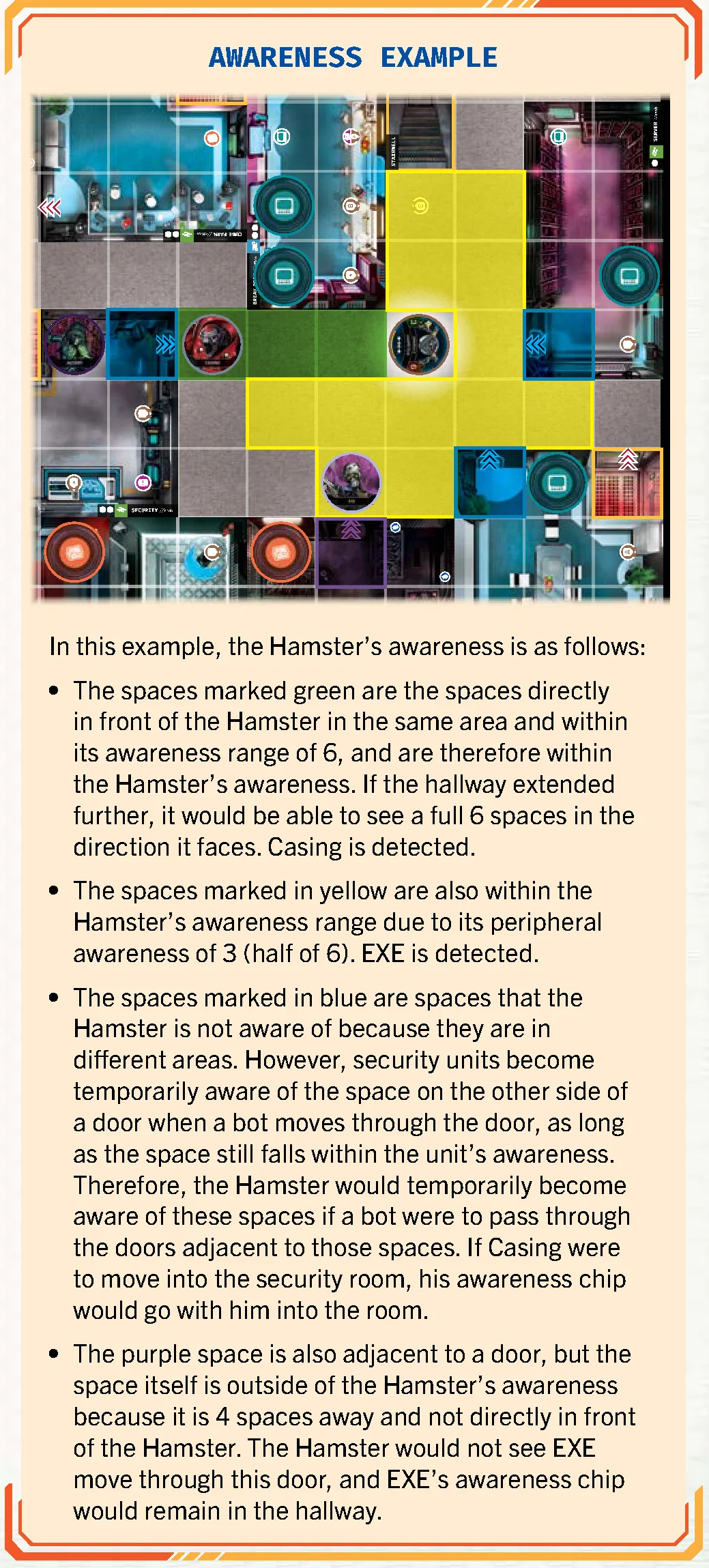
Awareness Range
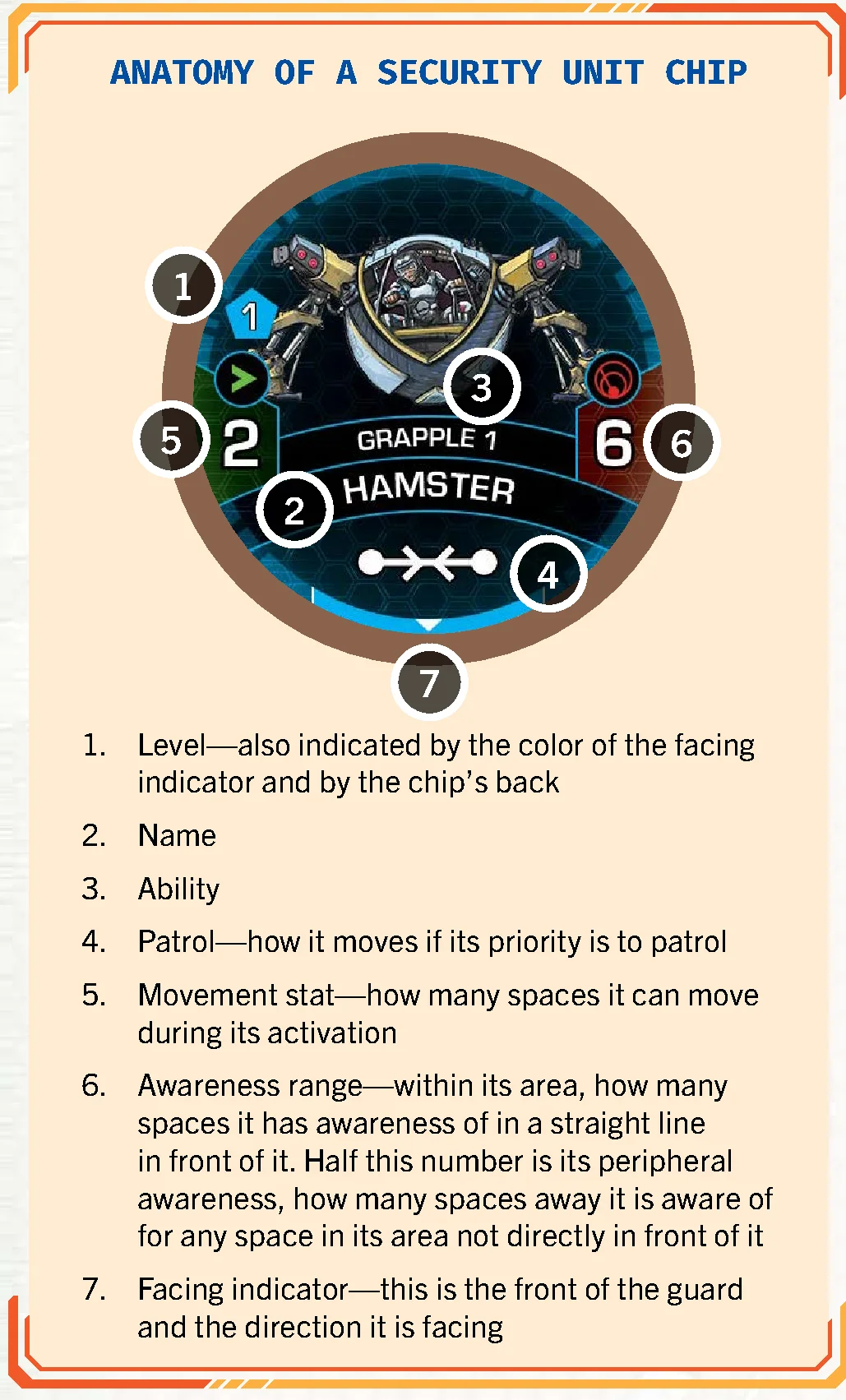
Security units have an awareness stat printed on their chip:
- Direct Sight: Equal to the full awareness stat in spaces straight ahead in the direction of the unit’s facing, within the same area.
- Peripheral Awareness: Equal to half of the awareness stat (rounded up) in all other directions within the same area.
Awareness Through Doors
Security units only see into another area when a detected bot moves through a door: the unit temporarily sees 1 space beyond that door, provided its range reaches it. If the bot is spotted entering the space, its awareness chip follows it.
Awareness in Safe Zones
Guards outside safe zones cannot see into them when bots enter through doors; awareness chips are left outside. However, performing noisy actions inside (attacking or breaking walls) causes detection within the safe zone.
Awareness in Hiding Spots
A bot moving onto a hiding spot becomes hidden only if undetected when entering, or if the hiding spot lies outside enemy awareness when entering. If a detected bot steps into a visible hiding spot, hiding fails and detection remains.
Security Activation
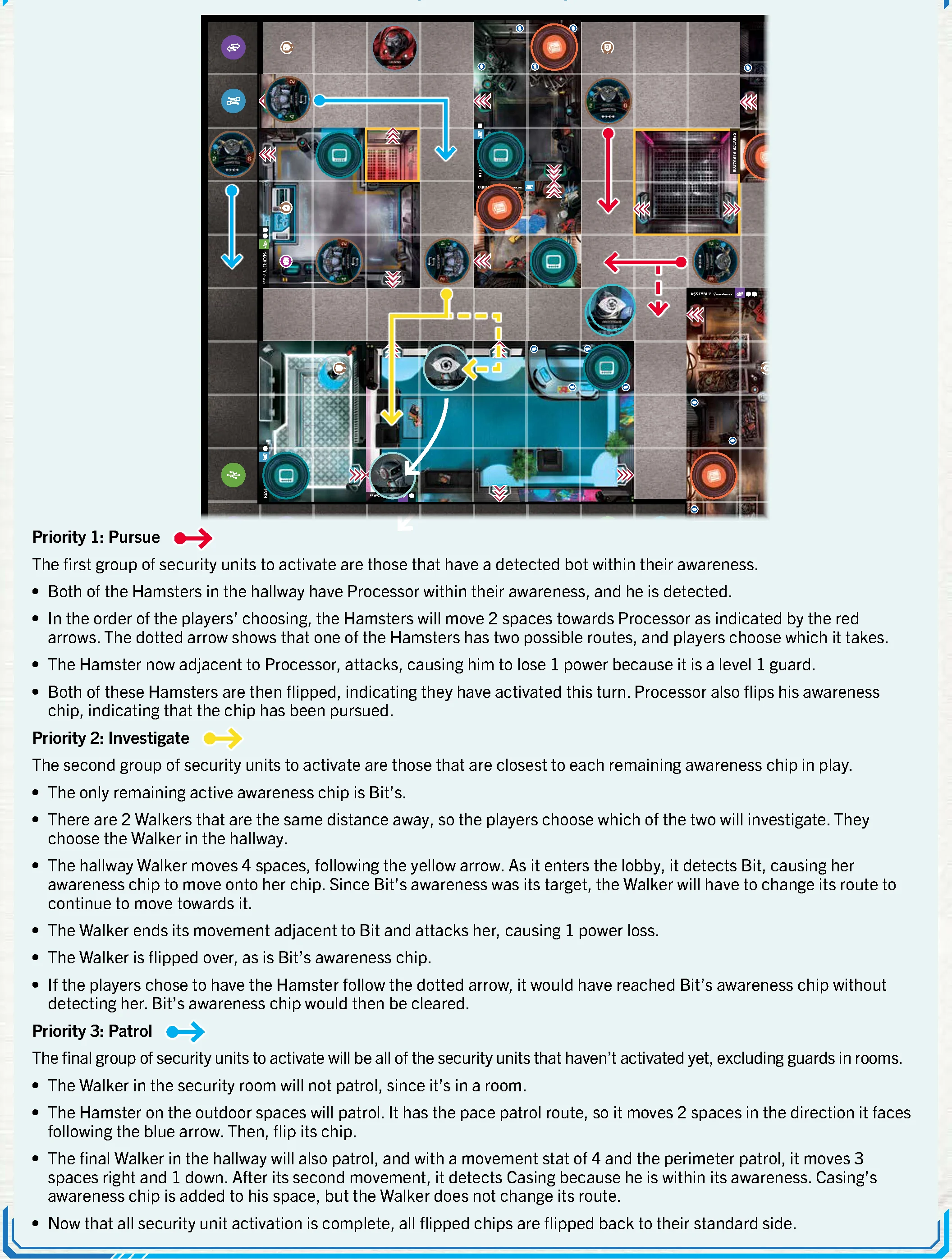
Guards activate in strict hierarchical order during the corporation turn:
- Priority 1: Pursue: Security units with detected bots in their awareness move via the shortest path to become adjacent and attack.
- Priority 2: Investigate: Security units move toward active awareness chips to clear them.
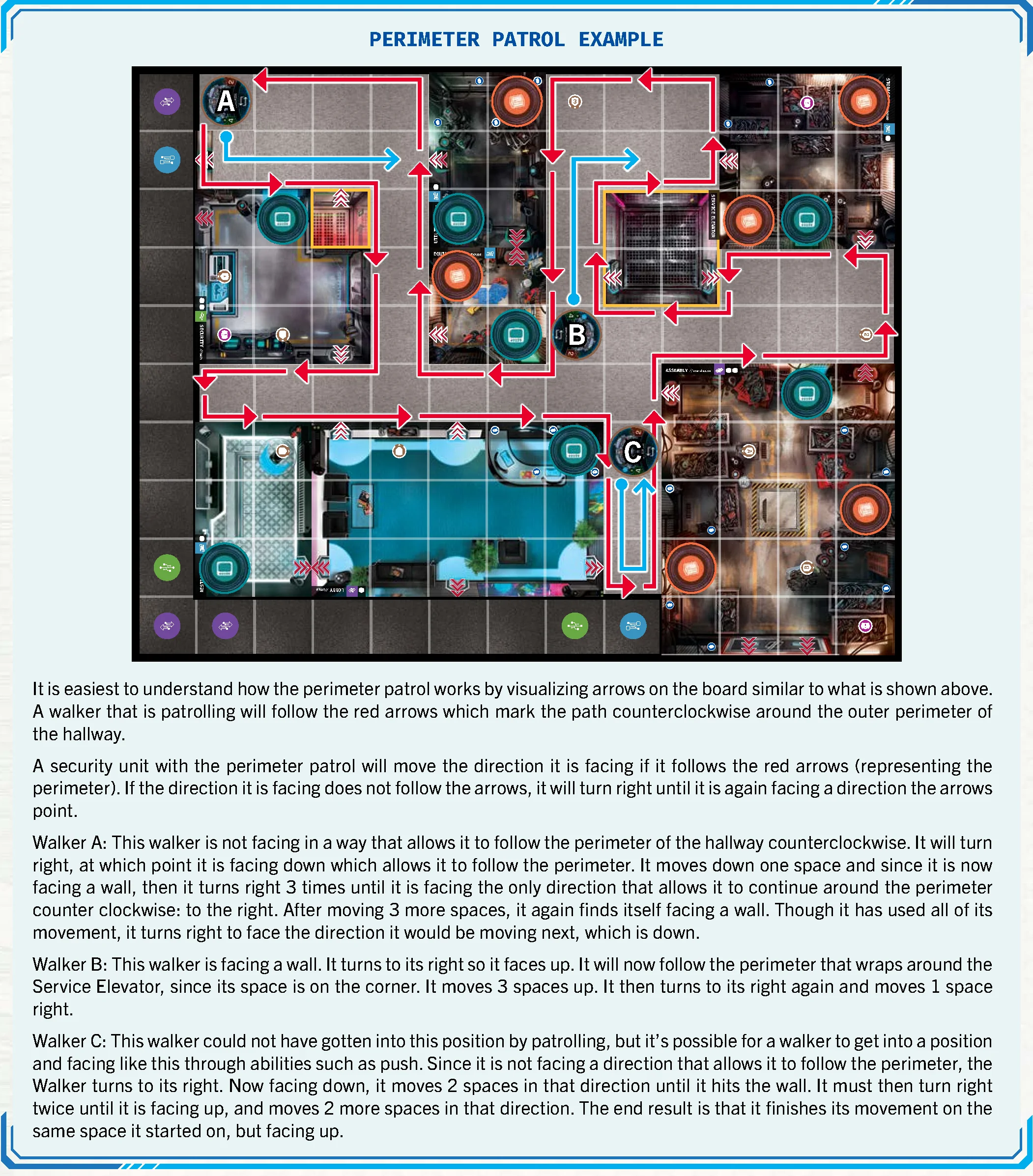
- Priority 3: Patrol: Security units with no targets follow their assigned patrol patterns (perimeter, pace, etc.). Guards in rooms do not patrol.
Guards deal damage equal to their level (1, 2, or 3); captains deal 3 damage.
Shut Downs & Stuns
- Bot Shut Down: Power reaches 0. Threat increases by +3; bot chip flips. Cannot act or advance floors until repaired. If the command module shuts down, the game is immediately lost.
- Security Unit Shut Down: Discard unit chip; attacker gains 1 power and claims any carried key.
- Stunned Security: Unit chip is flipped face down; skips activation this round and ignores awareness/abilities. Reactivates at end of corporation turn.
Network Cyberspace
The network mat represents the digital cyberspace. Agents are represented by colored IP pegs; the CEO is represented by red pings. Network levels range from 1 to 6.
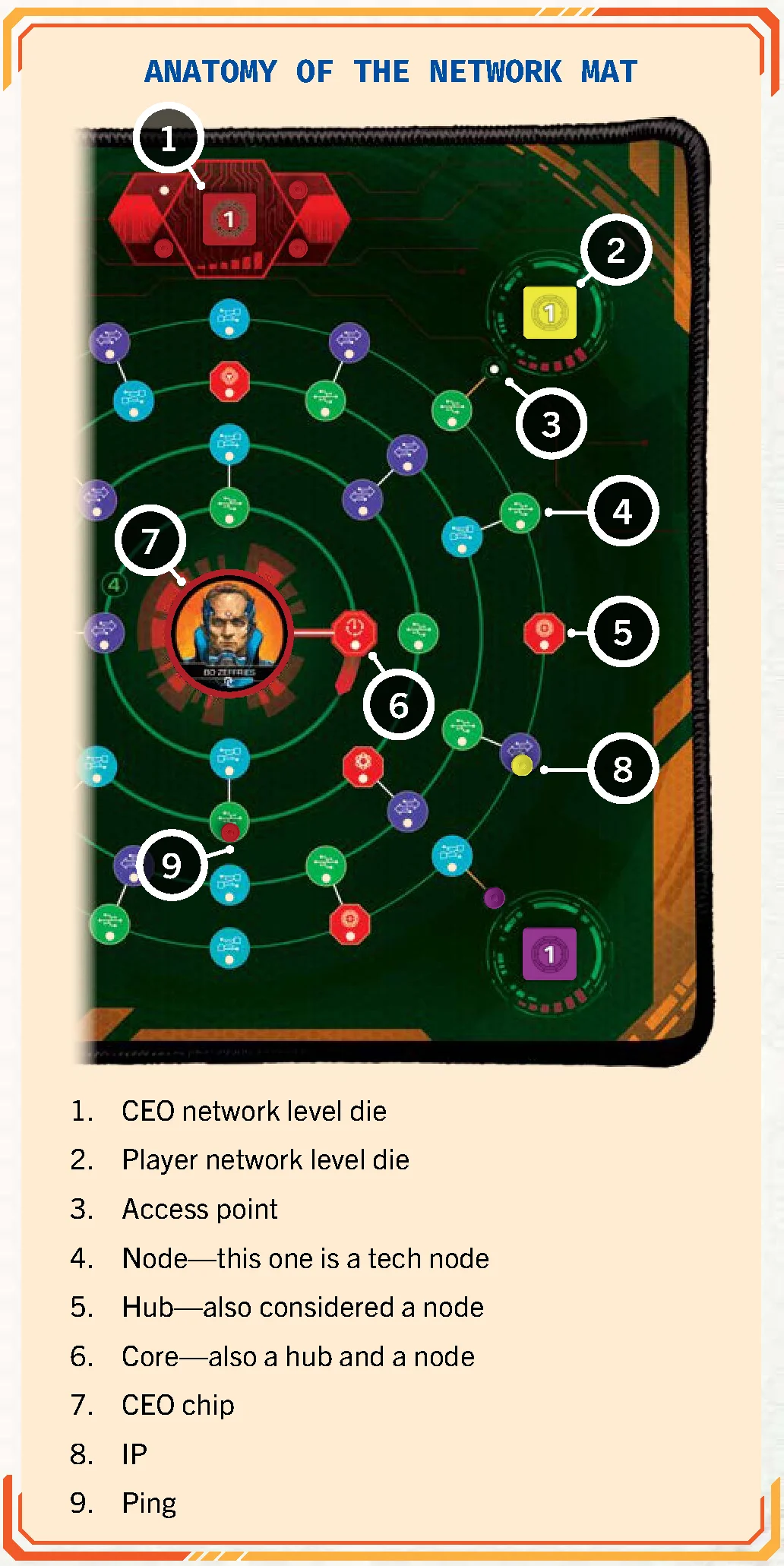
IP Movement
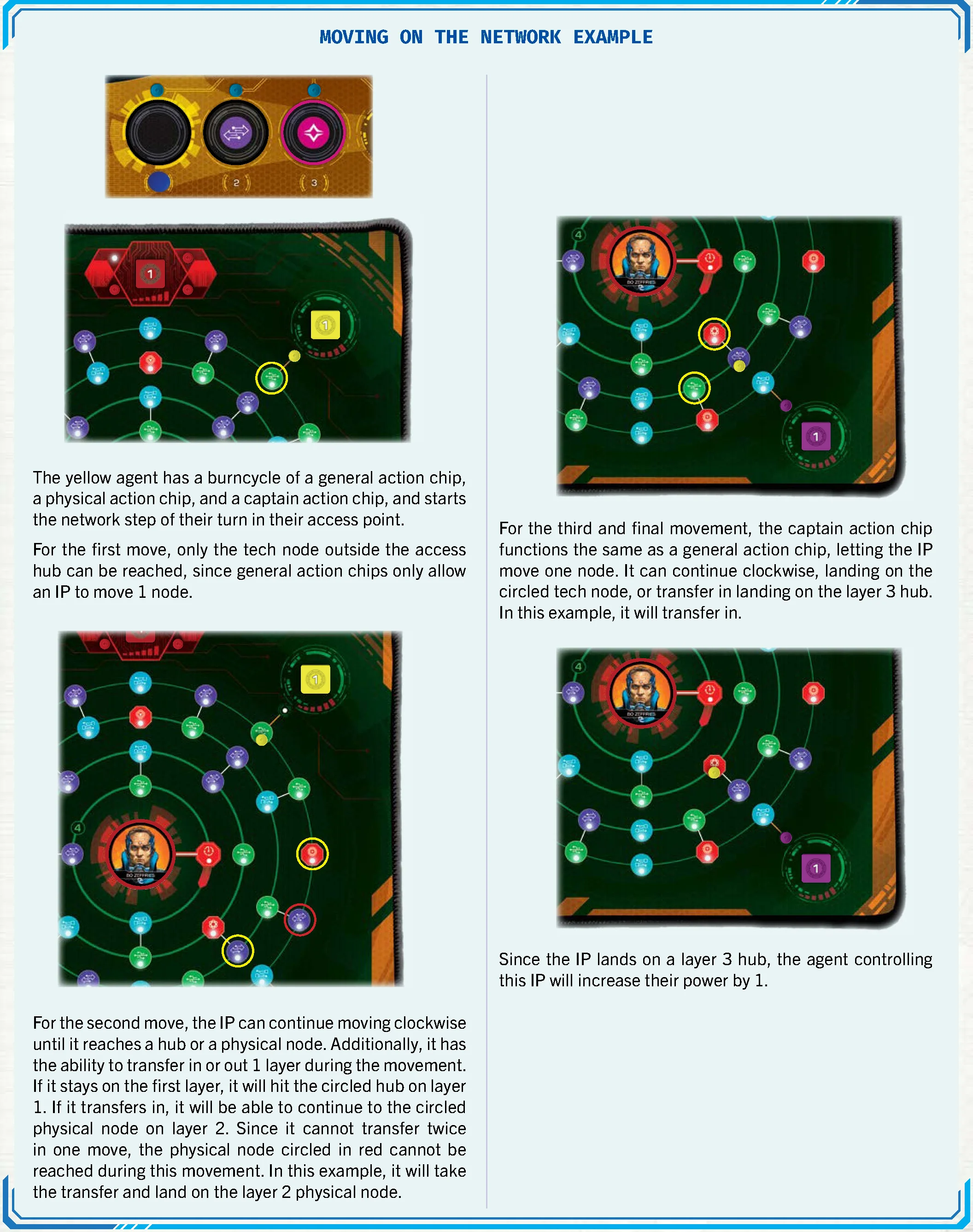
Driven by the burncycle chips from left to right. Movement proceeds clockwise until reaching a hub, ping, or matching action node. IPs can transfer across layers along white lines once per movement step.
 Layer 1 Hub: Increase network level by 1.
 Layer 2 Hub: Reduce threat by 1.
 Layer 3 Hub: Gain 1 power.
 Layer 4 (The Core): Gain all three benefits, then return IP to access point.
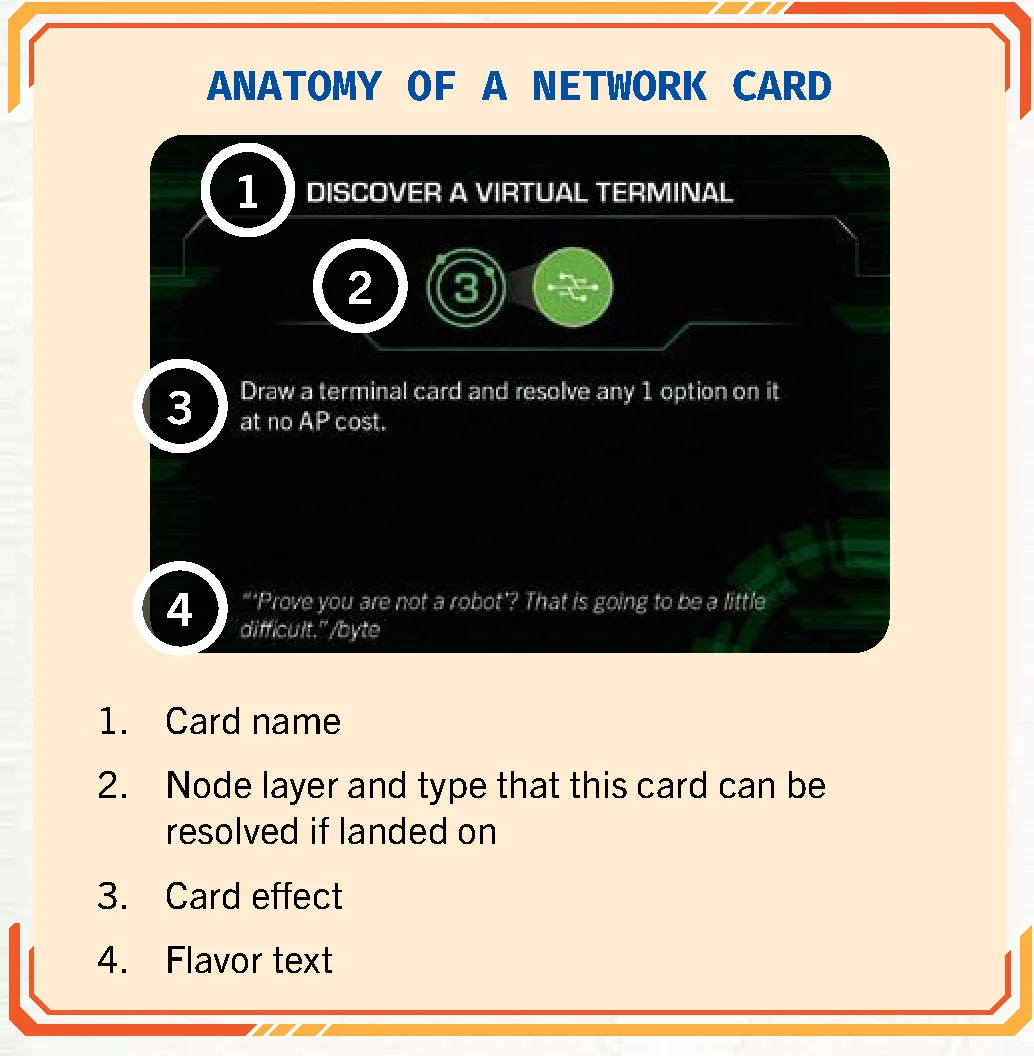
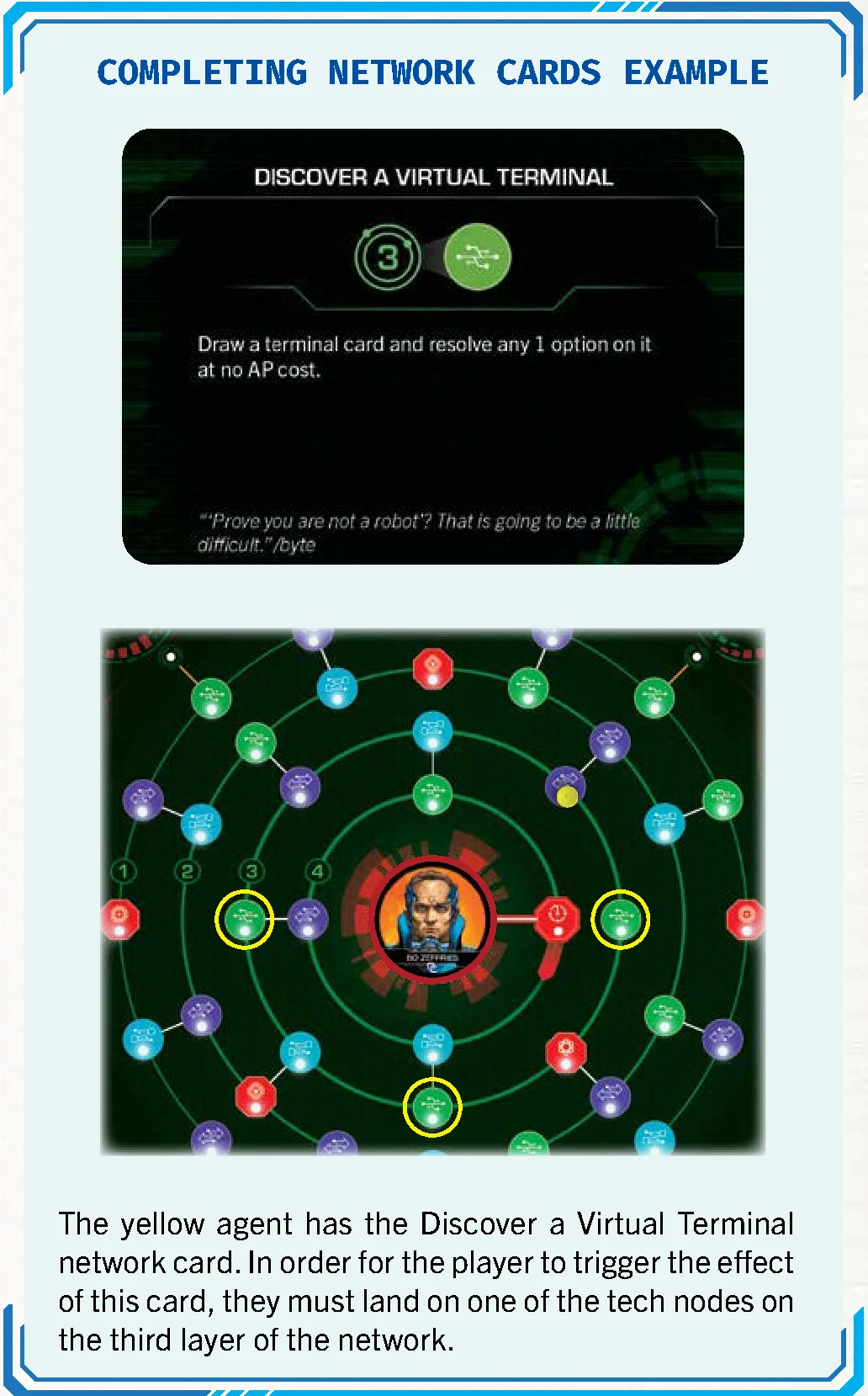
Network Cards
Ping Activation & Boots
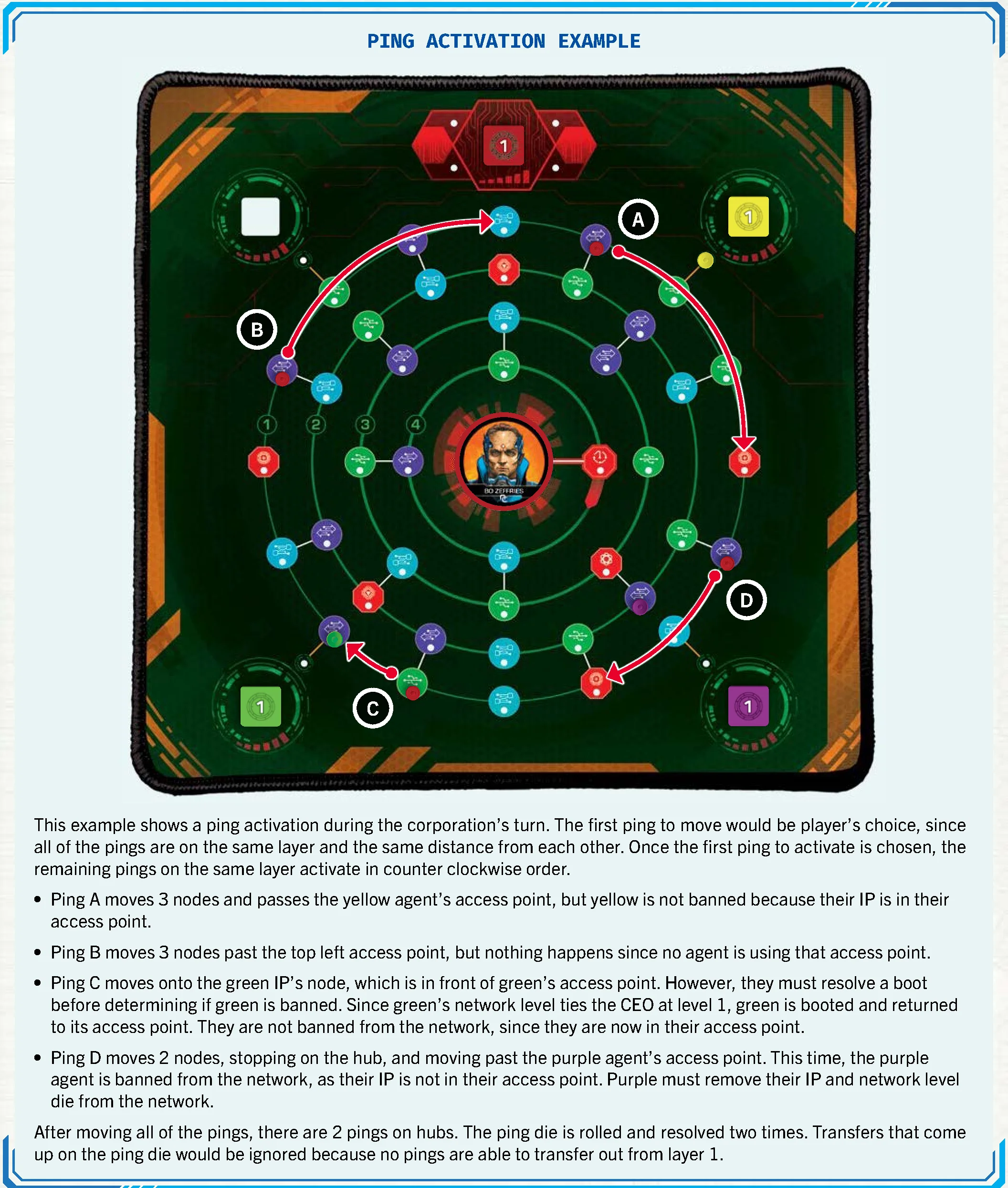
During the corporation’s turn, pings move clockwise up to 3 nodes, stopping at hubs, IPs, or before other pings. If pings occupy hubs, roll the ping die once per occupied hub:
 Advance threat by 1.
 Advance threat by 1, then all eligible pings transfer outwards.
 Increase CEO network level by 1.
 Increase CEO network level by 1, then all eligible pings transfer outwards.
 Add 1 ping to the core.
 Add 1 ping to the core, then all eligible pings transfer outwards.
Resolving a Boot
When an IP and ping occupy the same node, compare network levels. The lower level is booted; the winner reduces network level by 1. CEO wins ties (except at level 6, where the agent wins). An agent booted by a ping is immediately detected on the floor.
Banned IPs
If a ping passes an empty access point, that IP is banned (removed from the mat until a burncycle reboot).
Missions & Objectives
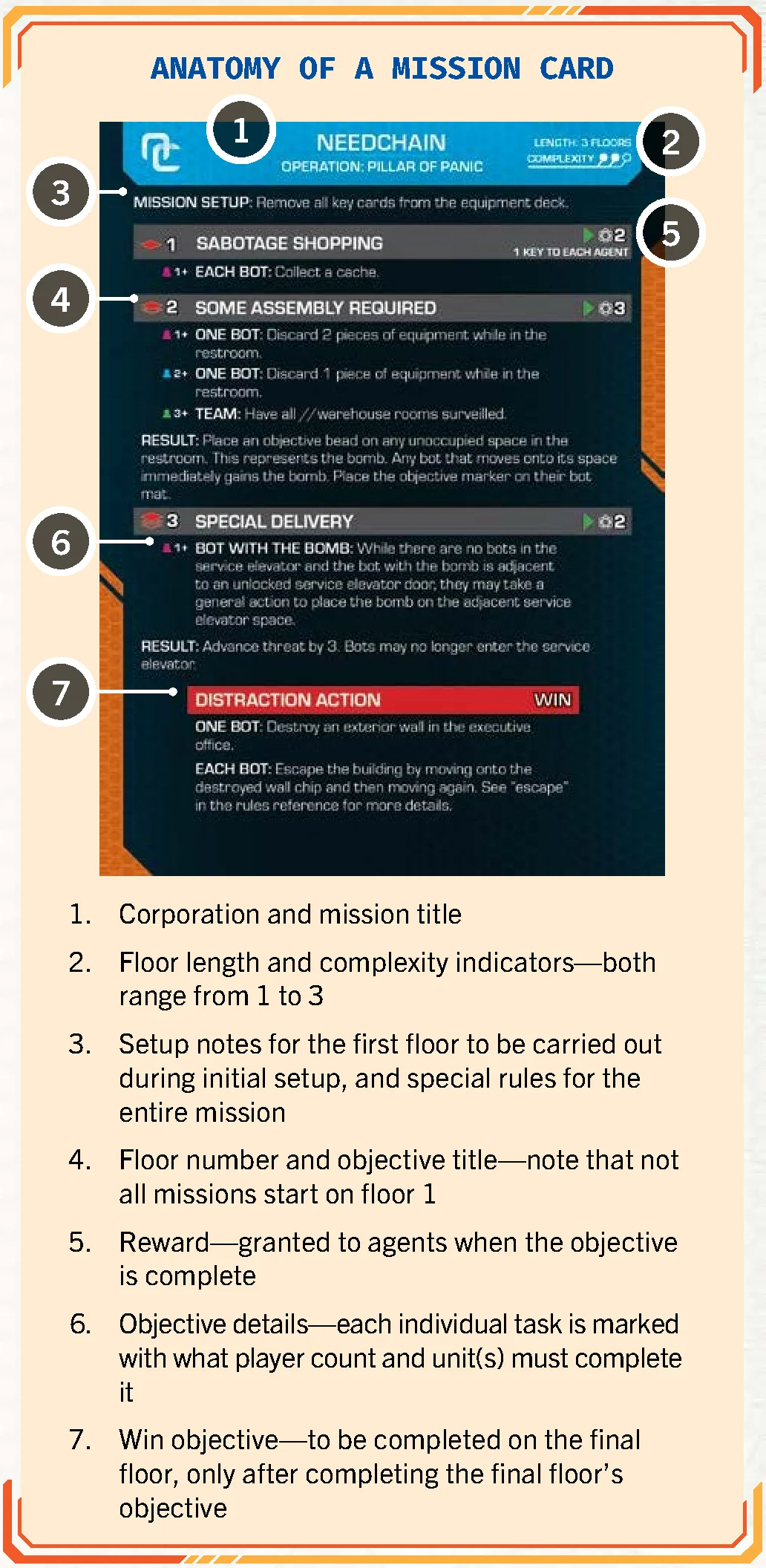
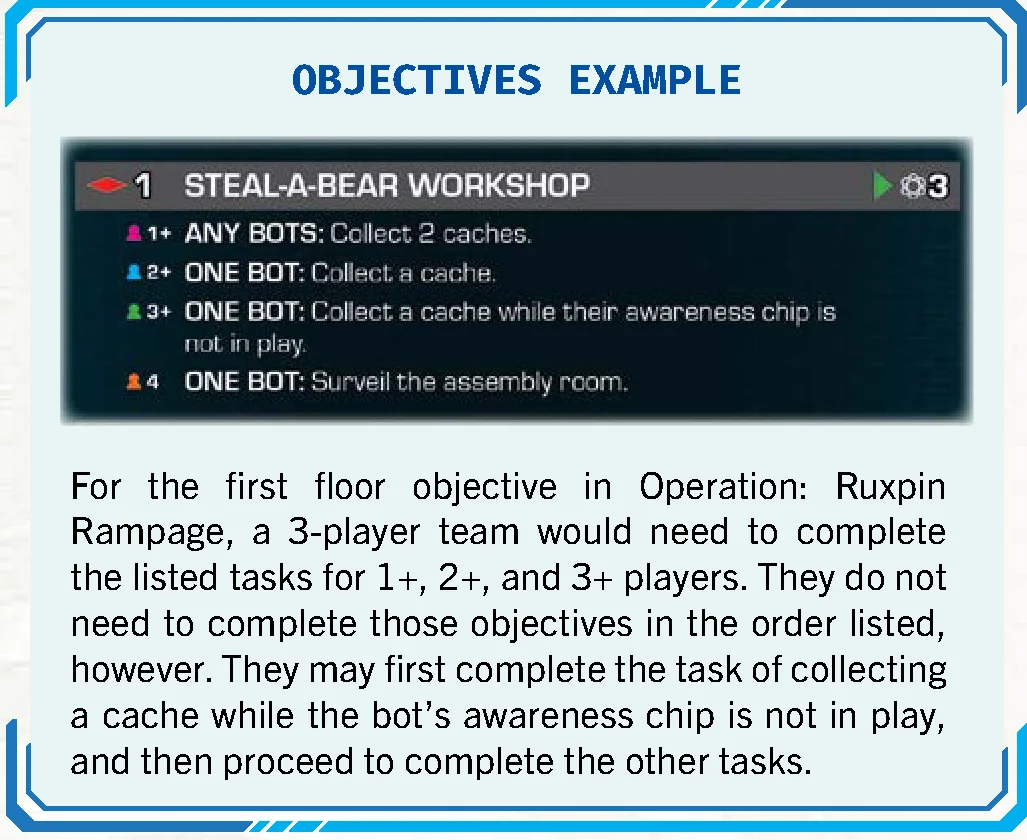
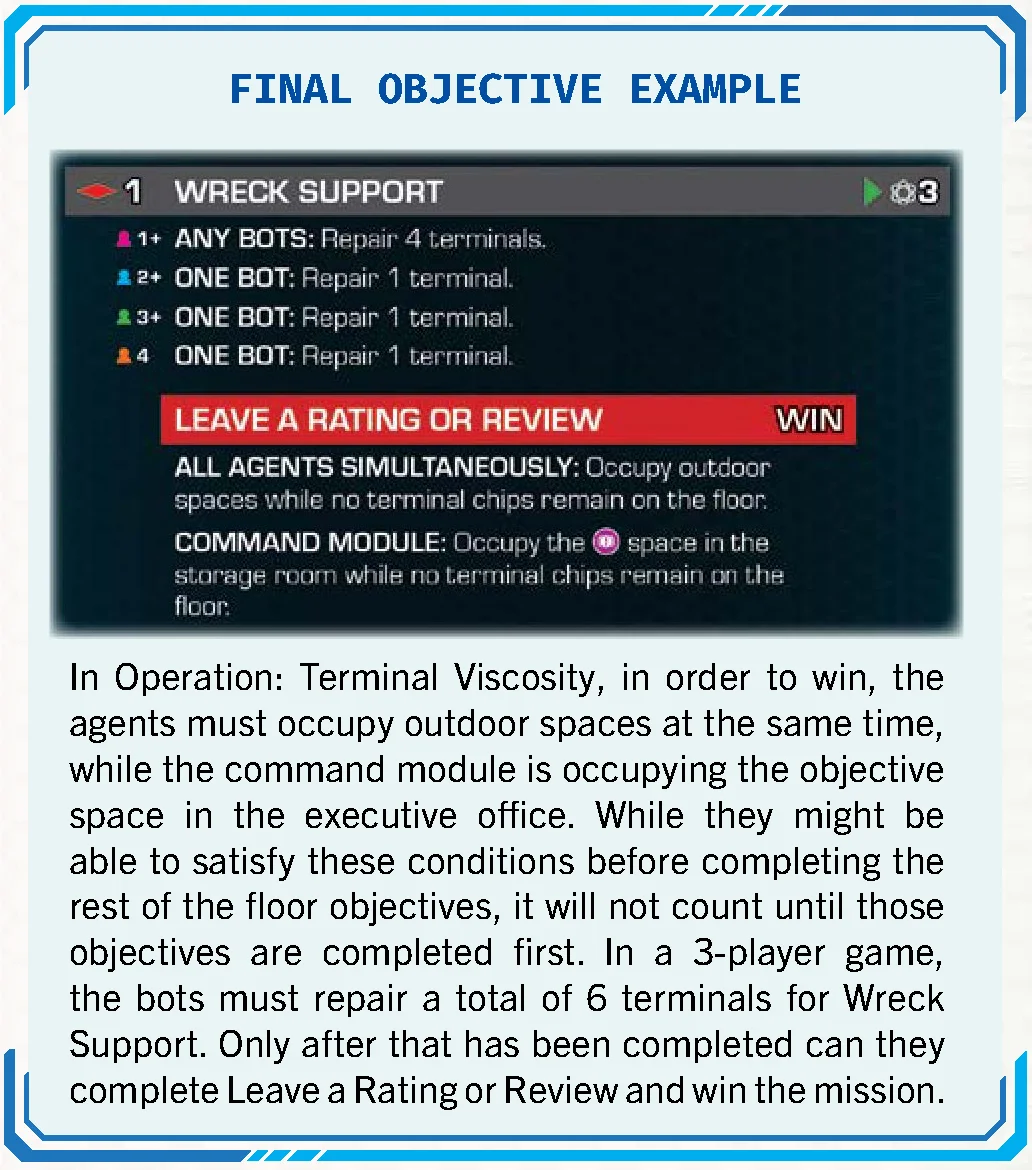
Missions specify the corporation, floor progression, objectives, and win condition. Task qualifiers include:
- ONE BOT / AGENT: Any single bot/agent must accomplish the task.
- TWO BOTS / AGENTS: Requires participation by two distinct bots/agents.
- ANY BOTS / AGENTS: Tasks can be split in any combination.
- EACH BOT / AGENT: Must be fulfilled independently by every bot/agent.
- ALL BOTS/AGENTS SIMULTANEOUSLY: All must satisfy the condition concurrently.
Escape
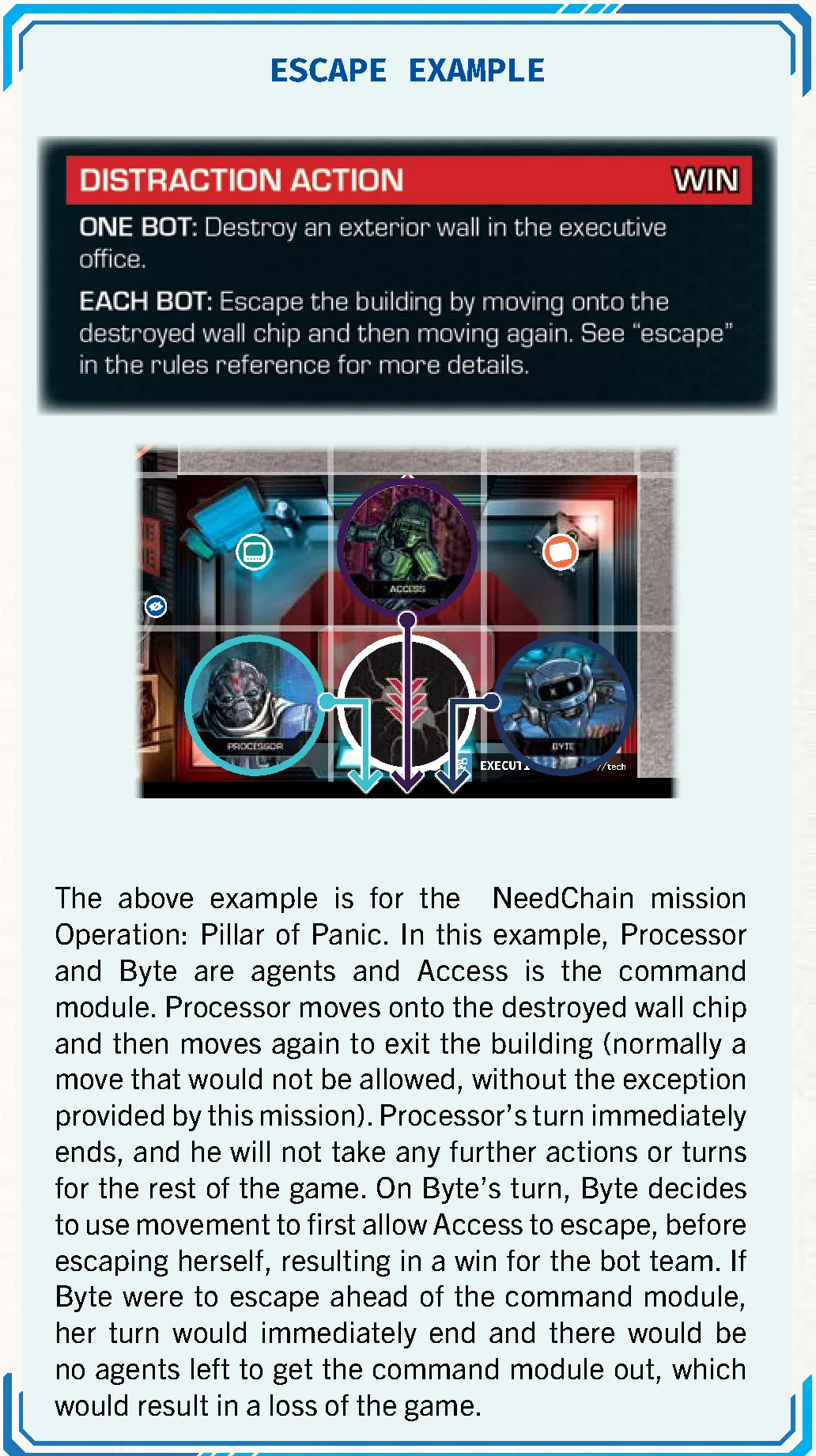
Some mission objectives conclude with an escape. When an agent satisfies escape conditions, it is removed from the board and takes no further turns. If all agents escape before the command module escapes, the mission is lost because nobody remains to pilot the module.
Threat & Defeat Conditions
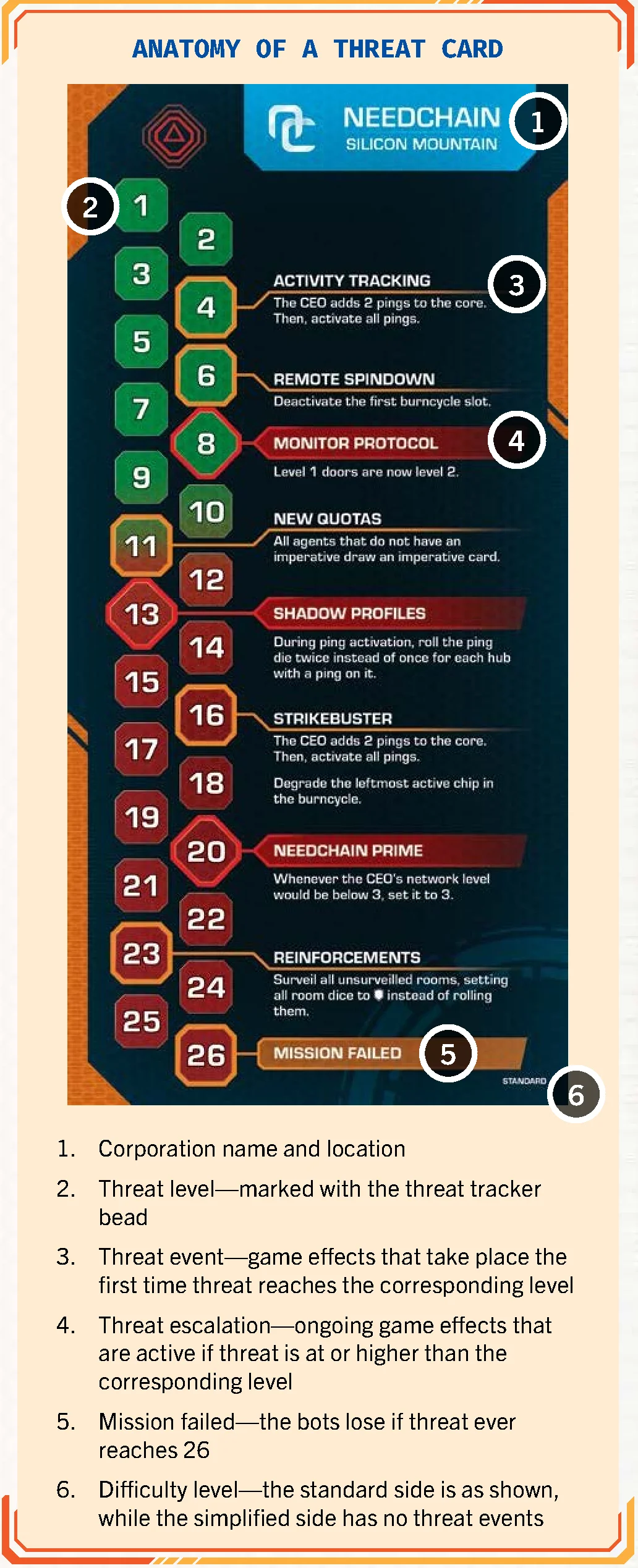
Threat tracks the corporation’s overall alert level on the threat track (ranging from 0 to 26). Reaching 26 causes immediate defeat. Threat events trigger once when reached; escalation effects remain active while threat equals or exceeds their threshold. End-of-round increase equals the player count.
Overview & Core Concepts
Using This Book
This reference consolidates all gameplay rules for burncycle into an accessible, alphabetical format. New players are encouraged to begin with the Learn to Play manual to grasp the basic round flow and initial setup. Turn to this reference guide whenever specific questions or edge cases arise.
Clarifications addressing frequently anticipated questions are highlighted with >> at the conclusion of relevant entries.
Difficulty Levels
- Simplified: Use the simplified threat card (no threat events). Security unit special abilities are disabled.
- Standard: Standard threat card and all abilities active.
- Seasoned: Standard rules, plus threat advances by +1 whenever an awareness chip enters play from off-board.
Area & Adjacency
Area
An area is any contiguous group of spaces bounded by walls, closed doors, or mat edges. Each room is a distinct area. All connected hallway spaces form an area; segmented hallways or disconnected outdoor spaces count as separate areas. Safe zones are distinct rooms and separate areas.
Adjacency
Adjacency applies strictly orthogonally (never diagonally) between spaces sharing an edge:
- Walls block adjacency. Unlocked doors and destroyed walls do not block adjacency.
- Bots: Locked doors block bot adjacency.
- Security Units: Locked doors DO NOT block security unit adjacency, as guards can traverse locked doors.
- Targeted Abilities: Adjacency is evaluated from the perspective of the acting unit (e.g., a Walker’s Drain affects a bot through a locked door).
- >> Security units only detect bots within their current area; a bot adjacent through a closed door or destroyed wall remains undetected unless spotted directly.
Component Limits
- Limited: Action chips, action dice, security unit chips, pings, destroyed wall chips (max 3 per floor).
- Unlimited: Beads, cache/key chips, terminal chips, pegs.
Bots & Upgrades
Bots Overview
Bots are player-controlled characters, comprising agents and the command module.
Agents
Agents are individual bots controlled by specific players. Rules affecting “agents” do not apply to the command module. Certain agents possess proprietary dice (e.g., Casing’s Pressure die, Bit’s Lift die) that are only used when playing as an agent.
Command Module
The command module is a shared unit accompanying the agent team. It does not take its own turns; players allocate move AP and action slots to it instead. Key rules:
- It has inventory slots and can carry keys, equipment, and uninstalled mods, but cannot activate equipment or mods. It can use keys.
- It does not receive objective power rewards.
- If the command module is shut down, the game is immediately lost.
- It starts with a fixed power level and does not need to spend power down to a limit, holding up to 10 power.
- Upgrades on the command module can be purchased using power from any combination of bots, provided at least 1 power is paid by the command module or the active player’s agent.
- The team reserve serves as the command module’s reserve.
Power & Routing
Power serves as bot health (0 power = shut down), currency for upgrades, and basic action dice in the pool (1 power = 1 basic action die). Players route power during steps 1 and 5 of their turn to activate abilities or purchase upgrades. Agents must spend down to their power bank limit at the end of step 5.
Action Dice & AP Checks
There are three grades of action dice:
- Basic Dice (1, 1, 1, 1, 2, blank)
- Advanced Dice (1, 1, 2, 2, 2, 3)
- Elite Dice (2, 2, 2, 2, 3, reroll)
During step 2 of their turn, a player builds their dice pool: 1 basic die for each current power point, plus advanced and elite dice matching their activated upgrades. Dice can be rolled in any quantity (including 0) when performing AP checks. Unused blanks from basic dice can be spent in pairs (2 blanks = 1 AP) or returned to the player’s pool. Reroll symbols on elite dice allow rerolling any die before totaling AP. Rolled dice return to the supply once spent.
AP (Action Points) & AP Checks
AP is generated by rolling action dice or from optimization bonuses. Rolled AP cannot be saved across actions or turns. Players may choose to utilize less AP than rolled. In threshold AP checks (such as strikes or terminals), all rolled dice are sent to the supply regardless of success, and excess AP is lost.
Inventory, Equipment & Keys
Each bot has 2 inventory slots for equipment/mods, and unlimited space for key chips. Keys are acquired from key equipment cards or by defeating guards carrying keys. Keys can be traded freely, used during keypad actions to auto-unlock doors, or spent during move actions to open adjacent doors on the fly.
Equipment Cards
Acquired from caches, equipment cards are kept in inventory (limit 2 cards total across mods and equipment). Categories include:
- Discard: Trigger immediately when drawn, then discard.
- Single Use: Discard after using.
- Counter: Uses an equipment die showing charges or values.
- Breakable: Uses a die. If the rolled result displays a hazard icon in the corner, discard the card after resolving.
Mods & Imperatives
Mods
Obtained from terminals. Placed sideways as uninstalled (can be traded; discarding awards printed power). At any time, an agent can install a mod upright to gain its permanent ongoing benefit (installed mods cannot be traded or uninstalled; discarding them yields 0 power).
Imperatives
Cards imposing conditions on agents. Drawn at the start of each floor (limit 1 per agent; command modules never draw imperatives). Completing an imperative awards the listed power immediately. Failing or discarding an imperative costs 1 power.
Universal Abilities & Upgrades
Bots can acquire universal upgrades for 1 power each:
- Swap (1 Power): Move into an adjacent bot’s space, swapping positions simultaneously.
- Push (1 Power): Spend +1 AP during a move action to shove a security unit to an adjacent empty space, entering its space (causes detection). Adjacency is preserved during movement.
- Repair (1 Power): Use a general action to transfer power to any bot on the map.
Special Characters
Interface (Special Rules)
When disguised as a guard, Interface ignores detection from guard awareness and moves up to the disguise’s movement value. Disguised Interface acts as a guard during the corporation’s turn. If attacked, the disguise is lost and Interface takes 2 damage.
Memory & Joan the Drone
Joan is not a bot and does not trigger guard awareness. She has two states: charged and depleted. Depleted by surveilling or stunning guards via abilities, Joan recharges when sharing a space with Memory. Units can pass through Joan via automatic swap.
The Burncycle Mechanism
The Burncycle
The burncycle represents the operational instruction sequence on the command module mat, consisting of up to 5 slots. Active slots contain action chips used for both physical/tech/utility actions and network movement.
Action Chips & Reserves
Action chips exist in five varieties: general, physical, tech, utility, and captain. They populate the burncycle track and constitute reserves.
Chips have an active side and a degraded side. The degraded side is only used while slotted in the burncycle track to signify that the chip is inactive for both actions and network movement.
Reserves are created during burncycle creation and reboots from outdoor spaces and occupied rooms. Used to alter the burncycle or resolve keypad inputs.
Using the Burncycle for Actions
During the action phase, players proceed through active burncycle slots from left to right, advancing the tracking bead:
- Captain Action Chip: Its designated event on the Captain card must be executed immediately when reached, even if the player passes on taking an action with the chip.
- Matching Chip Type: Performing an action matching the chip optimizes it. Matching is entirely optional.
- Degraded chips are skipped.
Using the Burncycle for Network Movement
During step 4 of a turn, each non-degraded chip grants network movement. General and captain chips allow an IP to move 1 node; physical, tech, and utility chips grant extended movement.
Degrading the Burncycle
At the end of every turn, roll the burncycle die to degrade a slot: flip the matching slot’s chip to its degraded face. A result lets the player choose which chip degrades. If the rolled slot is already degraded or inactive, advance clockwise to the next active chip (slot 5 wraps to slot 1).
Rebooting the Burncycle
Rebooting can be declared before any player’s turn (not before the corporation’s turn):
- Clear all chips from the burncycle and all reserves to the supply.
- Place the captain chip and general action chips into the bag equal to the number of active slots. Draw and place them left-to-right.
- Regenerate team and personal reserves.
- Advance threat by the player count. Return banned IPs to the network at level 1.
Upgrading & Deactivating Slots
Players can unlock new slots during the power routing step by paying the power cost printed on the command module card. Unlocked slots immediately receive a general action chip from the supply. If an event deactivates a slot, remove its peg and return its chip to the supply.
Actions & Turn Steps
Actions Overview
During the action phase of their turn, players can execute several categories of actions: general, physical, tech, and utility. The player advances the burncycle tracker token from left to right along the active chips currently installed in the burncycle track. For every active chip, the player may perform one action or choose to pass. Depending on the nature of the action, it is executed by the player’s agent, the command module, or the player directly.
An action is not required to match the type of chip it is activated on. However, if a physical, tech, or utility action aligns with a matching action chip in the burncycle track, that action becomes optimized, granting enhanced benefits or greater chances of success.
In contrast, free actions do not consume burncycle slots and may be triggered at any eligible moment during a player’s turn, provided they do not disrupt an action or resolution already taking place.
Physical Actions
Physical actions comprise move actions and strike actions. When activated on a physical action chip, they are optimized and provide an extra +2 AP for that action.
Move Actions
Move actions represent the primary method for bots to traverse the floor. When declaring a move action, the player performs an AP check by rolling any desired quantity of action dice from their dice pool:
- If optimized, add +2 AP to the total rolled.
- The player distributes the accumulated AP between their agent and the command module in any combination.
- Each AP allows a bot to move 1 space orthogonally.
- Bots cannot move through walls, locked doors, or other units, but may enter and pass through spaces containing caches or terminals.
- During movement, a bot may pick up any cache it enters (optional).
- Entering a room with a surveillance bead requires immediate surveillance: remove the bead, check the infobar for the number of surveillance dice (1 or 2), roll and resolve them, then resume the move action.
- >> Because action dice are rolled prior to dividing AP between the agent and command module, abilities modifying die rolls (such as Byte’s Tumble Magnet) can be triggered even if all resulting AP is allocated to the command module.
- >> If a move action is optimized, the bot may move using the 2 bonus AP without rolling any dice from the pool.
- >> Powers that explicitly modify agent movement (e.g., Casing’s Pressure die) cannot be applied to the command module.
- >> Players may interleave steps between their agent and the command module freely during a single move action.
- >> Movement awarded outside of standard move actions (such as bonus movement from gear or abilities) does not count as a move action. Abilities requiring a move action cannot trigger during bonus moves (for example, using a key requires a move action and cannot be done during Nitro Shot movement).
Strike Actions
Strike actions allow bots to attack security units and demolish walls. Either the agent or the command module may strike an adjacent target by conducting an AP check with any number of dice from their pool:
- If the action is optimized, add +2 AP to the total rolled.
- The total AP rolled must equal or exceed the durability of the target in a single attempt; AP cannot be accumulated across multiple actions.
Striking Security Units
A bot adjacent to a security unit may spend a strike action to stun or shut it down. Durability depends on the unit’s level:
- Level 1 Guard: 10 AP
- Level 2 Guard: 15 AP
- Level 3 Guard: 20 AP
- Captain: Value printed on the Captain card
Results of striking a security unit:
- Shut Down: If rolled AP equals or exceeds durability, the guard chip is discarded and the striking bot gains 1 power. If the guard carries a key, the bot takes the key into its inventory.
- Stun: If the strike fails but comes within 5 AP of the durability value, the attacker may choose to stun the unit instead. Flip the guard chip over; it will not activate on the corporation’s next turn and flips back at the end of the security phase. A key held by a stunned guard is also claimed by the striking bot.
- Threat and Detection: Striking a security unit always advances threat by 1 and immediately causes the striking bot to become detected, regardless of success.
- >> Players may intentionally use less than the rolled AP, such as electing to stun a guard instead of destroying it.
Striking Walls
A bot adjacent to a wall may attempt to destroy it with a strike action:
- Durability: 10 AP.
- Success: Place a destroyed wall chip on either side of the wall with its door arrow pointing toward the broken wall. The striking bot becomes detected and may immediately take a free move through the opening into an empty space.
- Failure: No chip is placed and the bot remains undetected.
- >> Destroyed walls are treated as unlocked doors for movement and adjacency.
- >> Bots cannot strike a wall segment that already contains a door.
- >> Maximum limit: Only 3 walls can be destroyed per floor. Destroyed wall chips are returned to the supply when changing floors.
- >> Exterior walls can be attacked, but openings lead nowhere unless granted a specific rule by the mission card. Exterior-facing door arrows are ignored.
Tech Actions
Tech actions include terminal actions and network card actions. They are optimized by the tech action chip.
Terminal Actions
A bot occupying a terminal chip may take a terminal action. The player reveals the top card of the terminal deck, which presents 3 distinct options, each detailing an AP requirement and an effect:
- Select an option before rolling dice, then roll an AP check. Meeting or exceeding the requirement resolves the chosen effect. The terminal card and the floor chip are discarded regardless of success.
- Optimized: The player may select up to 2 options prior to rolling. Rolled AP can be distributed between both options. If insufficient for both, the player chooses which option to satisfy.
- >> Selected options cannot be altered after the roll. Players may choose to roll 0 dice or decline to apply rolled AP, but the terminal chip is still discarded.
Mainframe Terminals
Terminals flipped to their mainframe side (typically via surveillance rolls) reduce the AP cost of all options on terminal cards to 0 AP. Option limits still apply: 1 option for standard actions, 2 options when optimized.
Network Card Actions
An agent may execute a network card action from any position on the floor; the command module cannot take this action:
- Draw 1 network card and place it faceup near your agent mat. Agent hand limit is 3 network cards; excess cards must be discarded immediately.
- At the end of your turn, all unplayed network cards are discarded and do not carry over.
- Optimized: In addition to drawing the card, the player may immediately take an extra unoptimized action without moving the burncycle tracker.
- Network cards are resolved during the network step of the turn.
Utility Actions (Keypads)
The sole utility action is the keypad action, optimized by the utility action chip.
A bot adjacent to a locked door may attempt to open it with a keypad action. If a keypad card is already assigned to the door, use it; otherwise, draw the top keypad card and place it faceup next to the door. The column used corresponds to the current floor number (Floor 1, 2, or 3).
For every keypad die icon printed in the column, roll the keypad die. Possible outcomes include:
- Automatic Unlock: The door opens instantly, resolving all requirements.
- Any other icon rolled (, , , , , ) is treated as an extra input that must be resolved.
Approaches to unlock the door:
- Resolving Inputs: Satisfy every icon in the column.
- Brute Force: Pass an AP check against the keypad’s durability (if not Jammed).
- Key: Discard a key to unlock the door immediately.
- Abort: Conclude the action without unlocking. The card remains by the door.
Upon success, discard the card, place an unlocked door peg in the board hole, and the bot may take a free move through into an empty space (without triggering swap or push). If unsuccessful, leave the keypad card faceup by the door for future attempts.
- >> Unlocking doors via keys during a move action or through terminal cards is not a keypad action.
- >> You cannot alter the burncycle midway through a keypad action.
- >> Multiple keypad attempts can be made on the same door in the same turn, keeping the same revealed card.
Resolving Inputs
All displayed and rolled inputs must be fulfilled during the same action in any chosen sequence. If optimized, the player may ignore any single input. Icons are resolved as follows:
- Physical / Tech / Utility: Discard a matching chip from personal/team reserve, OR jump the burncycle tracker ahead to a matching chip to the right of the current slot (forfeiting skipped actions).
- Alarm: The acting bot becomes detected (if already detected, counts as resolved).
- Ping: The CEO places 1 ping on the core (resolved even if all pings are deployed).
- Shock: The acting bot suffers 1 power loss.
- >> Inputs do not carry over across separate actions; all must be satisfied in one go.
- >> Keypad die results are re-rolled on subsequent attempts.
- >> The action chip currently holding the burncycle tracker cannot be used to pay for an input; only chips to its right may be used.
Brute Force
Unless the column states “Jam”, a bot may attempt to force the door via an AP check:
- Level 1: 4 AP
- Level 2: 6 AP
- Level 3: 8 AP
- >> Optimizing a keypad action provides no benefit when using brute force.
Keys
A bot in possession of a key may discard it at any point during a keypad action to immediately unlock the door without resolving inputs or rolling AP.
General Actions (Repair)
General actions cannot be optimized. The primary general action is Repair, available once a bot activates its repair upgrade. Certain abilities and mission cards may provide other general actions.
Repair Actions
With the repair ability unlocked (by routing 1 power to it), a bot may spend a general action to transfer power to another bot anywhere on the board (range is unlimited and line of sight is not required):
- The acting bot reduces its power bank by any chosen amount and increases the target bot’s power by that same amount.
- The acting bot must retain at least 1 power.
- A bot’s power may exceed its power bank capacity (up to the absolute maximum of 10).
- Repairing a shut-down bot reactivates it immediately.
- >> A bot repaired above its normal capacity does not have to discard excess power until step 5 of its subsequent turn.
Free Actions
Free actions do not advance the burncycle tracker and can be executed outside the standard action step. They can occur at any point on a player’s turn, except during another ongoing action, die roll resolution, or card effect resolution. Typical free actions include altering the burncycle and trading items. Mission cards, agent abilities, and equipment cards may also offer unique free actions.
- >> Free actions cannot interrupt movement within an ongoing move action. For instance, two bots cannot trade equipment midway through a move action.
- >> Free actions are permitted at the very beginning of a turn before taking any action-step actions, or at the very end after degrading the burncycle.
Altering the Burncycle
As a free action on their turn, a player may swap any chip in the burncycle track with an available action chip taken from either the team reserve or their personal reserve:
- The replaced chip (whether active or degraded) is returned to the general supply.
- The incoming reserve chip is always placed into the burncycle on its active face.
- If the captain action chip is removed and replaced before it has degraded, threat immediately advances by 2.
- >> Because free actions cannot interrupt other resolutions, you cannot alter the burncycle during a keypad action to fulfill required inputs.
- >> You cannot alter the burncycle after rolling the burncycle die but prior to degrading the indicated slot.
Trading
As a free action, an agent or command module may trade with any adjacent bot. Bots can exchange any quantity of keys, equipment cards, and uninstalled mod cards currently stored in their inventory. Exchanges between two player agents require the consent of both players.
- >> A trade is completely valid even if one participant receives nothing in return.
- >> Once a mod card is installed, it can never be traded.
- >> Following a trade, any bot whose inventory holds more than 2 total mods and equipment must discard down to the maximum hand limit of 2. Discarding an uninstalled mod in this manner still awards the power value printed on the card.
Floor Exploration & Board Features
Floors & Mats
Each floor consists of room mats and hallways.
Changing Floors
Advancing to the next floor requires completing all floor objectives and assembling all bots simultaneously in safe zones at the end of a turn:
- Assign the corporation marker to the player who took the final turn. Turn order resets so the player to their left becomes first player.
- Record unlocked safe zone doors (they remain unlocked on the next floor) and bot/guard locations inside safe zones.
- Remove all other board components and reset awareness chips.
- Set up the new floor according to the floorplan book, placing returning units in corresponding safe zones.
- Agents lacking an imperative card draw one.
Doors & Entrance
Doors are marked with . All doors start locked. Bots cannot pass through locked doors, while guards can. Unlocking requires a keypad action or spending a key. Once unlocked, insert an unlocked door peg. Destroyed walls act as unlocked doors.
The single-tile Entrance mat creates a doorway and covers unused security posts.
Walls & Destroyed Walls
Outer mat edges, room borders, and lines separating outdoor spaces are walls that block sight, movement, and adjacency. Striking a wall with 10+ AP places a destroyed wall chip. Destroyed walls function as unlocked doors, and up to 3 walls may be destroyed per floor.
Surveillance
Entering an unsurveilled room (containing a surveillance bead) halts movement on the first space to roll the surveillance dice indicated in the room’s infobar:
- Guard: Spawn a floor-level guard at room post A (then B).
- Mainframe: Upgrade a terminal in the room to a mainframe terminal.
- Powercell: Surveilling bot gains 1 power.
- Autolock: Lock all doors leading into this room immediately.
- Imperative: The surveilling agent draws 1 imperative card.
Caches
Orange cache chips populate cache spaces during setup. Units can enter and pass through cache spaces. When a bot moves onto a cache, it may collect it: discard the chip and draw 1 equipment card into inventory. Security units do not collect caches but block bots while occupying the space.
Hiding Spots
Designated by symbols in rooms. When entered by an undetected bot (or outside enemy awareness), the bot hides and cannot be detected via awareness. If an enemy enters the space, the bot is detected.
Corporation & Stealth Mechanics
The Corporation Turn
The CEO is located on the network mat and acts via pings. The corporation turn follows the player with the corporation marker chip and consists of three successive phases:
- Security Unit Activation (Pursue, Investigate, Patrol)
- Ping Activation
- Threat Advancement
Security Posts & Units
Deployment markers for guards:
- Hallway Posts (1-3): Populated according to the Captain’s security detail chart.
- Mandatory Posts (Star): Populated during setup with a guard of the current floor level.
- Room Posts (A/B): Populated when a guard icon is rolled on surveillance dice.
Awareness & Detection
Awareness tracks the corporation’s surveillance of the bot team. Each bot has an awareness chip placed on the floor to mark its last confirmed position. A bot whose awareness chip occupies its current space is detected. Detection occurs upon entering a guard’s awareness range, triggering keypad alarms, being booted on the network, or attacking security.
- Security awareness is continuously checked at all times, during any phase or turn.
- On Seasoned difficulty, threat increases by +1 whenever an awareness chip enters the board from off-board.
- When a security unit moves onto an awareness chip, the chip is cleared and returned to the bot’s mat.
Awareness Range
Security units have an awareness stat printed on their chip:
- Direct Sight: Equal to the full awareness stat in spaces straight ahead in the direction of the unit’s facing, within the same area.
- Peripheral Awareness: Equal to half of the awareness stat (rounded up) in all other directions within the same area.
Awareness Through Doors
Security units only see into another area when a detected bot moves through a door: the unit temporarily sees 1 space beyond that door, provided its range reaches it. If the bot is spotted entering the space, its awareness chip follows it.
Awareness in Safe Zones
Guards outside safe zones cannot see into them when bots enter through doors; awareness chips are left outside. However, performing noisy actions inside (attacking or breaking walls) causes detection within the safe zone.
Awareness in Hiding Spots
A bot moving onto a hiding spot becomes hidden only if undetected when entering, or if the hiding spot lies outside enemy awareness when entering. If a detected bot steps into a visible hiding spot, hiding fails and detection remains.
Security Activation
Guards activate in strict hierarchical order during the corporation turn:
- Priority 1: Pursue: Security units with detected bots in their awareness move via the shortest path to become adjacent and attack.
- Priority 2: Investigate: Security units move toward active awareness chips to clear them.
- Priority 3: Patrol: Security units with no targets follow their assigned patrol patterns (perimeter, pace, etc.). Guards in rooms do not patrol.
Guards deal damage equal to their level (1, 2, or 3); captains deal 3 damage.
Shut Downs & Stuns
- Bot Shut Down: Power reaches 0. Threat increases by +3; bot chip flips. Cannot act or advance floors until repaired. If the command module shuts down, the game is immediately lost.
- Security Unit Shut Down: Discard unit chip; attacker gains 1 power and claims any carried key.
- Stunned Security: Unit chip is flipped face down; skips activation this round and ignores awareness/abilities. Reactivates at end of corporation turn.
The Network
Network Cyberspace
The network mat represents the digital cyberspace. Agents are represented by colored IP pegs; the CEO is represented by red pings. Network levels range from 1 to 6.
IP Movement
Driven by the burncycle chips from left to right. Movement proceeds clockwise until reaching a hub, ping, or matching action node. IPs can transfer across layers along white lines once per movement step.
- Layer 1 Hub: Increase network level by 1.
- Layer 2 Hub: Reduce threat by 1.
- Layer 3 Hub: Gain 1 power.
- Layer 4 (The Core): Gain all three benefits, then return IP to access point.
Network Cards
Ping Activation & Boots
During the corporation’s turn, pings move clockwise up to 3 nodes, stopping at hubs, IPs, or before other pings. If pings occupy hubs, roll the ping die once per occupied hub:
- Advance threat by 1.
- Advance threat by 1, then all eligible pings transfer outwards.
- Increase CEO network level by 1.
- Increase CEO network level by 1, then all eligible pings transfer outwards.
- Add 1 ping to the core.
- Add 1 ping to the core, then all eligible pings transfer outwards.
Resolving a Boot
When an IP and ping occupy the same node, compare network levels. The lower level is booted; the winner reduces network level by 1. CEO wins ties (except at level 6, where the agent wins). An agent booted by a ping is immediately detected on the floor.
Banned IPs
If a ping passes an empty access point, that IP is banned (removed from the mat until a burncycle reboot).
Missions, Threat & Game End
Missions & Objectives
Missions specify the corporation, floor progression, objectives, and win condition. Task qualifiers include:
- ONE BOT / AGENT: Any single bot/agent must accomplish the task.
- TWO BOTS / AGENTS: Requires participation by two distinct bots/agents.
- ANY BOTS / AGENTS: Tasks can be split in any combination.
- EACH BOT / AGENT: Must be fulfilled independently by every bot/agent.
- ALL BOTS/AGENTS SIMULTANEOUSLY: All must satisfy the condition concurrently.
Escape
Some mission objectives conclude with an escape. When an agent satisfies escape conditions, it is removed from the board and takes no further turns. If all agents escape before the command module escapes, the mission is lost because nobody remains to pilot the module.
Threat & Defeat Conditions
Threat tracks the corporation’s overall alert level on the threat track (ranging from 0 to 26). Reaching 26 causes immediate defeat. Threat events trigger once when reached; escalation effects remain active while threat equals or exceeds their threshold. End-of-round increase equals the player count.
Expansions for
burncycle

burncycle: Robophobia Expansion
2023
Expand your 1–4 player adventure with new cards, chips, dice, and missions.
View expansion
burncycle: Ebbwall Expansion
2023
Take on Ebbwall’s elite guards, powerful CEO, and new tactical challenges.
Medium Heavy

View expansion

burncycle: The Renegades Expansion
2023
Expand your team with four specialized bots and new components.
View expansion

burncycle: The Specialists
2022
Add four specialists with sharply focused skills to your bot team.
180
minutes
View expansion
burncycle: BioDefend Expansion
2022
Face BioDefend, a dangerous new corporation with powerful new tools.
180
minutes
View expansion