
Coal Baron
2013
Place workers, extract four grades of coal, compete for contracts, and manage cash in a tense three-round mining challenge.
75
minutes
2 - 4
player(s)
10+
Medium


About this board game
Coal Baron is a worker-placement board game for 2–4 players that plays in about 75 minutes. Released in 2013, it sends players underground to dig tunnels, extract coal, and fulfill contracts over three rounds.
In each round, players take turns placing their workers on available action spaces. An action space may still be used when another player has claimed it, but doing so requires placing additional workers, creating competition for the actions needed to develop a successful mining operation.
Every player has an individual elevator shaft. Workers are needed not only to dig for coal, but also to extract it and bring it to the surface. Coal comes in four levels of quality, and the different grades are used to complete contracts.
- Place workers on action spaces, including spaces occupied by opponents.
- Use an individual elevator shaft to bring coal to the surface.
- Acquire and manage four levels of coal quality.
- Compete for contracts and search for cash to support your plans.
Contracts provide the central goal as players work to obtain the coal they need while deciding how to spend their limited workers. At the same time, cash is essential for everything else that must be done, so every action contributes to the challenge of balancing underground production with surface-level demands.
Known as Glück Auf in German—a greeting miners use when wishing one another luck—Coal Baron combines contested worker placement, mining logistics, coal quality, contracts, and cash management in a focused three-round game.
Mechanics
Designers
Illustrators
/pic7182955.jpg)

Board Game Rules for
Coal Baron
Game Overview
A boardgame for 2 to 4 players, aged 10 and up
Authors: Wolfgang Kramer and Michael Kiesling
Essen, on the verge of the 20th century: A time when endless supplies of coal are abundant in the earth and ripe for the taking! You are the owner of a coal mine fulfilling contracts for various types of coal. Spend capital to buy coal carts and expand tunnels as you dig a variety of coal.
Complete orders to gain victory points. However, the orders are very specific about the type of coal they demand. Since each kind is in a different mine level, you must expand your tunnels, costing even more money.
Finances are tight and each company has a limited number of workers. Be careful, the later you assign a job, the more workers are needed to get that job done. Once everyone runs out of workers, the shift is over. After three shifts, whoever has the most victory points wins.
Now, get your hands dirty! As they say in Essen, Glück auf!
Components
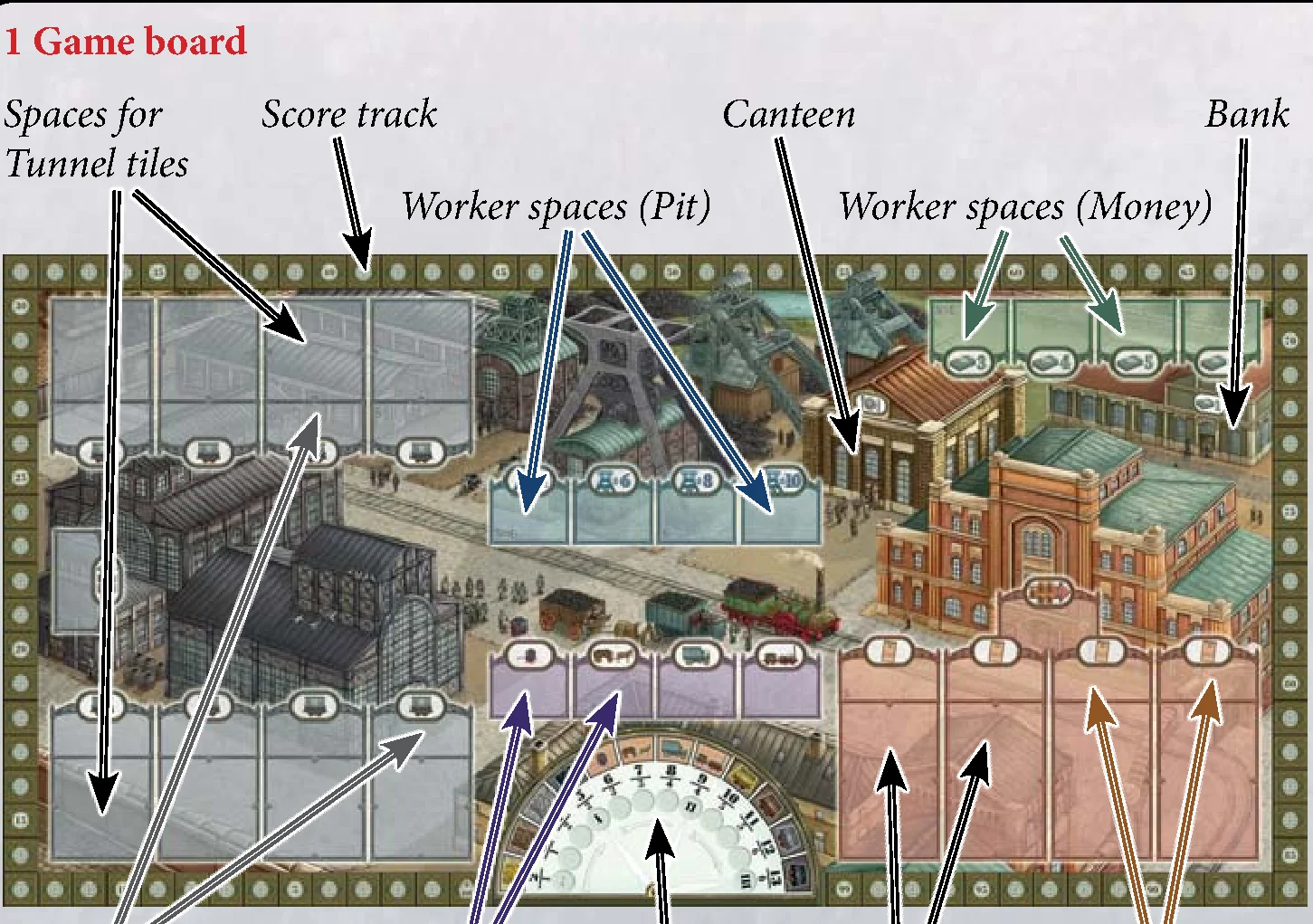
- 1 Game board
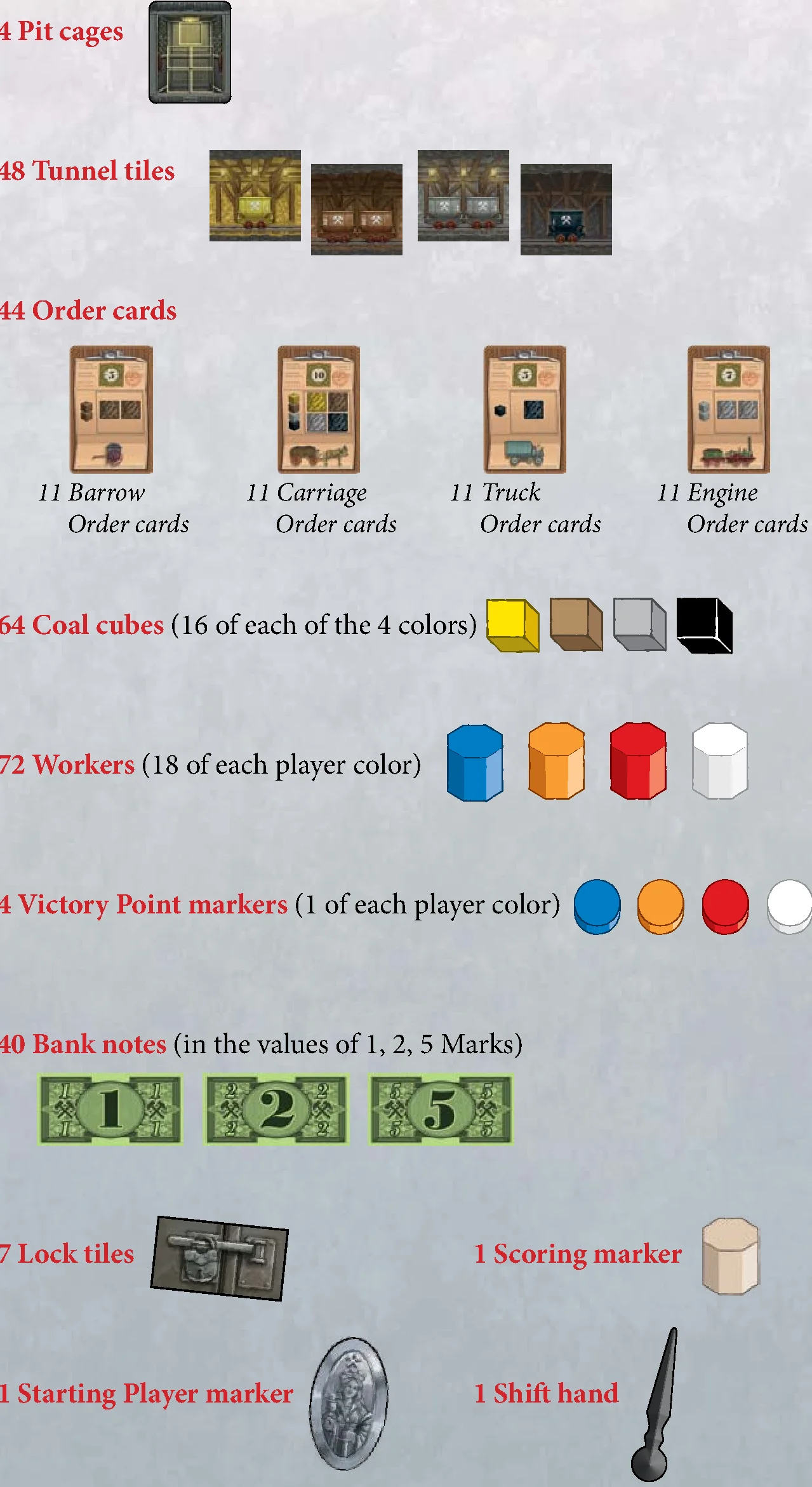
- 4 Pit cages
- 48 Tunnel tiles
- 44 Order cards:
- 11 Barrow Order cards
- 11 Carriage Order cards
- 11 Truck Order cards
- 11 Engine Order cards
- 64 Coal cubes (16 of each of the 4 colors)
- 72 Workers (18 of each player color)
- 4 Victory Point markers (1 of each player color)
- 40 Bank notes (in values of 1, 2, 5 Marks)
- 7 Lock tiles
- 1 Scoring marker
- 1 Starting Player marker
- 1 Shift hand
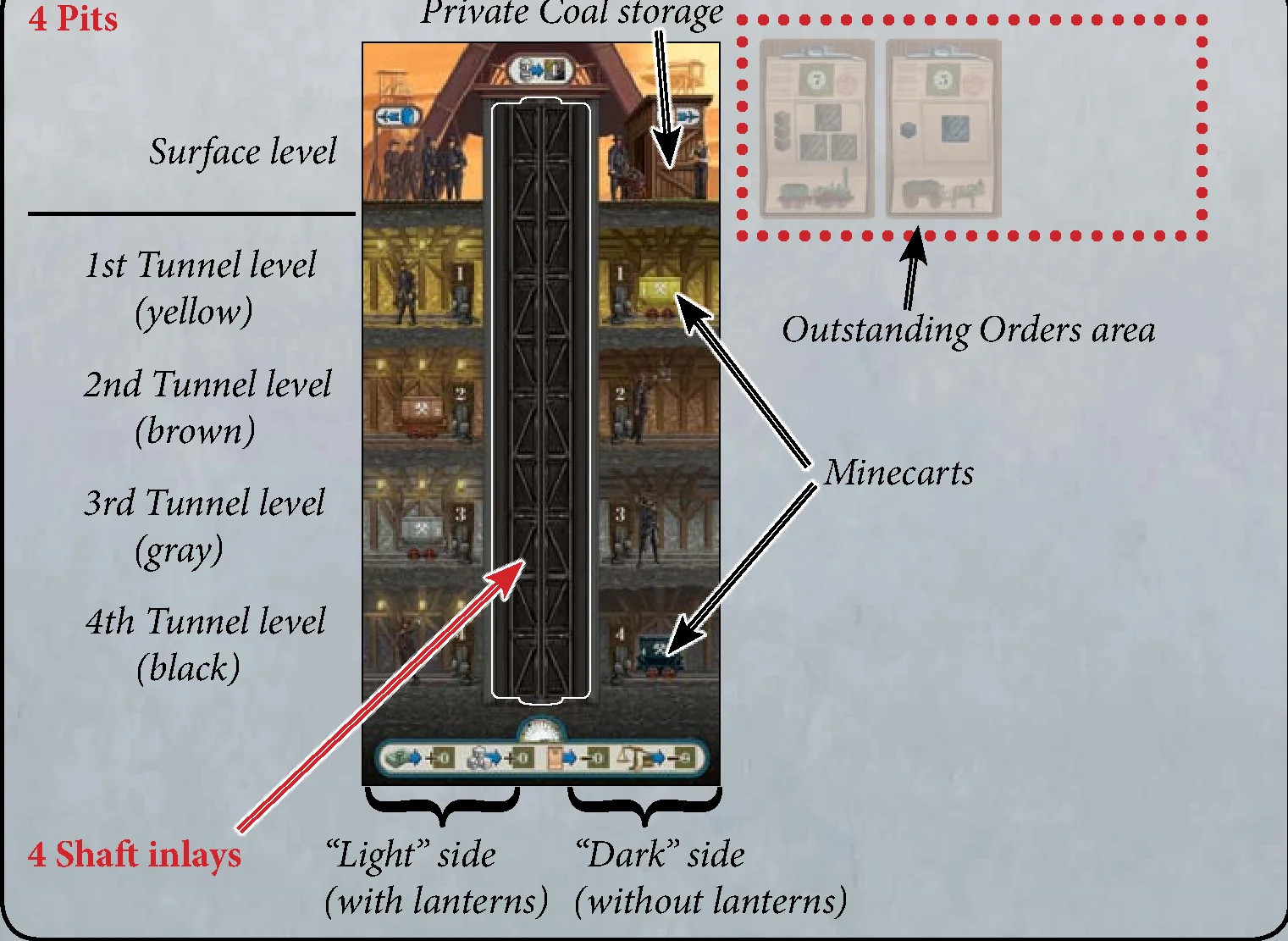
- 4 Pits
- 4 Shaft inlays
Game Setup
Before the first game, detach all cardboard pieces carefully from the punch boards.
- Put the Game board in the middle of the table.
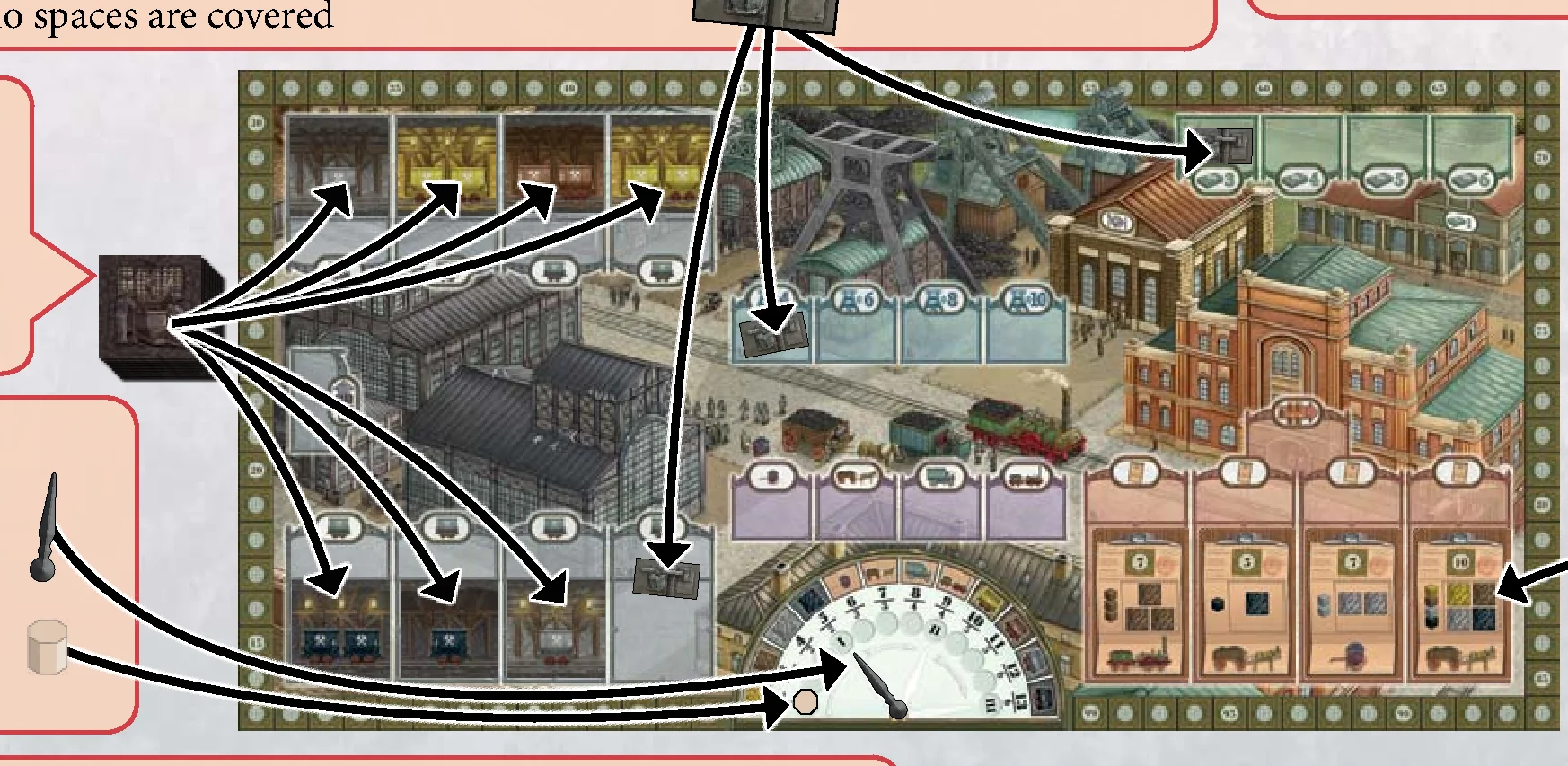
- Depending on the number of players, reduce the number of available Worker spaces by covering the indicated spaces on the Game board with Lock tiles:
- in a 2-player game: cover the four spaces marked “2” and the three spaces marked “2+3”
- in a 3-player game: cover the three spaces marked “2+3”
- in a 4-player game: no spaces are covered
- Form a general supply of the Coal cubes as well as a general supply of the Bank notes (separated by their values).
- Shuffle all Tunnel tiles and place them next to the Game board as a face-down stack. Place 1 Tunnel tile drawn randomly from this stack face up onto each (unlocked) Tunnel tile space of the Minecart factory.
- Place the Shift hand onto the leftmost hand outline of the Shift Clock, so that it points to the circle space marked “I”. Then place the Scoring marker onto the leftmost circle space of the Shift Clock (the circle with the arrow).
- Each player chooses a player color and receives:
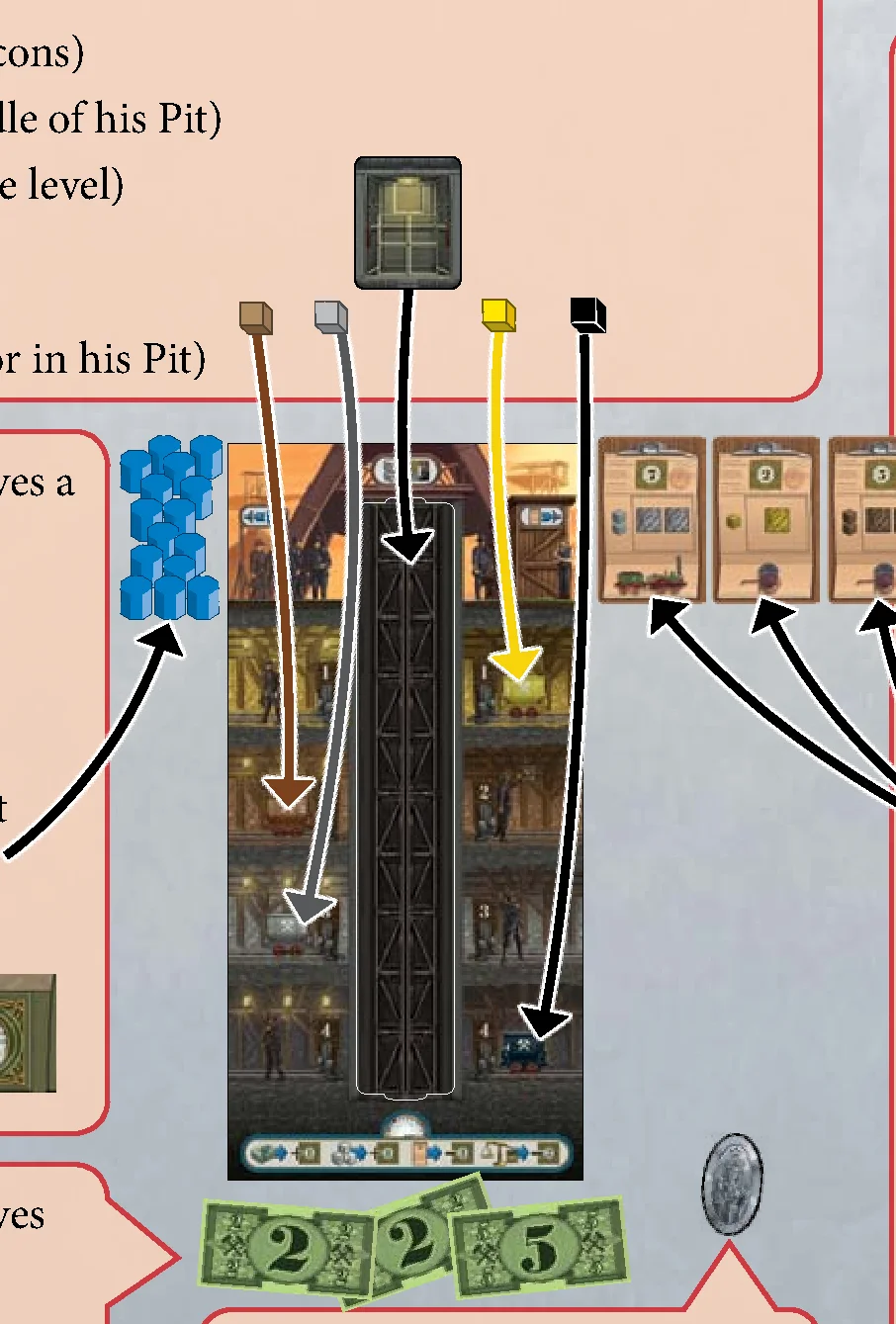
- the Pit of his color (as indicated by the color of the icons)
- 1 Shaft inlay (placed in the cavity in the middle of his Pit)
- 1 Pit cage (placed onto the Shaft at the Surface level)
- 4 Coal cubes from the general supply: 1 brown, 1 gray, 1 yellow, 1 black (each placed onto the Minecart of its color in his Pit)
- Depending on the number of players, each player receives a certain number of Workers of his color:
- in a 2-player game: 18 Workers each
- in a 3-player game: 15 Workers each
- in a 4-player game: 13 Workers each
Return any spare Workers to the box. Then each player places his Workers to the left of his Pit at the Surface level. This is his personal Worker supply.
Place each player’s Victory Point marker on the “0/100” space of the score track.
- Depending on the number of players, each player receives a certain number of Marks from the general Bank note supply as starting capital:
- in a 2-player game: 10 Marks
- in a 3-player game: 9 Marks
- in a 4-player game: 8 Marks
- Determine the Starting Player and give him the Starting Player marker.
- Shuffle all Order cards and place them next to the Game board as a face-down stack.
Depending on the number of players, draw Order cards from this stack and display them face up below the Game board:
- in a 2-player game: reveal 7 Order cards
- in a 3-player game: reveal 10 Order cards
- in a 4-player game: reveal 13 Order cards
Starting with the right-hand neighbor of the Starting Player and then going counter-clockwise, each player takes 1 Order card from among the cards displayed. Repeat this until each player has 3 Orders cards, which he places face up to the right of his Pit in his Outstanding Orders area.
Place the remaining card that has not been taken by any player onto 1 of the 4 Order spaces on the Game board. Finally, fill each of the other 3 Order spaces on the Game board with an Order card from the stack. (In a 2-player game, leave the leftmost Order space empty, as it is blocked with a Lock tile).
Round Structure
Coal Baron is played over a total of 3 rounds (Shifts). Each Shift starts with the turn of the current Starting Player and then continues in a clockwise direction. On his turn, a player always performs exactly 1 action by placing 1 or more of his Workers onto 1 Worker space of his choice.
The Shift ends when the Workers of all players have been placed onto the Game board. Then a Shift scoring takes place.
After the first and second Shift, all Workers return to their owners. Then the new Shift starts. After the third Shift, the game ends.
The player with the most Victory Points (VPs) wins the game.
Taking Your Turn
When it is your turn, choose 1 Worker space on the Game board. You may only choose a space if you are able to perform that space’s action:
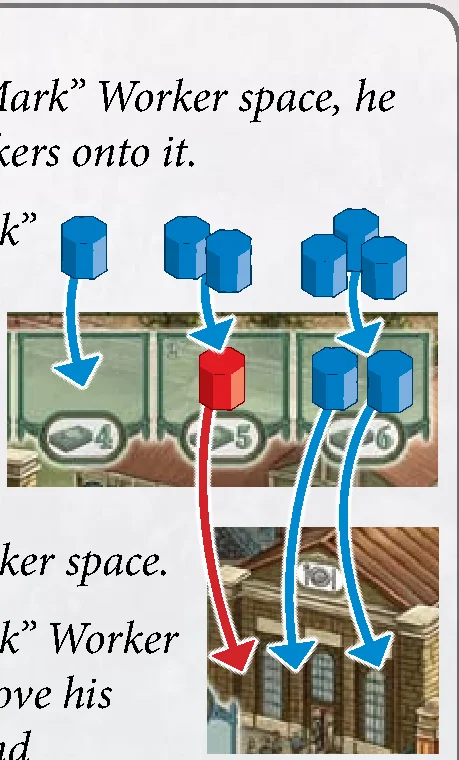
- If the worker space is empty: you must place exactly 1 of your workers from your supply onto it and then perform its action.
- If there are already 1 or more Workers on that space (no matter which player’s): remove them from that space first and put them on the Canteen. Then take from your supply as many Workers as you removed plus 1 additional Worker and place them onto the Worker space. Then perform the space’s action.
- If you cannot perform the action of a Worker space or do not have enough Workers to oust the previous ones, you must select a different Worker space.
- The Canteen is just a holding area for used Workers. It can hold any number of Workers (of all colors).
Bank option: If you cannot or do not want to select a Worker space, you must place exactly 1 of your Workers from your supply onto the Bank instead (the building below the green “Money” Worker spaces). For this you receive exactly 1 Mark from the general Bank note supply. Like the Canteen, the Bank can hold any number of Workers (of all colors).
After you have performed the action of your chosen Worker space, it is the next player’s turn. As soon as you have run out of Workers in your Worker supply, your turn is skipped for the rest of the Shift.
Worker Spaces
There are 5 kinds of Worker spaces on the Game board (each allowing a specific action):
1. Minecarts Factory (Acquire 1 Tunnel tile and add to your Pit)
When placing your worker(s) onto a Worker space in the Minecarts factory, you must acquire the Tunnel tile connected to this Worker space by paying money. The number of Marks that you must return to the general Bank note supply depends on the color and number (1 or 2) of Minecarts on the tile:
- each yellow Minecart costs 1 Mark
- each brown Minecart costs 2 Marks
- each gray Minecart costs 3 Marks
- each black Minecart costs 4 Marks
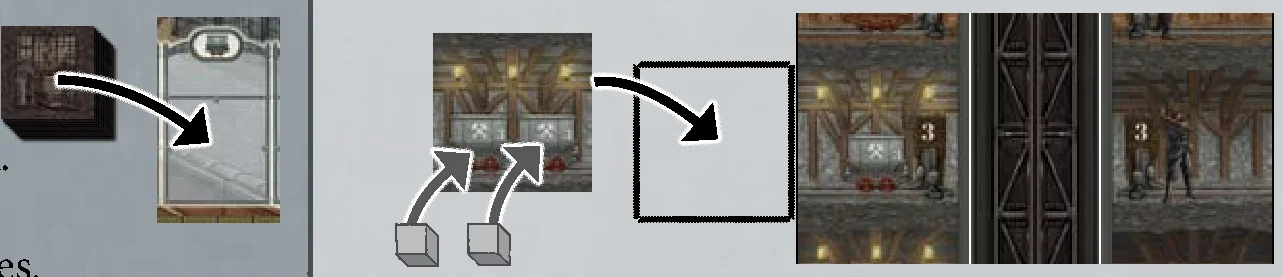
After you have acquired the Tunnel tile, immediately place 1 Coal cube of the matching color (taken from the general supply) onto each of its Minecarts. Then add the tile to your Pit. Make sure that you add it:
- to its matching level (yellow, brown, gray, black)
- on the matching side (“Light” side or “Dark” side – the “Light” side has lanterns, the “Dark” side has no lanterns).
At the end of your turn, if you acquired the Tunnel tile from a space of the Minecarts factory, fill its empty space with a face-up Tunnel tile drawn from the face-down stack.
Note: Minecarts are never refilled. You only get new Coal by acquiring new Tunnel tiles.
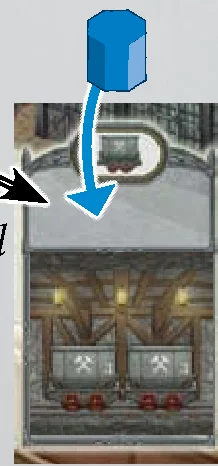
Important – Special Worker Space: This Worker space works a little differently: If you place your Worker(s) here, take the top 5 Tunnel tiles from the face-down stack. Choose 1 Tunnel tile from among those 5 and pay the usual costs for the Minecarts on this tile. Then return the remaining 4 tiles face down in the order of your choice EITHER to the top OR to the bottom of the stack. (You are allowed to return all 5 tiles to the top or bottom of the stack and thus not gain a Tunnel tile at all – this still counts as a complete action.)
2. Mining (Get Coal from your Pit onto your Outstanding Orders)
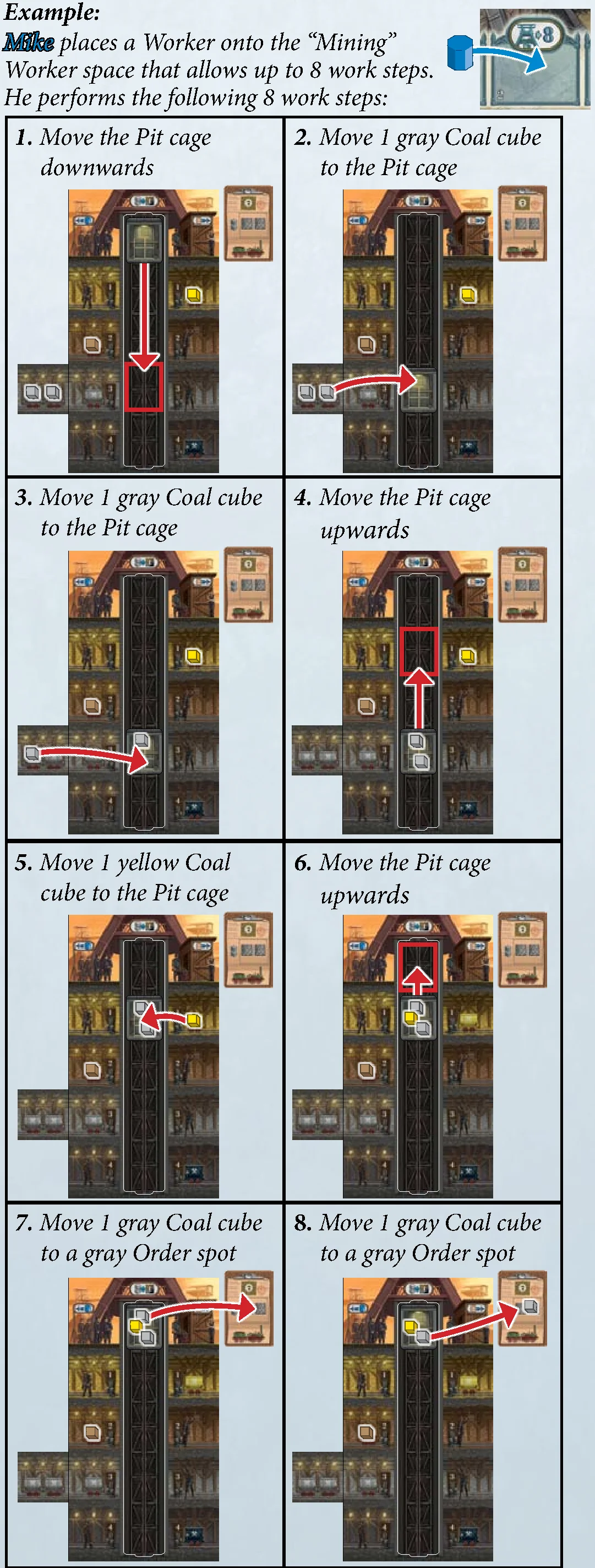
When placing your Worker(s) onto a “Mining” Worker space, you can mine your Pit and prepare your Orders for Delivery. The number stated on the Worker space indicates the maximum number of work steps you may perform. (If you perform fewer work steps, the rest are simply forfeited.)
Each of the following moves is considered 1 work step:
- Move your Pit cage downwards and stop at any Tunnel level.
- Move your Pit cage upwards and stop at any Tunnel level or at the Surface level.
- While your Pit cage is at a Tunnel level: Move 1 Coal cube from any Minecart at that level onto any free spot on your Pit cage (your Pit cage has a total of 5 spots).
- While your Pit cage is at the Surface level: Move 1 Coal cube from your Pit cage to an Order card in your Outstanding Orders area, placing it onto any free Order spot of the matching color.
Important: Instead of the Coal cube of the requested color you may place any 2 Coal cubes (of the same or different colors) onto the Order spot. However, moving these 2 Coal cubes from your Pit cage to the Order spot still requires a total of 2 work steps. - At the Surface level: If you do not have an appropriate Order card in your Outstanding Orders area, but want to vacate a spot in your Pit cage anyway: Move 1 Coal cube from your Pit cage to your Private Coal storage. (There is no limit to the number of Coal cubes that may be stored in your Private Coal storage.)
- Move 1 Coal cube from your Private Coal storage to an Order card in your Outstanding Orders area. (For this the same rules apply as when moving the cube from your Pit cage to the Order card.)
Note: Once Coal cubes are placed on Order spots, you may not relocate them to other Order spots later!
3. Delivery (Deliver completed Orders)
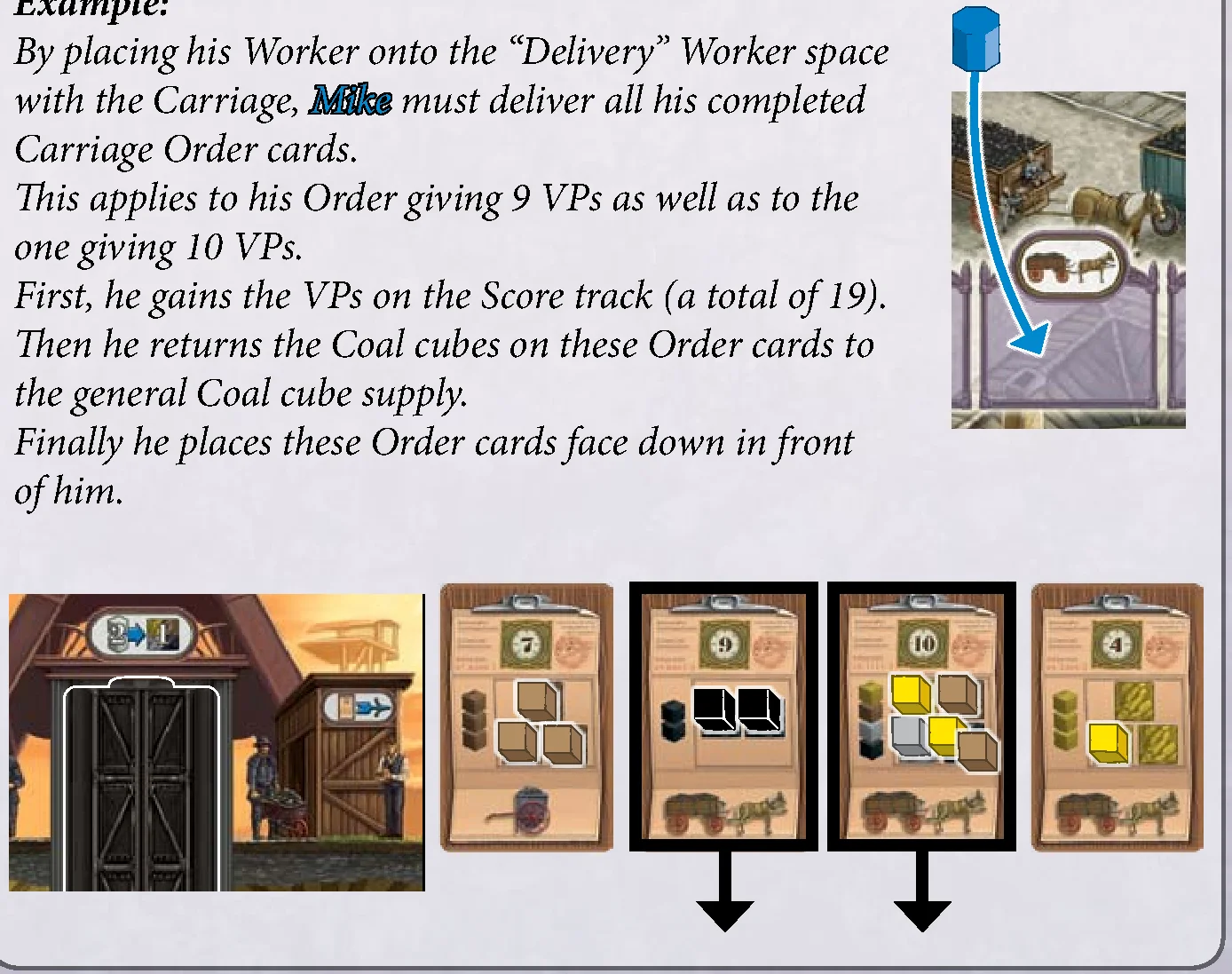
When placing your Worker(s) onto a “Delivery” Worker space, you must deliver all Orders that:
- show the same transport Vehicle as depicted above that Worker space, and
- are complete (i.e. all Order spots are occupied by Coal cubes).
(You are only allowed to choose a “Delivery” worker space if you can deliver at least 1 completed Order of that vehicle.)
For each of your delivered Orders, gain the amount of Victory Points (VPs) stated at the top of that card by advancing your Victory Point marker on the Score track accordingly.
Then remove the delivered Orders from your Outstanding Orders area and return the Coal cubes on them to the general supply.
Finally, place the delivered Order cards face down in front of you (you will need them again for each Shift scoring).
4. Money (Gain Bank notes)
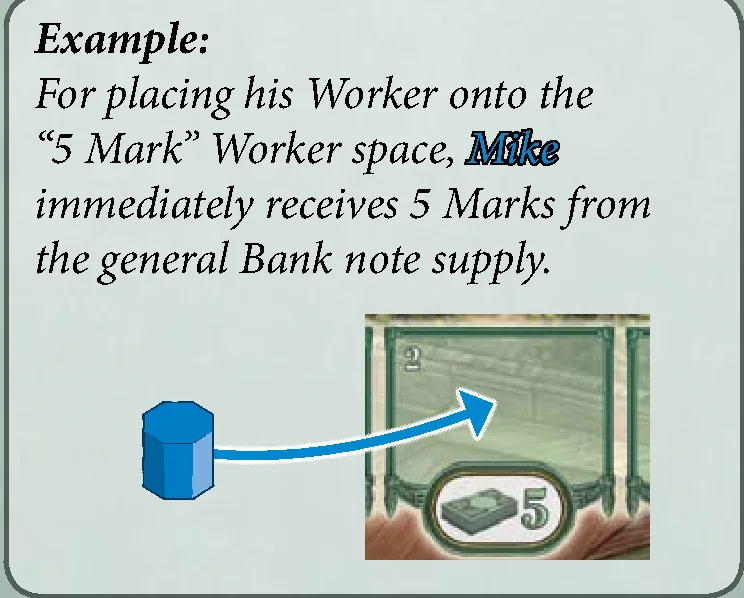
When placing your Worker(s) onto a “Money” Worker space, you receive the number of Marks stated on that space. (Money is necessary for acquiring Tunnel tiles at the Minecart factory.)
5. New Order (Gain 1 Order Card)
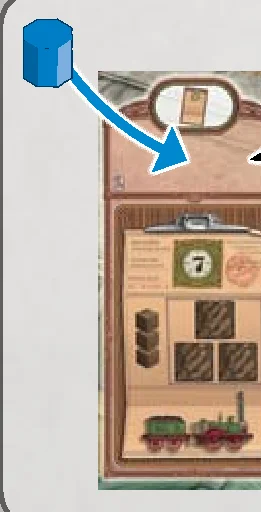
When placing your worker(s) onto an “Order” Worker space, you must take the Order card below that Worker space and place it in your Outstanding Orders area. (There is no limit to the number of Order cards that you may have in your Outstanding Order area.)
Then refill the now empty Order space on the Game board with a face-up Order card drawn from the face-down stack.
Important – Special Order Worker Space: If you place your Worker(s) here, take the top 5 Order cards from the face-down stack. Secretly choose 1 Order card from among those 5 and place it face up in your Outstanding Order area. Then return the remaining 4 cards face down in the order of your choice EITHER to the top OR to the bottom of the stack. (You are allowed to return all 5 cards to the top or bottom of the stack and thus not gain an Order at all – this still counts as a complete action.)
End of a Shift
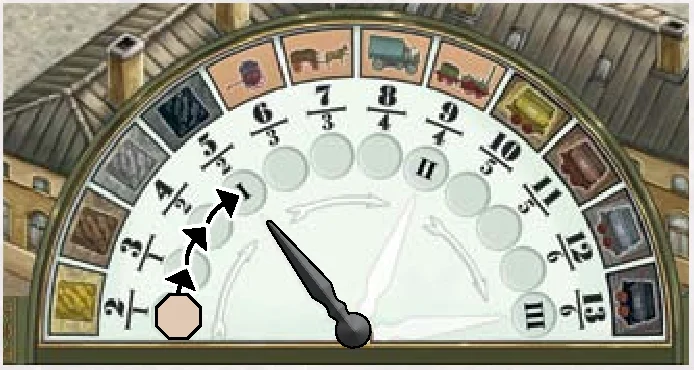
As soon as all players have run out of Workers, the Shift ends and a Shift scoring takes place. This is done with the help of the Shift Clock. The Shift Clock comprises a total of 12 elements. The number of elements that are scored increases with every Shift:
- After the first Shift: only the first 4 elements of the Shift Clock are scored.
- After the second Shift: the first 8 elements are scored.
- After the third Shift: all 12 elements are scored.

Shift Scoring
To carry out the Shift scoring, first reveal all your delivered Order cards and display them in front of you in a row. (Only delivered Orders are eligible for this scoring. Outstanding Orders to the right of your Pit do not count.)
Then, according to the elements on the Shift clock, award Victory Points (VPs) for majorities (first and second place). Start by distributing the VPs of the first element (as indicated by the position of Scoring marker). Afterwards, move the Scoring marker to the circle space of the next element, distribute its VPs and so on. When the Scoring marker finally reaches the position which the Shift hand is pointing at, this is the last element scored for that Shift.
The first 4 elements reward delivered Coal majorities:
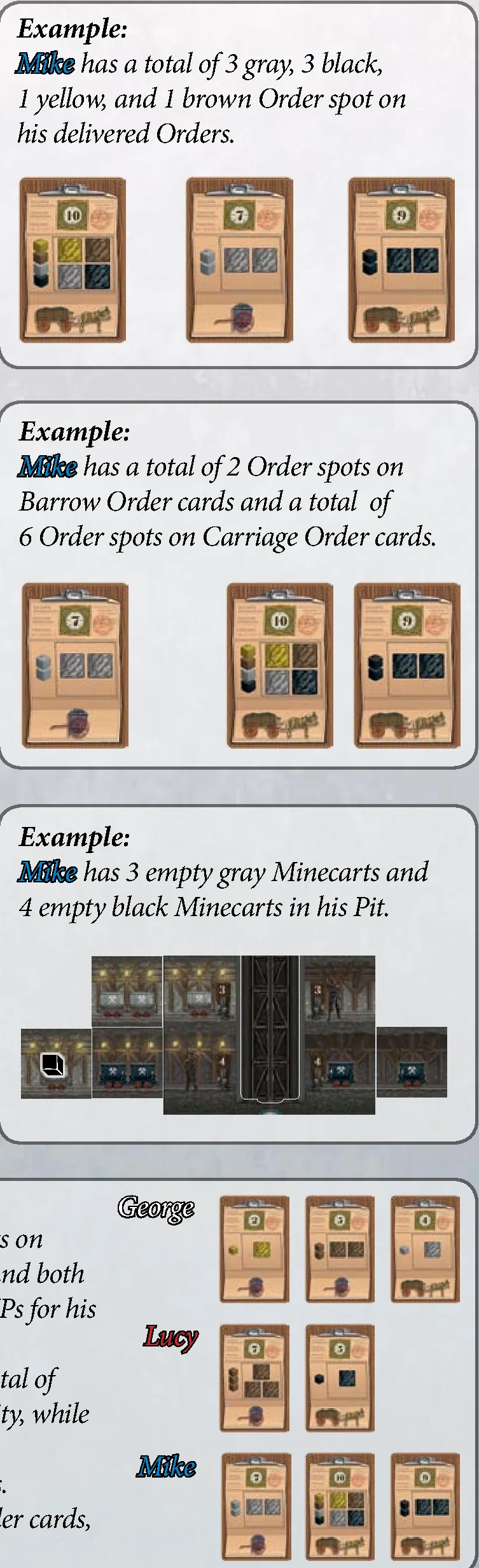
- Yellow Order spots: Highest = 2 VPs; Second highest = 1 VP.
- Brown Order spots: Highest = 3 VPs; Second highest = 1 VP.
- Gray Order spots: Highest = 4 VPs; Second highest = 2 VPs.
- Black Order spots: Highest = 5 VPs; Second highest = 2 VPs.
The second 4 elements reward Coal majorities that were delivered via a certain Vehicle:
- Barrow Order cards: Highest = 6 VPs; Second highest = 3 VPs.
- Carriage Order cards: Highest = 7 VPs; Second highest = 3 VPs.
- Truck Order cards: Highest = 8 VPs; Second highest = 4 VPs.
- Engine Order cards: Highest = 9 VPs; Second highest = 4 VPs.
The third 4 elements reward the majority of empty Minecarts (no Coal cube on it) in the players’ Pits:
- Empty yellow Minecarts: Highest = 10 VPs; Second highest = 5 VPs.
- Empty brown Minecarts: Highest = 11 VPs; Second highest = 5 VPs.
- Empty gray Minecarts: Highest = 12 VPs; Second highest = 6 VPs.
- Empty black Minecarts: Highest = 13 VPs; Second highest = 6 VPs.
Tie-Breaking and Special Rules for Scoring:
- Tie for first place: All tied players get the VP reward for first place. In this case, the VP reward for second place is omitted.
- Tie for second place: All tied players get the VP reward for second place.
- Special rule in a 2-player game: There is no VP reward for second place when scoring any element. Only the VP reward for first place is awarded.
- Of course, players can only score Victory Points for elements of which they have at least 1 delivered Order (or at least 1 empty Minecart).
Prepare for the Next Shift
After all Victory Points of the Shift scoring have been distributed, prepare for the next Shift:
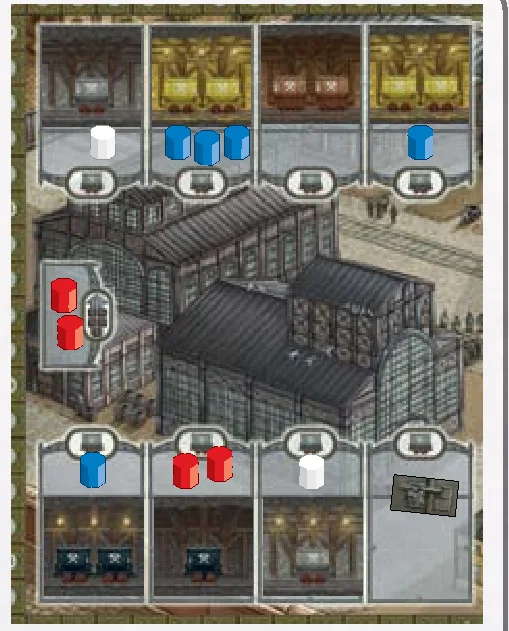
- Give the Starting Player marker to the player who has the most Workers on Worker spaces in the Minecarts factory.
In the case of a tie, give the Starting Player marker to the tied player that in clockwise direction is sitting closest to the Starting Player of the previous Shift. (If the Starting Player of the previous Shift participates in the tie, he does not remain the Starting Player.)
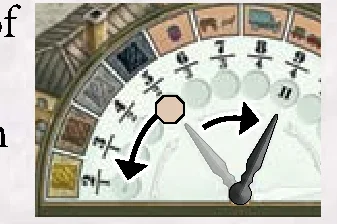
- Return the Scoring marker to the leftmost circle space of the Shift Clock. Then place the Shift hand onto the next hand to the right, so that it points at the circle space with the next highest Shift number (II/III).
- Place all your delivered Order cards that you revealed for the Shift scoring face down in front of you. You will need them again for the next Shift scoring.
- Remove all your Workers from the Game board and place them to the left of your Pit as your new Worker supply.
The new Shift now starts with the turn of the player holding the Starting Player marker.
End of the Game
The game ends after the Shift scoring of the 3rd Shift.
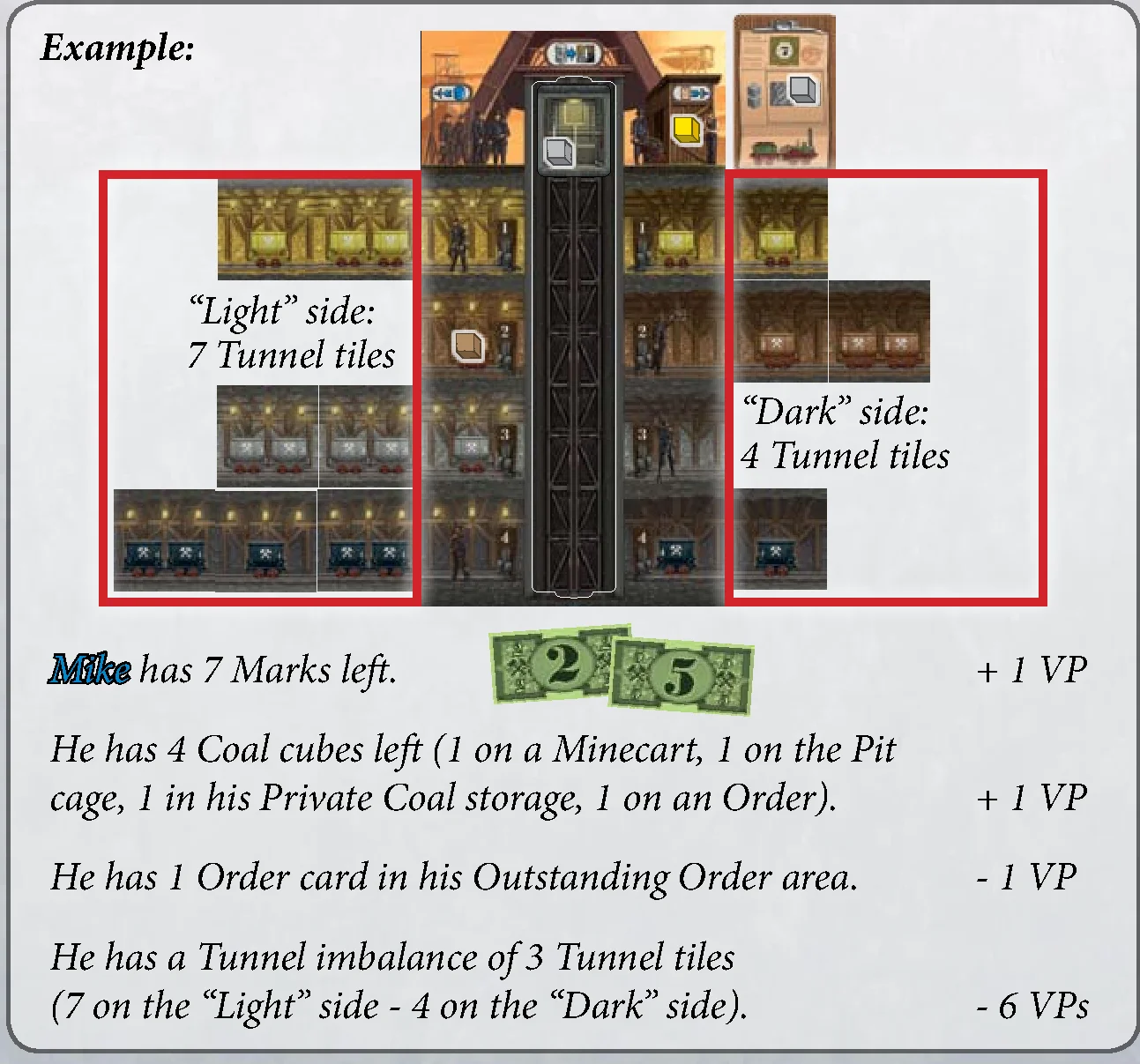
Final Scoring
Now convert Bank notes and Coal cubes that you have left into Victory Points:
- Money: For every 5 Marks that you return to the general Bank note supply, you receive 1 VP. (Keep any Marks in excess of this as a tiebreaker.)
- Coal cubes: For every 3 Coal cubes, you receive 1 VP. (It does not matter which color the cubes are or where they are placed: Pit, Pit cage, Private Coal storage, or Outstanding Orders.)
Then check if you have Outstanding Orders:
- For each Order card left in your Outstanding Orders area, you lose 1 VP. (Move your Victory Point marker on the Score track backwards.)
Then check your Pit for Tunnel balance:
- To be balanced, your Pit must have an equal number of Tunnel tiles (not Minecarts!) on its “Light” and on its “Dark” side. (Only the total number on each side matters, not the number on each Tunnel level.)
- However, if your Pit exhibits a Tunnel imbalance, you lose points: For each Tunnel tile that one side has in excess of the other side, you lose 2 VPs.
Winner: The player with the most Victory Points in total wins. In the case of a tie, the tied player with the most Marks left wins. If there is still a tie, the victory is shared.
Additional Notes
- Players may not keep their money hidden.
- The general Bank note supply is not limited. If the supply should run out, keep track of the money in a different way (note it on paper, for example).
- If the stack of Tunnel tiles or the stack of Order cards should run out, the respective spaces are simply not refilled and stay empty.
- If, when a player acquires a Tunnel tile, the supply contains fewer Coal cubes of the color he needs to fill the Minecarts on that tile, the player may place 1 Coal cube of any color onto each Minecart on that tile which he cannot fill properly. This does not affect any costs paid for the tile.
Credits
Authors: Wolfgang Kramer and Michael Kiesling
Illustrations: Dennis Lohausen
Rule book and layout: Alfred Viktor Schulz
Rule book revision: Neil Crowley
Copyright: © 2013 eggertspiele GmbH & Co. KG, Friedhofstr. 17, 21073 Hamburg, Germany. All rights reserved. | www.eggertspiele.de
Distribution: R&R Games Inc., PO Box 130195, Tampa, Fl 33681, www.RnRgames.com
We wish to thank all test players. Special thanks go to Ina Kiesling, Uschi and Reinhard Kramer, Waltraud and Heinz Niederberger, and the Gaming Club Gerlingen.
Overview & Components
Game Overview
A boardgame for 2 to 4 players, aged 10 and up
Authors: Wolfgang Kramer and Michael Kiesling
Essen, on the verge of the 20th century: A time when endless supplies of coal are abundant in the earth and ripe for the taking! You are the owner of a coal mine fulfilling contracts for various types of coal. Spend capital to buy coal carts and expand tunnels as you dig a variety of coal.
Complete orders to gain victory points. However, the orders are very specific about the type of coal they demand. Since each kind is in a different mine level, you must expand your tunnels, costing even more money.
Finances are tight and each company has a limited number of workers. Be careful, the later you assign a job, the more workers are needed to get that job done. Once everyone runs out of workers, the shift is over. After three shifts, whoever has the most victory points wins.
Now, get your hands dirty! As they say in Essen, Glück auf!
Components
- 1 Game board
- 4 Pit cages
- 48 Tunnel tiles
- 44 Order cards:
- 11 Barrow Order cards
- 11 Carriage Order cards
- 11 Truck Order cards
- 11 Engine Order cards
- 64 Coal cubes (16 of each of the 4 colors)
- 72 Workers (18 of each player color)
- 4 Victory Point markers (1 of each player color)
- 40 Bank notes (in values of 1, 2, 5 Marks)
- 7 Lock tiles
- 1 Scoring marker
- 1 Starting Player marker
- 1 Shift hand
- 4 Pits
- 4 Shaft inlays
Setup
Game Setup
Before the first game, detach all cardboard pieces carefully from the punch boards.
- Put the Game board in the middle of the table.
- Depending on the number of players, reduce the number of available Worker spaces by covering the indicated spaces on the Game board with Lock tiles:
- in a 2-player game: cover the four spaces marked “2” and the three spaces marked “2+3”
- in a 3-player game: cover the three spaces marked “2+3”
- in a 4-player game: no spaces are covered
- Form a general supply of the Coal cubes as well as a general supply of the Bank notes (separated by their values).
- Shuffle all Tunnel tiles and place them next to the Game board as a face-down stack. Place 1 Tunnel tile drawn randomly from this stack face up onto each (unlocked) Tunnel tile space of the Minecart factory.
- Place the Shift hand onto the leftmost hand outline of the Shift Clock, so that it points to the circle space marked “I”. Then place the Scoring marker onto the leftmost circle space of the Shift Clock (the circle with the arrow).
- Each player chooses a player color and receives:
- the Pit of his color (as indicated by the color of the icons)
- 1 Shaft inlay (placed in the cavity in the middle of his Pit)
- 1 Pit cage (placed onto the Shaft at the Surface level)
- 4 Coal cubes from the general supply: 1 brown, 1 gray, 1 yellow, 1 black (each placed onto the Minecart of its color in his Pit)
- Depending on the number of players, each player receives a certain number of Workers of his color:
- in a 2-player game: 18 Workers each
- in a 3-player game: 15 Workers each
- in a 4-player game: 13 Workers each
Return any spare Workers to the box. Then each player places his Workers to the left of his Pit at the Surface level. This is his personal Worker supply.
Place each player’s Victory Point marker on the “0/100” space of the score track.
- Depending on the number of players, each player receives a certain number of Marks from the general Bank note supply as starting capital:
- in a 2-player game: 10 Marks
- in a 3-player game: 9 Marks
- in a 4-player game: 8 Marks
- Determine the Starting Player and give him the Starting Player marker.
- Shuffle all Order cards and place them next to the Game board as a face-down stack.
Depending on the number of players, draw Order cards from this stack and display them face up below the Game board:
- in a 2-player game: reveal 7 Order cards
- in a 3-player game: reveal 10 Order cards
- in a 4-player game: reveal 13 Order cards
Starting with the right-hand neighbor of the Starting Player and then going counter-clockwise, each player takes 1 Order card from among the cards displayed. Repeat this until each player has 3 Orders cards, which he places face up to the right of his Pit in his Outstanding Orders area.
Place the remaining card that has not been taken by any player onto 1 of the 4 Order spaces on the Game board. Finally, fill each of the other 3 Order spaces on the Game board with an Order card from the stack. (In a 2-player game, leave the leftmost Order space empty, as it is blocked with a Lock tile).
How to Play & Worker Placement
Round Structure
Coal Baron is played over a total of 3 rounds (Shifts). Each Shift starts with the turn of the current Starting Player and then continues in a clockwise direction. On his turn, a player always performs exactly 1 action by placing 1 or more of his Workers onto 1 Worker space of his choice.
The Shift ends when the Workers of all players have been placed onto the Game board. Then a Shift scoring takes place.
After the first and second Shift, all Workers return to their owners. Then the new Shift starts. After the third Shift, the game ends.
The player with the most Victory Points (VPs) wins the game.
Taking Your Turn
When it is your turn, choose 1 Worker space on the Game board. You may only choose a space if you are able to perform that space’s action:
- If the worker space is empty: you must place exactly 1 of your workers from your supply onto it and then perform its action.
- If there are already 1 or more Workers on that space (no matter which player’s): remove them from that space first and put them on the Canteen. Then take from your supply as many Workers as you removed plus 1 additional Worker and place them onto the Worker space. Then perform the space’s action.
- If you cannot perform the action of a Worker space or do not have enough Workers to oust the previous ones, you must select a different Worker space.
- The Canteen is just a holding area for used Workers. It can hold any number of Workers (of all colors).
Bank option: If you cannot or do not want to select a Worker space, you must place exactly 1 of your Workers from your supply onto the Bank instead (the building below the green “Money” Worker spaces). For this you receive exactly 1 Mark from the general Bank note supply. Like the Canteen, the Bank can hold any number of Workers (of all colors).
After you have performed the action of your chosen Worker space, it is the next player’s turn. As soon as you have run out of Workers in your Worker supply, your turn is skipped for the rest of the Shift.
Worker Actions
Worker Spaces
There are 5 kinds of Worker spaces on the Game board (each allowing a specific action):
1. Minecarts Factory (Acquire 1 Tunnel tile and add to your Pit)
When placing your worker(s) onto a Worker space in the Minecarts factory, you must acquire the Tunnel tile connected to this Worker space by paying money. The number of Marks that you must return to the general Bank note supply depends on the color and number (1 or 2) of Minecarts on the tile:
- each yellow Minecart costs 1 Mark
- each brown Minecart costs 2 Marks
- each gray Minecart costs 3 Marks
- each black Minecart costs 4 Marks
After you have acquired the Tunnel tile, immediately place 1 Coal cube of the matching color (taken from the general supply) onto each of its Minecarts. Then add the tile to your Pit. Make sure that you add it:
- to its matching level (yellow, brown, gray, black)
- on the matching side (“Light” side or “Dark” side – the “Light” side has lanterns, the “Dark” side has no lanterns).
At the end of your turn, if you acquired the Tunnel tile from a space of the Minecarts factory, fill its empty space with a face-up Tunnel tile drawn from the face-down stack.
Note: Minecarts are never refilled. You only get new Coal by acquiring new Tunnel tiles.
Important – Special Worker Space: This Worker space works a little differently: If you place your Worker(s) here, take the top 5 Tunnel tiles from the face-down stack. Choose 1 Tunnel tile from among those 5 and pay the usual costs for the Minecarts on this tile. Then return the remaining 4 tiles face down in the order of your choice EITHER to the top OR to the bottom of the stack. (You are allowed to return all 5 tiles to the top or bottom of the stack and thus not gain a Tunnel tile at all – this still counts as a complete action.)
2. Mining (Get Coal from your Pit onto your Outstanding Orders)
When placing your Worker(s) onto a “Mining” Worker space, you can mine your Pit and prepare your Orders for Delivery. The number stated on the Worker space indicates the maximum number of work steps you may perform. (If you perform fewer work steps, the rest are simply forfeited.)
Each of the following moves is considered 1 work step:
- Move your Pit cage downwards and stop at any Tunnel level.
- Move your Pit cage upwards and stop at any Tunnel level or at the Surface level.
- While your Pit cage is at a Tunnel level: Move 1 Coal cube from any Minecart at that level onto any free spot on your Pit cage (your Pit cage has a total of 5 spots).
- While your Pit cage is at the Surface level: Move 1 Coal cube from your Pit cage to an Order card in your Outstanding Orders area, placing it onto any free Order spot of the matching color.
Important: Instead of the Coal cube of the requested color you may place any 2 Coal cubes (of the same or different colors) onto the Order spot. However, moving these 2 Coal cubes from your Pit cage to the Order spot still requires a total of 2 work steps. - At the Surface level: If you do not have an appropriate Order card in your Outstanding Orders area, but want to vacate a spot in your Pit cage anyway: Move 1 Coal cube from your Pit cage to your Private Coal storage. (There is no limit to the number of Coal cubes that may be stored in your Private Coal storage.)
- Move 1 Coal cube from your Private Coal storage to an Order card in your Outstanding Orders area. (For this the same rules apply as when moving the cube from your Pit cage to the Order card.)
Note: Once Coal cubes are placed on Order spots, you may not relocate them to other Order spots later!
3. Delivery (Deliver completed Orders)
When placing your Worker(s) onto a “Delivery” Worker space, you must deliver all Orders that:
- show the same transport Vehicle as depicted above that Worker space, and
- are complete (i.e. all Order spots are occupied by Coal cubes).
(You are only allowed to choose a “Delivery” worker space if you can deliver at least 1 completed Order of that vehicle.)
For each of your delivered Orders, gain the amount of Victory Points (VPs) stated at the top of that card by advancing your Victory Point marker on the Score track accordingly.
Then remove the delivered Orders from your Outstanding Orders area and return the Coal cubes on them to the general supply.
Finally, place the delivered Order cards face down in front of you (you will need them again for each Shift scoring).
4. Money (Gain Bank notes)
When placing your Worker(s) onto a “Money” Worker space, you receive the number of Marks stated on that space. (Money is necessary for acquiring Tunnel tiles at the Minecart factory.)
5. New Order (Gain 1 Order Card)
When placing your worker(s) onto an “Order” Worker space, you must take the Order card below that Worker space and place it in your Outstanding Orders area. (There is no limit to the number of Order cards that you may have in your Outstanding Order area.)
Then refill the now empty Order space on the Game board with a face-up Order card drawn from the face-down stack.
Important – Special Order Worker Space: If you place your Worker(s) here, take the top 5 Order cards from the face-down stack. Secretly choose 1 Order card from among those 5 and place it face up in your Outstanding Order area. Then return the remaining 4 cards face down in the order of your choice EITHER to the top OR to the bottom of the stack. (You are allowed to return all 5 cards to the top or bottom of the stack and thus not gain an Order at all – this still counts as a complete action.)
End of a Shift & Scoring
End of a Shift
As soon as all players have run out of Workers, the Shift ends and a Shift scoring takes place. This is done with the help of the Shift Clock. The Shift Clock comprises a total of 12 elements. The number of elements that are scored increases with every Shift:
- After the first Shift: only the first 4 elements of the Shift Clock are scored.
- After the second Shift: the first 8 elements are scored.
- After the third Shift: all 12 elements are scored.
Shift Scoring
To carry out the Shift scoring, first reveal all your delivered Order cards and display them in front of you in a row. (Only delivered Orders are eligible for this scoring. Outstanding Orders to the right of your Pit do not count.)
Then, according to the elements on the Shift clock, award Victory Points (VPs) for majorities (first and second place). Start by distributing the VPs of the first element (as indicated by the position of Scoring marker). Afterwards, move the Scoring marker to the circle space of the next element, distribute its VPs and so on. When the Scoring marker finally reaches the position which the Shift hand is pointing at, this is the last element scored for that Shift.
The first 4 elements reward delivered Coal majorities:
- Yellow Order spots: Highest = 2 VPs; Second highest = 1 VP.
- Brown Order spots: Highest = 3 VPs; Second highest = 1 VP.
- Gray Order spots: Highest = 4 VPs; Second highest = 2 VPs.
- Black Order spots: Highest = 5 VPs; Second highest = 2 VPs.
The second 4 elements reward Coal majorities that were delivered via a certain Vehicle:
- Barrow Order cards: Highest = 6 VPs; Second highest = 3 VPs.
- Carriage Order cards: Highest = 7 VPs; Second highest = 3 VPs.
- Truck Order cards: Highest = 8 VPs; Second highest = 4 VPs.
- Engine Order cards: Highest = 9 VPs; Second highest = 4 VPs.
The third 4 elements reward the majority of empty Minecarts (no Coal cube on it) in the players’ Pits:
- Empty yellow Minecarts: Highest = 10 VPs; Second highest = 5 VPs.
- Empty brown Minecarts: Highest = 11 VPs; Second highest = 5 VPs.
- Empty gray Minecarts: Highest = 12 VPs; Second highest = 6 VPs.
- Empty black Minecarts: Highest = 13 VPs; Second highest = 6 VPs.
Tie-Breaking and Special Rules for Scoring:
- Tie for first place: All tied players get the VP reward for first place. In this case, the VP reward for second place is omitted.
- Tie for second place: All tied players get the VP reward for second place.
- Special rule in a 2-player game: There is no VP reward for second place when scoring any element. Only the VP reward for first place is awarded.
- Of course, players can only score Victory Points for elements of which they have at least 1 delivered Order (or at least 1 empty Minecart).
Prepare for the Next Shift
After all Victory Points of the Shift scoring have been distributed, prepare for the next Shift:
- Give the Starting Player marker to the player who has the most Workers on Worker spaces in the Minecarts factory.
In the case of a tie, give the Starting Player marker to the tied player that in clockwise direction is sitting closest to the Starting Player of the previous Shift. (If the Starting Player of the previous Shift participates in the tie, he does not remain the Starting Player.)
- Return the Scoring marker to the leftmost circle space of the Shift Clock. Then place the Shift hand onto the next hand to the right, so that it points at the circle space with the next highest Shift number (II/III).
- Place all your delivered Order cards that you revealed for the Shift scoring face down in front of you. You will need them again for the next Shift scoring.
- Remove all your Workers from the Game board and place them to the left of your Pit as your new Worker supply.
The new Shift now starts with the turn of the player holding the Starting Player marker.
End of the Game & Final Scoring
End of the Game
The game ends after the Shift scoring of the 3rd Shift.
Final Scoring
Now convert Bank notes and Coal cubes that you have left into Victory Points:
- Money: For every 5 Marks that you return to the general Bank note supply, you receive 1 VP. (Keep any Marks in excess of this as a tiebreaker.)
- Coal cubes: For every 3 Coal cubes, you receive 1 VP. (It does not matter which color the cubes are or where they are placed: Pit, Pit cage, Private Coal storage, or Outstanding Orders.)
Then check if you have Outstanding Orders:
- For each Order card left in your Outstanding Orders area, you lose 1 VP. (Move your Victory Point marker on the Score track backwards.)
Then check your Pit for Tunnel balance:
- To be balanced, your Pit must have an equal number of Tunnel tiles (not Minecarts!) on its “Light” and on its “Dark” side. (Only the total number on each side matters, not the number on each Tunnel level.)
- However, if your Pit exhibits a Tunnel imbalance, you lose points: For each Tunnel tile that one side has in excess of the other side, you lose 2 VPs.
Winner: The player with the most Victory Points in total wins. In the case of a tie, the tied player with the most Marks left wins. If there is still a tie, the victory is shared.
Additional Notes
- Players may not keep their money hidden.
- The general Bank note supply is not limited. If the supply should run out, keep track of the money in a different way (note it on paper, for example).
- If the stack of Tunnel tiles or the stack of Order cards should run out, the respective spaces are simply not refilled and stay empty.
- If, when a player acquires a Tunnel tile, the supply contains fewer Coal cubes of the color he needs to fill the Minecarts on that tile, the player may place 1 Coal cube of any color onto each Minecart on that tile which he cannot fill properly. This does not affect any costs paid for the tile.
Credits
Authors: Wolfgang Kramer and Michael Kiesling
Illustrations: Dennis Lohausen
Rule book and layout: Alfred Viktor Schulz
Rule book revision: Neil Crowley
Copyright: © 2013 eggertspiele GmbH & Co. KG, Friedhofstr. 17, 21073 Hamburg, Germany. All rights reserved. | www.eggertspiele.de
Distribution: R&R Games Inc., PO Box 130195, Tampa, Fl 33681, www.RnRgames.com
We wish to thank all test players. Special thanks go to Ina Kiesling, Uschi and Reinhard Kramer, Waltraud and Heinz Niederberger, and the Gaming Club Gerlingen.