Planet Unknown
2022
Develop a viable planet by placing dual-resource tiles, building infrastructure, and overcoming meteors in a simultaneous strategic challenge.
80
minutes
1 - 6
player(s)
10+
Medium


About this board game
Planet Unknown is a competitive board game for 1–6 players, with an average play time of 80 minutes, in which players develop the best possible planet for colonization.
Earth has run out of resources, so humanity must move on. After rovers discover a series of planets and confirm between one and six viable options, players begin the challenge of creating a planet capable of supporting life.
Each round, every player places one polyomino-shaped, dual-resource tile on their planet. Careful placement matters: players must cover their planet efficiently while also building an engine from the infrastructure represented by the tile.
- Place a polyomino tile on your planet.
- Use the tile’s two infrastructure types to perform two associated actions.
- Develop your planet while responding to meteor impacts.
Each resource represents infrastructure needed to support life. Once a tile is placed, its two infrastructure types determine the actions available, creating a direct connection between spatial planning and planetary development.
Some tile placements trigger meteors. These make every planet more difficult to develop and prevent players from scoring points in the meteor’s row and column. As the game progresses, these hazards add further pressure to every placement decision.
Planet Unknown uses the Lazy S.U.S.A.N. space station in the center of the table to support simultaneous, yet strategic turn-based play. Players can develop their planets at the same time while still making meaningful decisions about tile placement, infrastructure, and scoring.
Released in 2022, Planet Unknown combines polyomino placement, resource-driven actions, engine building, and planetary hazards in a competitive experience for one to six players.
/pic7182955.jpg)
Planet Unknown
Board Game Rules
Overview
Earth has run out of resources. One to six planeteers have been selected to develop an unknown planet to preserve the future of humanity.
Objective
Win the game by scoring the most victory points via efficient planet development, resource track advancement, collecting lifepods, removing meteorites, and besting your neighboring planets.
Components
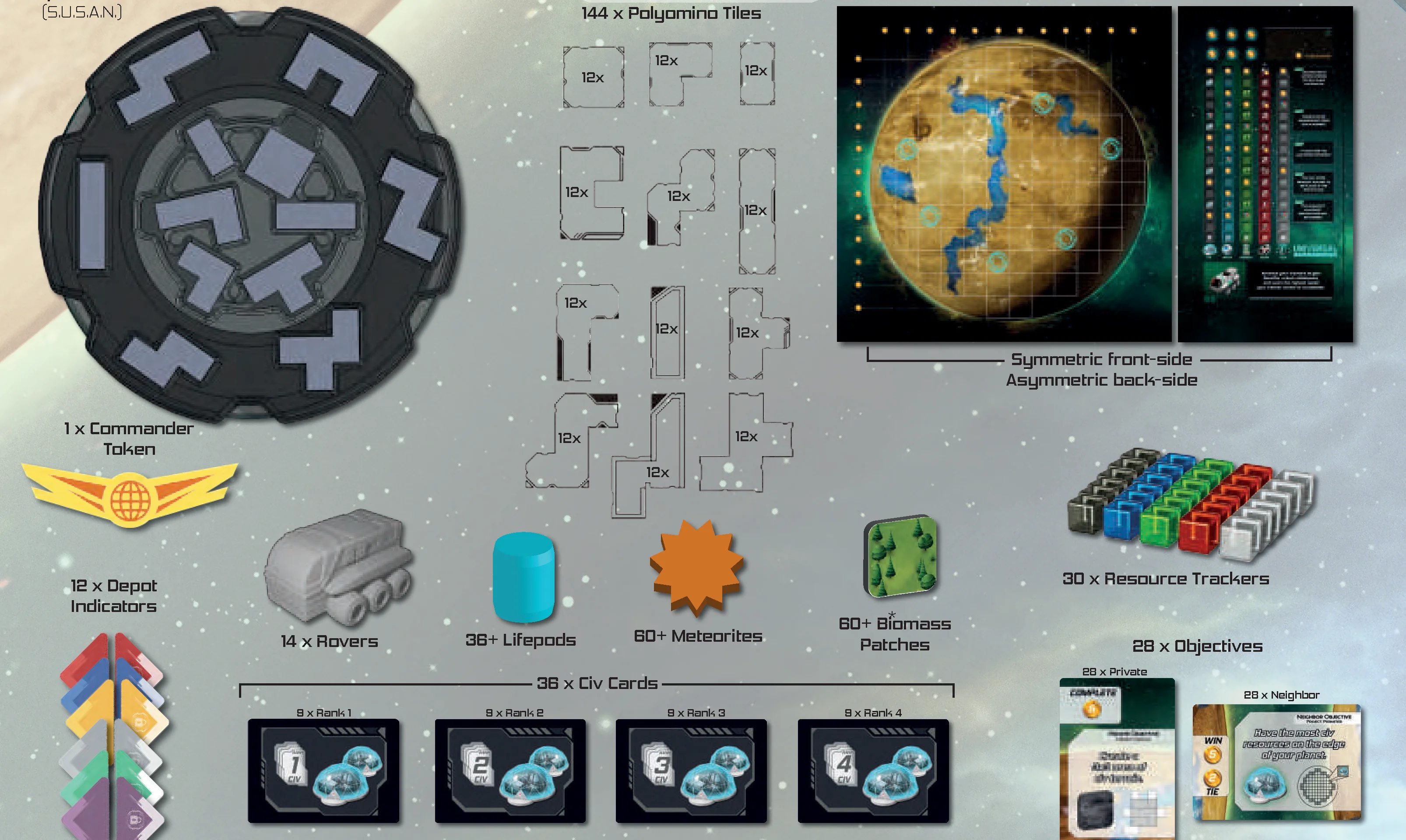
- 1x Space Station (S.U.S.A.N.)
- 144 x Polyomino Tiles (12 of each shape)
- 6 x Planet Boards (Symmetric front-side, Asymmetric back-side)
- 6 x Corporation Boards (Symmetric front-side, Asymmetric back-side)
- 1x Commander Token
- 12 x Depot Indicators
- 14 x Rovers
- 36+ Lifepods
- 60+ Meteorites
- 60+ Biomass Patches
- 30 x Resource Trackers
- 28 x Objectives (28 x Private, 28 x Neighbor)
- 36 x Civ Cards (9 x Rank 1, 9 x Rank 2, 9 x Rank 3, 9 x Rank 4)
- Event Module: 60 x Event Deck cards (20 x Green Alerts, 20 x Orange Alerts, 20 x Red Alerts)
- 1x Scorepad

Component Upgrades* / Expandable Content**
*Components Upgraded in Limited Deluxe edition.
**Expandable Content included in all Kickstarter editions.
- 2 x Corporation Boards (Page 13)**
- 6 x Planet Boards (Page 15)**
- 1x Flux token**
Getting Started
For the best player experience, we recommend your first game uses only the symmetric Planet and Corporation boards (KSB-4156 and Universal Coalition). Once you understand the symmetric game, the asymmetric planets and corporations will be easier to learn and play.
General Setup
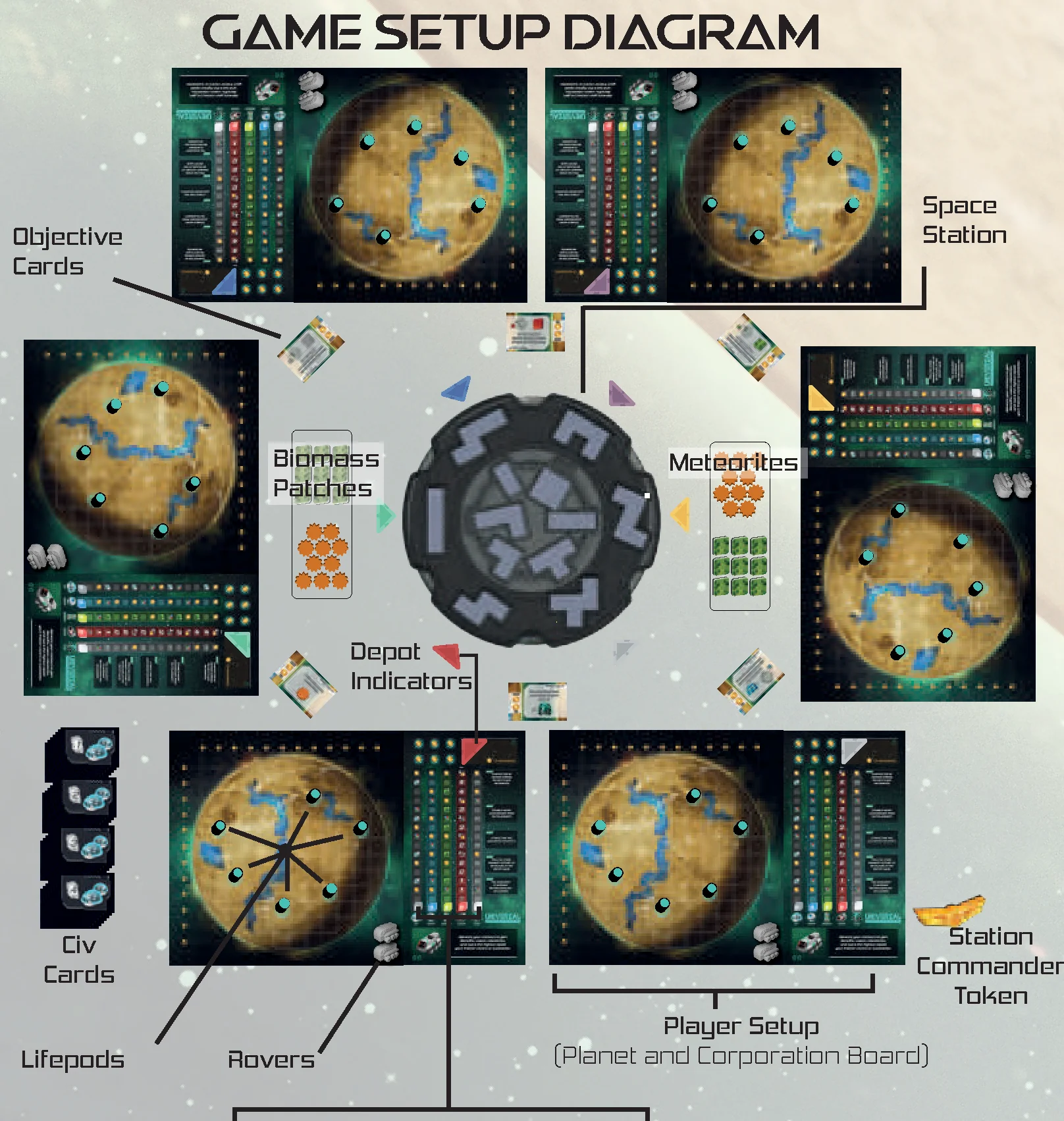
- Place the Space Station in the center of the table. Load the POLYOMINO TILES based on the space station setup instructions.
- Give each player one PLANET BOARD, one CORPORATION BOARD, two matching DEPOT INDICATORS, and five RESOURCE TRACKERS (one of each black, blue, green, red, and white). Set up each corporation board, resource trackers, rovers, and lifepods as pictured.
- Each player should individually choose to play with the symmetric side or asymmetric side of their corporation and planet board. The symmetric side has a complexity rating of one. The asymmetric side has a complexity rating that may be higher than one.
- Each player should take and position the number of LIFEPODS and ROVERS as designated by their planet and corporation boards respectively. Each player should position their depot indicator around the space station separated equally and directly in front of a depot.
- Randomly select CIV CARDS equal to number of players plus one for each civ card rank 1, 2, 3, 4. For example, in a 4-player game, there should be 5 cards of each rank. Cards should be organized into stacks separated by rank and placed on the table face down. All other civ cards should be returned to the box.
- METEORITES and BIOMASS PATCHES should be set aside and within easy reach of all players.
- Shuffle and deal OBJECTIVE CARDS. The objective cards have two sides to them. Use the card side as designated by the grid below:
- 3-6 players: Neighbor side — One card positioned between each player
- 2 players: Neighbor side — Three cards positioned between both players
- Solo Game: Private side — Four cards, choose three to play with
- Choose a player to be station commander and give them the STATION COMMANDER TOKEN.
Space Station Setup
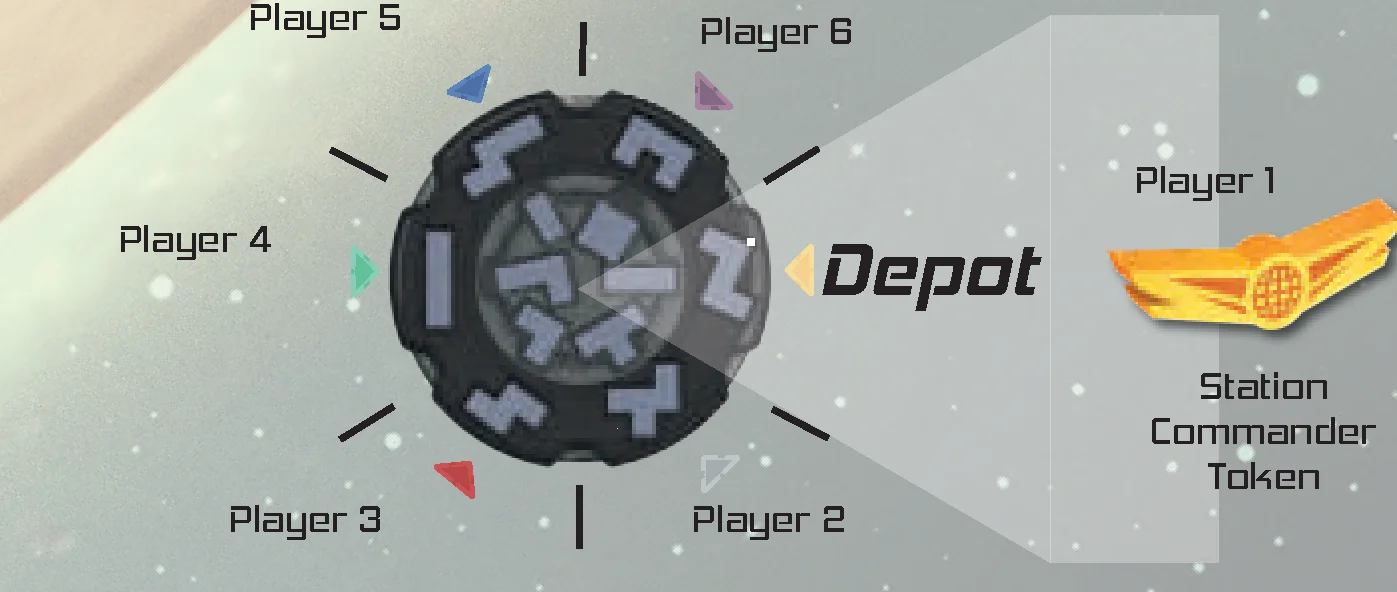
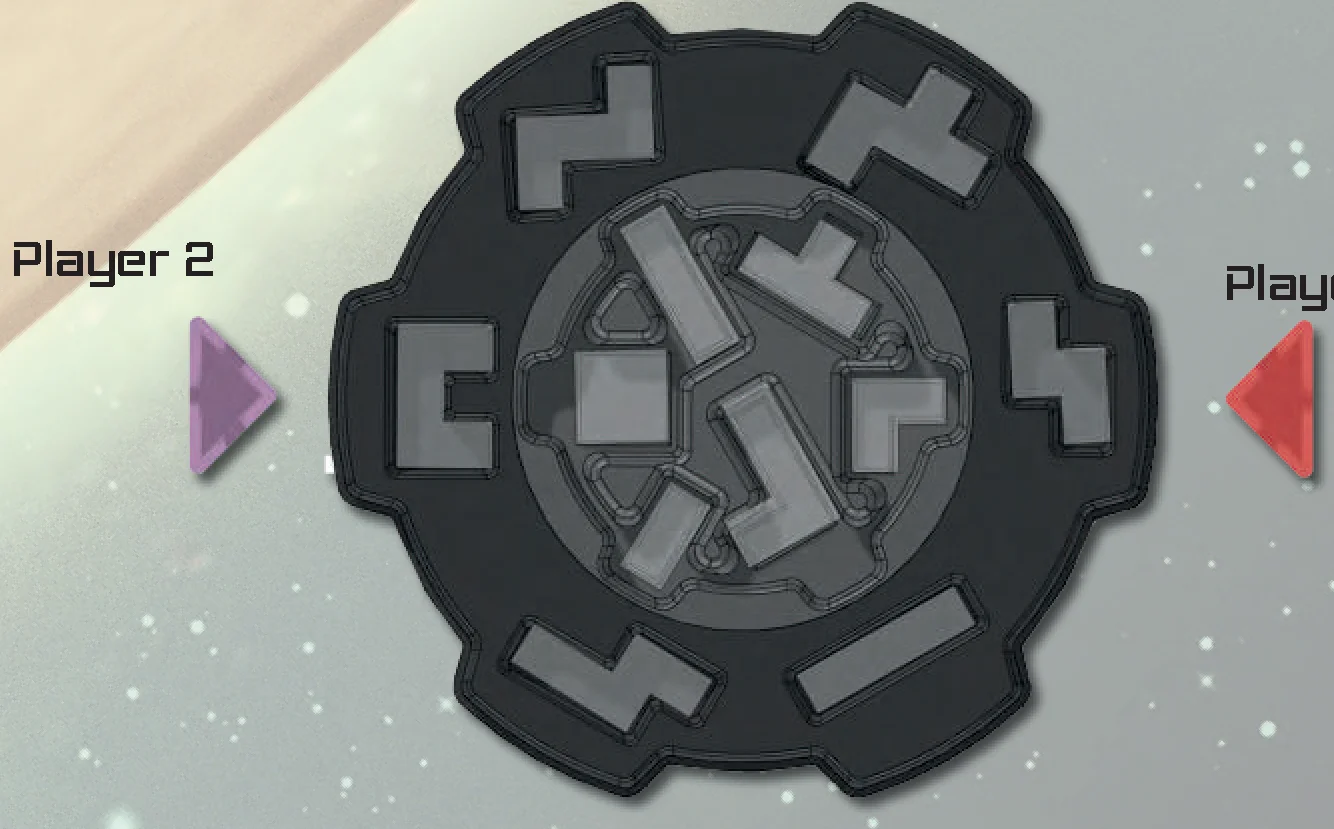
Load the SPACE STATION with POLYOMINO TILES before starting the game. Each section of the space station, called a DEPOT, should be loaded with two stacks of twelve tiles each. All tiles within a stack should be the same shape and have the same orientation.
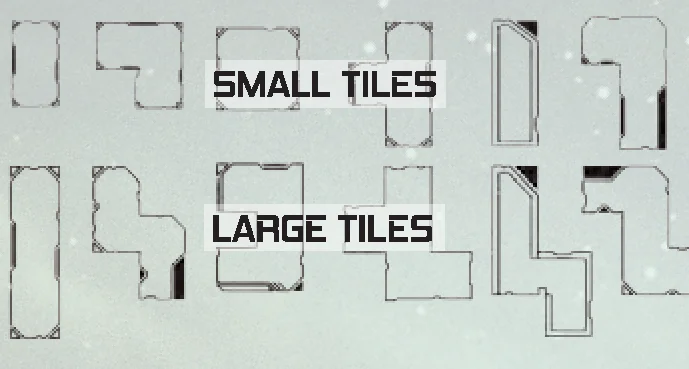
Tiles should be organized into an interior ring (small tiles) and exterior ring (large tiles). Position the interior ring before you start play to create a variable setup for the entire game.
See the diagram for a recommended setup or choose your own setup. Each depot always has a large and small tile stack.
Round Structure
Each round, the station commander may rotate the space station as much or as little as they like until any one DEPOT is directly in front of themself or their depot indicator. Conversely, the station commander may choose to not rotate the space station leaving it exactly as it is.
Once the station commander is done rotating the station, all players must draft one of the two tiles from the depot corresponding to their depot indicator. Tile drafting is simultaneous for all players.
All players place their drafted tile on their planet’s grid according to the Tile Placement Rules.
Each tile is divided into two sections. Each section contains one Resource and is covered with Terrain that corresponds to that resource.
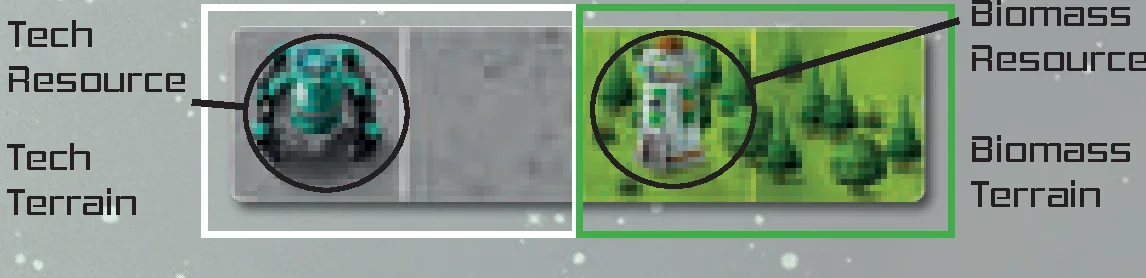
After the tile has been placed, advance the resource trackers on your corporation board once for each resource on the tile, no matter the tile’s size.
Note: There is no energy resource track or tracker on your corporation board as it functions differently than Civ, Water, Biomass, Rover, and Tech.
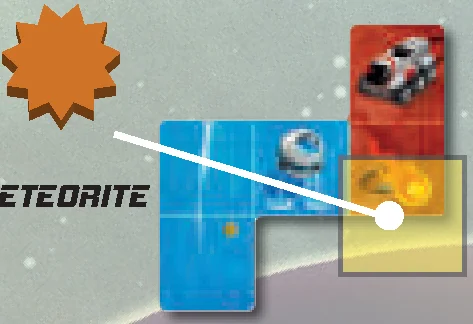
Anytime a tile with a meteor symbol  is placed on your planet, immediately place a METEORITE on top of the meteor symbol. Squares with a meteorite prevent planet scoring for the row and column where the meteorite exists.
After all players have drafted a tile and are done advancing their resource trackers, pass the station commander token to the next player clockwise and begin a new round.
Tile Placement Rules
- PERIMETER FIRST: The first tile to be placed on a player’s planet must be touching the perimeter of the planet grid.
- TILE ADJACENCY: Subsequent tiles to be placed must be adjacent to another tile (orthogonally adjacent to at least one other tile already placed either horizontally or vertically but not diagonally).
- SINGLE LAYER: Tiles cannot be placed on top of each other.
- NO OVERLAP: Tiles may not be placed overlapping or outside the grid on the planet.
- GRID ALIGNMENT: Tiles must be placed aligned with the grid squares on the planet.
- DESTROY: If a tile is placed onto a lifepod or rover, the lifepod or rover is destroyed and removed from the game permanently.
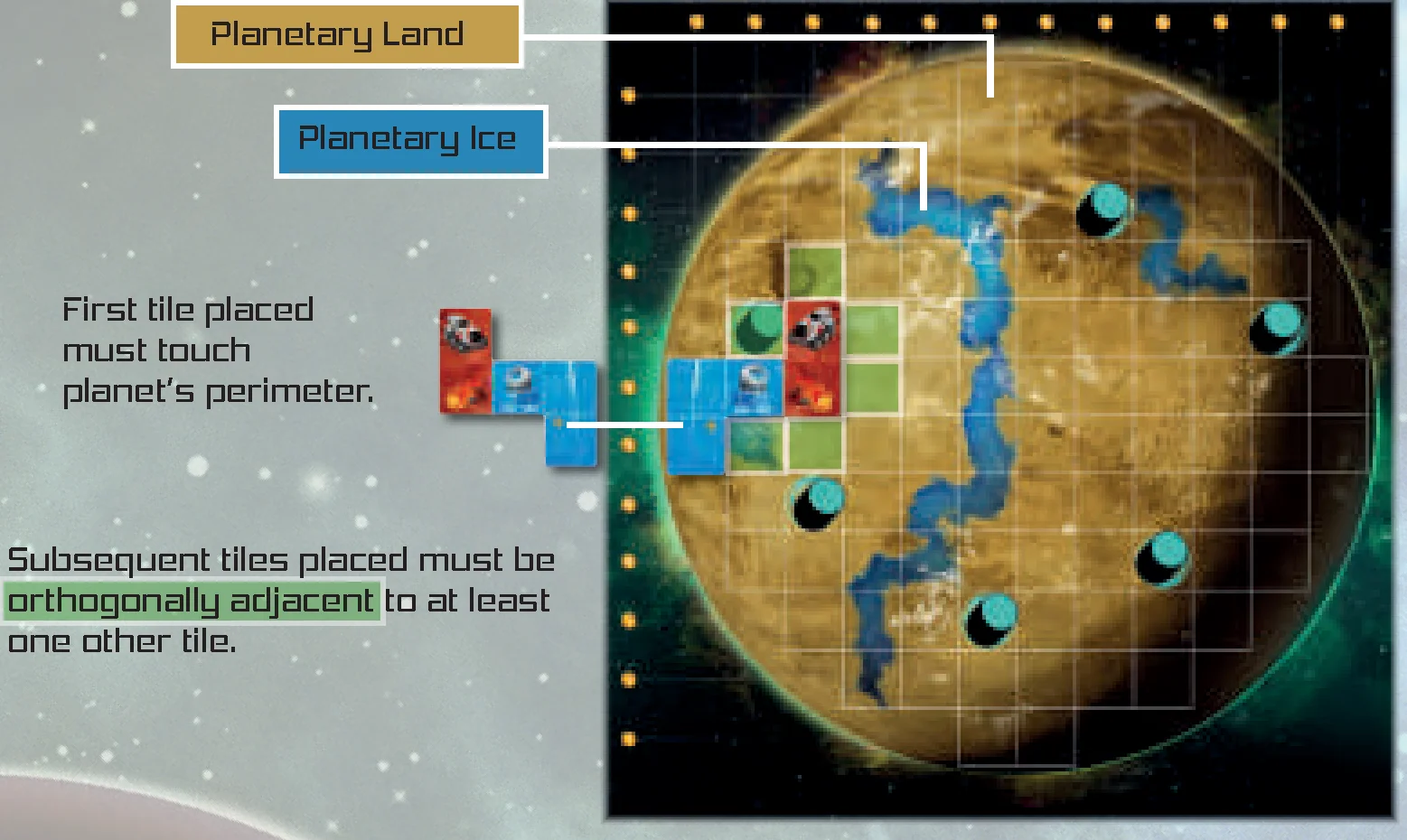
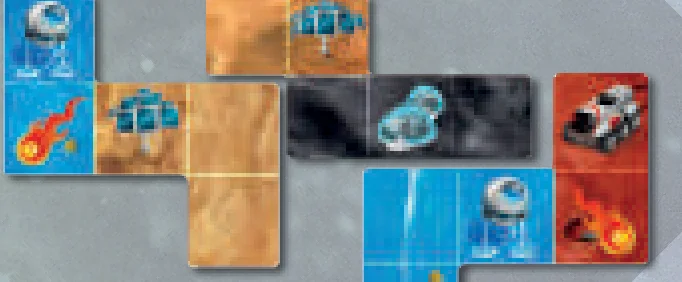
Note: Specific placement rules exist for both Water and Energy tile types. See Water Resource and Energy Resource sections below.
Resource Tracks Overview
Each resource track has a corresponding translucent RESOURCE TRACKER that starts at 0 and advances (moves one position upward) throughout the game. Whenever a resource tracker advances, the player claims the benefit underneath the tracker if possible.
- Medals (Victory Points) are claimed at the end of the game based on the position of the resource tracker. Score the highest value medal that each tracker has surpassed or currently covers on the track it occupies.
- Synergy boosts are claimed immediately. When claiming a synergy boost, the player must advance any single tracker once (obeying resource track rules and claiming the benefit underneath the tracker).
If a resource tracker advances to the top of a track, the player claims the maximum medals of the track at game end, but does not benefit from additional tile placements of this resource. The rover resource is the exception to this rule.
In addition to medals and synergy boosts, each resource track may have a unique milestone benefit associated with it.

Civ Resource Track
“The race to innovate and discover requires people.”
When a player advances their tracker onto a civ milestone  , they take all remaining civ cards of the corresponding rank from the center of the table and must select one to keep. Return any remaining civ cards face down to the center of the table.
- Once a card is chosen, claim any benefits from the chosen card immediately only if it is labeled Immediate.
- If a card is labeled End Game
 , keep it next to your corporation board as secret information to be revealed at the end of the game.
 - If two or more players reach the same ranking civ milestone during a round, they should select their cards in clockwise order starting with the station commander.
- It is possible that a rank of civ cards may have zero cards remaining if playing with modules or asymmetric corporations. In this case, the player reaching the milestone is not able to claim a civ card.
Water Resource Track
“Water is not a milestone, rather it is essential to life itself.”
A tile with a water resource obeys normal tile placement rules, but has an additional placement rule required to advance the water tracker. Any one square of water terrain on the tile must be placed directly onto planetary ice in order to advance the water tracker as a result of the tile’s water resource. If the water terrain of the tile is not placed over planetary ice, it may still be placed legally, but the water tracker does not advance.
The water track does not have a unique milestone, but it is dense with medals.
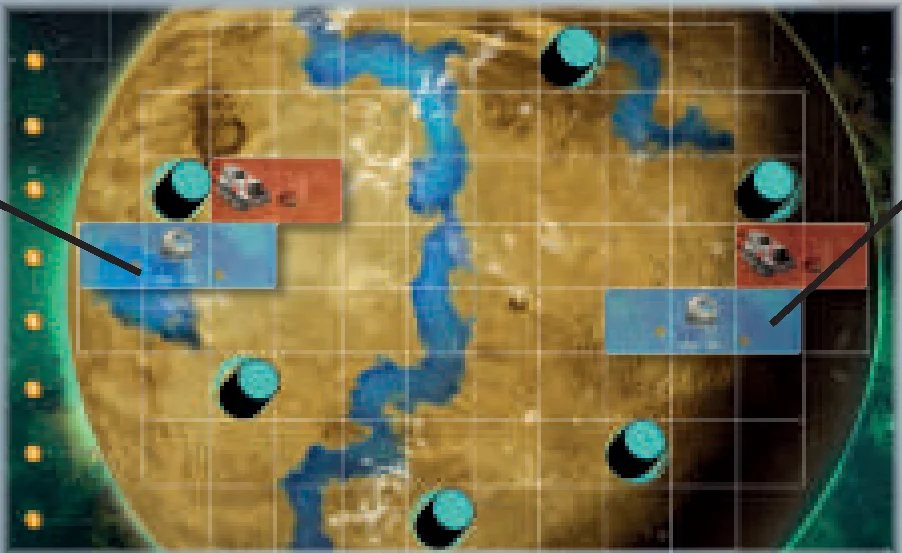
Rover Resource Track
“The meteorite cleanup crew is always ready for duty.”
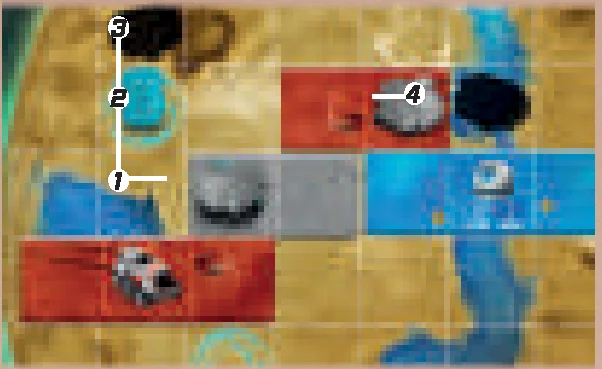
When a player advances their tracker onto a rover milestone  , they immediately place a Rover from their corporation board onto any grid square of the last tile they placed. If the last tile they placed contains a meteorite, they may place their rover onto the meteorite, collecting it immediately.
Rover Movement: When a player advances their rover tracker onto a number, they move their rover(s) a combined total squares equal to this number.
- Rover movement is orthogonal adjacent and must follow the planet grid, where one movement is one square on the planet grid.
- Rover movement may be split between multiple rovers.
- Rovers may move both on tiles and on the planet grid.
- Rovers may backtrack.
- If the rover tracker reaches the top of the track, you still gain movement every time you place a subsequent rover tile. (X∞)
Collect Meteorite/Lifepod: Move your rover onto or through a meteorite/lifepod to collect it and place the collected component onto your player board.
A component (tile, biomass patch, meteorite from event card) that is placed onto a rover destroys the rover.
It is possible for a player to destroy all of their rovers. It is possible that a rover is not available on the corporation board when claiming a rover milestone.
Tech Resource Track
“Technology is that which separates us from our environment.”
When a player advances their tech track onto a tech milestone  , they unlock powerful technology that may be used every round for the remainder of the game (unless otherwise stated).
Example Tech Levels: Universal Coalition
- Lvl 1: Tile adjacency placement restrictions may be ignored.
- Lvl 2: You may store biomass patches to be placed at the end of the game.
- Lvl 3: +1 each time you gain Rover movement.
- Lvl 4: Double water advancement from tile placement.
- Lvl 5: Unaffected by meteor strikes. Do not place meteorites.
Clarifications:
Lvl 4: Advance your water tracker twice instead of once when advancement occurs due to tile placement. Claim benefits as normal from each advancement. Do not advance your water tracker twice as a result of synergy boosts, event cards, or tiles you do not place.
Biomass Resource Track
“Biomass is the organic matter of fact that nothing is wasted.”
When a player advances their tracker onto a biomass milestone  , they gain a Biomass Patch and immediately place it on their planet following normal placement rules.
Biomass patches contain biomass terrain, but they do not contain a biomass resource and do not advance the biomass tracker. Biomass patches help you complete rows and columns on your planet.
Energy Resource
“When harnessed, energy will transform deficiency into efficiency.”
There is no energy resource track represented on the corporation board. When a tile containing an energy resource is placed, the energy resource advances another resource of your choice limited to the following options:
- The non-energy resource on the tile you placed.
- The resource of any one terrain that is orthogonally adjacent to the energy terrain area established from your tile placement.
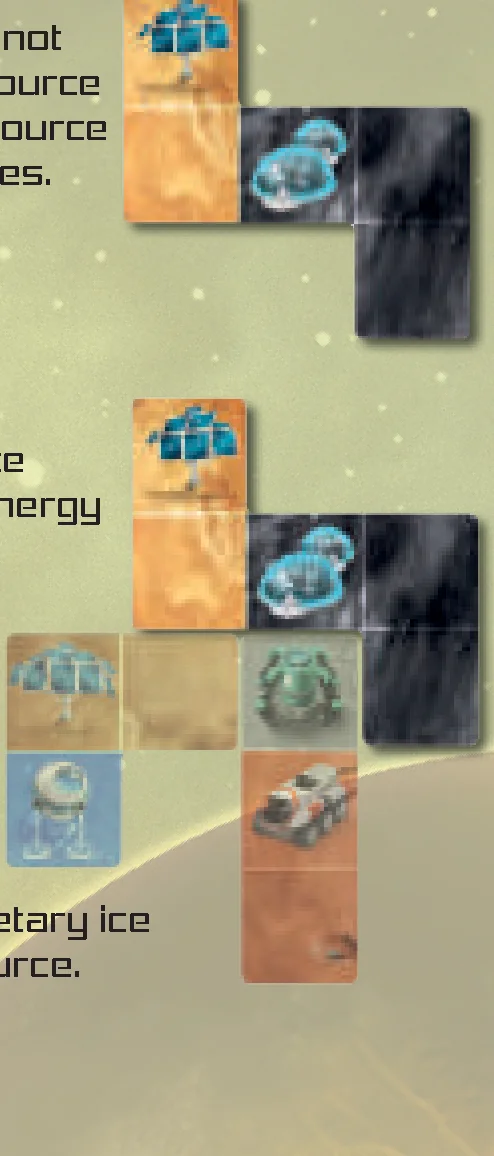
Example 1: A tile containing an energy resource is placed and is not adjacent to any other tile. By default, the energy resource would then advance the civ tracker. The tile’s civ resource would advance the civ tracker as well per normal rules.
Example 2: A tile containing an energy resource is placed and is adjacent to other tiles. Choose to advance a resource based on the terrains orthogonally adjacent to the energy terrain area established from your placement. (Civ, Tech, Water). The rover resource in “Example 2” may not be advanced because it does not connect with the energy terrain area.
Clarifications: The water terrain does not need to be on top of planetary ice to be chosen for advancement from an energy resource.
Game End
The game ends when a player cannot legally place any tile from their depot (A), or when one depot is completely emptied (B) from the space station.
- When a player cannot legally place any of the two tiles from their depot, all players finish the round as normal and then the game is over. Any player who cannot legally place a tile still chooses one tile and advances their tracks for BOTH resources on the tile but does not place it on their planet. See scoring section to calculate final victory points.
- If both stacks of tiles of a depot are completely emptied, the game ends at the end of the round the depot was emptied.
Important: A player who can play one of the two tiles in front of them must play that tile, and the game continues.
End of Game Scoring
Prior to scoring, make sure all players have placed any biomass patches they have, executed any end game corporation technologies, and advanced any trackers due to end game civ cards.
Total Medals = Final Score
- A.) Score medals for EVERY COMPLETE ROW AND COLUMN of your planet as long as it does not have a meteorite or empty grid square. Each row and column scores 1VP, 2VP, or 3VP based on the medal to the side or above it, respectively.
- B.) Score the highest value medal that each tracker has surpassed or currently covers on the track it occupies.
- C.) Score medals for the lifepods and meteorites collected in your scoring area. One medal per lifepod by default. One medal per three meteorites, rounding down, by default. (It may be possible to improve these ratios via civ cards etc.)
- D.) Score medals for your civ cards labeled End Game .
- E.) Score medals based on the private objective card for any of your complete private objectives (only if playing with the Private Objective Module or playing solo mode).
- F.) Finally, score medals based on the neighbor objective cards if your planet is the winner when comparing your planet with your adjacent neighbor’s planet (skip this step if playing the solo game).
In the case of a tie, the player with the fewest number of uncovered grid squares wins. If there is still a tie, the player with the fewest meteorites remaining on their planet wins.
Scoring Example
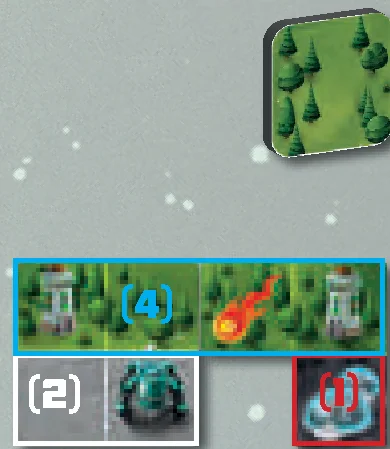
The end of the game was triggered due to the player not being able to legally place either tile from their depot. The player chose the tile pictured and advanced their water tracker twice based on the resources of their chosen tile. Since the tile was not placed, they did not take advantage of unlocked Tech Lvl 4 when advancing their water tracker. Additionally, the meteorite symbol was ignored because the tile was not placed on their planet.
All players have confirmed that they are done advancing their resource trackers and have placed any stored biomass patches. It is helpful at this point to remove rovers and uncollected lifepods from the planet to ensure that the planet is scored properly.
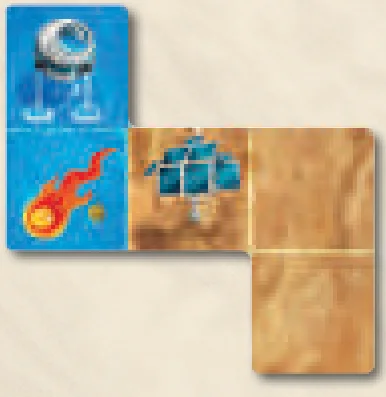
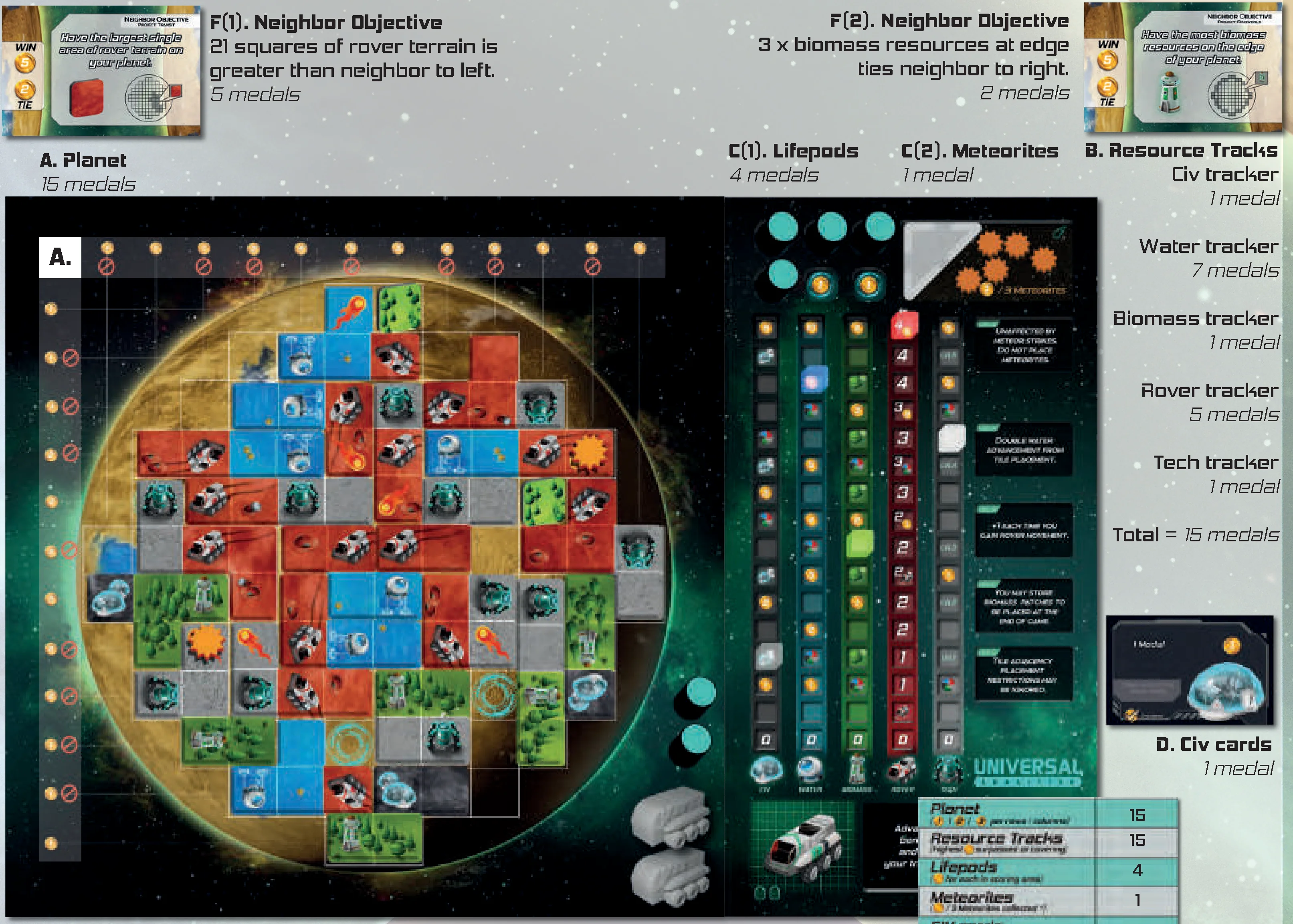
- A. Planet: 15 medals
- B. Resource Tracks:
- Civ tracker: 1 medal
- Water tracker: 7 medals
- Biomass tracker: 1 medal
- Rover tracker: 5 medals
- Tech tracker: 1 medal
- Total = 15 medals
- C(1). Lifepods: 4 medals
- C(2). Meteorites: 1 medal
- D. Civ cards: 1 medal
- F(1). Neighbor Objective: 21 squares of rover terrain is greater than neighbor to left → 5 medals
- F(2). Neighbor Objective: 3 x biomass resources at edge ties neighbor to right → 2 medals
- TOTAL: 43 medals
Two Player Variant
To maximize strategy and planning specifically in a two-player game, the space station should be rotated by one depot clockwise each round instead of the station commander choosing its orientation. Each subsequent round, the station should be rotated one depot. All other rules are the same.
Private Objective Module
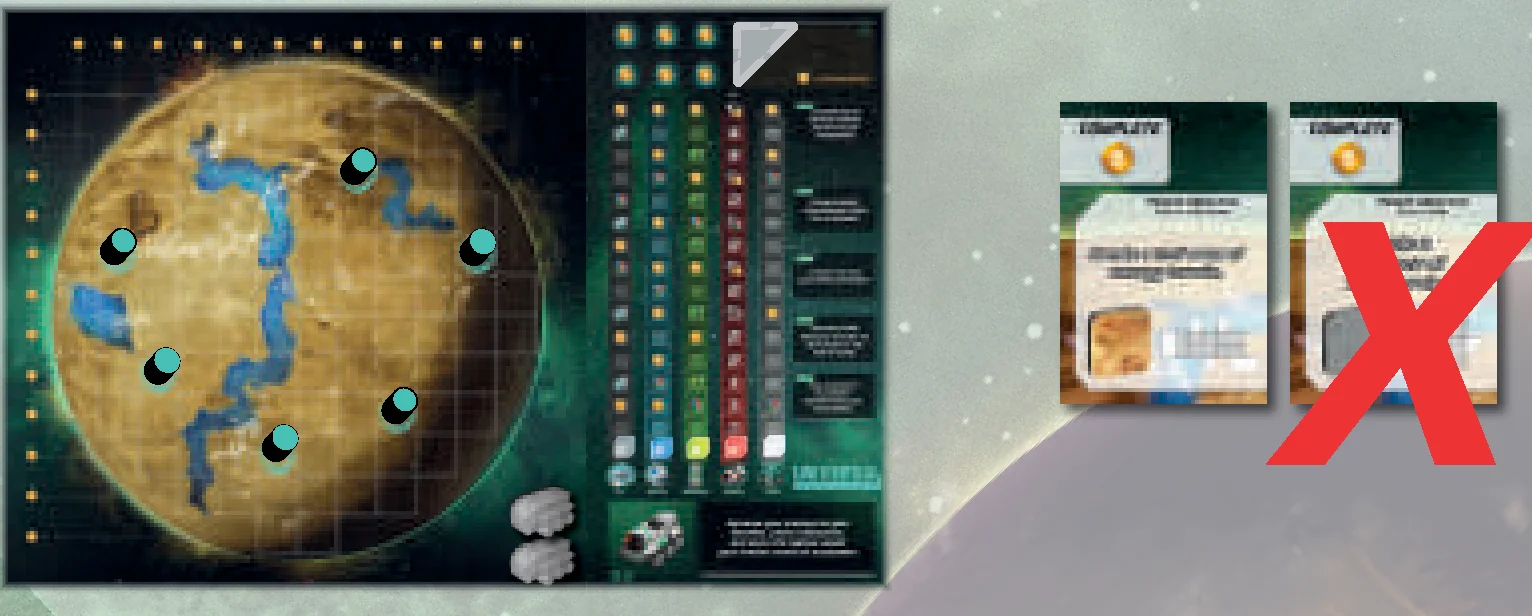
Objective cards have two sides to them. The neighbor objective side is always used with a multiplayer game. The private objective side is always used with the solo game.
In a multiplayer game, you may optionally use private objectives in addition to neighbor objectives. Each player should choose one of the two private objective cards dealt to them and return the other card to the box.
Once all players have chosen one private objective, then neighbor objectives can be dealt. Private objectives may be kept face down until the end of the game. Private objective cards are scored if complete at the end of the game.
Event Deck Module
The EVENT DECK consists of 20 event cards. One card is revealed and executed each round to simulate the hardships that might be faced while developing a planet.
The event deck may be added to the multiplayer game and should always be used during the solo game.
Important: All event cards must be executed by all players if possible, but should be ignored if the event card is solely responsible for triggering the end of the game.
Event Deck Setup
- Separate the event deck into three piles of cards separated by event type (green, orange, red alert).
- If more than one player is playing, remove any “Solo Mode Only” event cards.
- Create an event deck of 20 cards to be used during the game by randomly selecting cards from the three event types. The event deck may be customized by selecting more of the punishing red alerts, or the less punishing green and orange alerts.

Event Deck Game-Play
- Each round, once the space station has stopped all rotation, immediately draw the next event card and execute the action of the card. All actions must be executed if possible for all events and all players.
- Play the rest of the round per the normal Planet Unknown rules.
Additional Game End Condition: The last card of an event deck triggers the last round of the game as an additional game end condition.
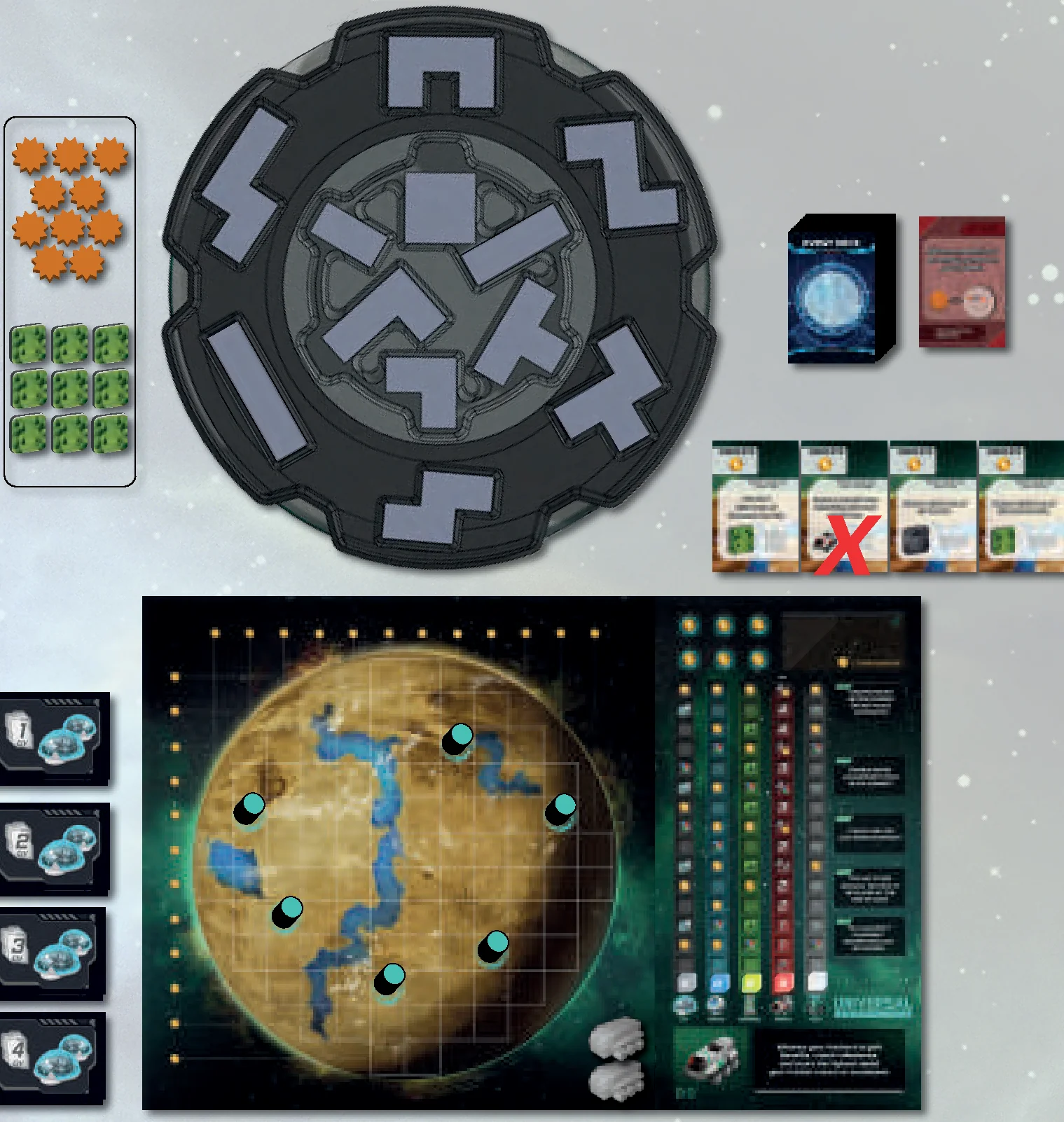
Solo Mode Setup
- Set up the planet, corporation board, civ cards, biomass patches, meteorites, and lifepods following the setup for a multiplayer game. Rotate the space station so there is a random Depot facing you.
- Shuffle and draw 4 objective cards. Looking at the Private Objective side of the card, choose 3 of the 4 cards to keep to establish the objectives for this game.
- Set up the event deck based on the challenge level you choose to accept (See Event Deck Setup and Event Deck Game-play).
Solo Mode Game-Play
Solo play follows all the same rules as a multiplayer game. However, instead of choosing which depot to draft tiles from each round, rotate the space station clockwise by one depot.
- Rotate the space station clockwise by one depot.
- Draw and execute a new event if possible.
- Finish the rest of the round per normal Planet Unknown rules.
Solo Mode Target Score
The preliminary target score for the solo game is 60 medals, and your final target score is adjusted based on the composition of the event deck.
| Card Count | Red Alerts | Orange Alerts | Green Alerts |
|---|---|---|---|
| 0-2 | Zero | Zero | Zero |
| 3-6 | -5 | -1 | +3 |
| 7-10 | -7 | -2 | +6 |
| 11-14 | -9 | -3 | +9 |
| 15+ | -11 | -4 | +12 |
Example Event Deck Adjustments:
8 Red Alerts (-7 medals) + 3 Orange Alerts (-1 medals) + 9 Green Alerts (+6 medals)
Preliminary Target Score: 60 Medals
Example Event Deck Adjustments: -7 – 1 + 6 = -2 Medals
Example Final Target Score = 58 Medals
When the game is complete, compare your final score to the final target score. Find your outcome below:
- -15 medals: Critical Fail. We’re going to need another Planet.
- -10 medals: Any sign of other survivors?
- -5 medals: Low capacity, but at least we survive.
- Target Score: Mission Complete and job well done.
- +5 medals: Excellent work, you’ve earned a promotion.
- +10 medals: This might be the best planet we’ve seen yet.
- +15 medals: All stars have aligned because of you, Planeteer.
Corporation boards each have a symmetric side and an asymmetric side. The symmetric side allows all players to play the same game with the same rules. The asymmetric side allows each player to control a unique corporation with a unique set of rules. Each unique corporation is explained below. Players can play with either symmetric or asymmetric or a combination of both.
Republic
“We invested in top talent to win the race for discovery and innovation.”
Republic Rule: You must regress another tracker each time you claim a milestone from the civ track. Do not claim benefits when you regress.
- Advantage: 7 x Civ milestones
- Weakness: 1 x Rover, Regression
Tech Levels:
- Tech Lvl 1: Gain movement based on your rover tracker when you draft a civ tile.
- Tech Lvl 2: Add a card from the next rank to your choices when you claim a civ milestone.
- Tech Lvl 3: Teleport your rover between any two civ resources. One movement cost.
- Tech Lvl 4: Gain a synergy boost when you claim a civ milestone.
- Tech Lvl 5: Look at all remaining civ cards and keep two. End of game.
Clarifications:
- Tech Lvl 1 is an immediate gain of movement even before you place your tile. If your rover tracker is not at a position with rover movement, then do not gain any movement.
- Tech Lvl 2 Example: With Tech Lvl 2 unlocked, the player claims a rank three civ milestone. The player picks up all cards from rank three plus one card at random from rank four and chooses one to keep. All cards are then returned to their respective rank piles.
- Regress another tracker (
 ) – Move any non-civ resource tracker one position downward on the resource track. Do not claim benefits.
Wormhole Corp.
“We found a way to accelerate the accumulation of biomass on the planet.”
Wormhole Rule: Advance your biomass tracker from tile placement only when you expand a biomass terrain area. Choose only one benefit each time you advance the biomass tracker.
- Advantage: Surplus biomass patches
- Weakness: Tile placement restrictions
Tech Levels:
- Tech Lvl 1: Biomass tracker may be reset to zero if at maximum.
- Tech Lvl 2: Biomass patches may be placed on top of a tile.
- Tech Lvl 3: Gain two biomass patches instead of one. Once per round.
- Tech Lvl 4: Biomass patches may be stored and placed at the end of the game.
- Tech Lvl 5: Biomass patches may be placed to destroy meteorites.
Clarifications:
- Example: Player advances tracker and chooses to gain a biomass patch instead of a free advancement of their civ tracker. There are always two choices when advancing. Medals are not included in choices but scored at game end per normal resource tracker scoring rules.
- Tech Lvl 2 may be used to achieve biomass terrain connections, but you cannot place a biomass patch onto a meteorite.
- Tech Lvl 5 allows you to place a biomass patch onto a meteorite at game end, thus destroying the meteorite.
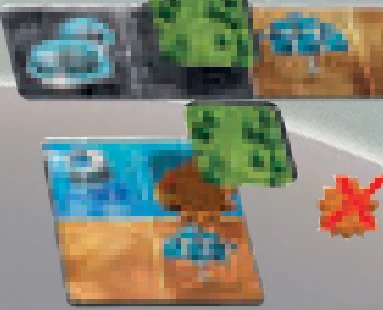
Cosmos Inc.
“We plan to build momentum using everything at our disposal. The lifepod design is especially intriguing.”
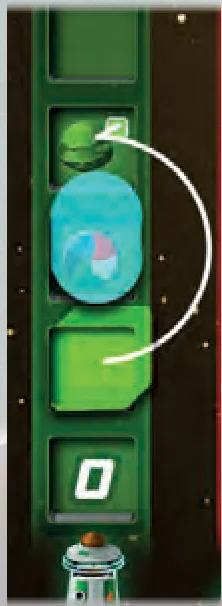
Cosmos Rule: Choose to position a collected lifepod onto a resource track or your scoring area. Your trackers skip over lifepods when advancing. Benefits and medals covered by lifepods are ignored.
- Advantage: Advancement engine
- Weakness: Lifepod scoring, 1 x Rover, Lifepods cover benefits
Tech Levels:
- Tech Lvl 1: Your rover may move diagonally.
- Tech Lvl 2: Reposition three collected lifepods immediately. Once per game.
- Tech Lvl 3: Reposition a collected lifepod when you place an energy tile.
- Tech Lvl 4: Rovers moving onto energy terrain do not spend movement.
- Tech Lvl 5: Reposition one collected lifepod. Once per round.
Clarifications:
- You may position lifepods such that a tracker skips over more than one lifepod at a time.
- Lifepods only score medals if they are on your scoring area at game end. You may use your tech to reposition them onto the scoring area later in the game.
Example: You advance the biomass tracker once and skip over the lifepod because the lifepod occupies the next position in the track. Do not gain the synergy boost underneath the lifepod, but do claim the biomass milestone.
Horizon Group
“We’re ready to move out with a double fleet of Rovers at your command.”
Horizon Group Rule: To collect a meteorite, your rover must pick it up and deliver it to a rover resource on your planet.
- Advantage: 4 x Rovers
- Weakness: Pick-up and deliver requirements
Tech Levels:
- Tech Lvl 1: Rover tiles may be placed ignoring adjacency placement restrictions.
- Tech Lvl 2: Gain one movement for each rover carrying a meteorite at round start.
- Tech Lvl 3: Gain a biomass patch when you collect a meteorite.
- Tech Lvl 4: Destroy a meteorite by delivering it to water terrain.
- Tech Lvl 5: Advance your rover tracker. Once per round.
Clarifications:
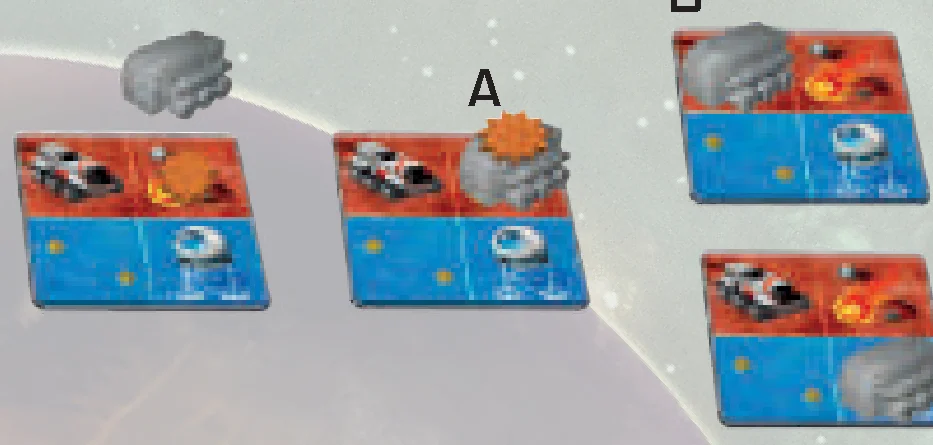
Each rover may hold one meteorite on top of it. A rover picks up a meteorite when it is placed onto, moves onto, or moves through the meteorite [A]. A rover delivers a meteorite it carries when it moves onto or through a rover resource [B]. A rover destroys a meteorite it carries when it moves onto water terrain [C].

Jump Drive
“We established a connection with another galactic civilization. They’re ready to equip us with powerful technology at the expense of our lifepods.”
Jump Drive Rule: Choose to place a collected lifepod onto your tech or your scoring area. A lifepod placed onto tech unlocks your tech in any order.
- Advantage: Flexibility, 6 x Techs
- Weakness: Lifepod scoring, 1 x Rover
Tech Options:
- Tech A: Gain a synergy boost instead of a biomass patch. Once per round.
- Tech B: Teleport a rover to a tile of the same terrain. One movement cost. Once per round.
- Tech C: Advance the tracker twice when using a synergy boost. Once per round.
- Tech D: You may treat a tech resource as energy during tile placement.
- Tech E: Choose a tracker and claim all benefits in its row. Once per game.
- Tech F: Draw 3 objectives and choose one that all players compete for. Once per game.
Clarifications:
- A tech may be used immediately when it is unlocked.
- Be aware that Jump Drive has little incentive to advance their tech resource tracker, as they score fewer medals the further they advance tech.
- Tech D: Treating tech resource as an energy resource during tile placement only applies to tile placement and not end of game resources.
- Tech E: A row consists of five resource track positions that span across all resource tracks of the corporation board as designated by the current tracker position.
Oasis Ultd.
“We have the potential to harness electrolysis and supplement other core functions of the planet, but the path ahead is not yet fully clear.”
Oasis Ultd. Rule: Advance your water tracker once for each water terrain square that covers planet ice. Gain the benefits from advancing your water tracker even when it advances onto another track.
- Advantage: Tracker manipulation, Medals on water track
- Weakness: Long winding water track
Tech Levels:
- Tech Lvl 1: Skip over another tracker blocking your advancement.
- Tech Lvl 2: Gain one movement for each rover starting the round on water terrain.
- Tech Lvl 3: Advance your water tracker once if you place your tile covering no ice.
- Tech Lvl 4: Gain a biomass patch when you place a water resource tile.
- Tech Lvl 5: Gain a synergy boost when you place a water resource tile.
Clarifications:
- Instead of simply advancing upward, your water tracker advances toward the end of the resource track, always following the irregular path.
- Each resource tracker only scores medals once based on its corresponding resource track.
- Tech Lvl 1: A tracker must stay on its corresponding track.
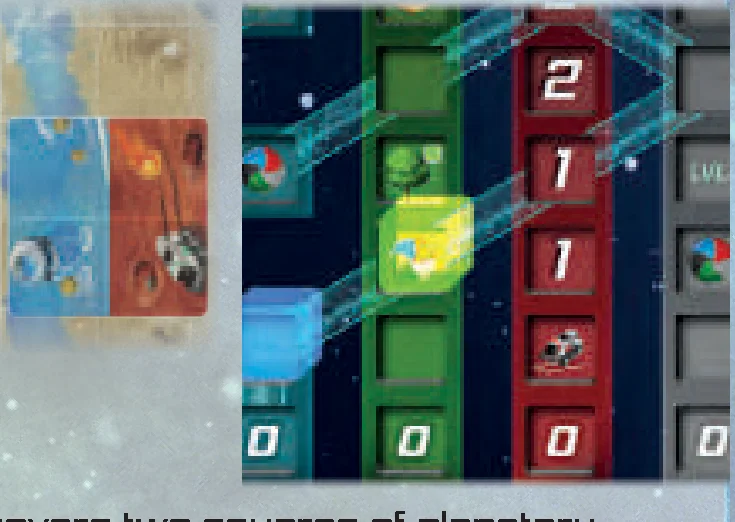
- Example: The tile is placed such that the water terrain covers two squares of planetary ice. Note that the biomass tracker blocks the water tracker preventing the water tracker from advancing twice. However, if Tech Lvl 1 is unlocked, advance the water tracker twice on the water track. Specifically, skip over the biomass tracker onto the water/rover intersection and then advance again onto the water/tech intersection and claim the rover movement benefit.
Makeshift
“We don’t mind being late to the party, and plan to catch-up by with our scrappy approach.”
Makeshift Rule: You may advance any tracker diagonally onto another adjacent track. Any tracker may claim any benefit. Tech Lvls becomes locked if no tracker occupies the Tech track.
- Advantage: Flexibility, Tracker manipulation
- Weakness: Resource dependency
Tech Levels:
- Tech Lvl 1: Treat CIV and TECH tracks as adjacent.
- Tech Lvl 2: +1 to rover movement if more than one tracker occupy the rover track.
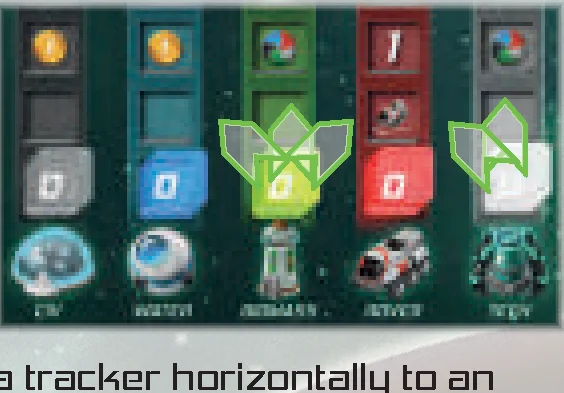
- Tech Lvl 3: Shift a tracker laterally to an adjacent track instead of advancing.
- Tech Lvl 4: Regress any one tracker. Once per round.
- Tech Lvl 5: Score each tracker as the highest scoring tracker on the track it occupies.
Clarifications:
- A resource tracker may block another resource tracker from advancing.
- Resource trackers score medals based on the track they occupy when the game ends.
- Tech Lvl 1: Trackers may advance diagonally from CIV to Tech and vice versa.
- Tech Lvl 3: A lateral shift is when a player moves a tracker horizontally to an adjacent resource track and claims the benefit.
- Tech Lvl 4: Regress () – Move a resource tracker one position downward on the resource track. Do not claim benefits.
Flux Industries**
**Expandable Content included in all Kickstarter editions (Page 13).
“We have unrivaled tech but have yet to figure out how to use it all at once.”
Flux Industries Rule: Your flux token designates one of your tracks as the flux track. Whenever you unlock a Tech level, you may reposition your flux token. Only your most recently unlocked tech is available.
- Advantage: Power level, Versatility
- Weakness: One tech available at a time
Tech Levels:
- Tech Lvl 1: Gain two movement for each rover starting on terrain of the flux track.
- Tech Lvl 2: Advance one tracker to the next milestone of the flux track. Once per game.
- Tech Lvl 3: Improve the flux Track:
- +1 to Civ card rank when you reach a milestone.
- Double synergy boosts on the water track.
- Take two biomass patches instead of one.
- +1 when you gain rover movement.
- Tech Lvl 4: Collect a meteorite when you place a resource tile matching the flux track.
- Tech Lvl 5: Advance the flux track. Once per round.
Clarifications:
- Tech Lvl 2: When you unlock Tech Lvl 2, choose the flux track as normal. You may advance your tracker to the next milestone on the flux track any time before you unlock Tech Lvl 3.
- Tech Lvl 3: Only the benefits of the flux track are improved. Disregard all other improvements that do not correspond to the flux track.
- Tech Lvl 4: Collect a meteorite from your planet if possible.
Planet boards each have a symmetric side and an asymmetric side. The symmetric side allows all players to play the same game with the same rules. The asymmetric side allows each player to develop a unique planet, sometimes containing unique grid or unique tile placement restrictions. Each planet is explained below.
Important: Asymmetric planet tile placement rules must be followed if possible, but should be ignored if they become solely responsible for triggering the end of the game.
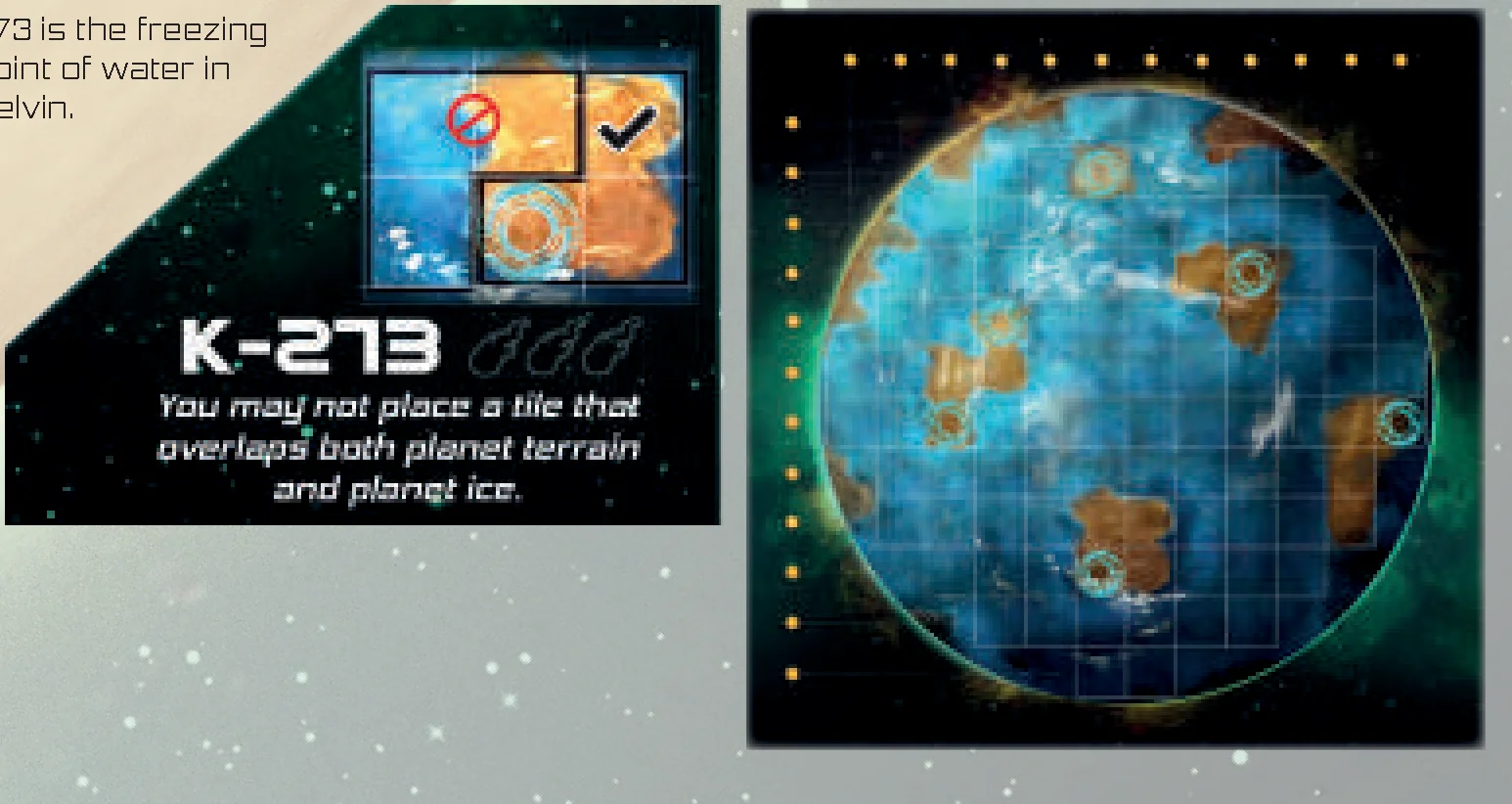
K-273 (Complexity 3)
“The unique challenge of K-273 is the ice. It’s unstable and seems to shift. You better avoid any overlap.” (273 is the freezing point of water in Kelvin.)
Rule: You may not place a tile that overlaps both planet terrain and planet ice.
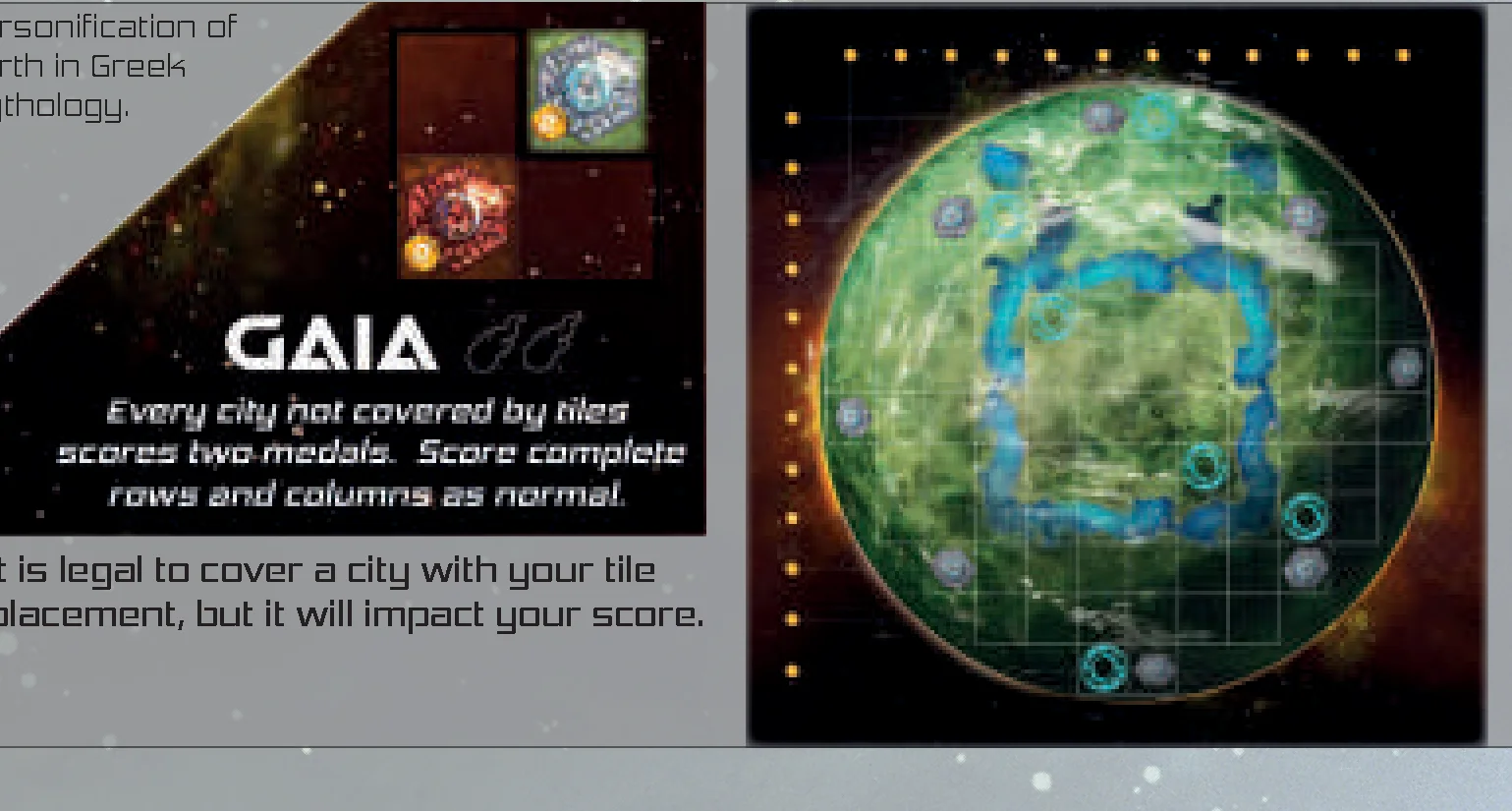
GAIA (Complexity 2)
“This civilization is peaceful for now, but maybe not if you’re tempted or forced to eliminate their cities.” (Personification of Earth in Greek Mythology.)
Rule: Every city not covered by tiles scores two medals. Score complete rows and columns as normal. It is legal to cover a city with your tile placement, but it will impact your score.
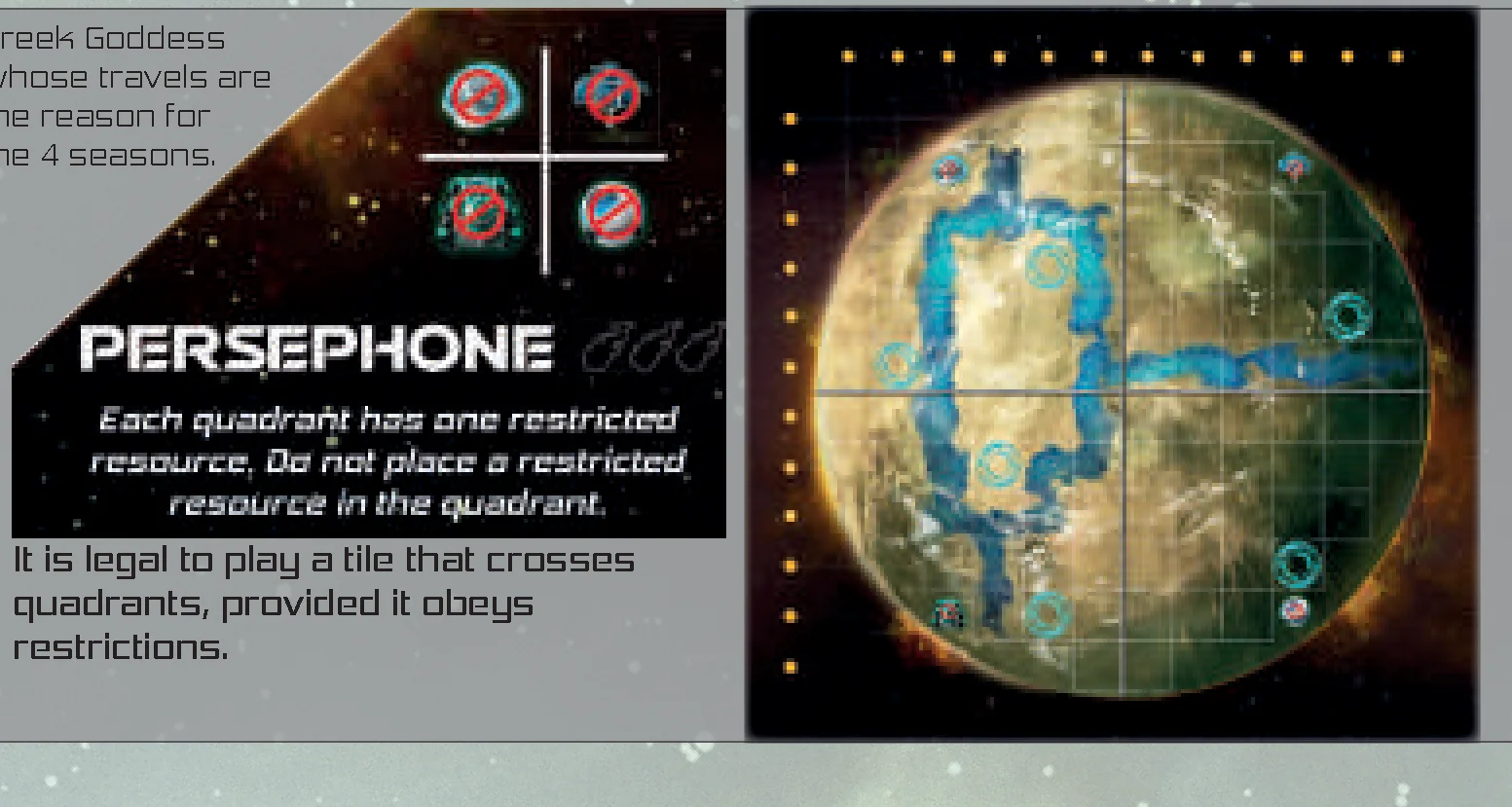
PERSEPHONE (Complexity 3)
“Separated into quadrants by harsh climates, the elements are only with us when they are not against us.” (Greek Goddess whose travels are the reason for the 4 seasons.)
Rule: Each quadrant has one restricted resource. Do not place a restricted resource in the quadrant. It is legal to play a tile that crosses quadrants, provided it obeys restrictions.
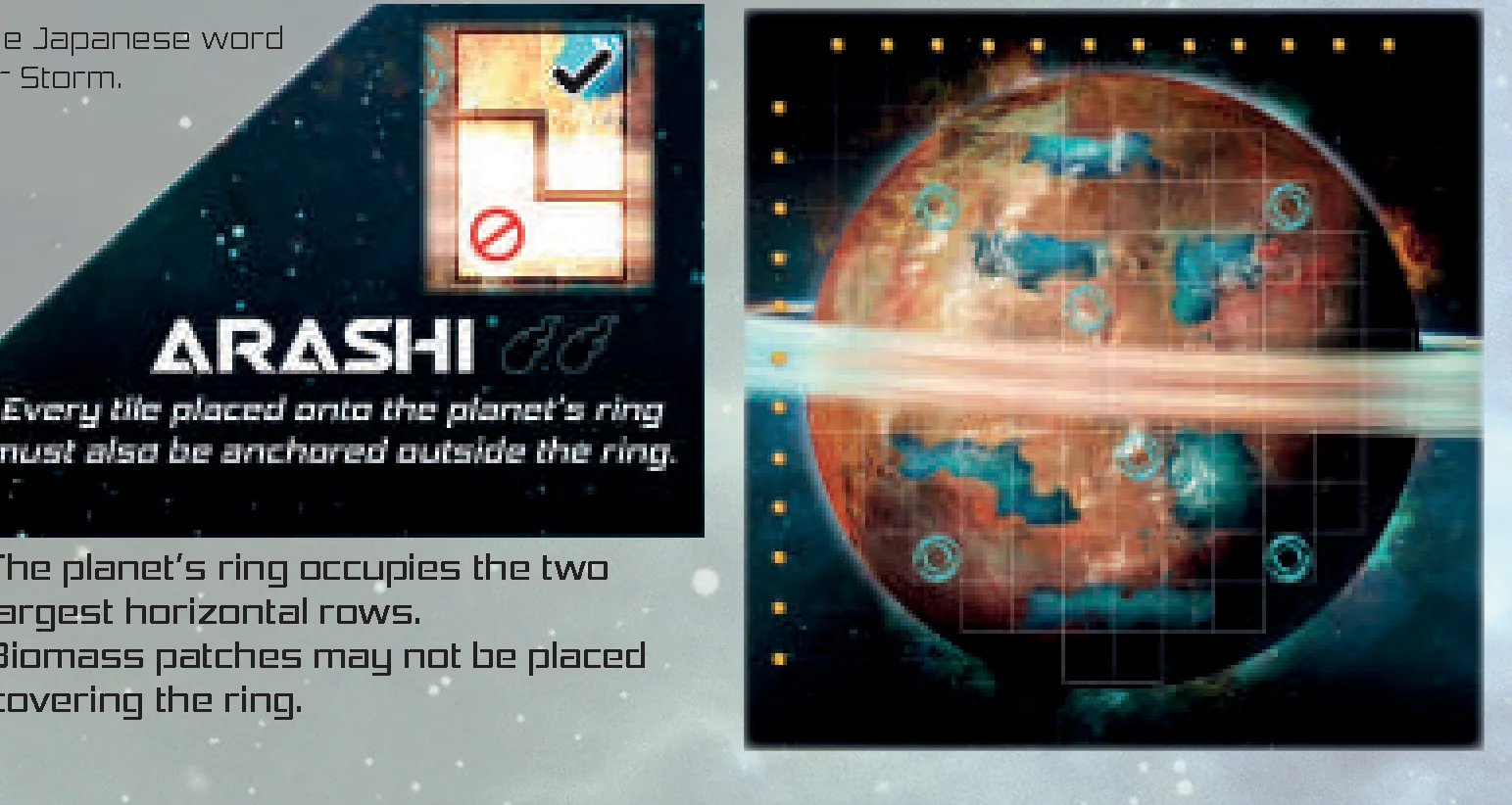
ARASHI (Complexity 2)
“The wind underneath the ring is relentless. Make sure you are anchored before you test it.” (The Japanese word for Storm.)
Rule: Every tile placed onto the planet’s ring must also be anchored outside the ring. The planet’s ring occupies the two largest horizontal rows. Biomass patches may not be placed covering the ring.
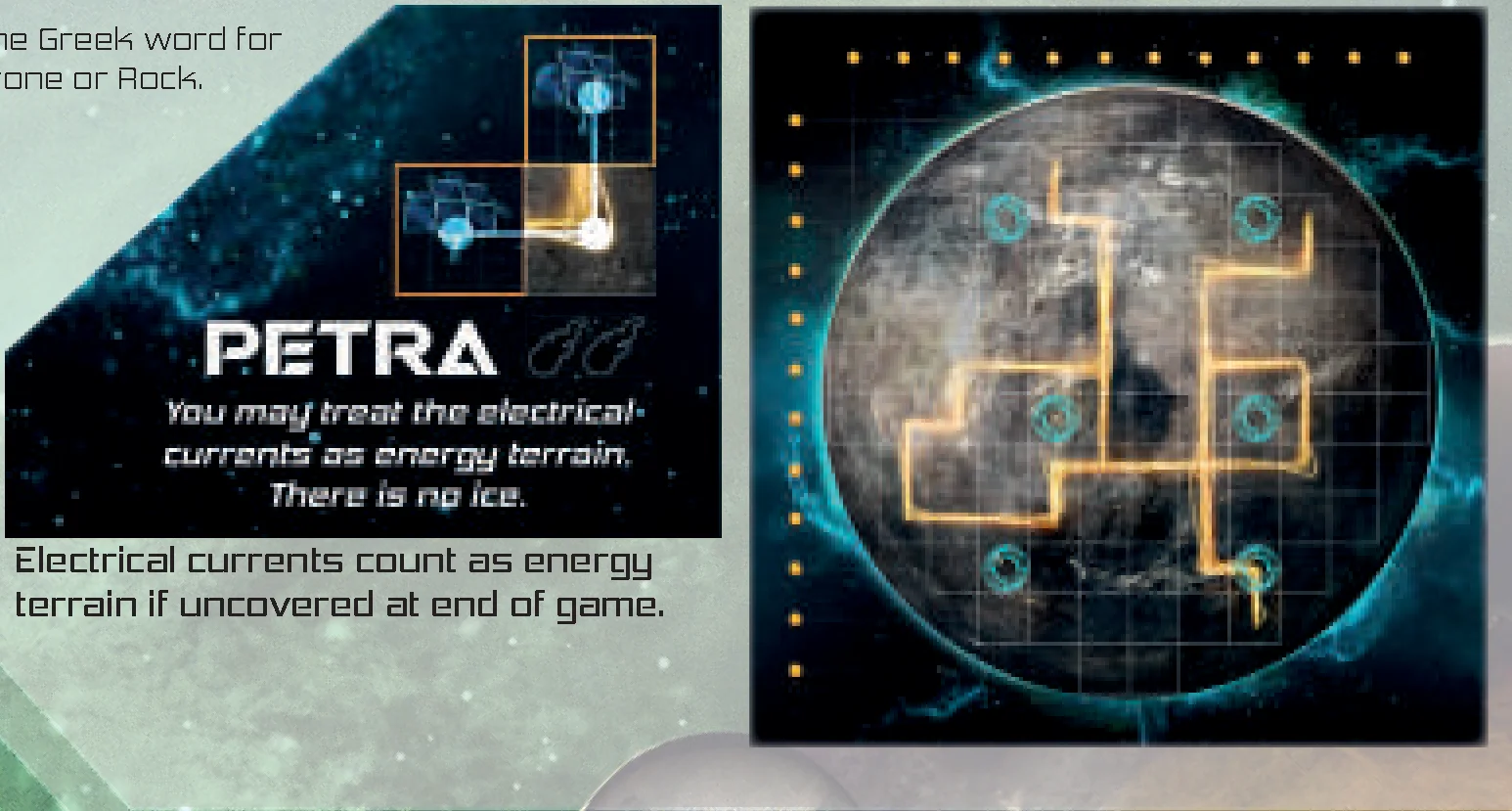
PETRA (Complexity 2)
“Barren of ice, but radiating with a grid of energy. Utilize this energy to your advantage.” (The Greek word for Stone or Rock.)
Rule: You may treat the electrical currents as energy terrain. There is no ice. Electrical currents count as energy terrain if uncovered at end of game.
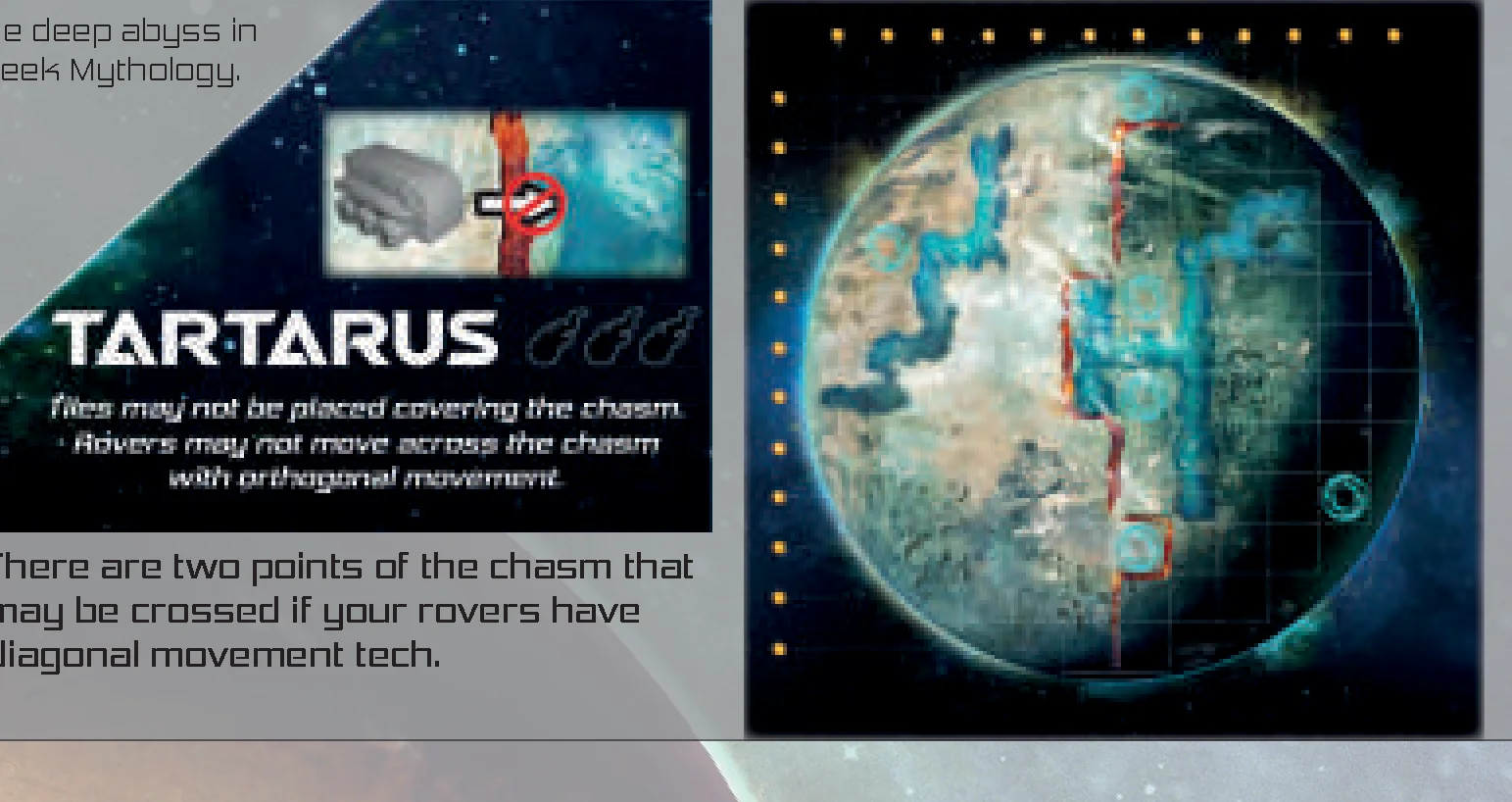
TARTARUS (Complexity 3)
“There is a giant chasm down the center that will make maneuvering and placement inconvenient.” (The deep abyss in Greek Mythology.)
Rule: Tiles may not be placed covering the chasm. Rovers may not move across the chasm with orthogonal movement. There are two points of the chasm that may be crossed if your rovers have diagonal movement tech.
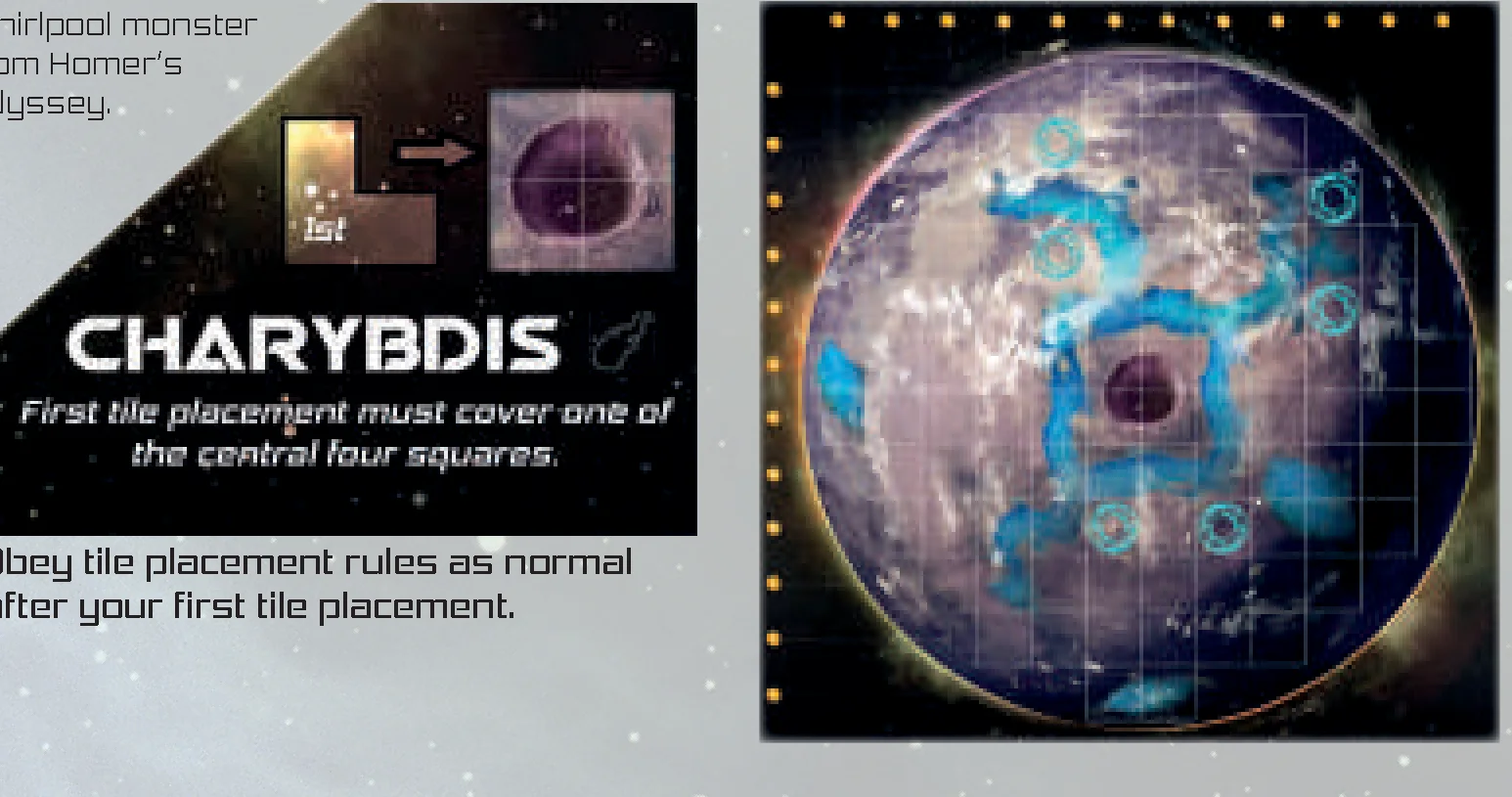
CHARYBDIS** (Complexity 1)
**Expandable Content included in all Kickstarter editions (Page 15).
“A giant pit has created an unusual gravitational field causing you to build from the inside outward.” (Whirlpool monster from Homer’s Odyssey.)
Rule: First tile placement must cover one of the central four squares. Obey tile placement rules as normal after your first tile placement.
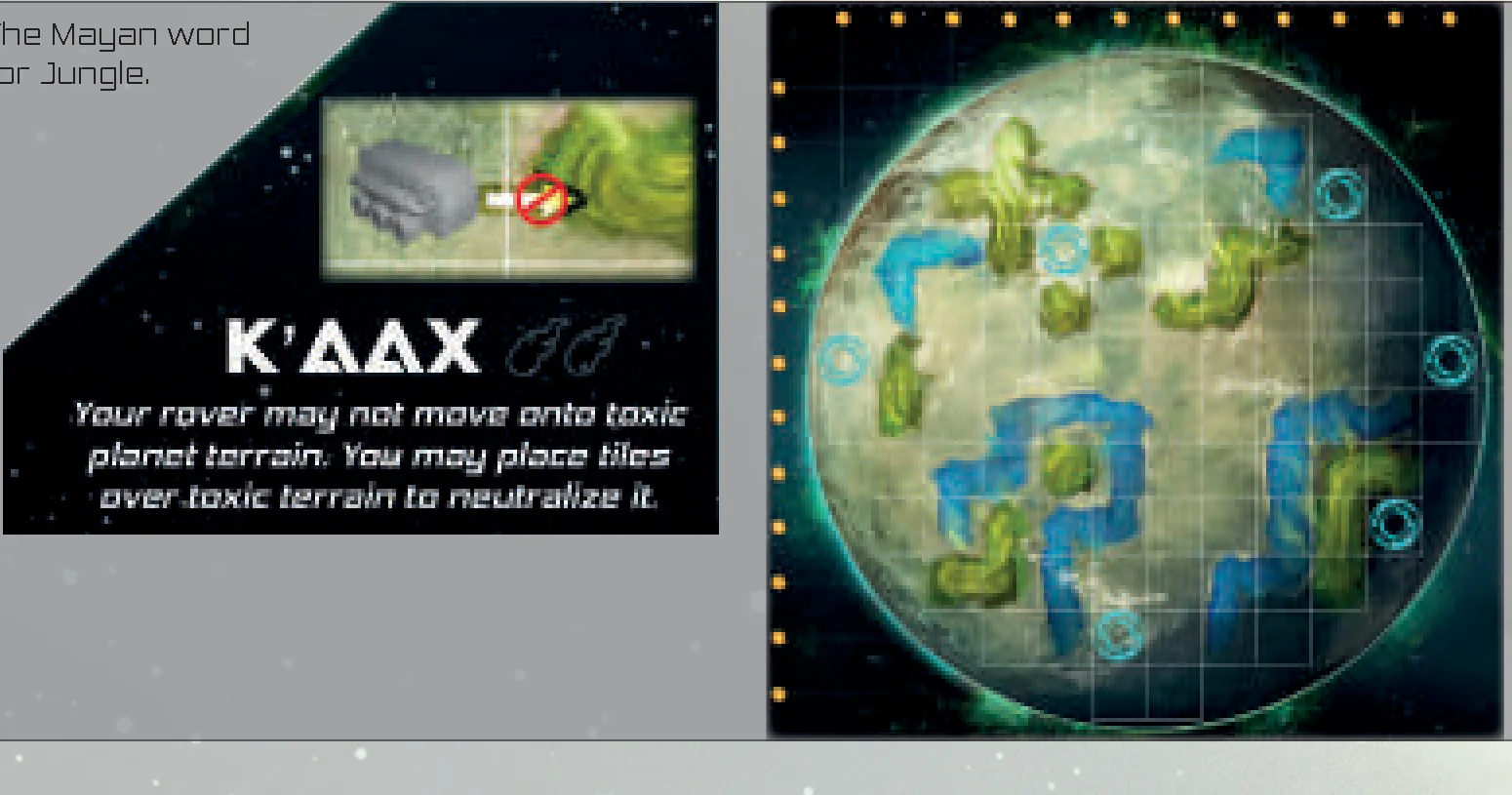
K’AAX** (Complexity 2)
“The clouds with the unidentified substance are corrosive to the rover fleet. Please steer clear.” (The Mayan word for Jungle.)
Rule: Your rover may not move onto toxic planet terrain. You may place tiles over toxic terrain to neutralize it.
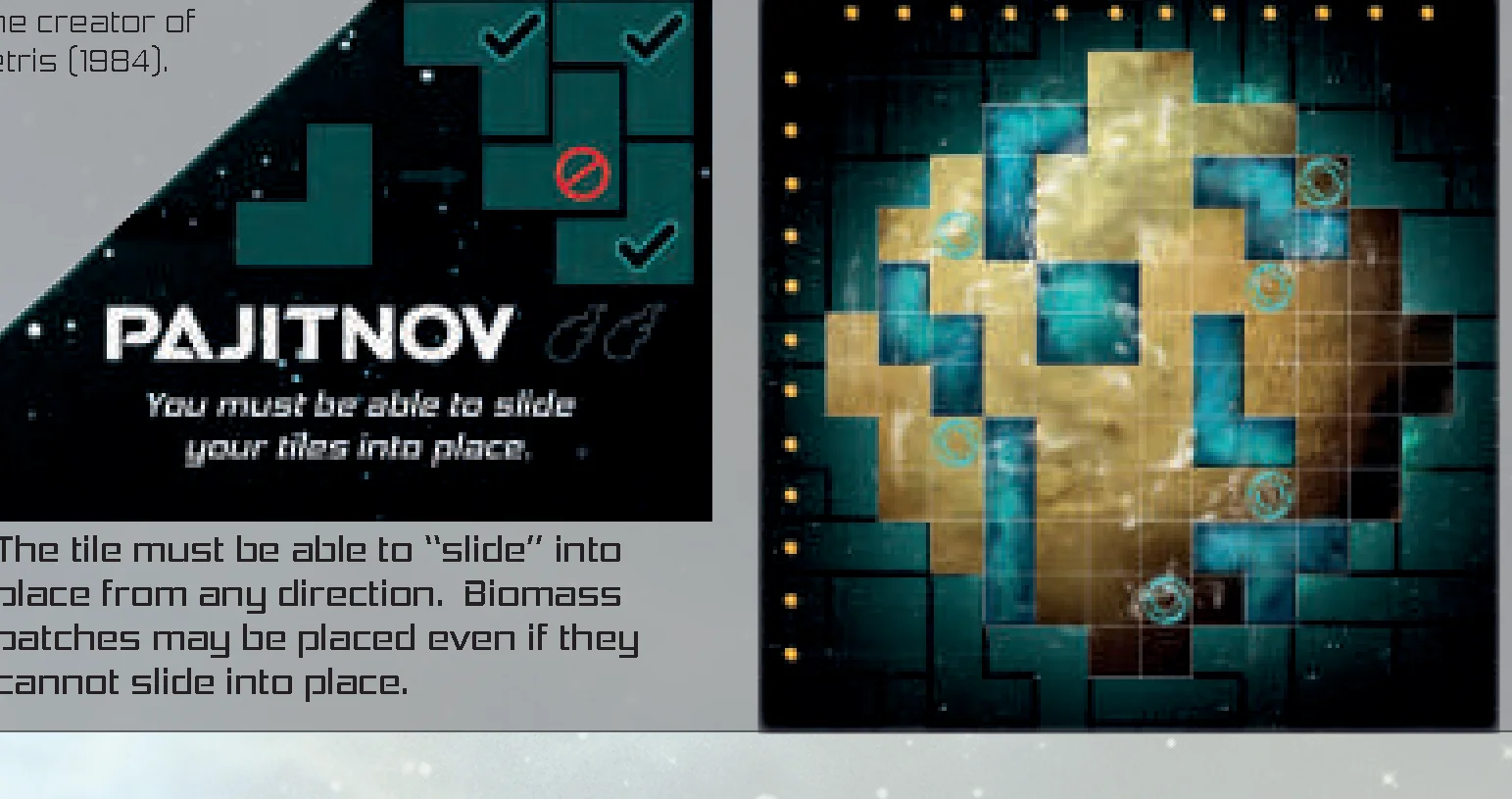
PAJITNOV** (Complexity 2)
“Order is better than chaos. Care must be taken not to disturb the order or risk finding chaos.” (The creator of Tetris [1984].)
Rule: You must be able to slide your tiles into place. The tile must be able to “slide” into place from any direction. Biomass patches may be placed even if they cannot slide into place.
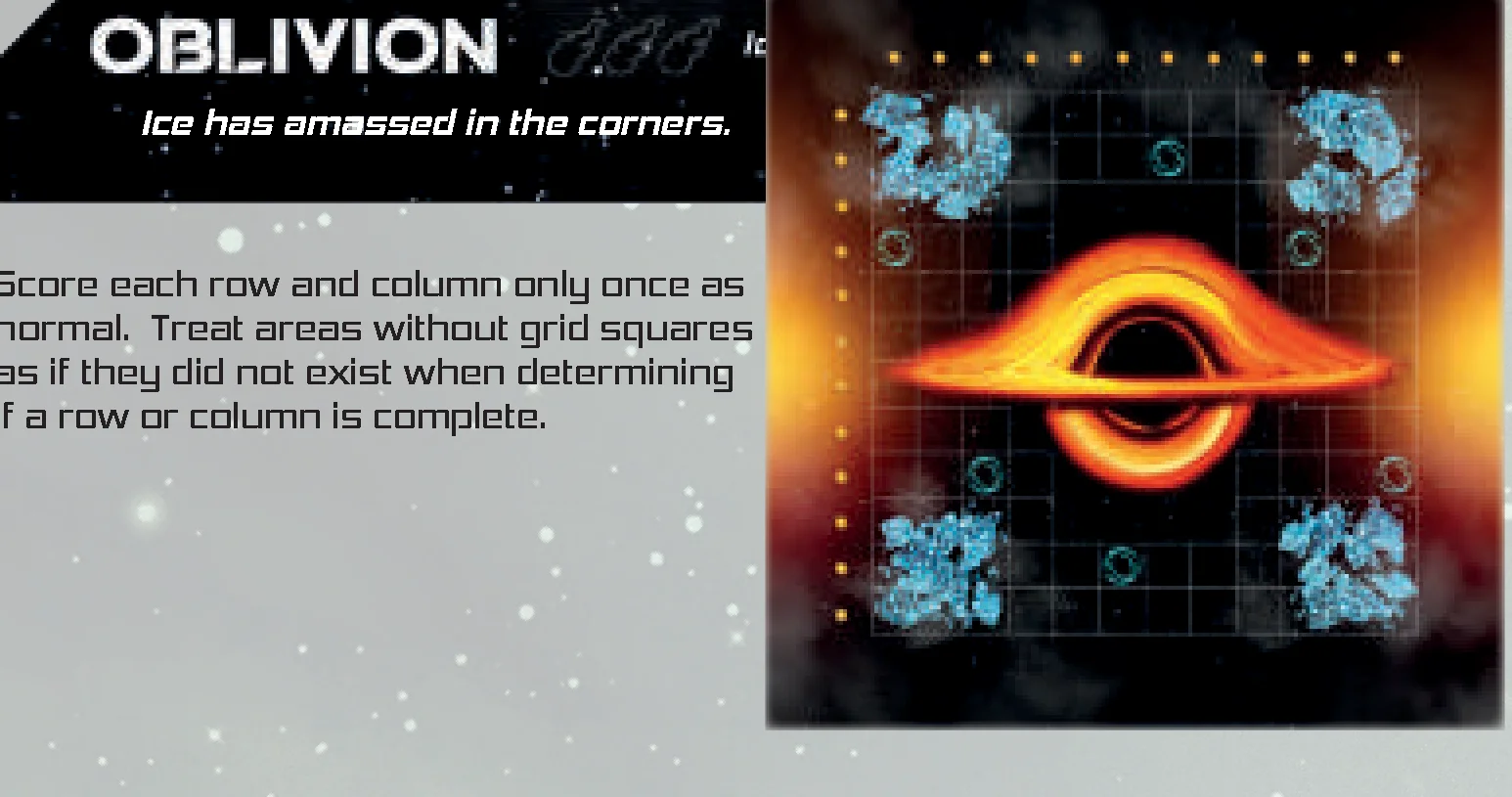
OBLIVION** (Complexity 3)
“The absence of all color.” (Extinction or nothingness.)
Rule: Ice has amassed in the corners. Score each row and column only once as normal. Treat areas without grid squares as if they did not exist when determining if a row or column is complete.
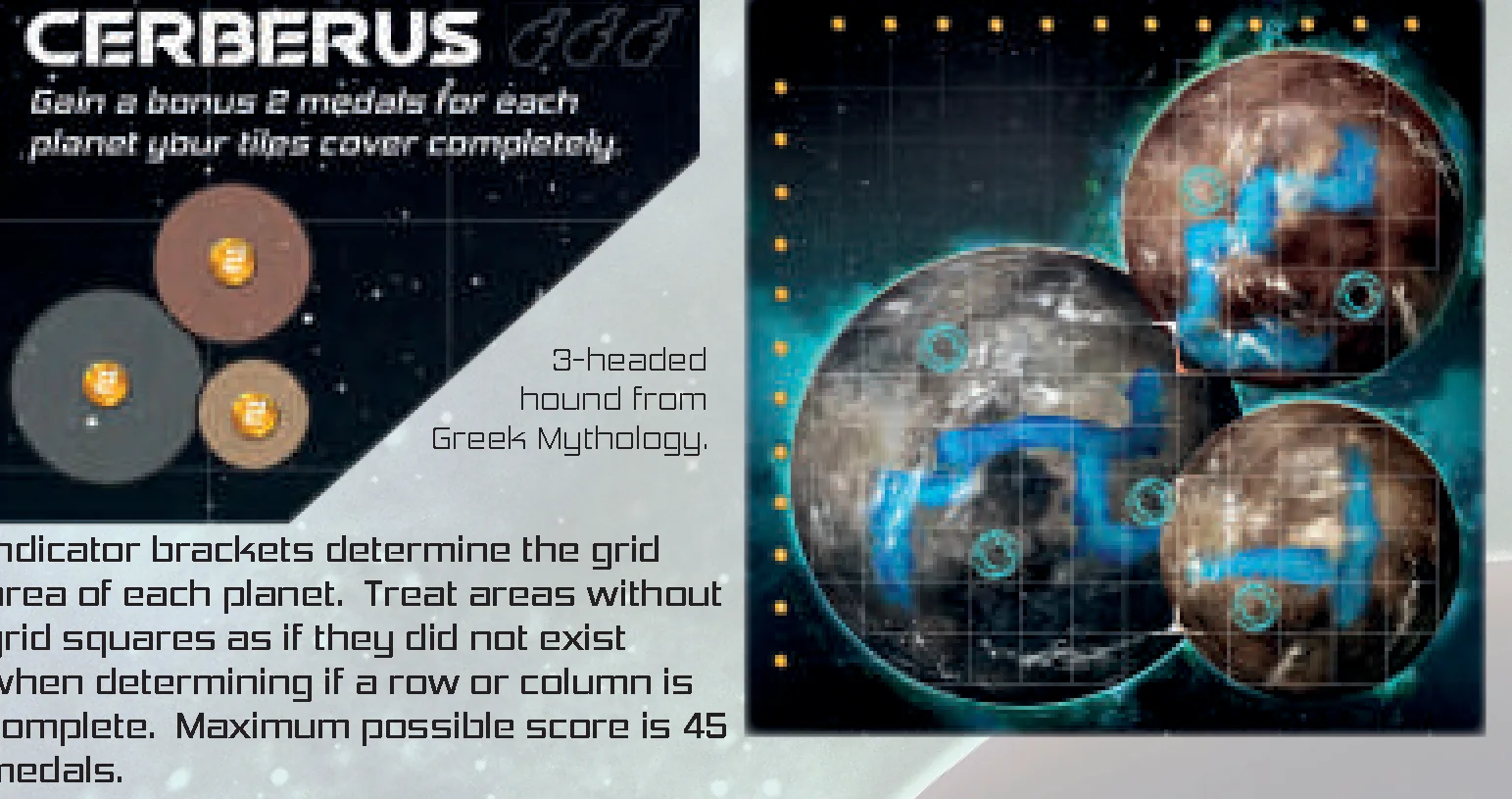
CERBERUS** (Complexity 3)
“Three planets are better than one planet, and a complete planet is better than an incomplete planet.” (3-headed hound from Greek Mythology.)
Rule: Gain a bonus 2 medals for each planet your tiles cover completely. Indicator brackets determine the grid area of each planet. Treat areas without grid squares as if they did not exist when determining if a row or column is complete. Maximum possible score is 45 medals.
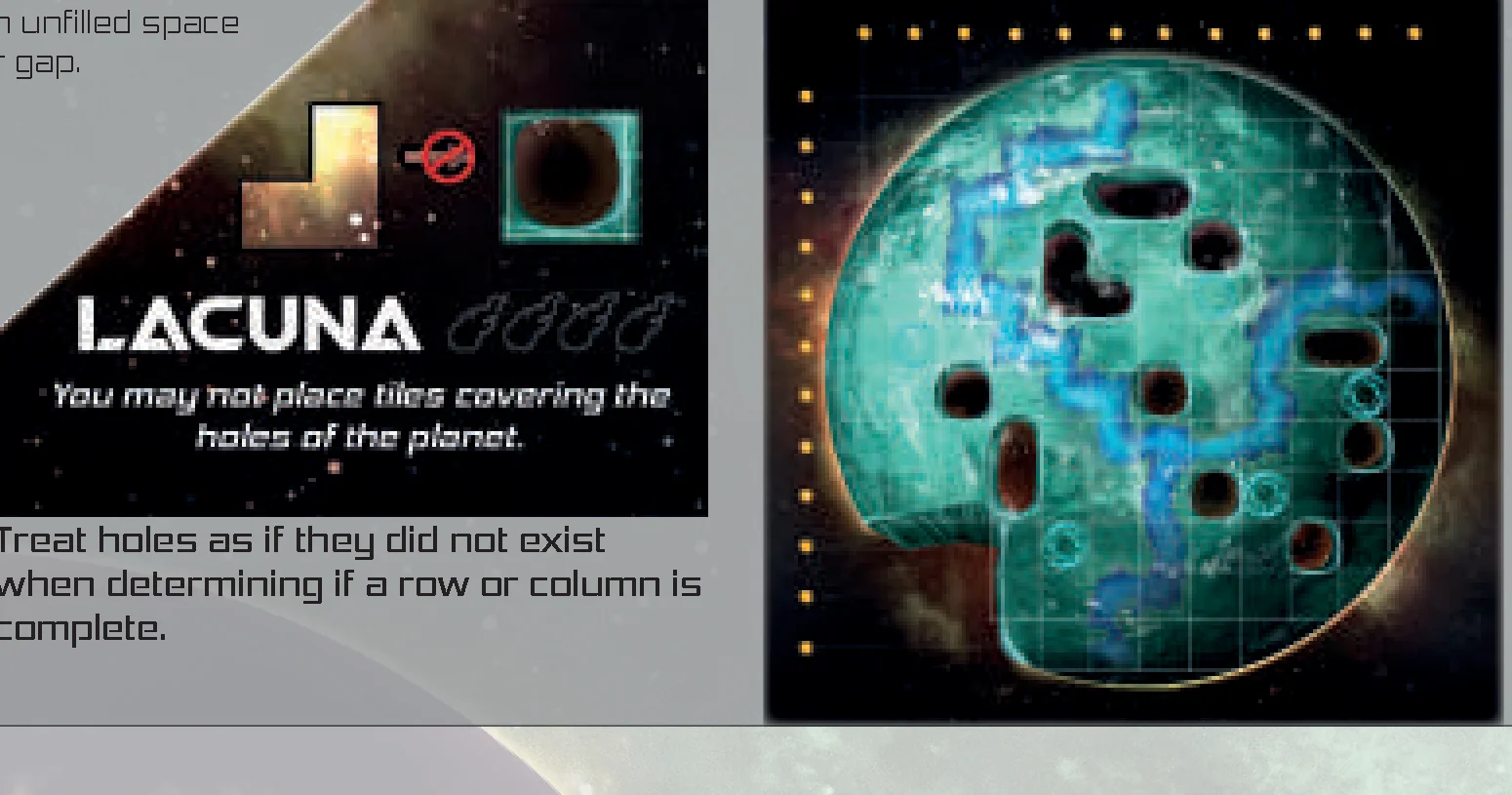
LACUNA** (Complexity 4)
“It looks as though this planet has been through a galactic war or maybe two. Luckily, there are still plenty of resources.” (An unfilled space or gap.)
Rule: You may not place tiles covering the holes of the planet. Treat holes as if they did not exist when determining if a row or column is complete.
FAQ
- Am I allowed to pick up a tile to see if it fits on my planet? Yes. However picking up a tile allows players to see the tile below it. If it becomes a concern, the table should create a house rule for future games.
- Am I allowed to flip the tile over to place it? Yes. There is identical artwork on both sides, so flipping a tile is part of your choices.
- Can I choose which tracker to advance first? Yes. It may be beneficial during certain situations to advance one tracker prior to the other.
Glossary of Terms
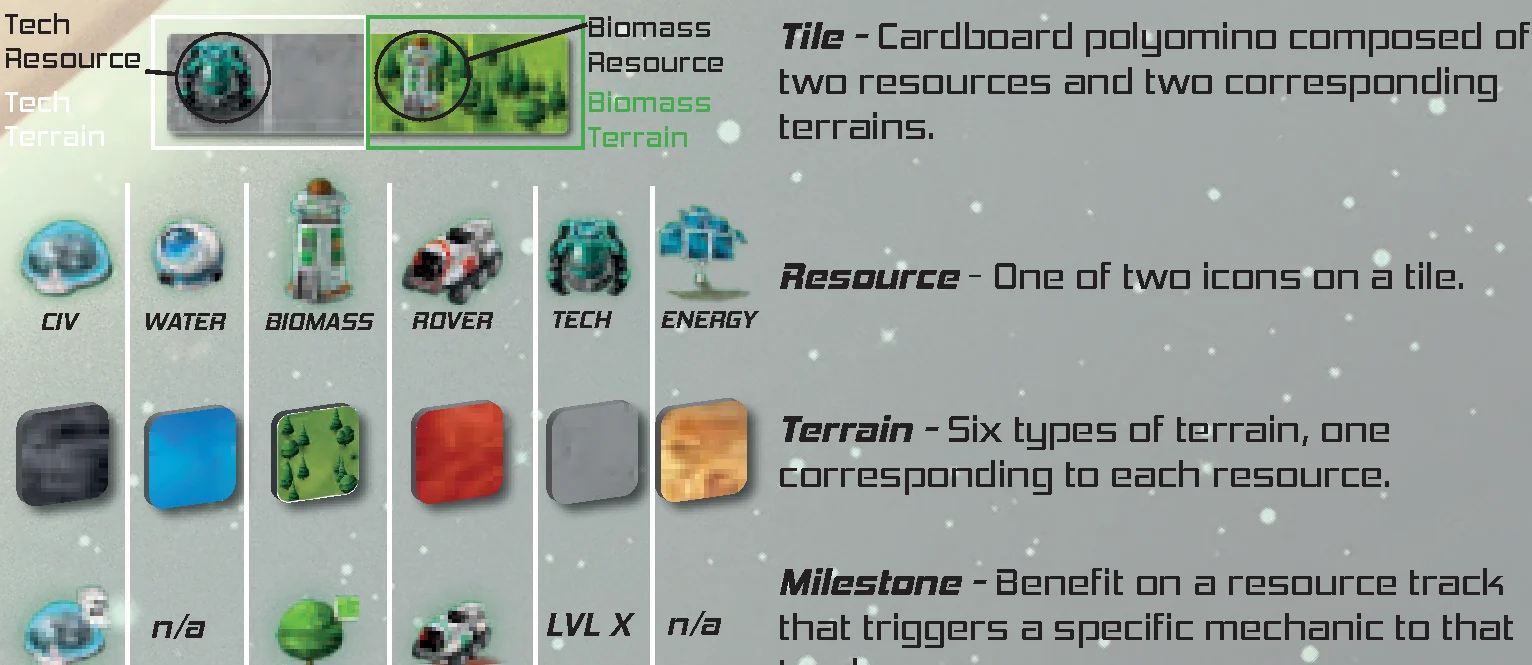
 Benefit: Any non-medal icon on your resource track.
 Medal: The number on the medal contributes to your end game scoring.
 Synergy Boost: Advance any resource track once.
 Advance: Move a resource tracker one position upward on the resource track. Claim the benefit underneath the tracker if possible.
- Regress: Move a resource tracker one position downward on the resource track. DO NOT claim any benefits.
- Tile: Cardboard polyomino composed of two resources and two corresponding terrains.
- Resource: One of two icons on a tile (Civ, Water, Biomass, Rover, Tech, Energy).
- Terrain: Six types of terrain, one corresponding to each resource.
- Milestone: Benefit on a resource track that triggers a specific mechanic to that track.
- Square: 1×1 area corresponding to the planet grid, a 1×1 section of a tile, or the size of a biomass patch.
- Biomass Patch: 1×1 square token that contains biomass terrain but no biomass resource. Place biomass patches immediately unless you have a tech that allows you to store them until game end. A biomass patch is a square but not a tile.
- Terrain Area: A contiguous group of terrain consisting of one or more tiles of the same resource type touching orthogonally (not diagonally). Area size is defined by total like terrain squares in the group.
- Rover Movement: Rover movement may be split between multiple rovers. Rovers may move both on tiles and on the planet grid. Rovers may backtrack.
- Collect: Take a component from your planet and place it onto your corporation board.
 Destroy: Remove a destroyed component from the game.
 Do Not, May not, or Cannot: This symbol describes additional game-play restrictions. The additional restrictions must be followed if possible, but should be ignored if they become solely responsible for triggering the end of the game.
 Complexity: A higher complexity is given for asymmetric planets and player boards that create more rule restrictions or advanced planning.
 Solo Mode Only: A component that should only be used during solo mode.
 Immediate: Execute any effects right away.
- End of Game: Execute any effects at the end of the game. Include medals in your scoring if you met all necessary conditions.
 Example of Multiple Benefits: Gain 3 rover movement and a synergy boost.
 Lifepod on your Planet
Common Tech and Corporation phrases:
- At round start (Flux, Oasis, Horizon): Immediately execute this at the start of the each round if the conditional requirement of the tech is true.
- Carrying (Horizon): A rover that physically has a meteorite on top of the rover in the process of meteorite delivery or destruction.
- Deliver / delivering (Horizon): A rover carrying a meteorite reaches its destination and the player moves the meteorite from the rover to the corporation board.
- Gain a biomass patch (Oasis, Horizon, Wormhole): Take a biomass patch from the supply and place it immediately (or store it if you have unlocked this technology).
- Gain movement (Flux, Republic, Oasis, Horizon): Add movement to your total rover movement this round.
- Ignore tile adjacency placement restrictions (Universal Coalition, Horizon): Remove the restriction for orthogonally adjacent tile placement. Rules for placement on the planet grid squares and inside planet perimeter must still be followed. Any other placement restrictions put in place by asymmetric planets, corporations, or event cards must be followed.
- Position lifepod (Cosmos, Jump Drive): Place a lifepod that was gained or collected into either the scoring area or another designated area of your corporation board.
- Store biomass patch (Universal Coalition, Wormhole): Keep the biomass patch by your corporation board until a future point as noted by the corporation.
- Teleport a rover (Jump Drive, Republic): Pick up a rover from one square and place it down onto another square. The rover does not move on the planet between the starting and ending square.
- +X rover movement (Universal Coalition, Makeshift): Add X to the number underneath the rover tracker each time you gain rover movement.
Overview & Components
Overview
Earth has run out of resources. One to six planeteers have been selected to develop an unknown planet to preserve the future of humanity.
Objective
Win the game by scoring the most victory points via efficient planet development, resource track advancement, collecting lifepods, removing meteorites, and besting your neighboring planets.
Components
- 1x Space Station (S.U.S.A.N.)
- 144 x Polyomino Tiles (12 of each shape)
- 6 x Planet Boards (Symmetric front-side, Asymmetric back-side)
- 6 x Corporation Boards (Symmetric front-side, Asymmetric back-side)
- 1x Commander Token
- 12 x Depot Indicators
- 14 x Rovers
- 36+ Lifepods
- 60+ Meteorites
- 60+ Biomass Patches
- 30 x Resource Trackers
- 28 x Objectives (28 x Private, 28 x Neighbor)
- 36 x Civ Cards (9 x Rank 1, 9 x Rank 2, 9 x Rank 3, 9 x Rank 4)
- Event Module: 60 x Event Deck cards (20 x Green Alerts, 20 x Orange Alerts, 20 x Red Alerts)
- 1x Scorepad
Component Upgrades* / Expandable Content**
*Components Upgraded in Limited Deluxe edition.
**Expandable Content included in all Kickstarter editions.
- 2 x Corporation Boards (Page 13)**
- 6 x Planet Boards (Page 15)**
- 1x Flux token**
Getting Started
For the best player experience, we recommend your first game uses only the symmetric Planet and Corporation boards (KSB-4156 and Universal Coalition). Once you understand the symmetric game, the asymmetric planets and corporations will be easier to learn and play.
Game Setup
General Setup
- Place the Space Station in the center of the table. Load the POLYOMINO TILES based on the space station setup instructions.
- Give each player one PLANET BOARD, one CORPORATION BOARD, two matching DEPOT INDICATORS, and five RESOURCE TRACKERS (one of each black, blue, green, red, and white). Set up each corporation board, resource trackers, rovers, and lifepods as pictured.
- Each player should individually choose to play with the symmetric side or asymmetric side of their corporation and planet board. The symmetric side has a complexity rating of one. The asymmetric side has a complexity rating that may be higher than one.
- Each player should take and position the number of LIFEPODS and ROVERS as designated by their planet and corporation boards respectively. Each player should position their depot indicator around the space station separated equally and directly in front of a depot.
- Randomly select CIV CARDS equal to number of players plus one for each civ card rank 1, 2, 3, 4. For example, in a 4-player game, there should be 5 cards of each rank. Cards should be organized into stacks separated by rank and placed on the table face down. All other civ cards should be returned to the box.
- METEORITES and BIOMASS PATCHES should be set aside and within easy reach of all players.
- Shuffle and deal OBJECTIVE CARDS. The objective cards have two sides to them. Use the card side as designated by the grid below:
- 3-6 players: Neighbor side — One card positioned between each player
- 2 players: Neighbor side — Three cards positioned between both players
- Solo Game: Private side — Four cards, choose three to play with
- Choose a player to be station commander and give them the STATION COMMANDER TOKEN.
Space Station Setup
Load the SPACE STATION with POLYOMINO TILES before starting the game. Each section of the space station, called a DEPOT, should be loaded with two stacks of twelve tiles each. All tiles within a stack should be the same shape and have the same orientation.
Tiles should be organized into an interior ring (small tiles) and exterior ring (large tiles). Position the interior ring before you start play to create a variable setup for the entire game.
See the diagram for a recommended setup or choose your own setup. Each depot always has a large and small tile stack.
How to Play
Round Structure
Each round, the station commander may rotate the space station as much or as little as they like until any one DEPOT is directly in front of themself or their depot indicator. Conversely, the station commander may choose to not rotate the space station leaving it exactly as it is.
Once the station commander is done rotating the station, all players must draft one of the two tiles from the depot corresponding to their depot indicator. Tile drafting is simultaneous for all players.
All players place their drafted tile on their planet’s grid according to the Tile Placement Rules.
Each tile is divided into two sections. Each section contains one Resource and is covered with Terrain that corresponds to that resource.
After the tile has been placed, advance the resource trackers on your corporation board once for each resource on the tile, no matter the tile’s size.
Note: There is no energy resource track or tracker on your corporation board as it functions differently than Civ, Water, Biomass, Rover, and Tech.
Anytime a tile with a meteor symbol is placed on your planet, immediately place a METEORITE on top of the meteor symbol. Squares with a meteorite prevent planet scoring for the row and column where the meteorite exists.
After all players have drafted a tile and are done advancing their resource trackers, pass the station commander token to the next player clockwise and begin a new round.
Tile Placement Rules
- PERIMETER FIRST: The first tile to be placed on a player’s planet must be touching the perimeter of the planet grid.
- TILE ADJACENCY: Subsequent tiles to be placed must be adjacent to another tile (orthogonally adjacent to at least one other tile already placed either horizontally or vertically but not diagonally).
- SINGLE LAYER: Tiles cannot be placed on top of each other.
- NO OVERLAP: Tiles may not be placed overlapping or outside the grid on the planet.
- GRID ALIGNMENT: Tiles must be placed aligned with the grid squares on the planet.
- DESTROY: If a tile is placed onto a lifepod or rover, the lifepod or rover is destroyed and removed from the game permanently.
Note: Specific placement rules exist for both Water and Energy tile types. See Water Resource and Energy Resource sections below.
Resource Tracks & Energy
Resource Tracks Overview
Each resource track has a corresponding translucent RESOURCE TRACKER that starts at 0 and advances (moves one position upward) throughout the game. Whenever a resource tracker advances, the player claims the benefit underneath the tracker if possible.
- Medals (Victory Points) are claimed at the end of the game based on the position of the resource tracker. Score the highest value medal that each tracker has surpassed or currently covers on the track it occupies.
- Synergy boosts are claimed immediately. When claiming a synergy boost, the player must advance any single tracker once (obeying resource track rules and claiming the benefit underneath the tracker).
If a resource tracker advances to the top of a track, the player claims the maximum medals of the track at game end, but does not benefit from additional tile placements of this resource. The rover resource is the exception to this rule.
In addition to medals and synergy boosts, each resource track may have a unique milestone benefit associated with it.
Civ Resource Track
“The race to innovate and discover requires people.”
When a player advances their tracker onto a civ milestone , they take all remaining civ cards of the corresponding rank from the center of the table and must select one to keep. Return any remaining civ cards face down to the center of the table.
- Once a card is chosen, claim any benefits from the chosen card immediately only if it is labeled Immediate.
- If a card is labeled End Game , keep it next to your corporation board as secret information to be revealed at the end of the game.
- If two or more players reach the same ranking civ milestone during a round, they should select their cards in clockwise order starting with the station commander.
- It is possible that a rank of civ cards may have zero cards remaining if playing with modules or asymmetric corporations. In this case, the player reaching the milestone is not able to claim a civ card.
Water Resource Track
“Water is not a milestone, rather it is essential to life itself.”
A tile with a water resource obeys normal tile placement rules, but has an additional placement rule required to advance the water tracker. Any one square of water terrain on the tile must be placed directly onto planetary ice in order to advance the water tracker as a result of the tile’s water resource. If the water terrain of the tile is not placed over planetary ice, it may still be placed legally, but the water tracker does not advance.
The water track does not have a unique milestone, but it is dense with medals.
Rover Resource Track
“The meteorite cleanup crew is always ready for duty.”
When a player advances their tracker onto a rover milestone , they immediately place a Rover from their corporation board onto any grid square of the last tile they placed. If the last tile they placed contains a meteorite, they may place their rover onto the meteorite, collecting it immediately.
Rover Movement: When a player advances their rover tracker onto a number, they move their rover(s) a combined total squares equal to this number.
- Rover movement is orthogonal adjacent and must follow the planet grid, where one movement is one square on the planet grid.
- Rover movement may be split between multiple rovers.
- Rovers may move both on tiles and on the planet grid.
- Rovers may backtrack.
- If the rover tracker reaches the top of the track, you still gain movement every time you place a subsequent rover tile. (X∞)
Collect Meteorite/Lifepod: Move your rover onto or through a meteorite/lifepod to collect it and place the collected component onto your player board.
A component (tile, biomass patch, meteorite from event card) that is placed onto a rover destroys the rover.
It is possible for a player to destroy all of their rovers. It is possible that a rover is not available on the corporation board when claiming a rover milestone.
Tech Resource Track
“Technology is that which separates us from our environment.”
When a player advances their tech track onto a tech milestone , they unlock powerful technology that may be used every round for the remainder of the game (unless otherwise stated).
Example Tech Levels: Universal Coalition
- Lvl 1: Tile adjacency placement restrictions may be ignored.
- Lvl 2: You may store biomass patches to be placed at the end of the game.
- Lvl 3: +1 each time you gain Rover movement.
- Lvl 4: Double water advancement from tile placement.
- Lvl 5: Unaffected by meteor strikes. Do not place meteorites.
Clarifications:
Lvl 4: Advance your water tracker twice instead of once when advancement occurs due to tile placement. Claim benefits as normal from each advancement. Do not advance your water tracker twice as a result of synergy boosts, event cards, or tiles you do not place.
Biomass Resource Track
“Biomass is the organic matter of fact that nothing is wasted.”
When a player advances their tracker onto a biomass milestone , they gain a Biomass Patch and immediately place it on their planet following normal placement rules.
Biomass patches contain biomass terrain, but they do not contain a biomass resource and do not advance the biomass tracker. Biomass patches help you complete rows and columns on your planet.
Energy Resource
“When harnessed, energy will transform deficiency into efficiency.”
There is no energy resource track represented on the corporation board. When a tile containing an energy resource is placed, the energy resource advances another resource of your choice limited to the following options:
- The non-energy resource on the tile you placed.
- The resource of any one terrain that is orthogonally adjacent to the energy terrain area established from your tile placement.
Example 1: A tile containing an energy resource is placed and is not adjacent to any other tile. By default, the energy resource would then advance the civ tracker. The tile’s civ resource would advance the civ tracker as well per normal rules.
Example 2: A tile containing an energy resource is placed and is adjacent to other tiles. Choose to advance a resource based on the terrains orthogonally adjacent to the energy terrain area established from your placement. (Civ, Tech, Water). The rover resource in “Example 2” may not be advanced because it does not connect with the energy terrain area.
Clarifications: The water terrain does not need to be on top of planetary ice to be chosen for advancement from an energy resource.
Game End & Scoring
Game End
The game ends when a player cannot legally place any tile from their depot (A), or when one depot is completely emptied (B) from the space station.
- When a player cannot legally place any of the two tiles from their depot, all players finish the round as normal and then the game is over. Any player who cannot legally place a tile still chooses one tile and advances their tracks for BOTH resources on the tile but does not place it on their planet. See scoring section to calculate final victory points.
- If both stacks of tiles of a depot are completely emptied, the game ends at the end of the round the depot was emptied.
Important: A player who can play one of the two tiles in front of them must play that tile, and the game continues.
End of Game Scoring
Prior to scoring, make sure all players have placed any biomass patches they have, executed any end game corporation technologies, and advanced any trackers due to end game civ cards.
Total Medals = Final Score
- A.) Score medals for EVERY COMPLETE ROW AND COLUMN of your planet as long as it does not have a meteorite or empty grid square. Each row and column scores 1VP, 2VP, or 3VP based on the medal to the side or above it, respectively.
- B.) Score the highest value medal that each tracker has surpassed or currently covers on the track it occupies.
- C.) Score medals for the lifepods and meteorites collected in your scoring area. One medal per lifepod by default. One medal per three meteorites, rounding down, by default. (It may be possible to improve these ratios via civ cards etc.)
- D.) Score medals for your civ cards labeled End Game .
- E.) Score medals based on the private objective card for any of your complete private objectives (only if playing with the Private Objective Module or playing solo mode).
- F.) Finally, score medals based on the neighbor objective cards if your planet is the winner when comparing your planet with your adjacent neighbor’s planet (skip this step if playing the solo game).
In the case of a tie, the player with the fewest number of uncovered grid squares wins. If there is still a tie, the player with the fewest meteorites remaining on their planet wins.
Scoring Example
The end of the game was triggered due to the player not being able to legally place either tile from their depot. The player chose the tile pictured and advanced their water tracker twice based on the resources of their chosen tile. Since the tile was not placed, they did not take advantage of unlocked Tech Lvl 4 when advancing their water tracker. Additionally, the meteorite symbol was ignored because the tile was not placed on their planet.
All players have confirmed that they are done advancing their resource trackers and have placed any stored biomass patches. It is helpful at this point to remove rovers and uncollected lifepods from the planet to ensure that the planet is scored properly.
- A. Planet: 15 medals
- B. Resource Tracks:
- Civ tracker: 1 medal
- Water tracker: 7 medals
- Biomass tracker: 1 medal
- Rover tracker: 5 medals
- Tech tracker: 1 medal
- Total = 15 medals
- C(1). Lifepods: 4 medals
- C(2). Meteorites: 1 medal
- D. Civ cards: 1 medal
- F(1). Neighbor Objective: 21 squares of rover terrain is greater than neighbor to left → 5 medals
- F(2). Neighbor Objective: 3 x biomass resources at edge ties neighbor to right → 2 medals
- TOTAL: 43 medals
Variants & Optional Modules
Two Player Variant
To maximize strategy and planning specifically in a two-player game, the space station should be rotated by one depot clockwise each round instead of the station commander choosing its orientation. Each subsequent round, the station should be rotated one depot. All other rules are the same.
Private Objective Module
Objective cards have two sides to them. The neighbor objective side is always used with a multiplayer game. The private objective side is always used with the solo game.
In a multiplayer game, you may optionally use private objectives in addition to neighbor objectives. Each player should choose one of the two private objective cards dealt to them and return the other card to the box.
Once all players have chosen one private objective, then neighbor objectives can be dealt. Private objectives may be kept face down until the end of the game. Private objective cards are scored if complete at the end of the game.
Event Deck Module
The EVENT DECK consists of 20 event cards. One card is revealed and executed each round to simulate the hardships that might be faced while developing a planet.
The event deck may be added to the multiplayer game and should always be used during the solo game.
Important: All event cards must be executed by all players if possible, but should be ignored if the event card is solely responsible for triggering the end of the game.
Event Deck Setup
- Separate the event deck into three piles of cards separated by event type (green, orange, red alert).
- If more than one player is playing, remove any “Solo Mode Only” event cards.
- Create an event deck of 20 cards to be used during the game by randomly selecting cards from the three event types. The event deck may be customized by selecting more of the punishing red alerts, or the less punishing green and orange alerts.
Event Deck Game-Play
- Each round, once the space station has stopped all rotation, immediately draw the next event card and execute the action of the card. All actions must be executed if possible for all events and all players.
- Play the rest of the round per the normal Planet Unknown rules.
Additional Game End Condition: The last card of an event deck triggers the last round of the game as an additional game end condition.
Solo Mode
Solo Mode Setup
- Set up the planet, corporation board, civ cards, biomass patches, meteorites, and lifepods following the setup for a multiplayer game. Rotate the space station so there is a random Depot facing you.
- Shuffle and draw 4 objective cards. Looking at the Private Objective side of the card, choose 3 of the 4 cards to keep to establish the objectives for this game.
- Set up the event deck based on the challenge level you choose to accept (See Event Deck Setup and Event Deck Game-play).
Solo Mode Game-Play
Solo play follows all the same rules as a multiplayer game. However, instead of choosing which depot to draft tiles from each round, rotate the space station clockwise by one depot.
- Rotate the space station clockwise by one depot.
- Draw and execute a new event if possible.
- Finish the rest of the round per normal Planet Unknown rules.
Solo Mode Target Score
The preliminary target score for the solo game is 60 medals, and your final target score is adjusted based on the composition of the event deck.
| Card Count | Red Alerts | Orange Alerts | Green Alerts |
|---|---|---|---|
| 0-2 | Zero | Zero | Zero |
| 3-6 | -5 | -1 | +3 |
| 7-10 | -7 | -2 | +6 |
| 11-14 | -9 | -3 | +9 |
| 15+ | -11 | -4 | +12 |
Example Event Deck Adjustments:
8 Red Alerts (-7 medals) + 3 Orange Alerts (-1 medals) + 9 Green Alerts (+6 medals)
Preliminary Target Score: 60 Medals
Example Event Deck Adjustments: -7 – 1 + 6 = -2 Medals
Example Final Target Score = 58 Medals
When the game is complete, compare your final score to the final target score. Find your outcome below:
- -15 medals: Critical Fail. We’re going to need another Planet.
- -10 medals: Any sign of other survivors?
- -5 medals: Low capacity, but at least we survive.
- Target Score: Mission Complete and job well done.
- +5 medals: Excellent work, you’ve earned a promotion.
- +10 medals: This might be the best planet we’ve seen yet.
- +15 medals: All stars have aligned because of you, Planeteer.
Asymmetric Corporations
Corporation boards each have a symmetric side and an asymmetric side. The symmetric side allows all players to play the same game with the same rules. The asymmetric side allows each player to control a unique corporation with a unique set of rules. Each unique corporation is explained below. Players can play with either symmetric or asymmetric or a combination of both.
Republic
“We invested in top talent to win the race for discovery and innovation.”
Republic Rule: You must regress another tracker each time you claim a milestone from the civ track. Do not claim benefits when you regress.
- Advantage: 7 x Civ milestones
- Weakness: 1 x Rover, Regression
Tech Levels:
- Tech Lvl 1: Gain movement based on your rover tracker when you draft a civ tile.
- Tech Lvl 2: Add a card from the next rank to your choices when you claim a civ milestone.
- Tech Lvl 3: Teleport your rover between any two civ resources. One movement cost.
- Tech Lvl 4: Gain a synergy boost when you claim a civ milestone.
- Tech Lvl 5: Look at all remaining civ cards and keep two. End of game.
Clarifications:
- Tech Lvl 1 is an immediate gain of movement even before you place your tile. If your rover tracker is not at a position with rover movement, then do not gain any movement.
- Tech Lvl 2 Example: With Tech Lvl 2 unlocked, the player claims a rank three civ milestone. The player picks up all cards from rank three plus one card at random from rank four and chooses one to keep. All cards are then returned to their respective rank piles.
- Regress another tracker () – Move any non-civ resource tracker one position downward on the resource track. Do not claim benefits.
Wormhole Corp.
“We found a way to accelerate the accumulation of biomass on the planet.”
Wormhole Rule: Advance your biomass tracker from tile placement only when you expand a biomass terrain area. Choose only one benefit each time you advance the biomass tracker.
- Advantage: Surplus biomass patches
- Weakness: Tile placement restrictions
Tech Levels:
- Tech Lvl 1: Biomass tracker may be reset to zero if at maximum.
- Tech Lvl 2: Biomass patches may be placed on top of a tile.
- Tech Lvl 3: Gain two biomass patches instead of one. Once per round.
- Tech Lvl 4: Biomass patches may be stored and placed at the end of the game.
- Tech Lvl 5: Biomass patches may be placed to destroy meteorites.
Clarifications:
- Example: Player advances tracker and chooses to gain a biomass patch instead of a free advancement of their civ tracker. There are always two choices when advancing. Medals are not included in choices but scored at game end per normal resource tracker scoring rules.
- Tech Lvl 2 may be used to achieve biomass terrain connections, but you cannot place a biomass patch onto a meteorite.
- Tech Lvl 5 allows you to place a biomass patch onto a meteorite at game end, thus destroying the meteorite.
Cosmos Inc.
“We plan to build momentum using everything at our disposal. The lifepod design is especially intriguing.”
Cosmos Rule: Choose to position a collected lifepod onto a resource track or your scoring area. Your trackers skip over lifepods when advancing. Benefits and medals covered by lifepods are ignored.
- Advantage: Advancement engine
- Weakness: Lifepod scoring, 1 x Rover, Lifepods cover benefits
Tech Levels:
- Tech Lvl 1: Your rover may move diagonally.
- Tech Lvl 2: Reposition three collected lifepods immediately. Once per game.
- Tech Lvl 3: Reposition a collected lifepod when you place an energy tile.
- Tech Lvl 4: Rovers moving onto energy terrain do not spend movement.
- Tech Lvl 5: Reposition one collected lifepod. Once per round.
Clarifications:
- You may position lifepods such that a tracker skips over more than one lifepod at a time.
- Lifepods only score medals if they are on your scoring area at game end. You may use your tech to reposition them onto the scoring area later in the game.
Example: You advance the biomass tracker once and skip over the lifepod because the lifepod occupies the next position in the track. Do not gain the synergy boost underneath the lifepod, but do claim the biomass milestone.
Horizon Group
“We’re ready to move out with a double fleet of Rovers at your command.”
Horizon Group Rule: To collect a meteorite, your rover must pick it up and deliver it to a rover resource on your planet.
- Advantage: 4 x Rovers
- Weakness: Pick-up and deliver requirements
Tech Levels:
- Tech Lvl 1: Rover tiles may be placed ignoring adjacency placement restrictions.
- Tech Lvl 2: Gain one movement for each rover carrying a meteorite at round start.
- Tech Lvl 3: Gain a biomass patch when you collect a meteorite.
- Tech Lvl 4: Destroy a meteorite by delivering it to water terrain.
- Tech Lvl 5: Advance your rover tracker. Once per round.
Clarifications:
Each rover may hold one meteorite on top of it. A rover picks up a meteorite when it is placed onto, moves onto, or moves through the meteorite [A]. A rover delivers a meteorite it carries when it moves onto or through a rover resource [B]. A rover destroys a meteorite it carries when it moves onto water terrain [C].
Jump Drive
“We established a connection with another galactic civilization. They’re ready to equip us with powerful technology at the expense of our lifepods.”
Jump Drive Rule: Choose to place a collected lifepod onto your tech or your scoring area. A lifepod placed onto tech unlocks your tech in any order.
- Advantage: Flexibility, 6 x Techs
- Weakness: Lifepod scoring, 1 x Rover
Tech Options:
- Tech A: Gain a synergy boost instead of a biomass patch. Once per round.
- Tech B: Teleport a rover to a tile of the same terrain. One movement cost. Once per round.
- Tech C: Advance the tracker twice when using a synergy boost. Once per round.
- Tech D: You may treat a tech resource as energy during tile placement.
- Tech E: Choose a tracker and claim all benefits in its row. Once per game.
- Tech F: Draw 3 objectives and choose one that all players compete for. Once per game.
Clarifications:
- A tech may be used immediately when it is unlocked.
- Be aware that Jump Drive has little incentive to advance their tech resource tracker, as they score fewer medals the further they advance tech.
- Tech D: Treating tech resource as an energy resource during tile placement only applies to tile placement and not end of game resources.
- Tech E: A row consists of five resource track positions that span across all resource tracks of the corporation board as designated by the current tracker position.
Oasis Ultd.
“We have the potential to harness electrolysis and supplement other core functions of the planet, but the path ahead is not yet fully clear.”
Oasis Ultd. Rule: Advance your water tracker once for each water terrain square that covers planet ice. Gain the benefits from advancing your water tracker even when it advances onto another track.
- Advantage: Tracker manipulation, Medals on water track
- Weakness: Long winding water track
Tech Levels:
- Tech Lvl 1: Skip over another tracker blocking your advancement.
- Tech Lvl 2: Gain one movement for each rover starting the round on water terrain.
- Tech Lvl 3: Advance your water tracker once if you place your tile covering no ice.
- Tech Lvl 4: Gain a biomass patch when you place a water resource tile.
- Tech Lvl 5: Gain a synergy boost when you place a water resource tile.
Clarifications:
- Instead of simply advancing upward, your water tracker advances toward the end of the resource track, always following the irregular path.
- Each resource tracker only scores medals once based on its corresponding resource track.
- Tech Lvl 1: A tracker must stay on its corresponding track.
- Example: The tile is placed such that the water terrain covers two squares of planetary ice. Note that the biomass tracker blocks the water tracker preventing the water tracker from advancing twice. However, if Tech Lvl 1 is unlocked, advance the water tracker twice on the water track. Specifically, skip over the biomass tracker onto the water/rover intersection and then advance again onto the water/tech intersection and claim the rover movement benefit.
Makeshift
“We don’t mind being late to the party, and plan to catch-up by with our scrappy approach.”
Makeshift Rule: You may advance any tracker diagonally onto another adjacent track. Any tracker may claim any benefit. Tech Lvls becomes locked if no tracker occupies the Tech track.
- Advantage: Flexibility, Tracker manipulation
- Weakness: Resource dependency
Tech Levels:
- Tech Lvl 1: Treat CIV and TECH tracks as adjacent.
- Tech Lvl 2: +1 to rover movement if more than one tracker occupy the rover track.
- Tech Lvl 3: Shift a tracker laterally to an adjacent track instead of advancing.
- Tech Lvl 4: Regress any one tracker. Once per round.
- Tech Lvl 5: Score each tracker as the highest scoring tracker on the track it occupies.
Clarifications:
- A resource tracker may block another resource tracker from advancing.
- Resource trackers score medals based on the track they occupy when the game ends.
- Tech Lvl 1: Trackers may advance diagonally from CIV to Tech and vice versa.
- Tech Lvl 3: A lateral shift is when a player moves a tracker horizontally to an adjacent resource track and claims the benefit.
- Tech Lvl 4: Regress () – Move a resource tracker one position downward on the resource track. Do not claim benefits.
Flux Industries**
**Expandable Content included in all Kickstarter editions (Page 13).
“We have unrivaled tech but have yet to figure out how to use it all at once.”
Flux Industries Rule: Your flux token designates one of your tracks as the flux track. Whenever you unlock a Tech level, you may reposition your flux token. Only your most recently unlocked tech is available.
- Advantage: Power level, Versatility
- Weakness: One tech available at a time
Tech Levels:
- Tech Lvl 1: Gain two movement for each rover starting on terrain of the flux track.
- Tech Lvl 2: Advance one tracker to the next milestone of the flux track. Once per game.
- Tech Lvl 3: Improve the flux Track:
- +1 to Civ card rank when you reach a milestone.
- Double synergy boosts on the water track.
- Take two biomass patches instead of one.
- +1 when you gain rover movement.
- Tech Lvl 4: Collect a meteorite when you place a resource tile matching the flux track.
- Tech Lvl 5: Advance the flux track. Once per round.
Clarifications:
- Tech Lvl 2: When you unlock Tech Lvl 2, choose the flux track as normal. You may advance your tracker to the next milestone on the flux track any time before you unlock Tech Lvl 3.
- Tech Lvl 3: Only the benefits of the flux track are improved. Disregard all other improvements that do not correspond to the flux track.
- Tech Lvl 4: Collect a meteorite from your planet if possible.
Asymmetric Planets
Planet boards each have a symmetric side and an asymmetric side. The symmetric side allows all players to play the same game with the same rules. The asymmetric side allows each player to develop a unique planet, sometimes containing unique grid or unique tile placement restrictions. Each planet is explained below.
Important: Asymmetric planet tile placement rules must be followed if possible, but should be ignored if they become solely responsible for triggering the end of the game.
K-273 (Complexity 3)
“The unique challenge of K-273 is the ice. It’s unstable and seems to shift. You better avoid any overlap.” (273 is the freezing point of water in Kelvin.)
Rule: You may not place a tile that overlaps both planet terrain and planet ice.
GAIA (Complexity 2)
“This civilization is peaceful for now, but maybe not if you’re tempted or forced to eliminate their cities.” (Personification of Earth in Greek Mythology.)
Rule: Every city not covered by tiles scores two medals. Score complete rows and columns as normal. It is legal to cover a city with your tile placement, but it will impact your score.
PERSEPHONE (Complexity 3)
“Separated into quadrants by harsh climates, the elements are only with us when they are not against us.” (Greek Goddess whose travels are the reason for the 4 seasons.)
Rule: Each quadrant has one restricted resource. Do not place a restricted resource in the quadrant. It is legal to play a tile that crosses quadrants, provided it obeys restrictions.
ARASHI (Complexity 2)
“The wind underneath the ring is relentless. Make sure you are anchored before you test it.” (The Japanese word for Storm.)
Rule: Every tile placed onto the planet’s ring must also be anchored outside the ring. The planet’s ring occupies the two largest horizontal rows. Biomass patches may not be placed covering the ring.
PETRA (Complexity 2)
“Barren of ice, but radiating with a grid of energy. Utilize this energy to your advantage.” (The Greek word for Stone or Rock.)
Rule: You may treat the electrical currents as energy terrain. There is no ice. Electrical currents count as energy terrain if uncovered at end of game.
TARTARUS (Complexity 3)
“There is a giant chasm down the center that will make maneuvering and placement inconvenient.” (The deep abyss in Greek Mythology.)
Rule: Tiles may not be placed covering the chasm. Rovers may not move across the chasm with orthogonal movement. There are two points of the chasm that may be crossed if your rovers have diagonal movement tech.
CHARYBDIS** (Complexity 1)
**Expandable Content included in all Kickstarter editions (Page 15).
“A giant pit has created an unusual gravitational field causing you to build from the inside outward.” (Whirlpool monster from Homer’s Odyssey.)
Rule: First tile placement must cover one of the central four squares. Obey tile placement rules as normal after your first tile placement.
K’AAX** (Complexity 2)
“The clouds with the unidentified substance are corrosive to the rover fleet. Please steer clear.” (The Mayan word for Jungle.)
Rule: Your rover may not move onto toxic planet terrain. You may place tiles over toxic terrain to neutralize it.
PAJITNOV** (Complexity 2)
“Order is better than chaos. Care must be taken not to disturb the order or risk finding chaos.” (The creator of Tetris [1984].)
Rule: You must be able to slide your tiles into place. The tile must be able to “slide” into place from any direction. Biomass patches may be placed even if they cannot slide into place.
OBLIVION** (Complexity 3)
“The absence of all color.” (Extinction or nothingness.)
Rule: Ice has amassed in the corners. Score each row and column only once as normal. Treat areas without grid squares as if they did not exist when determining if a row or column is complete.
CERBERUS** (Complexity 3)
“Three planets are better than one planet, and a complete planet is better than an incomplete planet.” (3-headed hound from Greek Mythology.)
Rule: Gain a bonus 2 medals for each planet your tiles cover completely. Indicator brackets determine the grid area of each planet. Treat areas without grid squares as if they did not exist when determining if a row or column is complete. Maximum possible score is 45 medals.
LACUNA** (Complexity 4)
“It looks as though this planet has been through a galactic war or maybe two. Luckily, there are still plenty of resources.” (An unfilled space or gap.)
Rule: You may not place tiles covering the holes of the planet. Treat holes as if they did not exist when determining if a row or column is complete.
Glossary & FAQ
FAQ
- Am I allowed to pick up a tile to see if it fits on my planet? Yes. However picking up a tile allows players to see the tile below it. If it becomes a concern, the table should create a house rule for future games.
- Am I allowed to flip the tile over to place it? Yes. There is identical artwork on both sides, so flipping a tile is part of your choices.
- Can I choose which tracker to advance first? Yes. It may be beneficial during certain situations to advance one tracker prior to the other.
Glossary of Terms
- Benefit: Any non-medal icon on your resource track.
- Medal: The number on the medal contributes to your end game scoring.
- Synergy Boost: Advance any resource track once.
- Advance: Move a resource tracker one position upward on the resource track. Claim the benefit underneath the tracker if possible.
- Regress: Move a resource tracker one position downward on the resource track. DO NOT claim any benefits.
- Tile: Cardboard polyomino composed of two resources and two corresponding terrains.
- Resource: One of two icons on a tile (Civ, Water, Biomass, Rover, Tech, Energy).
- Terrain: Six types of terrain, one corresponding to each resource.
- Milestone: Benefit on a resource track that triggers a specific mechanic to that track.
- Square: 1×1 area corresponding to the planet grid, a 1×1 section of a tile, or the size of a biomass patch.
- Biomass Patch: 1×1 square token that contains biomass terrain but no biomass resource. Place biomass patches immediately unless you have a tech that allows you to store them until game end. A biomass patch is a square but not a tile.
- Terrain Area: A contiguous group of terrain consisting of one or more tiles of the same resource type touching orthogonally (not diagonally). Area size is defined by total like terrain squares in the group.
- Rover Movement: Rover movement may be split between multiple rovers. Rovers may move both on tiles and on the planet grid. Rovers may backtrack.
- Collect: Take a component from your planet and place it onto your corporation board.
- Destroy: Remove a destroyed component from the game.
- Do Not, May not, or Cannot: This symbol describes additional game-play restrictions. The additional restrictions must be followed if possible, but should be ignored if they become solely responsible for triggering the end of the game.
- Complexity: A higher complexity is given for asymmetric planets and player boards that create more rule restrictions or advanced planning.
- Solo Mode Only: A component that should only be used during solo mode.
- Immediate: Execute any effects right away.
- End of Game: Execute any effects at the end of the game. Include medals in your scoring if you met all necessary conditions.
- Example of Multiple Benefits: Gain 3 rover movement and a synergy boost.
- Lifepod on your Planet
Common Tech and Corporation phrases:
- At round start (Flux, Oasis, Horizon): Immediately execute this at the start of the each round if the conditional requirement of the tech is true.
- Carrying (Horizon): A rover that physically has a meteorite on top of the rover in the process of meteorite delivery or destruction.
- Deliver / delivering (Horizon): A rover carrying a meteorite reaches its destination and the player moves the meteorite from the rover to the corporation board.
- Gain a biomass patch (Oasis, Horizon, Wormhole): Take a biomass patch from the supply and place it immediately (or store it if you have unlocked this technology).
- Gain movement (Flux, Republic, Oasis, Horizon): Add movement to your total rover movement this round.
- Ignore tile adjacency placement restrictions (Universal Coalition, Horizon): Remove the restriction for orthogonally adjacent tile placement. Rules for placement on the planet grid squares and inside planet perimeter must still be followed. Any other placement restrictions put in place by asymmetric planets, corporations, or event cards must be followed.
- Position lifepod (Cosmos, Jump Drive): Place a lifepod that was gained or collected into either the scoring area or another designated area of your corporation board.
- Store biomass patch (Universal Coalition, Wormhole): Keep the biomass patch by your corporation board until a future point as noted by the corporation.
- Teleport a rover (Jump Drive, Republic): Pick up a rover from one square and place it down onto another square. The rover does not move on the planet between the starting and ending square.
- +X rover movement (Universal Coalition, Makeshift): Add X to the number underneath the rover tracker each time you gain rover movement.